drwatson
Members
-
Joined
-
Last visited
Everything posted by drwatson
-
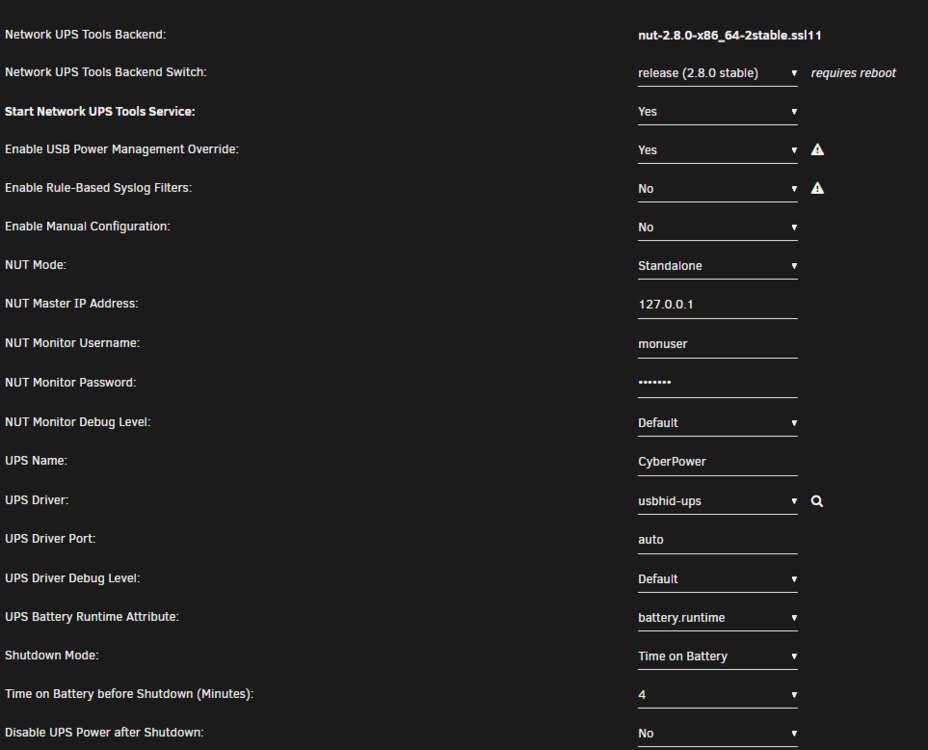
I am having a problem starting the NUT service for my UPS. I am not quite sure what I'm missing, but I've tried to follow other's advice and try different drivers other than usbhid-ups, but none seem to work. Can someone help me figure out what I need to change to get this working? I am running nut-2.8.0-x86_64-2stable.ssl11 on Unraid Version 6.11.5. I have a USB connected CyberPower UPS (cp1500 AVR LCD) only servicing the Unraid server (no master/slave required). When I scan for the ups driver, I get the following: [nutdev1] driver = "usbhid-ups" port = "auto" vendorid = "0764" productid = "0501" bus = "005" This jives with the USB Diagnostics output of: Bus 005 Device 003: ID 0764:0501 Cyber Power System, Inc. CP1500 AVR UPS When I try and start the service, the syslog indicates the following and NUT doesn't start: Jun 6 22:34:37 Ceti rc.nut: Network UPS Tools - Generic HID driver 0.47 (2.8.0) Jun 6 22:34:37 Ceti rc.nut: USB communication driver (libusb 1.0) 0.43 Jun 6 22:34:37 Ceti rc.nut: libusb1: Could not open any HID devices: insufficient permissions on everything Jun 6 22:34:37 Ceti rc.nut: No matching HID UPS found Jun 6 22:34:37 Ceti rc.nut: Driver failed to start (exit status=1) Jun 6 22:34:37 Ceti rc.nut: Network UPS Tools - UPS driver controller 2.8.0 Jun 6 22:34:45 Ceti ool www[2953]: /usr/local/emhttp/plugins/nut-dw/scripts/write_config Jun 6 22:34:45 Ceti rc.nut: Writing NUT configuration... Jun 6 22:34:48 Ceti rc.nut: Updating permissions for NUT... Jun 6 22:34:48 Ceti rc.nut: Checking if the NUT Runtime Statistics Module should be enabled... Jun 6 22:34:48 Ceti rc.nut: Disabling the NUT Runtime Statistics Module... Here is a screen cap of the settings in the UI:
-
Hello all! I have worked through a lot of the stumbling blocks I've encountered so far, but I'm stumped on this one. I am trying to get transcoding to work on my Plex media server, but have not been able to get it to work. It always shows Direct Stream. I have unraid version 6.11.5. I have an Nvidia GTX 760 I have version 470.141.03 of the driver (through reading, I discovered that this unraid version and this driver are compatible) When looking in Settings > Nvidia Driver, I see it recognizes the correct card and gives me a GPU uuid. In my Plex container, I have set: NVIDIA_DRIVER_CAPABILITIES = all NVIDIA_VISIBLE_DEVICES = GPU GUID Nvidia Driver displays Extra Parameters = --runtime=nvidia I have Plex Pass I have check marks in "Use hardware acceleration when available" and "Use hardware-accelerated video when encoding" Hardware transcoding device dropdown set to Auto nvidia-smi shows that it sees the card, gets the card temperature and shows the right driver version. Question 1: In Plex transcoding configuration in the Hardware transcoding device dropdown, is it supposed to show my GPU there? If so, it's not there. Question 2: I have looked in a couple of locations to see if the GTX 760 is capable of transcoding. Some show yes and other show no. Does anyone have success in Plex with this card? Question 3: When it shows Direct Stream, does that mean it doesn't think it needs to transcode? I test using a video that is 4K (HEVC Main) showing in a web browser as the Plex client. Shouldn't this trigger transcoding?
-
Yes, that disk is still being emulated. Unraid detected a full drive failure so it automatically flipped into emulation mode. I went to look at the drive and I couldn't get any SMART information at all. That drive is dead. It doesn't look like there are any files on it though. When I browse to it in the Unraid UI (far right button) it says 0 objects: 0 directories, 0 files (0 B total). So I think technically, I could remove that disk all together and I wouldn't mind. It was only 2TB.
-
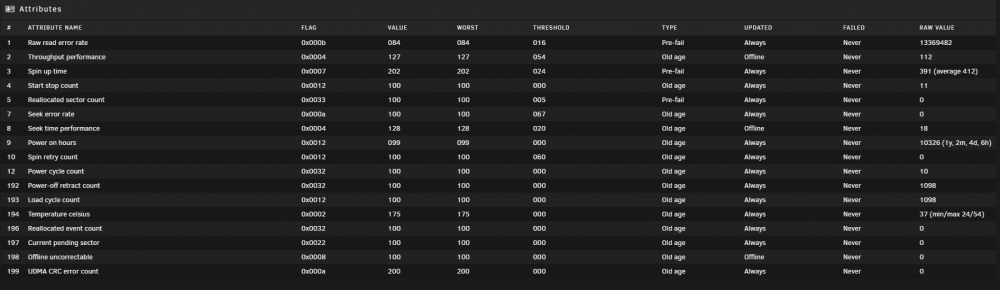
Looking through the log, I see the most recent 4 errors. They all look like this: Error 137 [0] occurred at disk power-on lifetime: 10328 hours (430 days + 8 hours) When the command that caused the error occurred, the device was active or idle. After command completion occurred, registers were: ER -- ST COUNT LBA_48 LH LM LL DV DC -- -- -- == -- == == == -- -- -- -- -- 40 -- 41 00 00 00 00 00 00 00 00 00 00 Error: UNC at LBA = 0x00000000 = 0 Commands leading to the command that caused the error were: CR FEATR COUNT LBA_48 LH LM LL DV DC Powered_Up_Time Command/Feature_Name -- == -- == -- == == == -- -- -- -- -- --------------- -------------------- 60 04 00 00 a8 00 02 9b be 2c 28 40 00 1d+07:49:43.717 READ FPDMA QUEUED 2f 00 00 00 01 00 00 00 00 00 10 00 00 1d+07:49:43.717 READ LOG EXT 61 04 00 00 a0 00 02 9b be 30 28 40 00 1d+07:49:30.714 WRITE FPDMA QUEUED 60 00 30 00 d0 00 02 9b bc 3a e0 40 00 1d+07:49:24.272 READ FPDMA QUEUED 60 00 08 00 b8 00 02 9b bc 3a d8 40 00 1d+07:49:24.271 READ FPDMA QUEUED These are the two lines that seem concerning. Everything else looks ok. 0x03 0x028 4 100435 --- Read Recovery Attempts 0x04 0x008 4 137 --- Number of Reported Uncorrectable Errors So obviously there have been some errors. I just don't know where the tipping point is for replacing the drive. What would you do? Would these errors be enough to warranty-replace the drive?
-
ceti-smart-20220107-1050.zip Thanks for all your help. Here's the report.
-
SMART extended self-test finished and completed without errors. Is the SMART test result something that can be relied on? Does this mean the disk is fine?
-
Ok, I'm letting it run now and it's up to 50%. I'll see what the results are for that once it's done and post here. I'd say another 5 hours until it's done.
-
I have stopped the SMART extended self-test, set spin down to Never and then restarted the extended self-test. It jump straight to 10% and then stops. Been there for about 40 minutes so I stopped the test. Then I ran the short test with the spin down still set to never and that completed with "Completed without error". I have another identical drive to this one in the server. I started a SMART extended self-test on that one and it too sat at 10% complete for about 45 minutes. I then turned the spin down on that drive to Never and started the SMART extended self-test again. It too sits at 10% and doesn't move on after 40 mins of waiting. Not sure what to do here. I'm leaning toward replacing the drive and then doing a pre-clear on it and see what happens. Thoughts?
-
That's great news! Can you explain why there are 5916 errors listed for that drive on the main dashboard? What do these error messages mean then if there isn't a problem? Jan 6 00:51:27 Ceti kernel: blk_update_request: critical medium error, dev sdc, sector 11202867192 op 0x0:(READ) flags 0x0 phys_seg 6 prio class 0 I am running a SMART extended self-test, but seems to be sitting at 10% for a long time (like 15 minutes). Is that normal?
-
Sorry about that. I thought I attached them. Guess not. ceti-diagnostics-20220106-0816.zip
-
I have a failed data drive that is in emulation mode. I went out and purchased a larger (and equal in size as parity) drive to replace it. I was doing a preclear on the new drive and I started noticing errors on my parity drive. (I only run a single parity drive.) Here are the diagnostics on it: The log for the disk repeats these lines: Jan 5 22:02:16 Ceti kernel: blk_update_request: critical medium error, dev sdc, sector 11083279656 op 0x0:(READ) flags 0x0 phys_seg 66 prio class 0 Jan 5 22:02:40 Ceti kernel: sd 10:0:0:0: [sdc] tag#7962 UNKNOWN(0x2003) Result: hostbyte=0x00 driverbyte=0x08 cmd_age=6s Jan 5 22:02:40 Ceti kernel: sd 10:0:0:0: [sdc] tag#7962 Sense Key : 0x3 [current] [descriptor] Jan 5 22:02:40 Ceti kernel: sd 10:0:0:0: [sdc] tag#7962 ASC=0x11 ASCQ=0x0 Jan 5 22:02:40 Ceti kernel: sd 10:0:0:0: [sdc] tag#7962 CDB: opcode=0x88 88 00 00 00 00 02 94 9d c7 e0 00 00 04 00 00 00 Jan 5 22:02:40 Ceti kernel: blk_update_request: critical medium error, dev sdc, sector 11083303424 op 0x0:(READ) flags 0x0 phys_seg 60 prio class 0 Jan 5 22:35:38 Ceti kernel: sd 10:0:0:0: [sdc] tag#8485 UNKNOWN(0x2003) Result: hostbyte=0x00 driverbyte=0x08 cmd_age=6s Jan 5 22:35:38 Ceti kernel: sd 10:0:0:0: [sdc] tag#8485 Sense Key : 0x3 [current] [descriptor] Jan 5 22:35:38 Ceti kernel: sd 10:0:0:0: [sdc] tag#8485 ASC=0x11 ASCQ=0x0 Jan 5 22:35:38 Ceti kernel: sd 10:0:0:0: [sdc] tag#8485 CDB: opcode=0x88 88 00 00 00 00 02 8f da ee 90 00 00 04 00 00 00 Jan 5 22:35:38 Ceti kernel: blk_update_request: critical medium error, dev sdc, sector 11003425248 op 0x0:(READ) flags 0x0 phys_seg 22 prio class 0 I've done a bunch of looking around and have gathered information but I just want confirmation that I have the right answers. My questions are these: 1) Does this parity drive look like it needs replacing? (I think yes) 2) When replacing a parity drive, is a pre-clear necessary? (I think no. I think preclear is recommended to replace data drives.) Is it bad to do it? (I don't think so.) 3) Is it ok to do a parity-swap procedure with a drive that is reporting read errors like this? (I think yes.) If not, what's the alternative? (I don't have any idea.) 4) Maybe a dumb question, but the errors started on the parity drive when I removed the bad data disk from the array. I don't suppose having a bad data disk could make the parity read go bad, could it? I don't think so, but I thought I'd ask anyway.