





Corvus
Members
-
Joined
-
Last visited
Everything posted by Corvus
-
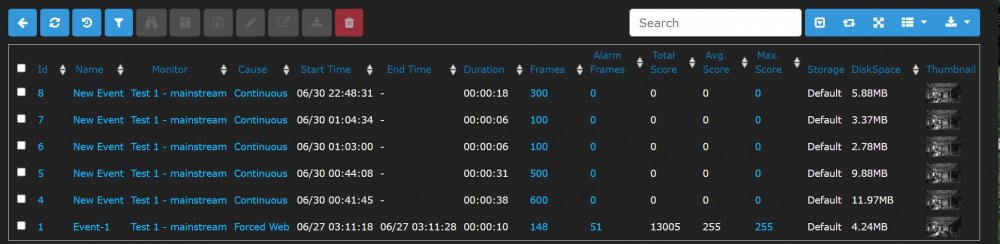
Hi, Zoneminder is running in a docker container within Unraid. System specs: M/B: ASRock Z270 Gaming-ITX/ac BIOS: American Megatrends Inc. Version P2.50. Dated: 02/26/2018 CPU: Intel® Core™ i5-7400 CPU @ 3.00GHz HVM: Enabled IOMMU: Enabled Cache: 256 KiB, 1 MB, 6 MB Memory: 16 GiB DDR4 (max. installable capacity 32 GiB) I've set up an external trigger within Home Assistant to trigger recording in Zoneminder. Basically, it changes the state of my monitor from 'monitor' to 'record'. After testing, it works flawlessly, however, even when I manually change the state of my monitor back from 'record' to 'monitor', the event still has no end time, meaning that Zoneminder still thinks it's recording. This still persists even if I stop the docker and start it again. Events are ONLY closed if I completely reboot Unraid. What am I doing wrong? And how can I fix this? Edit: I'm getting desperate. Nobody can tell me what the issue is or how to fix it. I will pay REAL MONEY to anyone who helps me fix this problem. I'm deadly serious. No other project I've worked on has made me feel this defeated.
-
Thanks! Big fan of your work. However I'm a complete newbie. What do I do with this code? I can see that the theme engine lets me upload a theme from a URL or a file. I'm kinda lost. Any help?
