





Corvus
Members
-
Joined
-
Last visited
Everything posted by Corvus
-
Thanks, that should be more than enough for 95% of the time. At the very least, Plex can fall back to the iGPU. I apologize and that's not my intention. If anything, I'm asking on advice in removing the patch. Now that I know the information above, I can do this confidently. I understand this, although since replacing a PSU is a major job (especially in the cramped case my system is in), I want to rule out software fixes first beforehand.
-
Just a follow-up on this to see what I need to do with this user script -- or if it's even necessary anymore to get unlimited transcodes.
-
Ok I just found what it is. Apparently it was recommended by SpaceInvader to remove the nvidia-imposed limit on the number of simultaneous transcoding streams. Is this something that is no longer required for me to get unlimited simultaneous transcodes? Happy to remove this if so. There isn't, which is why I rely on using the GPU for dockers. It's a Corsair CXM 750 W 80+. More than enough for my config + drives, according to pcpartpicker.
-
I have no idea. How do I remove it? Since I use the iGPU for my VMs, I still don't think this is a good idea. I also have a few AI object recognition dockers which utilize nvidia CUDA cores. Unless there's an alternative I'm missing? So I just type that command into terminal, and that's it? Does this remove the patch script you're seeing above? Since I need the dedicated GPU for other dockers (not used simultaneously), I would still like to solve this problem. How would I go about checking for an intermittent fault such as this? I think I should rule out the easy fixes first, starting with this custom script you mentioned. Could you please tell me how to remove it?
-
Why what? Sorry I'm a newbie at this. I'm assuming you mean that I modified the nvidia plugin somehow? That's impossible as I wouldn't even know how to do that. Unless I did so unwittingly by following someone else's advice. How would I undo this? 2. I have a large number of users. Sometimes up to 8-10 streams needing transcoding at once. BIOS is up to date. 'Above 4G decoding' is enabled in BIOS (unless I need to enable it elsewhere?). What is 'resizable BAR support'? Use what as my startup script? What does typing 'nvidia-persistenced' in terminal do? Sorry, again I'm very unfamiliar with Linux so I'll need much more detailed instructions please. 4. I run a couple of VMs 24/7 (No GPUs passed through) and I don't want to eat into the performance of my CPU, so I'm using the GPU for transcoding as I had it lying around. Additionally, I also use it for running my own 24/7 IPTV channels in another docker container. What should I be doing to fix this?
-
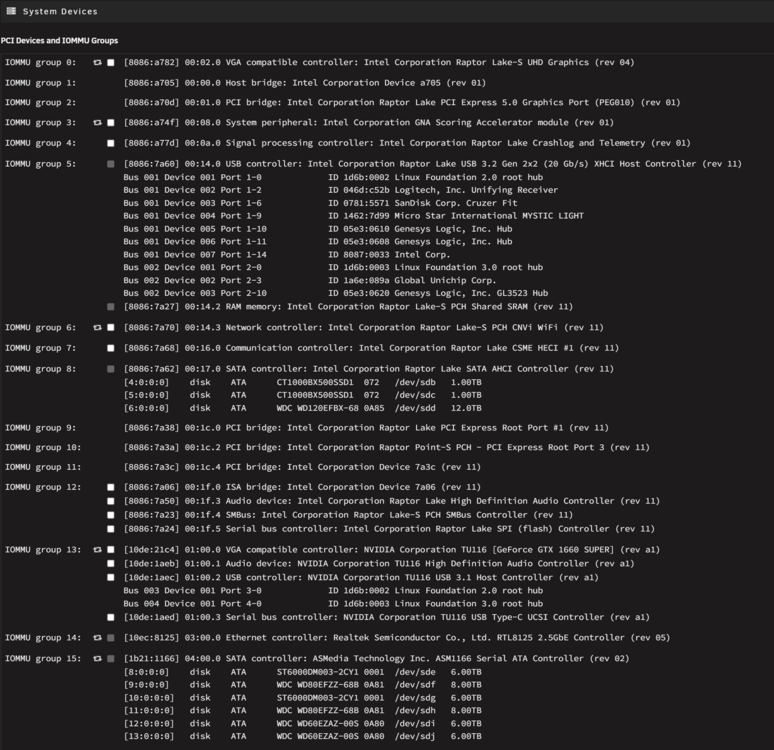
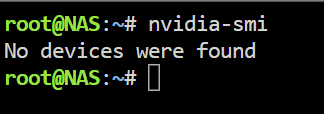
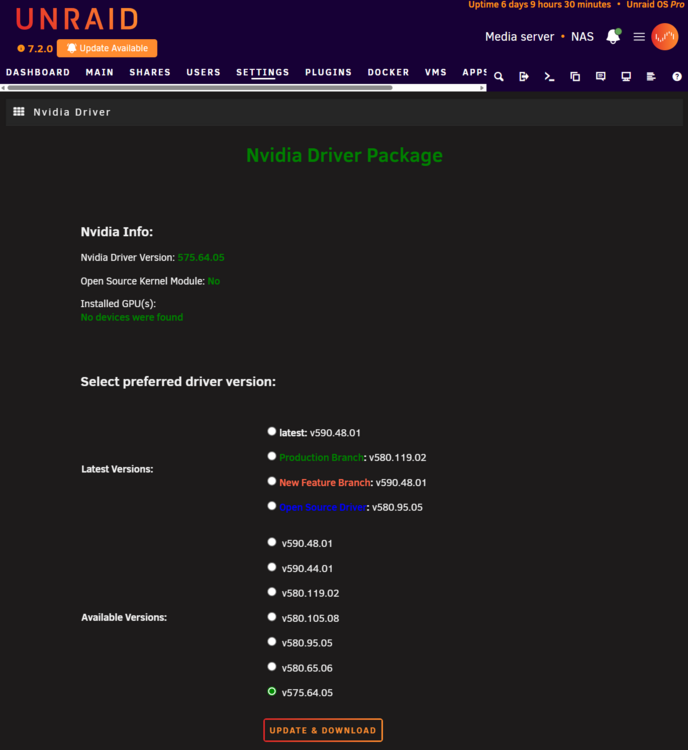
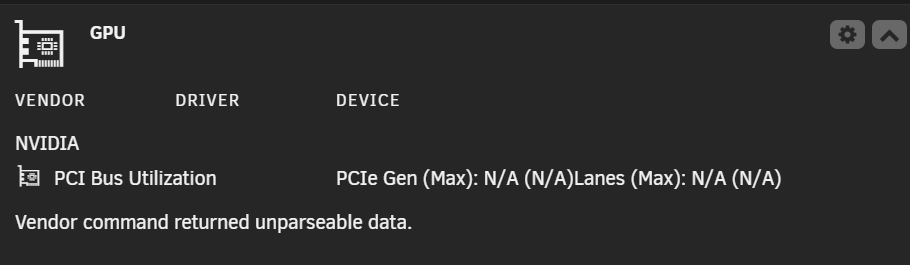
Hey guys, This problem has been going for MONTHS and it's driving me insane because just when I think I've fixed it, it happens again. So I mainly use this card for Plex transcoding, and when the Nvidia driver is detecting the card normally, it works flawlessly. When trandcoding, the GPU statistics plugin correctly displays the Plex icon and nvidia-smi returns the appropriate data. Needless to say, I have correctly set up the Plex docker for the nvidia transcoding. I DON'T have it passed through to a VM. However every few weeks, the nvidia driver/plugin decides it no longer wants to detect the card, and will not detect it again until I reboot the entire server. I've attached diags and screenshots. See below. The card is visible in system devices under IOMMU group 13: [10de:21c4] 01:00.0 VGA compatible controller: NVIDIA Corporation TU116 [GeForce GTX 1660 SUPER] (rev a1). However I can find no trace of it anywhere else. Even running 'nvidia-smi' returns 'No devices were found'. I've double and triple checked that the card is seated correctly. I've deleted the Nvidia plugin/driver, stopped docker, then reinstalled several times. I've rolled back the driver as far back as the plugin will allow (v575.64.05), but still no success. This also used to happen with my older 1050Ti on a different motherboard before I upgraded the system. I'm sick to death of logging into the web UI and discovering that the GPU Statistics plugin has not detected the card (god knows for how long), and I need this fixed PERMANENTLY. Any ideas??? nas-diagnostics-20251224-0010.zip
-
This also happened with my old 1080ti on another motherboard before I upgraded my Unraid build, so I doubt it's a hardware fault. What should I do next?
-
Hey guys, This problem has been going for MONTHS and it's driving me insane because just when I think I've fixed it, it happens again. So I mainly use this card for Plex transcoding, and when the Nvidia driver is detecting the card normally, it works flawlessly. When trandcoding, the GPU statistics plugin correctly displays the Plex icon and nvidia-smi returns the appropriate data. Needless to say, I have correctly set up the Plex docker for the nvidia transcoding. I DON'T have it passed through to a VM. However every few weeks, the nvidia driver/plugin decides it no longer wants to detect the card, and will not detect it again until I reboot the entire server. I've attached diags and screenshots. See below. The card is visible in system devices under IOMMU group 13: [10de:21c4] 01:00.0 VGA compatible controller: NVIDIA Corporation TU116 [GeForce GTX 1660 SUPER] (rev a1). However I can find no trace of it anywhere else. Even running 'nvidia-smi' returns 'No devices were found'. I've double and triple checked that the card is seated correctly. I've deleted the Nvidia plugin/driver, stopped docker, then reinstalled several times. I've rolled back the driver as far back as the plugin will allow (v575.64.05), but still no success. I'm sick to death of logging into the web UI and discovering that the GPU Statistics plugin has not detected the card (god knows for how long), and I need this fixed PERMANENTLY. Any ideas??? nas-diagnostics-20251224-0010.zip
-
SOLVED! I fixed my own problem. It wasn't anything mentioned on any other help forum. Instead, it's a new quirk of Plex. In 'remote access' settings, I had my correct upload speed entered (just like I did on the old server). I didn't think anything of it, especially since the old server no longer exists. All I did on a hunch was delete the value and press 'save'. Despite Plex telling me 'no upload speed set', HDR now streams flawlessly! Thanks for the new 'feature', Plex!
-
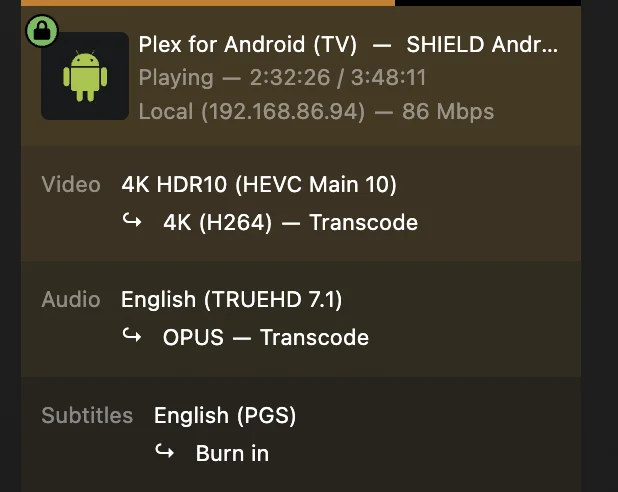
Guys, I just had to rebuild my Plex docker because my appdata become corrupt. Got Plex up and running, however remote users with Nvidia Shield Pros cannot direct play HDR titles. They used to flawlessly. Here's how their stream shows on my end. Even when disabling subtitles, there's no difference. There should be no transcoding, but I can't figure out why Plex is insisting on it. I've noticed that when unchecking 'enable HDR tonemapping' it allows him to play the title back in HDR - but previously I had this checked so that clients who couldn't play HDR could still benefit from HDR tonemapping. Those who could direct play HDR could still do so flawlessly. Any ideas?
-
Guys, can someone help me? I really don't want my Plex users to wait another 24 hours until this problem is fixed. First one to successfully help me restore Plex functionality within 2 hours gets a round of beers delivered by me to their Paypal account. I'm dead serious.
-
UPDATE: I went back into docker settings, deleted the docker img, then reenabled docker. As expected this time, no dockers appear. Went into app store, ticked all the previous dockers I want to install, and let it run. But again, same problem. I cannot get the WebUI to show for any of them. I've made zero network changes to my LAN/router, and for some reason, the weird LAN IP shows for most of the dockers container IP. However, if I try to access the docker UI from within Unraid by clicking on the icon and selecting 'WebUI', my browser all of a sudden wants to go to the correct IP address - still no UI shows though. What am I doing wrong?
-
Ok so I recreated my docker in docker settings. I pointed the appdata to mnt/cache/appdata, and the docker.img to /mnt/cache/system/docker/docker.img After it ran, I expected to see a blank 'docker' tab, but NO. ALL MY DOCKERS ARE THERE ALREADY! I'm pleasantly surprised, although I don't know how this could've happened. However, when I try to access the web UI for any of them, I notice that it doesn't resolve. I never had any custom networks set for any of them. What could be preventing this from working? EDIT: One thing that's weird is that some of these dockers have unusual IP address on them that I would have never assigned to them. My server has the local IP 192.168.x.x, and all of my dockers previously used that address prefix. However some of them have 172.17.x.x. All the ports seem correct though. Any ideas?
-
I have over 20+ dockers. Does having my previous docker.img file make this process any easier/faster?
-
Ok, I've copied across my appdata backup to cache/appdata. So all I have to do is reinstall the apps themselves from the app store? Does having access to my previous docker.img do me any favors here or make the process any faster?
-
Anyone?
-
Before you replied, I had already started the array with the drive re-added. Here are the diags. I managed to recover my docker.img. I also have my appdata folder. How do I restore my docker containers with all of their previous settings once the rebuild is finished? Your thoughts/advice are greatly appreciated. nas-diagnostics-20250525-2232.zip
-
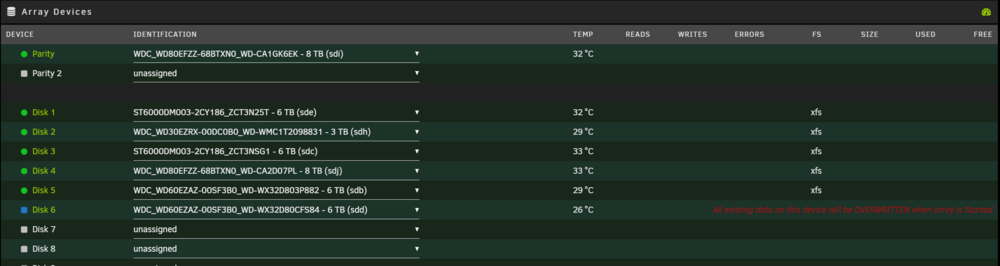
Update: I stopped the array, then I removed the disk from the array, started the array again, and then it appeared in my unassigned devices (with an option to mount). I then stopped the array again and assigned the same disk back to the array, however there's a message saying 'All existing data on this device will be OVERWRITTEN when array is Started'. If the data is erased, will it be restored via parity? I just want to make sure because I don't want to permanently lose the data on the disk. To be clear, I haven't changed or written any files to the disk manually when I attached it to the SATA caddy. Am I safe to continue?
-
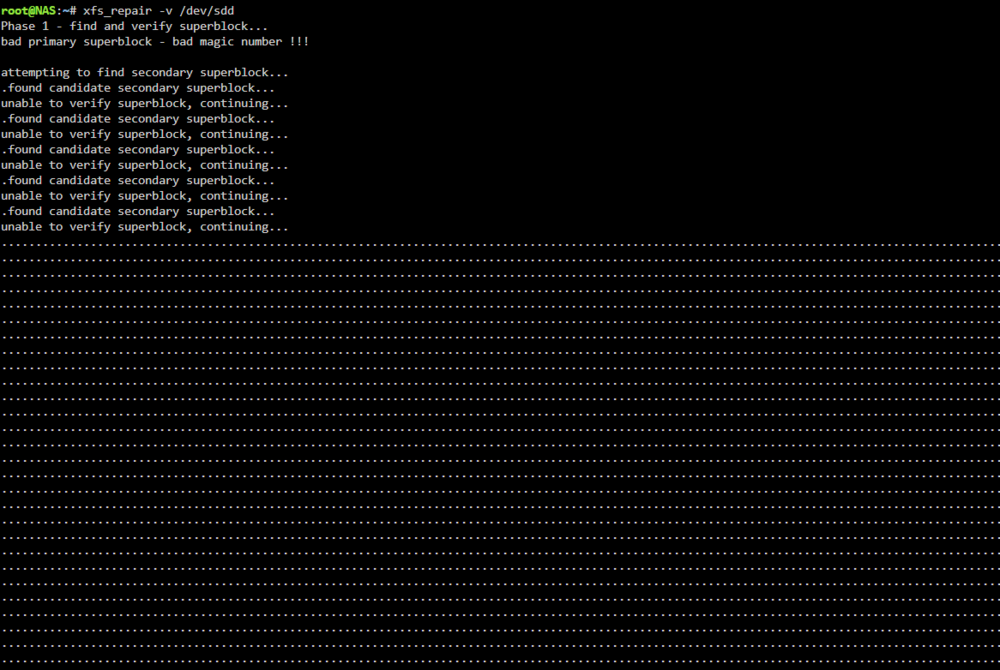
So I've been reading other threads, and I ran xfs_repair -v /dev/sdd This is what it spits out: Apparently this means the filesystem is corrupted. Is this fixable? If so, how?
-
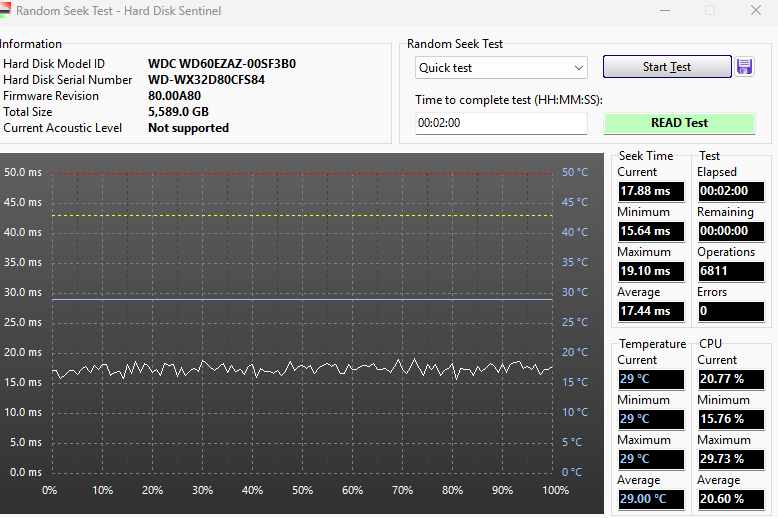
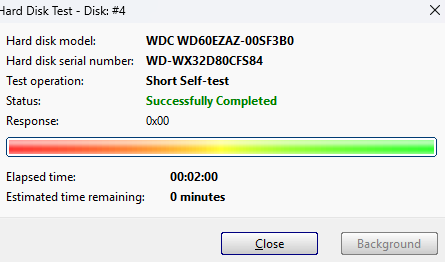
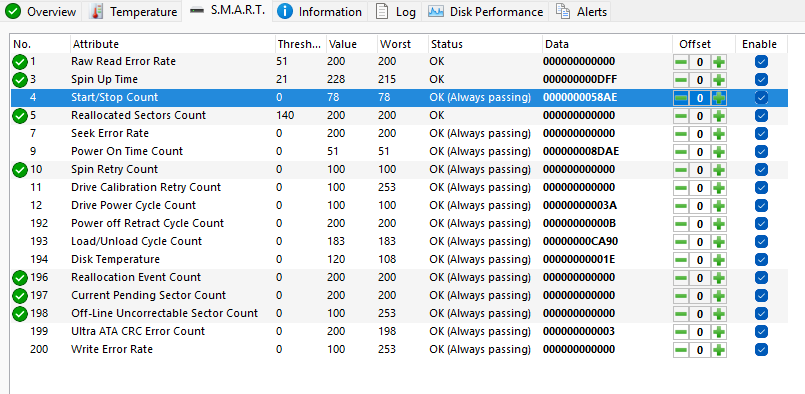
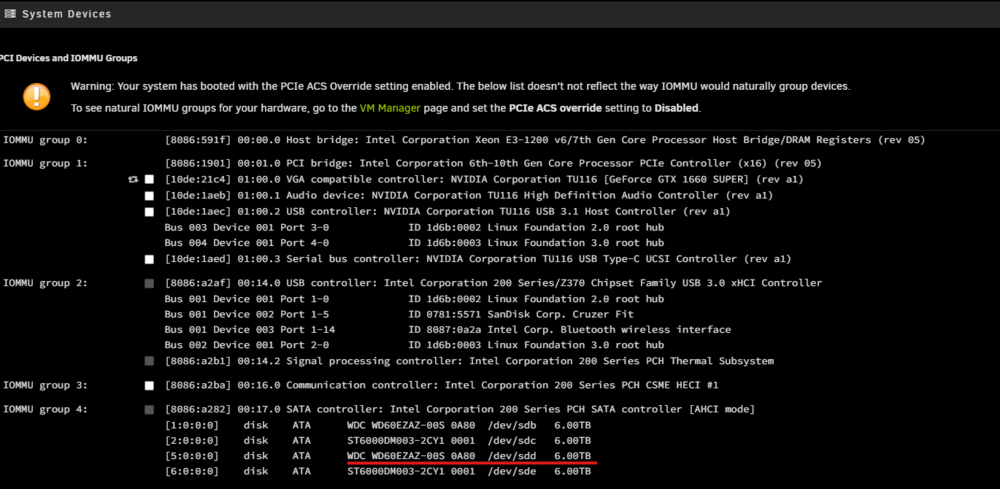
Hard Disk Sentinel reports zero errors under a random seek test. S.M.A.R.T. reports no errors. Short self test successful. Furthermore, an app called 'Linux reader' seems to be able to browse the directory structure just fine on Windows (albeit with a minute or so of loading from the drive, not sure if normal). When plugging it back into my Unraid box, I thought to check 'system devices', and it looks like it appears there. Is this good news? I have no idea where to go from here. I'd really appreciate any help!
-
Ok update: I borrowed a SATA USB caddy from my neighbor and took out disk6 and plugged it into my computer. Windows explorer does not display the drive (probably because it's xfs), but it is displayed in Windows Disk Management Tool as 'healthy partition'. I don't understand. I've replaced the power cable and SATA cable for that drive in my Unraid box. How come it suddenly won't detect it? What do I do now? :(
-
Ok so I mounted both drives in a single cache pool but mirrored. I think I learned my lesson this time. The cache pool is now correctly reading 1TB. However, now there's another problem. During this process, I received a notification in the Unraid UI that disk 6 is unreadable. So I shut down, reseated connectors, and rebooted. Now theres a red X next to where the drive should be in the array, and hovering over it says 'device is disabled, contents emulated'. I also notice that the icon for the Unraid chrome tab is an orange triangle instead of a green circle. The drive now appears in 'historical unassigned devices'. I've swapped SATA/power cables to no avail. Along with the two replacement cache SSDs, I also bought a 12TB HDD with the intention that I would eventually replace the 8TB parity drive, and the 8TB will replace the 3TB drive in my array. If in the event that disk 6 (which is a 6TB drive) is dead, I guess I can replace it with the 8TB ex-parity drive. But is this actually the case? If so, I'm in disbelief that two of my drives (one an SSD, and the other an HDD) could die within 24 hours of each other! The array now takes forever to start upon boot. How do I troubleshoot this? I really hope it's not the SATA port on my motherboard... Diags attached. nas-diagnostics-20250524-2239.zip
-
Ok, so should I replace the two cache drives with the new ones first, before I make a new pool? Also, should I format them to ZFS? I'd like to maximize performance as much as possible, so would RAID0 still be the best choice? Or would combining them into a pool be just as good? Do I need to do anything in the Unraid UI before I physically replace them?
-
Thanks. When you say 'restore the appdata', how do you mean exactly? It's been around 4 years since I set this up. All I can remember is that the appdata lives on the cache and doesn't get 'backed up' to the array. Assuming I've got the appdata folder on disk 6, what's the best way to do this? Sorry for the silly question.
-
Ok well it looks like the appdata is on one of the array disks. I've got two new cache drives (1tb each). Now what?



