





phoebus
Members
-
Joined
-
Last visited
Everything posted by phoebus
-
Thanks. Very odd that nothing is being recorded. I'll try what you suggest
-
Thanks @JorgeB yes that was me at 22:43 once diagnostics was run and 40mins after the error happened.
-
My Unraid array stopped working (my PC power light flashing like a siren when it does, can't access GUI or SSH, Dockers not working etc) but the command line so still accessible so I ran Diagnostics from there. However I am looking at the files and I can't seem to find anything that suggests a problem. Am I missing something as I have checked the log files. The Array stopped working on 2024-10-08 around 22:02 yet there is nothing in the log for this time. Help appreciated! unraid-diagnostics-20241008-2244.zip
-
Thanks, I think I'll try booting into GUI mode first to see if I can do anything when if and when it next crashes. I may also change the Unraid USB in case that is an issue, seeing as I have to unplug it it seems suspicious.
-
It was the last log line from before the crash I'm afraid. I have the setting so that the previous log is saved to the USB. What is strange is that my router allocates address is in the 192.168.4.XX range but the DHCP requests are for 192.168.122.84 It has happened before an likewise the last log lines never seem to give any relevant information. Which seems odd as I would have thought that it would have logged something.
-
Sorry I should have been clearer with my wording . The server stops working, I can't use the GUI and docker apps no longer respond. I then have to shut down by holding the power button. But no it doesn't power down the PC by itself.
-
Hi, lately I've been experiencing random Unraid shutdowns, mainly when running Plex. I'm not sure if it's my NVIDIA GPU transcoder or something else, I did a Memtest and all seemed fine. My latest Unraid log doesn't seem to reveal much but perhaps I'm missing something. When the system shuts crashes the PC's power light flashes and when I do shut down I have to remove the Unraid USB and reinsert or else it won't boot up. Latest_Unraid_log.txt
-
Thanks, annoyingly I thought I had set it up to mirror logs in the past but looks like it was disabled.
-
For the past couple of months my Unraid server will randomly shutoff from the intranet/internet. While the VM runs still no local traffic can log in so I can't log into the Unraid dashboard and have to do a physical shutdown. My most recent diagnostics but I don't know if it'll capture the error from before the failure. I've set up Syslog Server to mirror syslog to flash. unraid-diagnostics-20231123-1211.zip
-
Thanks that worked for me!
-
I went away for a couple of weeks and during that time my router went down. I suspect it may have been due to my Plex container which started the router to play up when initiating downloads on Android (but not iPhone for some reason). When I got back I reset my router and reset my Unraid. However since rebooting I found all my Dockers are gone with "No Docker containers installed". I tried CA App backup/restore to restore it but that didn't do anything, nor did a reboot. Looking at suggestions on similar issues I have checked that all my drives are mounting and that I have free space. Any other suggestions? unraid-diagnostics-20231028-2003.zip
-
Thanks. I had to factory reset my router recently so that must be why I lost access
-
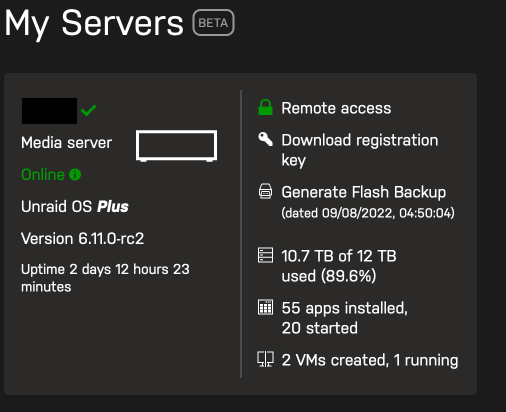
Hi, I can access my Unraid locally but I am away from my network at the moment. I've tried logging in through the My Servers page but I get a "The connection has timed out" when I click on "Remote Access". I've tried it on different browsers and on my mobile and laptop. As you can see it can tell I had a backup this morning and the other statuses regarding VMs running, space used etc are correct. But I just can't seem to log in. I'm on Unraid 6.11.0-rc2
-
Thanks Squid. Yes, so the VM had been in sleep display mode. I changed its network bridge mode from Br0 to virBr0 and had a few days without problems. So I then shut the VM down but had problems again last night at around 22:40. Oddly the log doesn't show any problems (diagnostics attached). I've kept all but essential dockers but Home Assistant is reporting a lot of network problems so I've disabled that and will wait and see. Apologies but not sure what this means. In System Devices that is an audio adaptor and it has a green light next to it (the only item to do so) but can't find what that means. Have I isolated it in my VM then as looking in Advanced View for my VM I can't see it. I can't recall isolating via syslinux and don't even know how to do so! May have been when I first installed Unraid and was playing around. unraid-diagnostics-20211203-2345.zip
-
I switched to Unraid earlier this year and loved how easy it was to set up dockers, VMs and services and paid up before the end of my trial period. However the past month I've had network disconnection issues that I can't seem to solve, and looking at similar posts on the forum I'm not alone. I mainly use Unraid to host shared network folders, Plex and related services and a Windows 10 VM for Slack and Teams. I can watch about 20 mins of Plex then will get network dying (no Plex, no access to any Dockers) till I go up and wake up the VM, then I'll get a few in a row. It seems worse in evenings and mainly when playing Plex locally, I played remotely Saturday morning no problems. PLex has never had a problem running on the Windows VM, only Smart TV and other devices. I'm at my wit's end and while I don't want to leave I'm starting to look at Plan B for a Plex server. I've tried: * installing an Intel NIC in addition to my motherboard's Broadcom one * updated to the latest Unraid Beta, rc-2 * changed my network settings to have bonded, single connections, checked and replaced the cables, checked ports on my hubs * checked other network related settings in Unraid * uninstalled network monitoring tools in case they were interfering * reset Plex app on my TV in case it was causing problems * checked the PCIe connections and re-set as I am getting PCIe messages * disabled IPv6, set all network settings to automatic where possible, checked my router's settings and upgraded firmware and set the static IP * checked my router logs to ensure I'm not being DDoS/hacked etc and changed myServers port just in case * used Tweak tools to check and tweak network settings * disabled un-needed Dockers I'm not sure what it is, it may be a VM issue if activating it seems to restore it but not sure what to change. However I have made no VM changes in the past few weeks. Any help appreciated as sticking with Unraid will be easiest for me but feel I'm running out of options. unraid-diagnostics-20211130-1826.zip
-
Okay so the mystery deepens as now I am getting spammed by these messgaes several times per minute Nov 26 18:05:35 Unraid kernel: bond0: (slave eth0): link status definitely up, 1000 Mbps full duplex Nov 26 18:05:35 Unraid kernel: bond0: (slave eth0): making interface the new active one Nov 26 18:05:35 Unraid kernel: device eth0 entered promiscuous mode Nov 26 18:05:35 Unraid kernel: bond0: active interface up! Nov 26 18:05:35 Unraid kernel: br0: port 1(bond0) entered blocking state Nov 26 18:05:35 Unraid kernel: br0: port 1(bond0) entered forwarding state Nov 26 18:06:07 Unraid kernel: e1000e 0000:05:00.0 eth0: Reset adapter unexpectedly Nov 26 18:06:07 Unraid kernel: bond0: (slave eth0): link status definitely down, disabling slave Nov 26 18:06:07 Unraid kernel: device eth0 left promiscuous mode Nov 26 18:06:07 Unraid kernel: bond0: now running without any active interface! Nov 26 18:06:07 Unraid kernel: br0: port 1(bond0) entered disabled state Nov 26 18:06:11 Unraid kernel: e1000e 0000:05:00.0 eth0: NIC Link is Up 1000 Mbps Full Duplex, Flow Control: Rx/Tx
-
Okay so despite adding eth1 to bonding members eth0 I still have been losing my internet connection. I have also upgraded to the latest Unraid Beta. I keep getting Nov 25 22:16:03 Unraid kernel: r8169 0000:03:00.0 eth1: rtl_rxtx_empty_cond == 0 (loop: 42, delay: 100). Nov 25 22:16:14 Unraid kernel: r8169 0000:03:00.0 eth1: rtl_txcfg_empty_cond == 0 (loop: 42, delay: 100). r8169 is eth1 so I thought that if eth0 is fine it should be okay. It always seems to happen around 9pm at night, I'd been using it all day. And when I reopen my laptop where I'm logged into my Unraid dashboard and/or the Windows VM running on it it tends to, but not always, fix itself. The Intel NIC seemed to be okay but after an error I thought that bonding the flakey r8169 motherboard device to eth0 it would mean that if one fell out then the other would kick in and I'd have a stable connection. Any thoughts? unraid-diagnostics-20211125-2216.zip
-
Amazing, thank you
-
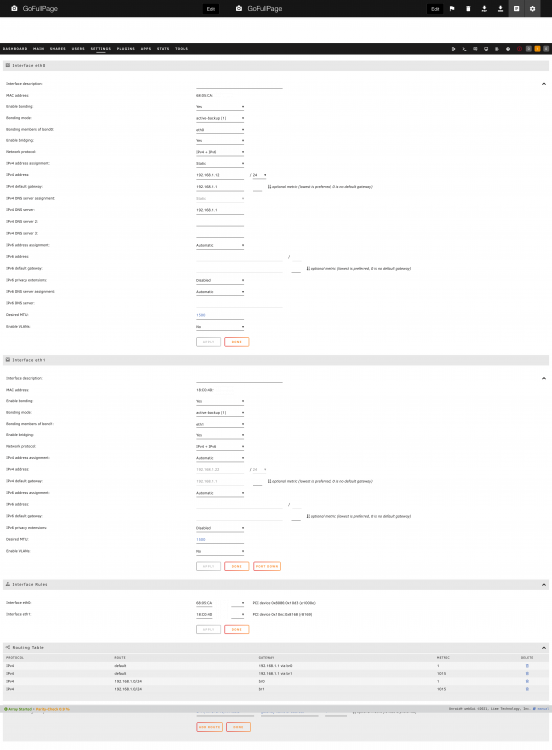
Due to recent hardware network issues I'd like my eth1 (motherboard network) to serve as a backup to my main network connection eth0 (NIC) and can't seem to get it right. I've assigned my Unraid a static IP locally to help with bookmarks etc. But when I disconnect the eth0 cable I can never connect. I've looked but can't seem to find the settings I need to change. Any advice welcome.
-
Ah, thanks. I just assumed that it would write over previous files. Yes looking at my dashboard I see it at 100%.
-
Thanks Squid, yes you're right I am using a Mac and had been trying to transfer several gigs from one onto my Unraid array earlier. However I have the setting on Yes. I've enabled syslog write to my flash so I can access it more easily in future. Think I'll reboot my Unraid device and see that helps.
-
My network died for a few minutes on Unraid (depsite a new NIC and updated drivers) so I went to diagnose via the syslog. However while the problem occurred at 18:45, my log only runs till 11:30, cutting out mid-entry: Nov 24 11:30:05 Unraid smbd[16572]: Nov 24 1 Any ideas what happened and how I can find out what caused my network to die? Diagnostics attached unraid-diagnostics-20211124-1856.zip
-
For any future readers, I solved this (so far the error hasn't reappeared) by updating my Unraid install to a beta. I went from 6.9.2 to 6.10.0-rc2 2021-11-01. Looking online it seems that Realtek drivers have a known issue around r8169 and the beta may include the latest drivers.
-
Over the past week I've been having problems with my Unraid setup, disconnecting from my local network. I've looked and it seems to be an Unraid rather than a Plex Media Server problem (where I first spotted it). Plex won't connect until I wake the Windows VM I am running on the Unraid device or I log into Unraid, though it could be a coincidence. It does tend to be in the evening and night time rather than morning. Looking in the log (attached) I keep getting: eth0: rtl_txcfg_empty_cond As you can see in the syslog-2 I keep getting this from when I try to use Plex from 21:25 until I log into Unraid at 21:28 and the error corrects itself. This problem only started the last week or 2 and will creep in while Plex is playing, either disconnecting or slowing down, but has become worse the last couple of days. I've disconnected and reconnected the ethernet cable and rebooted Unraid to no avail. I use the motherboard's built in ethernet adaptor. syslog-2 unraid-diagnostics-20211117-2155.zip
-
Thanks @frakman1 you just saved me a lot of frustration

