






Atreides
Members
-
Joined
-
Last visited
-
I've got the WTR Max and have followed similar steps, but still see no temperature. Any differences for the Max vs the other ones? Thanks!
-
This worked for me! Thanks
-
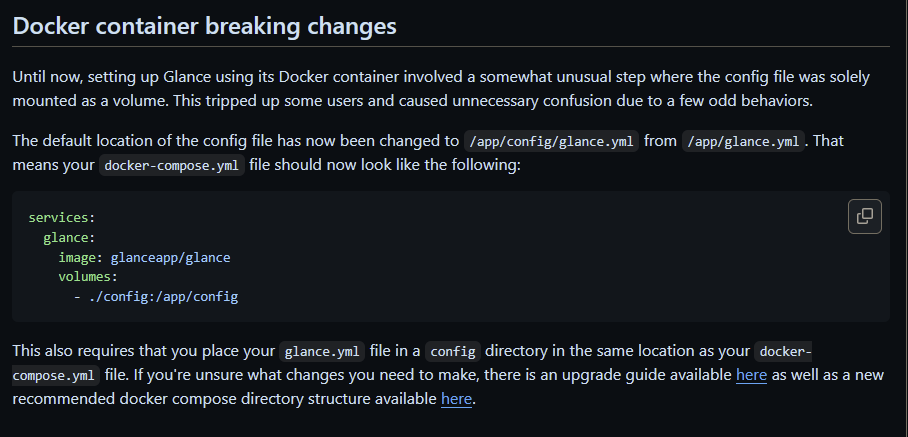
No matter how I tried to follow the setups above or the steps in the readme, I could not get it to recognize the glance.yml file. Any advice for this new update? How will it affect unRAID installs? https://github.com/glanceapp/glance/blob/main/docs/v0.7.0-upgrade.md
-
Oh man. I just missed it haha. I hear you you. My install did work but I understand moving on to something else JIC. Thanks!
-
https://github.com/Bee-Mar/mmpm For the magic Mirror docker, could install this alongside of it as its own docker or would this work with your "y" edit on the text file? Would it be possible in a future update you could integrate this into your package so we would have a module/management UI?
-
No that makes perfect sense and I will keep on the preview. Thanks! I hope they intergrate that into the main branch at some point though.
-
Thank you very much. I think I made an incorrect directory location for the backup, used it for several days, and when it restarted it(for update) held up the entire app. Editing the server.conf file and stopping the update fixed it till I could change it in GUI. Keeping the location "" as blank worked. Should this docker still be on the preview branch, as I think thats what was triggering the frequent updates?
-
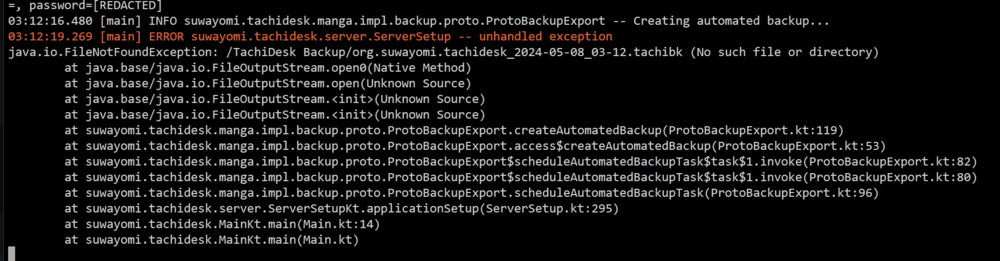
Thank you for your assistance. I ended up using the VPN manager inside of unraid itself and selecting that network. Still this is super useful as I know I will need to be able to know this going forward. Any idea about this new error after the last update? Everything has been working very well!
-
What do we put in the Komga USER and PSWD section if we are only using Kavita? It marks it as required.
-
I know it's unnecessary but I am trying to route this through my GluetunVPN. I can't seem to get the configuration to work. Using Network mode as "None" and adding after the Extra Parameters "--network=container:gluetun" it will successfully launch but I cannot access the webUI. I have added the internal port inside of the GluetunVPN container as well, but when checking the logs in TachiDesk, it shows IP 0.0.0.0:4567 which I think it perhaps not correct. Any ideas?
-
ARK: SA Dedicated Server Hosting Guide - 4 hours ago My understanding is that people can self host as long as they are not a commercial hoster selling access. Also apparently big streamers who make money with Ark have to host through Nitrado(🤬). I don't know if this helps but I am planning on setting up a whole another unRAID just to host Ark:SA away from Nitrado.
-
I saw a new update, but can't find the change log. Any idea what was changed?
-
Running into the same issue on a brand new install. My other system is running fine, so unsure whats up.
-
Thank you so much for posting this.
-
Whats the recommendation for backing up Plex if it's on its own in an Unassigned Disk SSD? Can I create two Backup tasks?


