





htpcnewbie
Members
-
Joined
-
Last visited
-
Hi - Did you figure out how to use expressvpn with this docker? Moving from PIA to ExpressVPN, the docker starts and seems to get a vpn ip but cannot connect to the gui.
-
Upgraded from 6.9.0-beta25 to 6.9.1. I am seeing poor video performance for my windows 10 kvm home theater setup. Have a Nvidia gtx 960 assigned to this kvm. Are there any known issues and fixes to improve pefromace?
-
Ouch, thanks for pointing out. Saw rc2 on top of the thread topic and assumed this was recent.
-
Sluggish WIN10 KVM performance on rc2 Hi, I have been missing from the forums for a while which goes to tell how trouble free unraid has been. Recently battled with horrible win10 kvm performance after upgrading to rc2 and had a hard time pinpointing the root cause. I didn't anticipate unraid version to be the problem since it was a while after the upgrade I used the kvm. While on rc2, the cores dedicated to the kvm were almost at 100% just by opening a browser. After I rolled back to beta25 the kvm is working as expected. If this is not a known issue I am happy to provide additional info to help diagnose the problem with rc2.
-
<rant> Feels frustrating when the docker just stops working and you realize a week later something isnt working and dont have time for another week to sit in front of the computer to pull up and try to diagnose what's working. I guess getting old means we need 'stuff' to work, there are times when we have ability and interest to spend tinkering but not always. <end rant> I stopped my deluge container until I can get some time to sit and figure out what's wrong. Would be nice to see in bold letters, change xx variable to yy to get things working to minimize effort in diagnosis. Appreciate the effort by binhex and team, guess the pains of growing up.
-
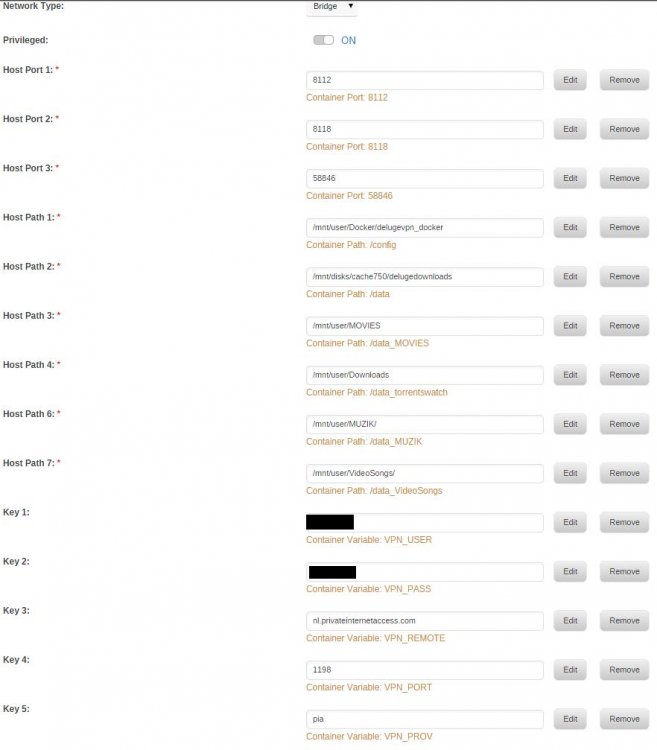
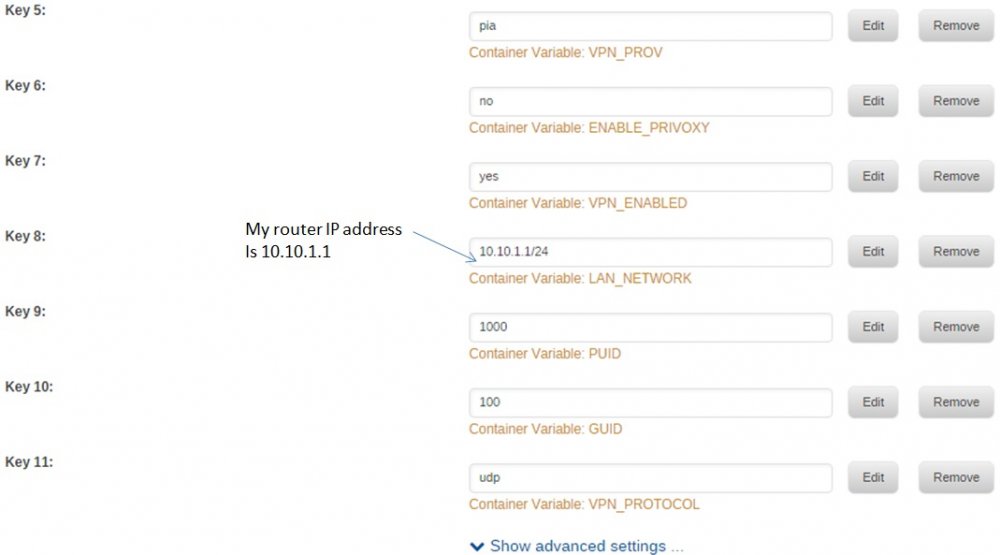
binhex - In have set my ip addresses to start at 10.10.1.1. I would think that should be the LAN network value. isnt it?
-
Adding snapshots of my delugevpn docker setup for a fellow user who needs some help. This post is for reference only to share my setup pictures and I am not asking for help!
-
Great work guys, Thank you for coordinating and getting a plugin out for the user community.
-
+1 on b12 until the b13 issues are sorted out. Can you please elaborate on what does vm-tools help with? I would love to have the ability of some programs (like Plex) bypassing the VPN. (not related to vm tools at all) EDIT: open vm tools: http://open-vm-tools.sourceforge.net/about.php
-
Peter - Would it be possible to skip one or couple of application from routing through the VPN and let is go through the WAN? I need plex and madsonic to pass through, PIA VPN allows only one port forward.
-
Yep, I am passing the Intel controller.The right usb ports (below the PS/2 KB) are USB5 and I had trouble passing it when using Win7 (no passthrough worked for me with Win7). I have not checked passing through the USB5 port with Win8. I think most of the ports are on usb3, the Intel controller. Maybe a x1 usb pcie card could help, like this one http://www.newegg.com/Product/Product.aspx?Item=N82E16815166026?
-
reluctantflux - Here is my output from lspci and the highlighted one is the one I am passing for USB (usb3/BUS 003). This config has the pci usb slots passing through, so I am not sure whether some of them are not visible to Unraid. EDIT: looks like I cannot make the bold that is input in code format but I have not removed the bold code to highlight the relevant code. " root@Tower:/mnt/disk/SSD1/vm/image# lspci 00:00.0 Host bridge: Intel Corporation Haswell DRAM Controller (rev 06) 00:01.0 PCI bridge: Intel Corporation Haswell PCI Express x16 Controller (rev 06) 00:01.1 PCI bridge: Intel Corporation Haswell PCI Express x8 Controller (rev 06) 00:02.0 VGA compatible controller: Intel Corporation Haswell Integrated Graphics Controller (rev 06) 00:03.0 Audio device: Intel Corporation Haswell HD Audio Controller (rev 06) [b]00:14.0 USB controller: Intel Corporation Device 8cb1[/b] 00:16.0 Communication controller: Intel Corporation Device 8cba 00:19.0 Ethernet controller: Intel Corporation Device 15a1 00:1a.0 USB controller: Intel Corporation Device 8cad 00:1b.0 Audio device: Intel Corporation Device 8ca0 00:1c.0 PCI bridge: Intel Corporation Device 8c90 (rev d0) 00:1c.2 PCI bridge: Intel Corporation Device 8c94 (rev d0) 00:1c.3 PCI bridge: Intel Corporation Device 8c96 (rev d0) 00:1c.6 PCI bridge: Intel Corporation Device 8c9c (rev d0) 00:1d.0 USB controller: Intel Corporation Device 8ca6 00:1f.0 ISA bridge: Intel Corporation Device 8cc4 00:1f.2 SATA controller: Intel Corporation Device 8c82 00:1f.3 SMBus: Intel Corporation Device 8ca2 01:00.0 VGA compatible controller: AMD/ATI [Advanced Micro Devices, Inc.] Tahiti XT [Radeon HD 7970] 01:00.1 Audio device: AMD/ATI [Advanced Micro Devices, Inc.] Tahiti XT HDMI Audio [Radeon HD 7970 Series] 02:00.0 Serial Attached SCSI controller: LSI Logic / Symbios Logic SAS2008 PCI-Express Fusion-MPT SAS-2 [Falcon] (rev 03) 04:00.0 Ethernet controller: Realtek Semiconductor Co., Ltd. RTL8111/8168 PCI Express Gigabit Ethernet controller (rev 11) 05:00.0 PCI bridge: ASMedia Technology Inc. Device 1184 06:01.0 PCI bridge: ASMedia Technology Inc. Device 1184 06:03.0 PCI bridge: ASMedia Technology Inc. Device 1184 06:05.0 PCI bridge: ASMedia Technology Inc. Device 1184 06:07.0 PCI bridge: ASMedia Technology Inc. Device 1184 08:00.0 SATA controller: ASMedia Technology Inc. ASM1062 Serial ATA Controller (rev 02) 0a:00.0 SATA controller: ASMedia Technology Inc. ASM1062 Serial ATA Controller (rev 02) 0b:00.0 USB controller: ASMedia Technology Inc. Device 1142 output from lsusb (note BUS 003 is missing here since it is being passed through) root@Tower:/mnt/disk/SSD1/vm/image# lsusb Bus 002 Device 002: ID 8087:8001 Intel Corp. Bus 002 Device 001: ID 1d6b:0002 Linux Foundation 2.0 root hub Bus 006 Device 001: ID 1d6b:0003 Linux Foundation 3.0 root hub Bus 005 Device 003: ID 03f0:0024 Hewlett-Packard KU-0316 Keyboard Bus 005 Device 002: ID 8564:1000 <<- This is the unraid key. Location: Leftmost bottom slot on the mobo, forward looking aft. Bus 005 Device 001: ID 1d6b:0002 Linux Foundation 2.0 root hub Bus 001 Device 002: ID 8087:8009 Intel Corp. Bus 001 Device 001: ID 1d6b:0002 Linux Foundation 2.0 root hub vfio-bind in go, the last address is for usb pci #For KVM videocard video & hdmi audio pass thru /usr/local/sbin/vfio-bind 0000:01:00.0 0000:01:00.1 0000:00:14.0 my xml (bold toward the end is the pci passthrough for usb3) <domain type='kvm' id='2' xmlns:qemu='http://libvirt.org/schemas/domain/qemu/1.0'> <name>win81x64pci</name> <uuid>d8d5720f-e23f-40d4-8a6b-19864c464c41</uuid> <description>win81x64pci</description> <memory unit='KiB'>13107200</memory> <currentMemory unit='KiB'>13107200</currentMemory> <memoryBacking> <nosharepages/> <locked/> </memoryBacking> <vcpu placement='static'>4</vcpu> <resource> <partition>/machine</partition> </resource> <os> <type arch='x86_64' machine='pc-q35-2.1'>hvm</type> <boot dev='hd'/> <bootmenu enable='yes'/> </os> <features> <acpi/> <apic/> </features> <cpu mode='host-passthrough'> </cpu> <clock offset='localtime'/> <on_poweroff>destroy</on_poweroff> <on_reboot>restart</on_reboot> <on_crash>restart</on_crash> <devices> <emulator>/usr/bin/qemu-system-x86_64</emulator> <disk type='file' device='disk'> <driver name='qemu' type='qcow2' cache='none' io='native'/> <source file='/mnt/disk/SSD1/vm/image/Win81x64.qcow2'/> <backingStore/> <target dev='vdc' bus='virtio'/> <alias name='virtio-disk2'/> <address type='pci' domain='0x0000' bus='0x02' slot='0x03' function='0x0'/> </disk> <disk type='file' device='cdrom'> <driver name='qemu' type='raw'/> <source file='/mnt/disk/SSD1/vm/media/Windows81Pro.iso'/> <backingStore/> <target dev='hda' bus='sata'/> <readonly/> <alias name='sata0-0-0'/> <address type='drive' controller='0' bus='0' target='0' unit='0'/> </disk> <disk type='file' device='cdrom'> <driver name='qemu' type='raw'/> <source file='/mnt/disk/SSD1/vm/media/virtio-win-0.1-81.iso'/> <backingStore/> <target dev='sdd' bus='sata'/> <readonly/> <alias name='sata0-0-1'/> <address type='drive' controller='0' bus='0' target='0' unit='1'/> </disk> <controller type='usb' index='0' model='ich9-ehci1'> <alias name='usb0'/> <address type='pci' domain='0x0000' bus='0x02' slot='0x01' function='0x7'/> </controller> <controller type='usb' index='0' model='ich9-uhci1'> <alias name='usb0'/> <master startport='0'/> <address type='pci' domain='0x0000' bus='0x02' slot='0x01' function='0x0' multifunction='on'/> </controller> <controller type='usb' index='0' model='ich9-uhci2'> <alias name='usb0'/> <master startport='2'/> <address type='pci' domain='0x0000' bus='0x02' slot='0x01' function='0x1'/> </controller> <controller type='usb' index='0' model='ich9-uhci3'> <alias name='usb0'/> <master startport='4'/> <address type='pci' domain='0x0000' bus='0x02' slot='0x01' function='0x2'/> </controller> <controller type='sata' index='0'> <alias name='sata0'/> <address type='pci' domain='0x0000' bus='0x00' slot='0x1f' function='0x2'/> </controller> <controller type='pci' index='0' model='pcie-root'> <alias name='pcie.0'/> </controller> <controller type='pci' index='1' model='dmi-to-pci-bridge'> <alias name='pci.1'/> <address type='pci' domain='0x0000' bus='0x00' slot='0x1e' function='0x0'/> </controller> <controller type='pci' index='2' model='pci-bridge'> <alias name='pci.2'/> <address type='pci' domain='0x0000' bus='0x01' slot='0x01' function='0x0'/> </controller> <interface type='bridge'> <mac address='52:54:00:0e:6d:3d'/> <source bridge='br0'/> <target dev='vnet0'/> <model type='virtio'/> <alias name='net0'/> <address type='pci' domain='0x0000' bus='0x02' slot='0x02' function='0x0'/> </interface> <input type='tablet' bus='usb'> <alias name='input0'/> </input> <memballoon model='virtio'> <alias name='balloon0'/> <address type='pci' domain='0x0000' bus='0x02' slot='0x04' function='0x0'/> </memballoon> </devices> <seclabel type='none' model='none'/> <qemu:commandline> <qemu:arg value='-device'/> <qemu:arg value='ioh3420,bus=pcie.0,addr=1c.0,multifunction=on,port=1,chassis=1,id=root.1'/> <qemu:arg value='-device'/> <qemu:arg value='vfio-pci,host=01:00.0,bus=root.1,addr=00.0,multifunction=on,x-vga=on'/> <qemu:arg value='-device'/> <qemu:arg value='vfio-pci,host=01:00.1,bus=pcie.0'/> [b] <qemu:arg value='-device'/> <qemu:arg value='vfio-pci,host=00:14.0,bus=root.1,addr=00.1'/>[/b] </qemu:commandline> </domain> So you're passing through the ASMedia controller, and not the intel one, correct? Can you show me your "Universal Serial Bus Controllers" section of Device Manager? I'm curious on if you have different host controllers showing than me. Also, I read this could be an issue with the Bios, having the USB 3.0 supporting legacy devices.
-
Hey reluctantflux - I have been meaning to ping and let you know about this but travelling this week and got busy. I tried win8.1 with the xml that I posted earlier on this thread and the Pci pass through for usb3 worked without trouble in first go. You were right about it not working in win7 though but it worked in win8.1. My unraid key is moved to usb5 slot, bottom left side (front looking aft). I think the inside USB slot, inside usb2 headers and mobo right side slots are on usb3 which I am passing through. Can you try this config and see whether it works on your win8.1? Merry Christmas and Happy Holidays! EDIT: I just checked the xml I posted earlier and seems it is my first pass using usb5 pass through. If you are having trouble let me know and I can send my working version of xml. I will be back home this Monday.
-
Spent sometime debugging and think it could be Win 7 related. I moved all the pci passthru intended usb's to usb003 (has one pci address similar to OP) and moved my unraid flash drive to usb005 (has two pci addresses). Defined the vfio-bind and qemu. The VM started and everything looked good except that the usb devices on pci pass thru were not recognized. In fact as soon as I defined the vfio-bind, the keyboards and mice on usb003 lost their power and kvm>devices did not show any usb003 devices. I am going back to define my usb's in host mode until I get around to installing Win 8
-
Arche - I realized that unraid cannot see bus005 by accident. After I started the VM and the usb devices weren't responding, I saw that none of the bus005 devices were not visible in VM > devices > pci. I thought they were disconnected and double checked they were all connected. A reboot showed they were visible again. So to answer your question, yes they were correctly vfio binded. I was wondering whether my interpretation of the pci address to xml is incorrect since I see two parts in there and I am using only the second part in the pci address. I am going to try to check again later tonight ... Meanwhile let me know if you have any suggestions to try out.

