





Cpmiller22
Members
-
Joined
-
Last visited
-
I have the same question. Any guidance would be much apprciated!
-
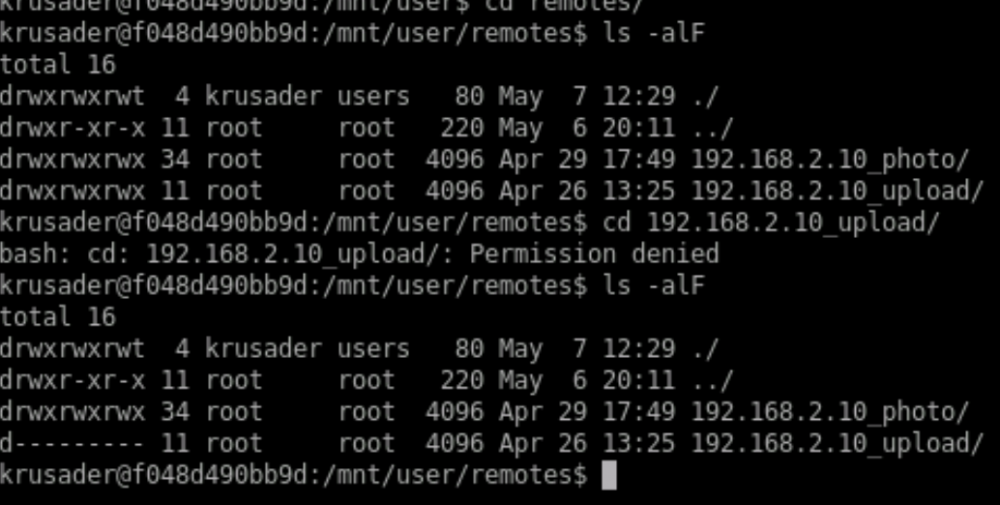
I'm hoping someone can help me with an issue I'm having mounting an NFS share on another NAS. There are two NFS shares on my synology that have the exact same configuration (photo and upload). I've mounted photo just fine and can use Krusader to navigate and sync folders with my Unraid shares. Today I did the same with the upload share and am experiencing a strange permissions issue. As you can see from the first check the permissions look just fine. When I try and access the upload folder in Krusader I get a premission denied and suddenly the directory permissions are changed. If I wait a bit, the permissions seem to reset, but as soon as I try and access it changes again. Here is the output from the terminal window in Krusader. I can see the same thing happening watching in the Unraid terminal as well. Any ideas would be much appreciated!
-
Ok, I was able to get it working. I had to stop the docker & VM services so I could configure the interface.
-
Here are the diagnostics: tower-diagnostics-20210428-1354.zip
-
I am on 6.9.2 but can’t get that working. Is there something specific I need to do to get the right driver loaded? Sent from my iPhone using Tapatalk
-
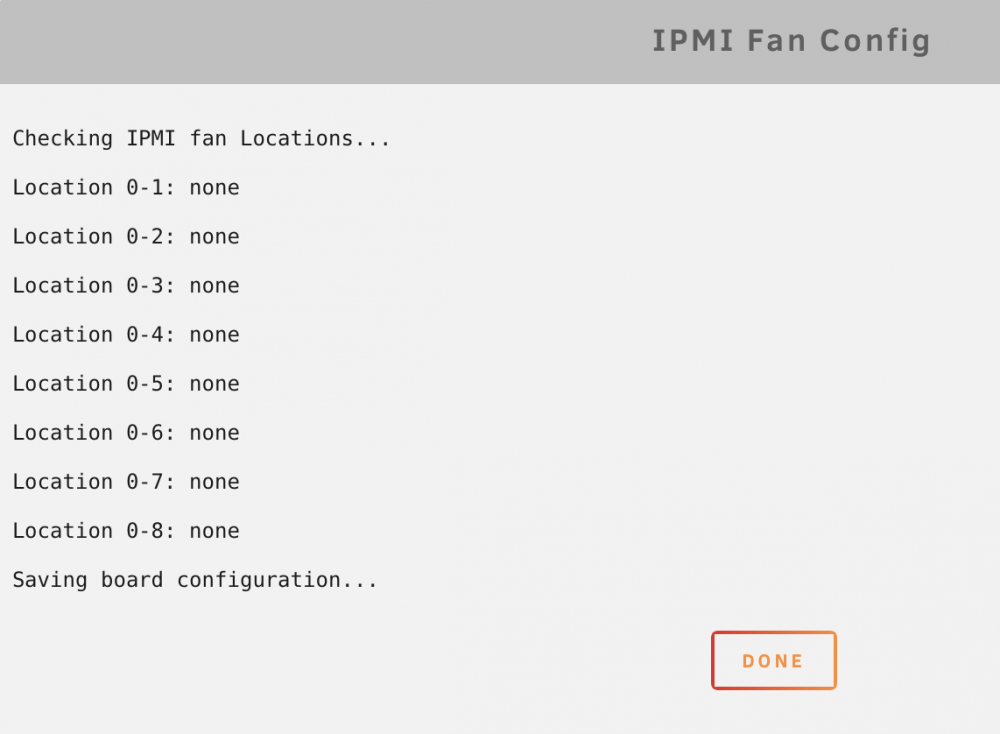
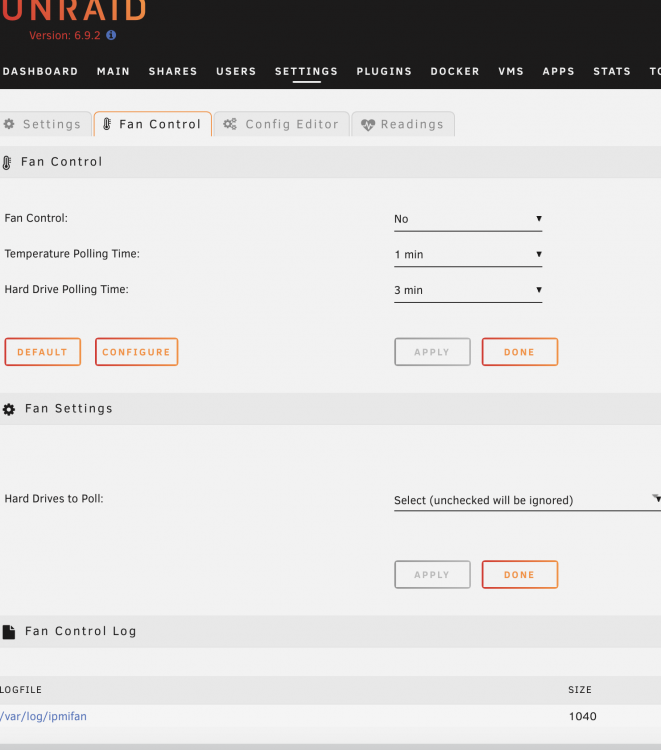
Hi all, Need some help getting IPMI setup for my unraid server. When I run the configuration it doesn't find anything, and on the config page there aren't any fans showing. My motherboard is a ASRock B460M Steel Legend. Any tips on how to get this configured and working properly would be much appreciated!
-
Recently just built an unraid server and I’m trying to get my temperature and fan controls setup properly. I have 3 noctura fans plugged into my motherboard and one fan that is plugged directly into a 5 drive hdd enclosure. My motherboard is an Asrock B460M steel legend. I’ve installed the Auto Fan Control plugin, but I’m a bit confused by the settings. It’s showing 7 different PVM controllers to choose from. Which PVM should I pick, and how can I make sure all my fans are spinning faster when my CPU or HDD temps pass a certain threshold? Sent from my iPhone using Tapatalk
-
When I run the command - scrutiny-collector-metrics run - I get the following errors see below. The data is showing up in the web portal, but I'm wondering why those errors are showing. INFO[0000] Executing command: smartctl --info -j /dev/sdd type=metrics INFO[0000] Generating WWN type=metrics INFO[0000] Executing command: smartctl --info -j /dev/sde type=metrics INFO[0000] Generating WWN type=metrics INFO[0000] Executing command: smartctl --info -j /dev/sdf type=metrics INFO[0000] Generating WWN type=metrics INFO[0000] Executing command: smartctl --info -j -d nvme /dev/nvme0 type=metrics INFO[0000] Using WWN Fallback type=metrics INFO[0000] Executing command: smartctl --info -j /dev/sdb type=metrics INFO[0000] Generating WWN type=metrics INFO[0000] Executing command: smartctl --info -j /dev/sdc type=metrics INFO[0000] Generating WWN type=metrics INFO[0000] Sending detected devices to API, for filtering & validation type=metrics INFO[0000] Collecting smartctl results for sdd type=metrics INFO[0000] Executing command: smartctl -x -j /dev/sdd type=metrics ERRO[0000] smartctl returned an error code (4) while processing sdd type=metrics ERRO[0000] smartctl detected a checksum error type=metrics INFO[0000] Publishing smartctl results for 0x5000c5006e098b8f type=metrics INFO[0000] Collecting smartctl results for sde type=metrics INFO[0000] Executing command: smartctl -x -j /dev/sde type=metrics ERRO[0001] smartctl returned an error code (4) while processing sde type=metrics ERRO[0001] smartctl detected a checksum error type=metrics INFO[0001] Publishing smartctl results for 0x50014ee20a4ab910 type=metrics INFO[0001] Collecting smartctl results for sdf type=metrics INFO[0001] Executing command: smartctl -x -j /dev/sdf type=metrics ERRO[0001] smartctl returned an error code (68) while processing sdf type=metrics ERRO[0001] smartctl detected a checksum error type=metrics INFO[0001] Publishing smartctl results for 0x50014ee25f9a29db type=metrics INFO[0001] Collecting smartctl results for nvme0 type=metrics INFO[0001] Executing command: smartctl -x -j -d nvme /dev/nvme0 type=metrics INFO[0001] Publishing smartctl results for 7fbc071205d900060942 type=metrics INFO[0001] Collecting smartctl results for sdb type=metrics INFO[0001] Executing command: smartctl -x -j /dev/sdb type=metrics INFO[0003] Publishing smartctl results for 0x5000c50066215c45 type=metrics INFO[0003] Collecting smartctl results for sdc type=metrics INFO[0003] Executing command: smartctl -x -j /dev/sdc type=metrics INFO[0004] Publishing smartctl results for 0x5000c500c8f1320e type=metrics INFO[0004] Main: Completed type=metrics


