





michael123
Members
-
Joined
-
Last visited
Everything posted by michael123
-
Since I updated a docker, CrashPlan is doing 'synchronization'. But soooo slow, I have 12TB and for a couple of days it merely accomplished less than 20% Some kind of throttling, but the issue is that there is no backup for these 2 weeks. I am running good old physical backup on external hard drive I tried to look for alternatives, but for this price (10$ per month) I could not.. Is there anything else that integrates with unRAID for more or less same price?
-
Today I got error '400' I entered the url in my browser, and got the same error 400 [ is there an easy way to copy/paste the url? I just entered character by character..]
-
But it is not running now -- says it can't connect
-
Hello I am having this message when connecting to the console - Unable to connect to destination for 5.5 days What can I do? I restarted the docker, it seems to be running, logs are clean.
-
Update: Following support advise (and as here already advised), rebooted in Safe Mode, 'Apply' button re-appeared, I also discovered that the vdisk size was merely 10GB, so I raised it to 40GB, and rebooted back. Interestingly, after that, Apply appeared also while not in Safe Mode. Another question, why the vdisk size was 10GB as the default should be 20GB (I didn't change, I usually don't do things I don't understand) I reiterated over my list of plugins, I basically have there Dynamix and few others like Recycle Bin.. Anyway, everything works now after reboot.
-
Browsers I also tried, safe mode - not yet, I opened a support ticket
-
That's not about theme Probably broken when upgraded to 7.0.1
-
I wrote I played with other themes also, exactly the same
-
No difference, tried also from different devices and browsers
-
I don't remember I changed a theme, but I now played with all 4 (Azure, White, Black, Gray), I set the dropdown to 'No' but nothing happens, no Apply button, there is also some checkbox on far right, without any label on it. It does nothing as well.
-
I don't see any 'Apply' button here.. is there?
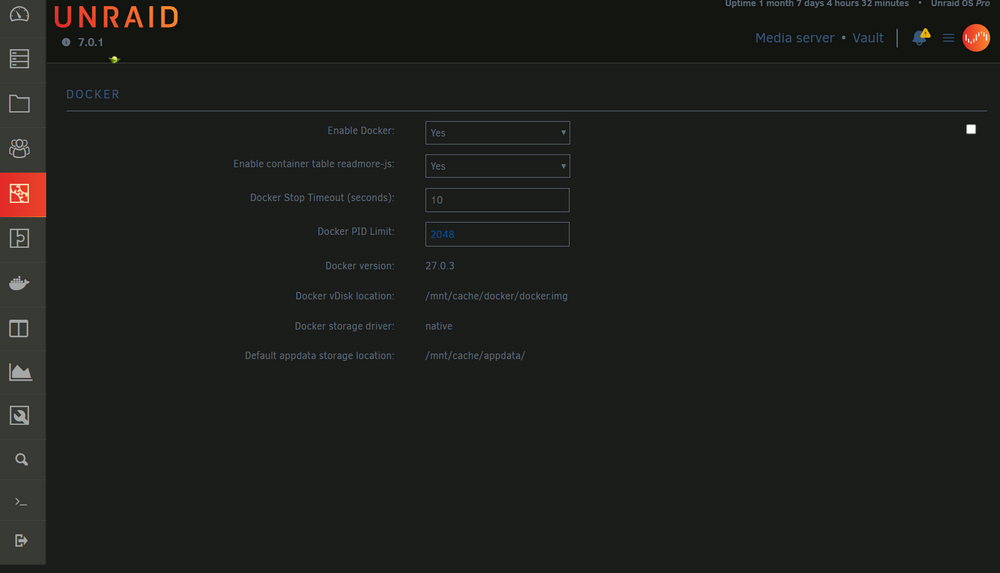
-
Hi Sorry I might be asking a silly question, how do I stop the docker service?
-
Hi when I update all my dockers, I succeed for all but Firefox due to insufficient space 'Container Size' I think looks reasonable Name Container Writable Log firefox 2.58 GB 0 B 49.8 MB PhotoPrism 2.29 GB 13.8 kB 7.48 kB CrashPlanPRO 686 MB 267 kB 122 kB GooglePhotosSync 420 MB 40.3 kB 262 kB qbittorrent 136 MB 71.7 kB 6.98 kB Total size 6.11 GB 393 kB 50.2 MB
-
Regarding WOL, Supermicro says (probably aligns with what you also mentioned) that WOL supports S4 and S5 S4 is hibernation, and S5 is regular shutdown.. right?
-
Is it safe? Why it is not default then? I usually create a screenshot of drives assignment before every shutdown. When I start the server, and once GUI is available I see unraid displays 'Configuration valid" and then I check the drives assignment against the previously saved screenshot. Then I start the array Is there something here redundant? What you say I can skip all that.. Sorry for idiotic question I also didn't know that I can use WOL on the system that was completely shutdown.
-
But I need to mount disks then.. validate the assignments and start the array, so it will be manual procedure. Yes it is possible Or you meant something else? Yes, it has an IPMI but actually I did not use it so far
-
I sent request in parallel to Supermicro and got a reply that since it is a server board it does not support S3, but it does support WOL by default What's the purpose of WOL then? What would you suggest? I rarely use server on weekdays, during weekends I saw couple of movies and my wife needs her photo archive On weekdays it just sweeps dust and spread the fans noise across the apartment 😞 Yes, disks are going to standby, but fans are spinning regardless.. if not S3, is there something close that reduces computing activity to a minimum?
-
Hello I have X11SSH-F motherboard from 2017, original BIOS revision (I did not upgrade it) I want to enable S3 Suspend & Wake On Lan, I understand I need to enable something in Power Management or ACPI, and then enable waking up by LAN somewhere inside PCI settings. That's what AI said But I can't figure out that in the BIOS settings. Neither manual says anything.. Should I do anything or that's already enabled by default? I am just going to try it then.. So there is S3 plugin, right? I want to ask also, what happens with the VMs running on the server after resume? Are they resumed automatically, like I have a continuous backup to cloud storage..? Thanks
-
I played with the cables, probably I had a bad connection 🤡 Sorry
-
Hi As it is impossible to work on 100 MBit/sec, I would like to downgrade back to 6.11.x, but how do I do it to preserve everything? thanks
-
I have ethtool output for 6.11.5 Settings for eth0: Supported ports: [ TP ] Supported link modes: 10baseT/Half 10baseT/Full 100baseT/Half 100baseT/Full 1000baseT/Full Supported pause frame use: Symmetric Supports auto-negotiation: Yes Supported FEC modes: Not reported Advertised link modes: 10baseT/Half 10baseT/Full 100baseT/Half 100baseT/Full 1000baseT/Full Advertised pause frame use: Symmetric Advertised auto-negotiation: Yes Advertised FEC modes: Not reported Speed: 1000Mb/s Duplex: Full Auto-negotiation: on Port: Twisted Pair PHYAD: 1 Transceiver: internal MDI-X: on (auto) Supports Wake-on: pumbg Wake-on: g Current message level: 0x00000007 (7) drv probe link Link detected: yes For 6.12.x that's same except it is 100Mb/s and driver info for 6.11 is driver: igb version: 5.19.17-Unraid firmware-version: 3.25, 0x800005cc expansion-rom-version: bus-info: 0000:03:00.0 supports-statistics: yes supports-test: yes supports-eeprom-access: yes supports-register-dump: yes supports-priv-flags: yes while for 6.12 is driver: igb version: 6.1.36-Unraid firmware-version: 3.25, 0x800005cc expansion-rom-version: bus-info: 0000:03:00.0 supports-statistics: yes supports-test: yes supports-eeprom-access: yes supports-register-dump: yes supports-priv-flags: yes
-
I upgraded from 6.12.1 to 6.12.2, but still same 100 MBit/sec Question - how difficult is to go back to 6.11.xx ?
-
unrelated to the question, but I see on the syslog few following lines Jun 30 16:40:21 Vault kernel: critical medium error, dev sda, sector 15589184 op 0x0:(READ) flags 0x80700 phys_seg 1 prio class 2 Also, this week the server once refused to recognize flash as boot device.. What should I do? Replace the flash drive? What is the procedure?
-
Hi After upgrade to 6.12 network is running on 100 rather than 1000, noticed during backup.. Tried manually to change to 1000, used other network socket, did not help. Other windows PC running on the same switch going well - 1000. What could be wrong? vault-diagnostics-20230630-1644.zip
-
Given there are no disk failure, I can connect the disks one by one right and copy its contents..? Sijce current capacity of HD drives, I believe the new server will be much smaller Re: Raid controller, that's Adaptec HBA SATA/SAS.. Sorry
