





flying_rabbi
Members
-
Joined
-
Last visited
-
I've been pulling my hair out for months over this issue. I've had all the symptoms described in this thread, and pulled the RAID card out of my system and put my all my drives on sata controllers to fix my issue. I bought some used SAS cards the other day as warm spares, and popped my Lsi Controller back in, with ONLY the sas drives hooked up to it. Within 24hrs, both my ironwolf drives have taken a nosedive, which have run flawlessly since the Lsi card was removed. (and thats the second lsi card, since i bought another thinking it was the issue). Extremely frustrating, as ive spent a lot a $ and a hell of a lot of time trying to work it out. Rant over.
-
Sorry mate, haven't checked in a while, but cheers for your thoughts! I'll investigate and see how it goes 🙂
-
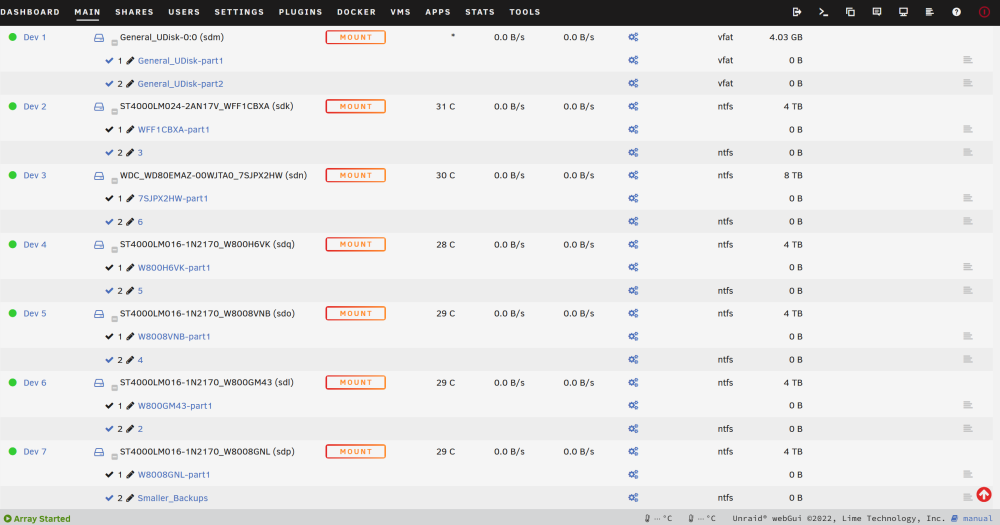
Hi all! I have about 30Tb of USB3 HDD's spread across a half dozen devices. Currently as a test, ive plugged them all into a hub and hooked it up to unraid happily (Showing as unassigned devices currently). I'm looking for guidance as to the easiest way to do a cold storage backup of some of the critical shares on my system (And have the drives available to other OS's when not plugged into my unraid) Anyone got some ideas on the best way to deal with a bunch of JBOD's like this? I envision it will be plugged into the server once a month or so to do some sort of incremental update, but im open to suggestions on best practices. Cheers everyone!
-
@JorgeB thanks mate, didn't look hard enough.
-
Hi brains trust! Scenario: Have an 64tb array consisting of 8x8tb hdds. 1x parity, 7 array disks. Lately one of the drives in the array has been failing, and I've been constantly removing it and rebuilding it whilst I swap other variables around eg cables raid cards etc On to the fun bit. I've bit the bullet, and ordered a 14tb drive to replace it, but, owing to the fact that my 14tb drive needs to be the parity, I'm hoping there's a way to shortcut the rebuild time. My idea at the moment is to rebuild my failing drive one last time, and then add the 14tb in as a second parity. Once that's done, remove 8tb parity and drop it in the array. Two full parity checks to complete the operation. Any thoughts on a better way? Had a look on the forums but didn't see my particular scenario.
-
Yeah I'm having the same issue - I've gone so far as to add the community scrapers as well, and cant get anything to run a successful query unfortunately,
-
+1 - This was my bugbear also

