





djismgaming
Members
-
Joined
-
Last visited
Everything posted by djismgaming
-
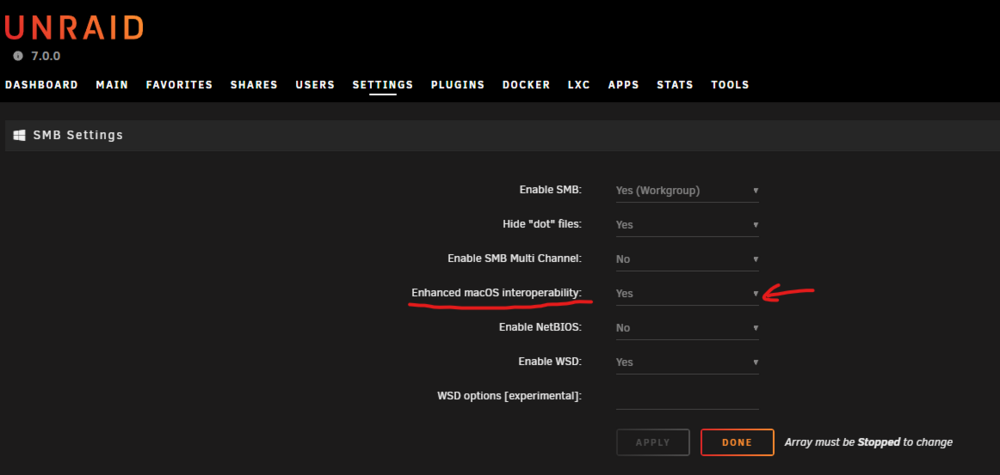
Just had this happen to me. Had to enable an option on SMB settings: "Enhanced macOS interoperability"
-
Yeah, it is working for me. No change, apart of waking up the next day haha. All good so far.
-
@Daniel15 Do as ich777 said before to share your diagnostics. It helps them a lot on these reports of issues. But in my case, the next day all worked alright. No changes on my side. Do you use Brave browser by any chance? That's the one I use. Just to see if there's a pattern, I guess.
-
Now this, is attention to detail. 😉 Thanks!
-
Yes, forgot about the distinction. The issue was with create via the Add Container button. No template. Also tried in incognito mode. Brave browser. ## Note ## Disregard this now. Tried it again just now and it works. Just noticed yesterday the dropdown menus for distribution and release where not there to make selections. Maybe the browser doing one of its tricks. Now it's working great. Thanks anyways for the support!
-
If you're already logged in as root, you can execute `passwd` from the root account to change its password. At least I've used that before.
-
Hi team! Hope you're having a great day. Weird "bug" here. I'm unable to add a new container. Just leaving the default options and adding a name. Pressing the Create button just "refreshes" the page and asks again for the new container name. Diagnostics included. mini-diagnostics-20250124-1626.zip
-
Thanks for including `btop` in your repo!
-
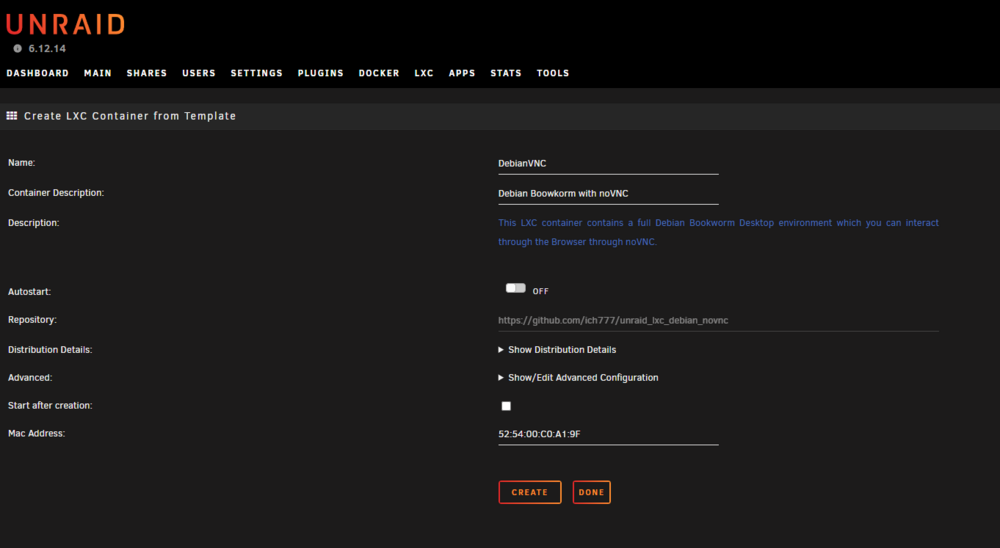
Hi everyone. I've tried to create a new LXC using the DebianVNC template using: wget https://github.com/ich777/unraid_lxc_debian_novnc/raw/refs/heads/master/lxc_container_template.xml -O /tmp/lxc_container_template.xml Then I go into: http://server:81/LXCAddTemplate All the information populates on the screen correctly: The issue is that pressing on CREATE does nothing. DONE gets me to the LXC page. I've tried in Brave/Brave Incognito/Firefox/Firefox Incognito. Have you seen this on your side?
-
As soon as you get your template in the store, let me know to remove mine. 🫡
-
Hi @motoxnate, unfortunately I'm not the developer of the application. I did create the template for Unraid though, as I did not see one at the time from the developer. But, I do see that the only mount point of this container in the Unraid host is for the application config file: <Host>:<Container> /mnt/cache/appdata/mbpfan/mbpfan.conf:/etc/mbpfan.conf Are your mounts adding more directories from your host? If the container is stopped, all data from the container (not in the config bind mount) will be lost. A system shutdown should do the same as it stops the docker service while shutting down.
-
Hi @Flaminel, you can take the xml from the GitHub repository and make your own docker template repository with it. 100% no problem. I just like to help people get their apps in unraid, 🥰 but having a template directly from the developer is always so much better. 🤩 I can assist if needed. Not a CA publishing guru here by any means. I just like to help. 😊 The GitHub repository I use for publishing in CA is: https://github.com/djismgaming/docker-templates/blob/72cc31c97da739da971a1c38b993c4158cb6b9ea/djismGAMING/cleanuperr.xml It will be great to have a template under your control as you make changes to the container and can keep those changes being reflected on your unraid template. 😍
-
Hi @ikedrinski, From the GitHub repo from the developer, on this specific variable CONTENTBLOCKER__BLACKLIST__PATH it gives an explanation for that feature. CONTENTBLOCKER__BLACKLIST__PATH can be a "path to the whitelist (local file or url); Needs to be json compatible". That means that you'll either need the URL to the file or the file itself as a local file. In the case of a local file, make sure to put it somewhere where the container will have access to it permanently. ## Either: - For a local file to work, you'll need to include a mount in the container to your directory where you'll keep this file. For that refer to: https://docs.unraid.net/unraid-os/manual/docker-management/#volume-mappings - For a hosted file (website/webserver), you'll use a URL. In that case just fill the container variable with the URL for the file.
-
Somehow the updated template is not hitting the CA on my side. If you see it, let me know. Edit: Never mind, a little fix in the repo made it appear now in the CA correctly.
-
Template modified with all new/current Environment Variables in the repo. Should be on CA in a bit.
-
I think you refer to adding the new Environment Variables for # OR # - DELUGE__ENABLED=true # - DELUGE__URL=http://localhost:8112 # - DELUGE__PASSWORD=testing # OR # - TRANSMISSION__ENABLED=true # - TRANSMISSION__URL=http://localhost:9091 # - TRANSMISSION__USERNAME=test # - TRANSMISSION__PASSWORD=testing I'll do in a bit. Remember that you can always modify your specific install and add/remove Environment Variables yourself depending on your needs
-
Did the developer change the Docker Hub image name? Last I checked the template was updated to use the latest tag so we all can have the latest image version. I'll give it a look.
-
Yes, it was fixed. There was another bug that made the template unavailable on the CA for some time. It's now updated with the latest tag Enjoy!
-
Indeed, seems the developer removed 1.1.0
-
Hi @Uliphant, in your case, you would have to request that to the developer of the container directly. You can find that out via the GitHub link.
-
DEPRECATED, use the developer's own template on the Community Applications Application Name: cleanuperr Application Site: https://github.com/flmorg/cleanuperr Docker Image Repository: https://hub.docker.com/r/flaminel/cleanuperr Github: https://github.com/flmorg/cleanuperr ## updates 2024.11.16 - the container developer seems to have removed image tag 1.1.0. Please change your container image tag to ‘latest’. See: https://www.reddit.com/r/sonarr/s/4Vbc95ZgCM ## cleanuperr How it works - Add excluded file names to prevent malicious files from being downloaded by qBittorrent. - cleanuperr goes through all items in Sonarr's queue at every 5th minute. - For each queue item, a call is made to qBittorrent to get the stats of the torrent. - If a torrent is found to be marked as completed, but with 0 downloaded bytes, cleanuperr calls Sonarr to add that torrent to the blocklist. - If any malicious torrents have been found, cleanuperr calls Sonarr to automatically search again. DEPRECATED, use the developer's own template on the Community Applications
-
I'm having this same behavior. The owner:group change to sshd:sshd.
-
Hi team, I've been hammering the server a little more than usual these past 2 days under 6.12.3. Setting up a lancache VM Saw mentions of macvlan traces on the Fix Common Problems plugin So I changed the docker network to ipvlan, although I do have the 2nd NIC fix applied since before those traces appeared, no biggie. So far Uptime 2 days 11 hours 57 minutes! We got past the 1 day mark now! And I see the possible 6.12.4 has a fix for macvlan traces and a possible revert to the usual macvlan with a single br0 link! These seem to be good times. I'll keep it as it is for now until 6.12.4 drops or a crash/shutdown happens. I deem this one as resolved for now. 😉
-
Hi, Local syslog server activated and the remote setup using the trickery option: Logging to file local to Unraid server Using a bit of trickery Will attach here the logs upon getting a crash/shutdown.
-
Hi team, I've tried 3 times the upgrade to 6.12 on my hardware. Each time on every 6.12.x release. On each I get no more than hours or 1 day of uptime. On each I've been reverting to the previous 6.11.5 which gives a lot of uptime (24 days before today's upgrade ☺️ that's a really good version!). I know I don't have the normal hardware for unRAID: Mac mini Late 2012 i7-3615QM CPU @ 2.30GHz 16 GiB DDR3 Almost all array drives are connected via USB. USB NIC for br0 (eth0) Built-In NIC for br1 (tg3, eth1 for VMs and Docker only) Took this diagnostic after the latest unattended and unclean shutdown happened Today. I was not around when it happened. Any input will be greatly appreciated. ☺️ I have currently set 2 of the 3 VMs (created but not running VMs for some months now) to br1 as the other was set. Let's hope it does something even though the 3 VMs are off by default. mini-diagnostics-20230822-0022.zip




