





djismgaming
Members
-
Joined
-
Last visited
Everything posted by djismgaming
-
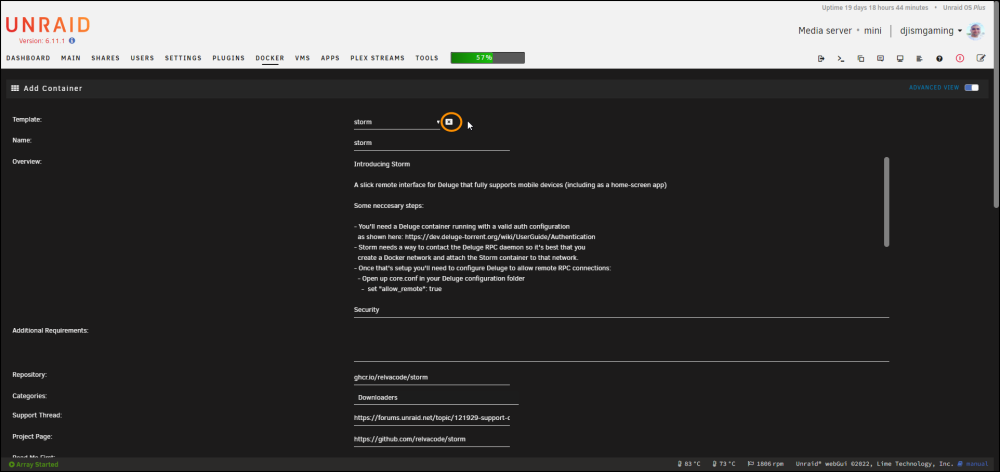
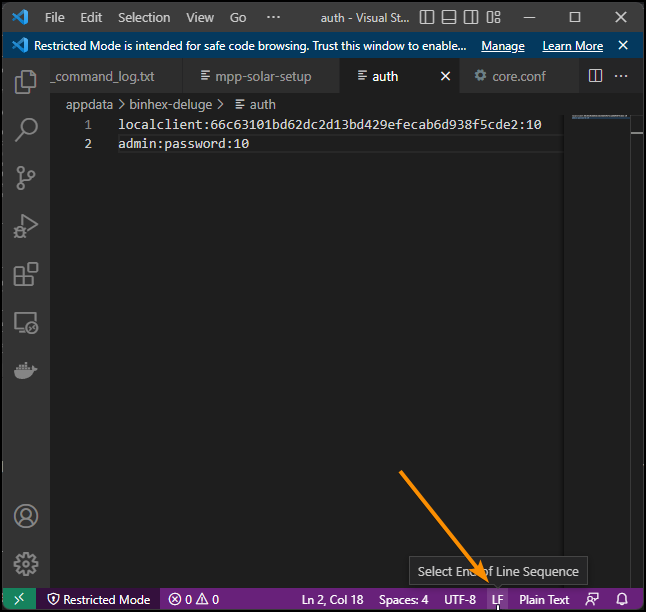
I see you have a DELUGE_RPC_PORT variable on Storm. THat is not on the latest version. You may be using an outdated template. Try to remove it by deleting the container completely, going into "add container" and select storm from the container list and then press the X on the side of the template name: You can also delete them directly from the flash drive from: Flash\config\plugins\dockerMan\templates-user. Then install from the CA again from scratch. Also "10.0.44.103:61176" may be your client PC's IP as Storm uses your IP to communicate. Those ports are randomly selected for outgoing communication from Storm with your PC. It's normal. But the error itself is telling you that the passwords do not match. Try removing the spaces/new lines on the end of the file. I have no new lines and it works. Make sure you're saving the auth file in LF line breaks and not CRLF. vscode example:
-
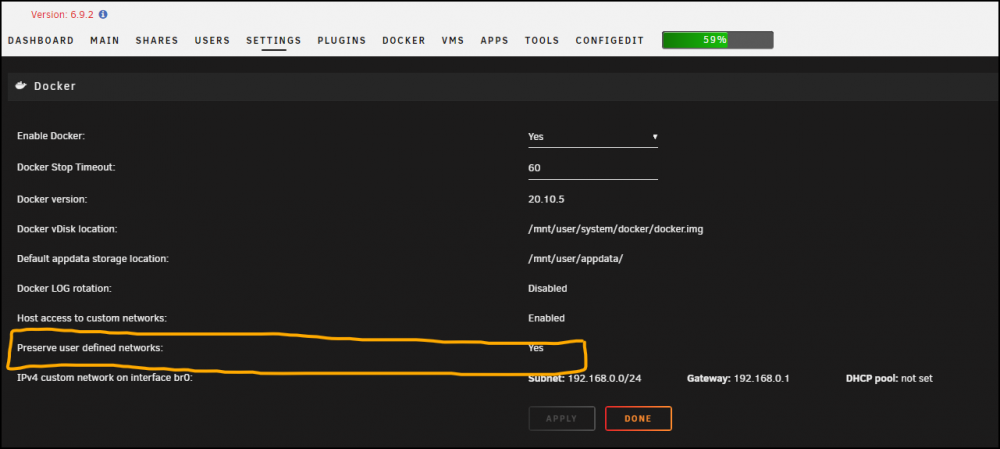
I think the issue you're having is that both containers are just members of the bridge network and not of a custom network. We need to have both containers to be in the same custom network OR instead of "binhex-delugevpn", use the static IP of your machine on the variable "DELUGE_RPC_HOSTNAME". The custom network, as its shared by any number of containers, will make it so you can do as you did (give just the container name) and it should work. But the default bridge network does not have that capability. (Modified the URL from the quote so it gets you directly to the differences between default/custom bridge docker networks.) User-defined bridges provide automatic DNS resolution between containers.
-
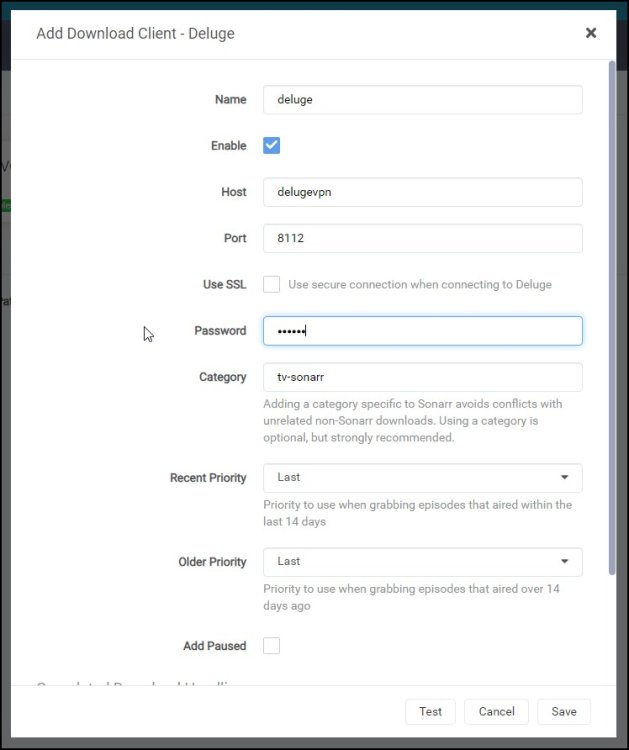
That means that, while using a custom docker network, the container IPs can change but their hostnames wont, which by default are the defined by the container name. Custom docker networks are created on the unraid host CLI by using: docker network create <networkname> If you have deluge installed with container name "delugedownloads" then, from any of the other containers on that same custom network, you can curl delugedownloads:8112 and it will work. IPs on the other hand can change for a variety of reasons. That's why I don't use IPs but hostnames between containers. As an example, if you're going to add Deluge, with container name "delugevpn", as a downloader entry on Sonarr, as long as the two containers are on the same custom docker network, you can add "delugevpn" on the host field. That is possible because the two containers share the same custom docker network. Example below:
-
any way to get ctop added in un-get?
-
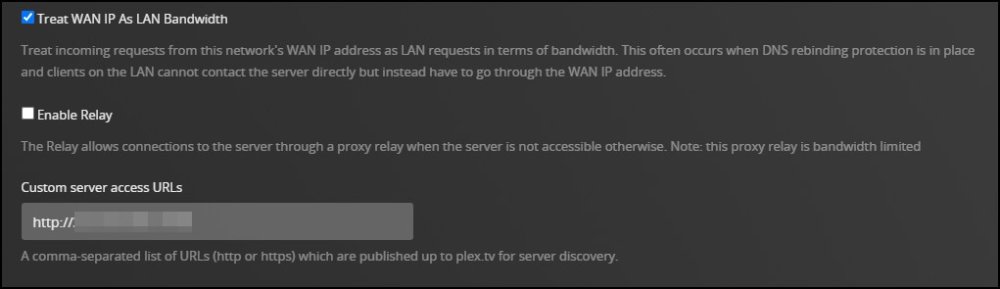
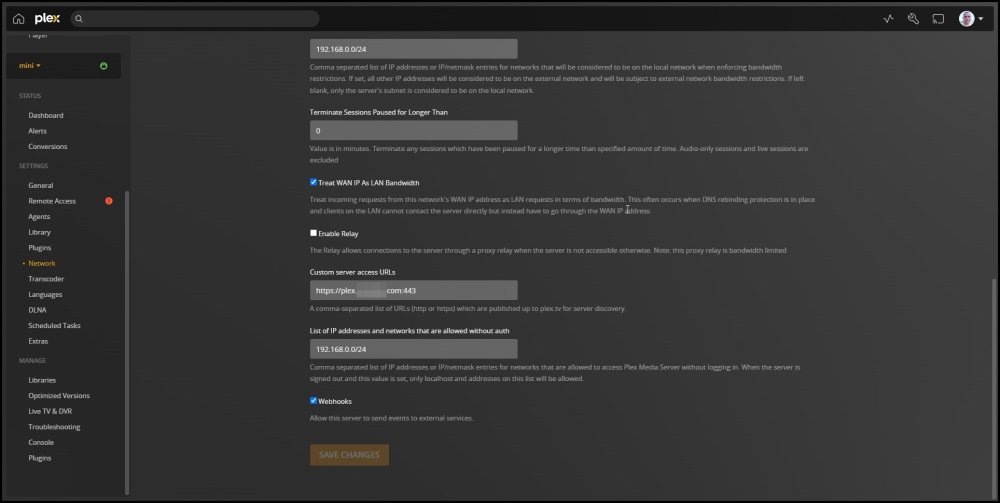
The URL provided by this container is not to be accessed directly by any user as this will change from time to time as far as I know. This URL is just sent to PLEX for it's servers to be able to find and access the media server itself. This get's sent to your client on Roku (as example) to connect to the server and retrieve media. I did just test it and it works to access the server directly after login in to the plex account. Now the PLEX token is for the container logic (Can be found here: https://github.com/andriinuts/plex-ngrok-docker) to be able to change the URL on your local PLEX media server settings. Specifically the entry: Custom server access URLs. That is because these URLs are dynamic (change from time to time). So this makes it an automated change Also this makes it so you don't have to use the Relay (More info: https://support.plex.tv/articles/216766168-accessing-a-server-through-relay/) as that is bandwidth limited to 2Mbps for Plex Pass subscribers and 1 Mbps for PLEX Free users. (notice I have it disabled at the moment)
-
Hi team, I have a weird (for me at least) issue with the latest stable UNRAID. I have slow root share speed while copying data through it but not via mapping the direct user share on Windows 10. Directly mapping the share gives me full speed in the 1Gbps connection. I made a little video recording testing the process and writing a file to the same directory via both connections. Server: mac Mini Late 2012 Intel® Core™ i7-3615QM CPU @ 2.30GHz (Turbo ON) 16 GB RAM 1Gbps USB adapter (so I don't have to use the internal tg3 provided by Apple) Any insight will be greatly appreciated share-vs-rootshare-speed-difference - Made with Clipchamp.mp4 mini-diagnostics-20220902-1205.zip
-
Is there a way to create symbolic/hard links with this plugin?
-
There should be a ngrok container by itself. I've not yet had a reason to deploy one myself from scratch for another application but Plex. This one is made for Plex since the developer added some python extras to make the URL change inside the Plex server configuration automatically after getting the details from ngrok.
-
Nice catch on your configuration. On mine I tried it and did not work for the remote iOS client I use. Relly don't know the difference this makes on the Plex access apart of changing the protocol to be used with ngrok's service.
-
Is there a way to use the docker mod linuxserver/mods:universal-cloudflared with this container to have SSH access via CGNAT? I tried with my version and get repeating error: s6-envuidgid: fatal: unknown user: abc I've seen this user "abc" in other linuxserver docker containers.
-
Same question here. I just uploaded a version of it using the repository version as base: https://github.com/linuxserver/docker-templates/blob/master/linuxserver.io/openssh-server.xml It's working perfectly so far and available in the Community Applications tab.
-
Hi, Did you get the ASUSTOR AS-U2.5G2 adapter to work @ 2.5G? Thanks in advance!
-
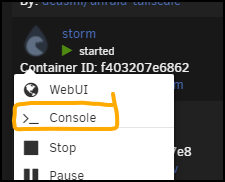
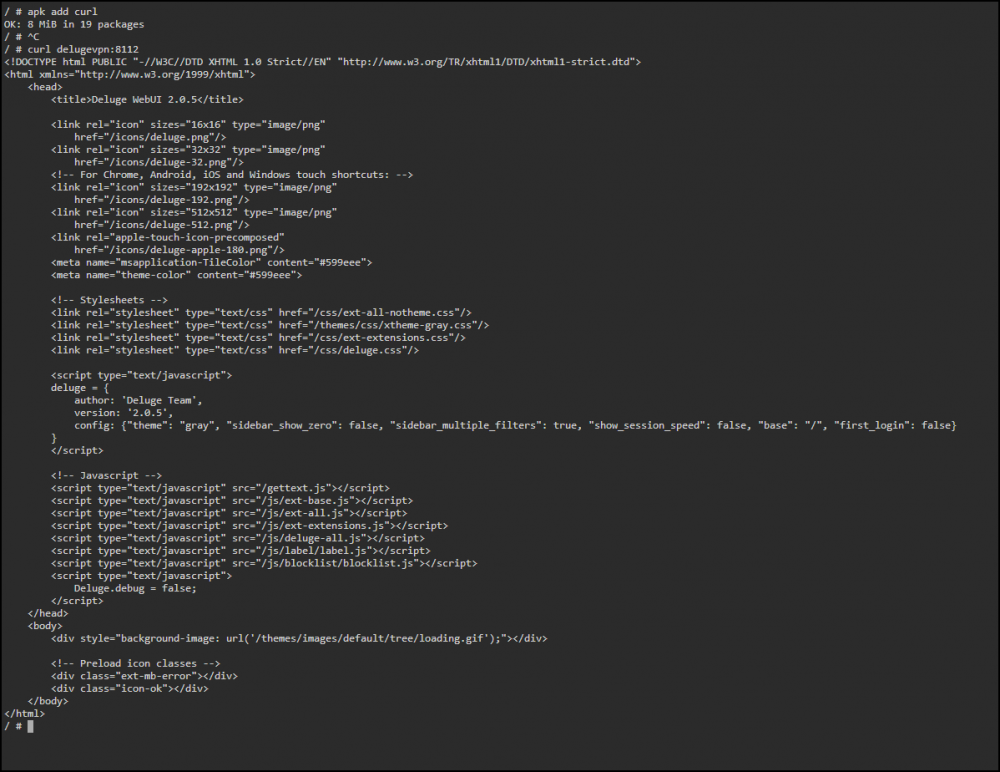
Try not to use IPs when using a custom docker network. The custom docker network makes it possible, for all containers on it, to address one another via their hostname (container name) http://storm >>>> http://delugevpn. I always try troubleshooting by using curl On the container console: Enter these commands to see if the containers see each other: apk add curl This will install curl inside the alpine-based storm container. curl delugecontainername:8112 This uses curl to get the html response from the deluge container in it's port 8112. Shown in my setup below: my command in this case was: curl delugevpn:8112 Try that to see if the containers see each other in their custom docker network. Here the explanation of how it works: https://docs.docker.com/network/bridge/ Also, be aware that, by default, custom docker networks are not persistent in unRAID.
-
Yeah, that has been my own experience with other apps that use the Plex Token and I've used the same one gotten the same way.
-
Don't know but I'll update this thread if it does and if I found a permanent way
-
I would really like to know on that regard but there is no info published on ngrok's site that I'm aware of. If I know something about that at some point, I'll update the post and reply here.
-
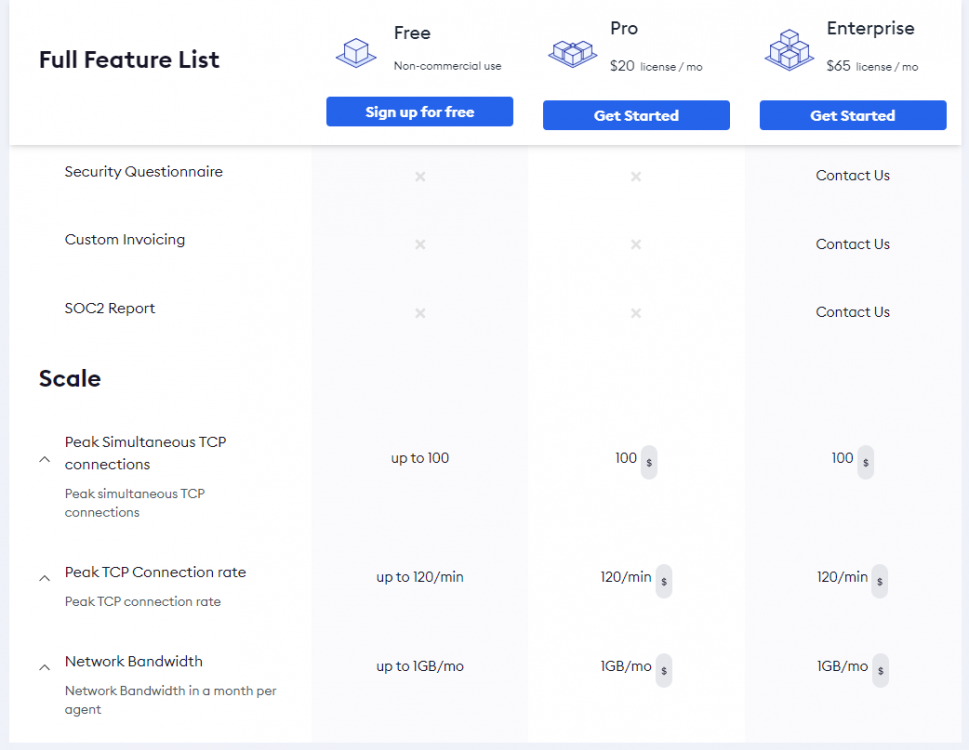
I took this from their pricing section. So seems to be a peak of connections, the rate in which those connections are created and 1GB/month per agent. I looked on their TOS but they only say that there are specified limits. I could not find anything in my account dashboard as to which are my limits on the free account and what I'm using of those limits.
-
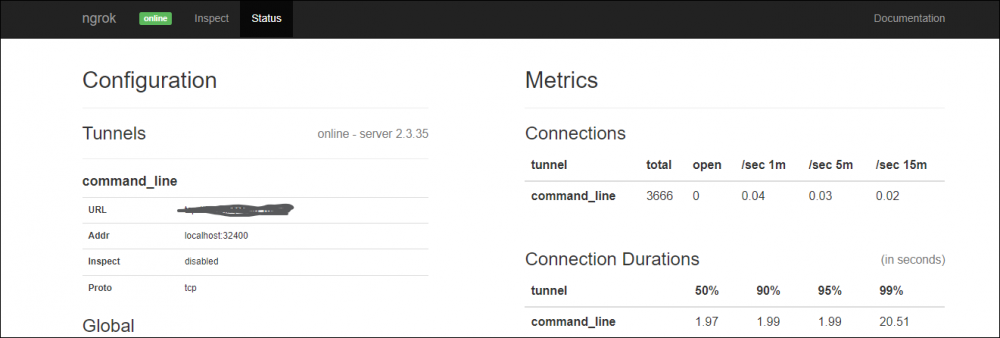
I really don't have any. My webUI shows the same (type of display, since the domain itself is different) but the connection works perfectly. The webUI is optional by the way. Not needed for anything regarding the connection or using it, as far as I know. Says "online" so it must be working. You can go (in your case) to http://0.tcp.ngrok.io:15538 and the Plex dashboard should load. All good there. Even accessing the link directly does not show any requests on that webUI page. Interestingly, the Status page shows the section "Inspect" as disabled. Maybe that's why. I really don't know how to enable it. Has not been needed to use the connection to Plex remotely or locally. Enabling it may even use more resources, so I'll not do so anytime soon
-
Yeah! Let's see if I can help you on this login to your plex server go to a movie you have there (where you see the cast/synopsis of the movie) push the 3 dots button called "More" when you hover over it select the option "Get Info" select the option "View XML" on the window that pops up get the Plex token from the end of the URL in Chrome/Edge/Safari/Opera like this example https://someserverinfo.plex.direct:32400/library/metadata/55587?checkFiles=1&includeAllConcerts=1&includeBandwidths=1&includeChapters=1&includeChildren=1&includeConcerts=1&includeExtras=1&includeFields=1&includeGeolocation=1&includeLoudnessRamps=1&includeMarkers=1&includeOnDeck=1&includePopularLeaves=1&includePreferences=1&includeRelated=1&includeRelatedCount=1&includeReviews=1&includeStations=1&X-Plex-Token=Abcd1234abCD1234 Just the values after "Plex-Token=" Abcd1234abCD1234 in this example That's your Plex token for use in the container Hope this helps!
-
You have to first find where in the container is the referenced file. That is needed since the commands take into consideration that the application is installed on bare hardware and not via the linuxserver image. You can modify the script for your setup like I did. I created snapdrop-single-room.sh inside the /config directory. I created it since it needs to be run (as of now) after every image update. I commented the original sed lines and added the modifications on lines # START: #!/bin/sh #sed -i 's/peer.ip/0/g' server/index.js #sed -i 's/sender.ip/0/g' server/index.js # make the snapdrop clients be all in a single room # USE WITH CARE # Will make it so even local and internet clients see each other # A literal single room # USE WITH CARE # START adjusted for linuxserver/snapdrop docker image sed -i 's/peer.ip/0/g' /app/snapdrop/server/index.js sed -i 's/sender.ip/0/g' /app/snapdrop/server/index.js echo "Please restart container snapdrop" Let us know how it works! Hope it does for you!
-
DEPRECATED as development for this container has been stagnant since 2020. It has stopped working for me now on the latest Plex updates so far. It's better now to use a proxy like linuxserver/swag or NPM, with a tunnel solution like Cloudflare Tunnels. Remember to add your public domain URL on Plex's Network settings after turning ON the advanced settings. Be sure to include the port 443 on the URL or Plex clients will still try to use 32400 and fail to connect: Original post: Application Name: plex-ngrok Application Site: https://github.com/andriinuts/plex-ngrok-docker Docker Image Repository: https://hub.docker.com/r/andrijn/plex-ngrok Github: https://github.com/andriinuts/plex-ngrok-docker Please post any questions/issues relating to this docker you have in this thread. If you need help but are not using unRAID, then please do not post here, instead head to the application's GitHub repository and open an issue there. Edited April 25, 2022 by djismgaming (my 2nd unRAID template ever!) DEPRECATED as development for this container has been stagnant since 2020. It has stopped working for me now on the latest Plex updates so far.

-
No PLEX Console expert but there seems to be something, from the VM itself (127.0.0.1:<insert any random port here>), trying to sign in constantly (GET /identity (5 live) Signed-in). Do you have anything else installed in the VM apart from PLEX? I hope a virtual machine is what you mean by a plex VMS. Sorry if I got it wrong.
-
Application Name: storm Application Site: https://github.com/relvacode/storm Docker Image Repository: https://github.com/relvacode/storm/pkgs/container/storm Github: https://github.com/relvacode/storm Please post any questions/issues relating to this docker you have in this thread. If you need help but are not using unRAID, then please do not post here, instead head to the application's GitHub repository and open an issue there. PLEASE READ THIS, IMPORTANT TO MAKE THE CONTAINER WORK WITH YOUR DELUGE CONTAINER Introducing Storm A slick remote interface for Deluge that fully supports mobile devices (including as a home-screen app) Some necessary steps: - You'll need a Deluge container running with a valid auth configuration as shown here: https://dev.deluge-torrent.org/wiki/UserGuide/Authentication - Storm needs a way to contact the Deluge RPC daemon so it's best that you create a Docker network and attach the Storm container to that network. - Once that's setup you'll need to configure Deluge to allow remote RPC connections: - Open up core.conf in your Deluge configuration folder - set "allow_remote": true Edited April 1, 2022 by @djismgaming (my first unRAID template ever!) Edited February 27, 2023 by @djismgaming (added Readme from template)
-
I resolved this by doing the sed commands noted here inside the container: https://github.com/RobinLinus/snapdrop/issues/159#issuecomment-691678186
-
Same behavior here. Gave it a local IP via br0 so I can go directly to IP and page loads but PC Chrome <> Android Chrome no devices appear






