





codefaux
Members
-
Joined
-
Last visited
Everything posted by codefaux
-
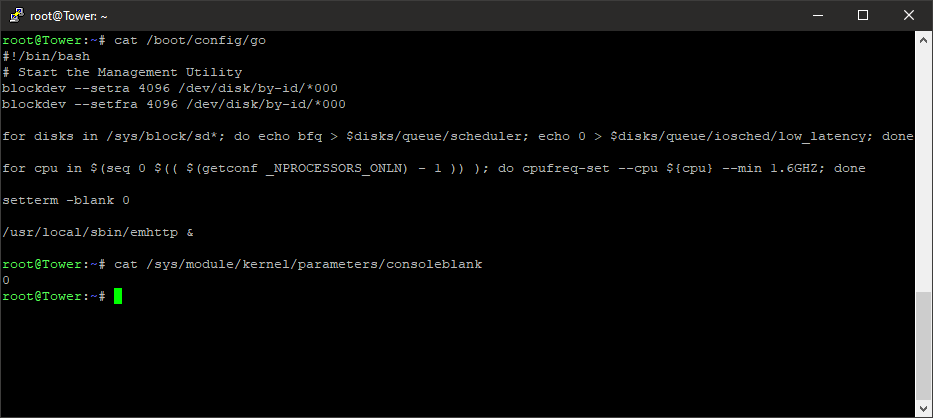
Correct, I keep forgetting that because I honestly prefer the terminal. I'll try to remember to offer that in the future. You are....not wrong. Huh. That's the first time I've seen a kernel parameter outright ignored in a while. Okay, a different method, and I actually rebooted to test this one -- we add setterm -blank 0 to /boot/config/go and I'll let you all sort out how to get there and edit it yourselves. You didn't forget that backup, right?
-
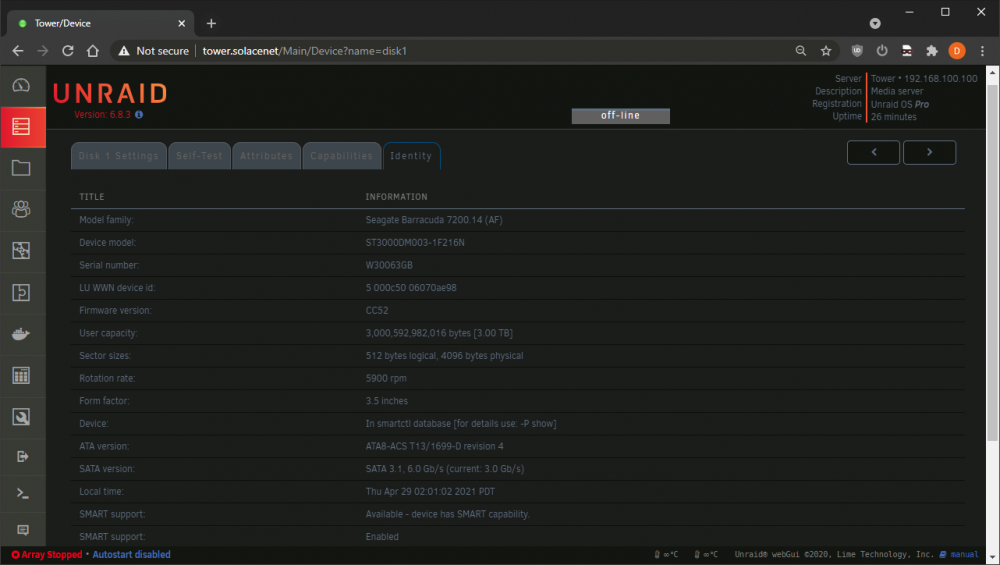
Important to consider -- if you don't have SMART data coming back from your drives, you don't know if they're failing. If they're failing and you're running long-stretch operations like parity sync checks over and over, you're thrashing a failing drive, which might make it fail faster, and destroy your data. Maybe throttle back for a moment, and let's do some forensics. First, do you see valid SMART data for your disks? I have a few non-default UI options, but go to the Main tab, click on a disk's label (ie Disk 1 ) and locate the Attributes and Identity information. If that sort of information is missing, you're going to need to set up SMART settings that are arcane and difficult and the source of much frustration, OR connect your devices to a good quality USB adapter (or directly to another PC, etc) and examine their SMART data with a valid tool. Windows- CrystalDiskInfo is free. https://crystalmark.info/en/software/crystaldiskinfo/ Linux - smartctl from the terminal, or just ssh to your unRAID box, since it has all the same tools. If the data is there, check for phrases like Pending Sector, Uncorrectable, Bad Block -- look for FAILING_NOW or IN_THE_PAST anywhere on the left, as some error triggers can be persistently flagged. Ignore HUGE numbers like "Raw Read Error Rate" -- it's actually a set of values encoded into one number. Just a cursory glance at your logs, I see nzbget segfaulting CONSTNATLY, which is a concern. It could be disk corruption, bad RAM, etc etc etc, but let's stop thrashing those disks and verify they're alive first, and I'll try to help from there.
-
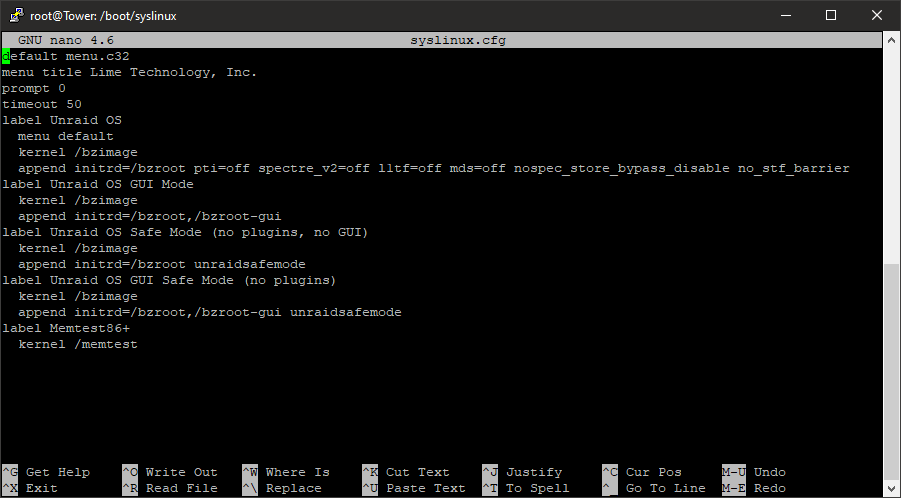
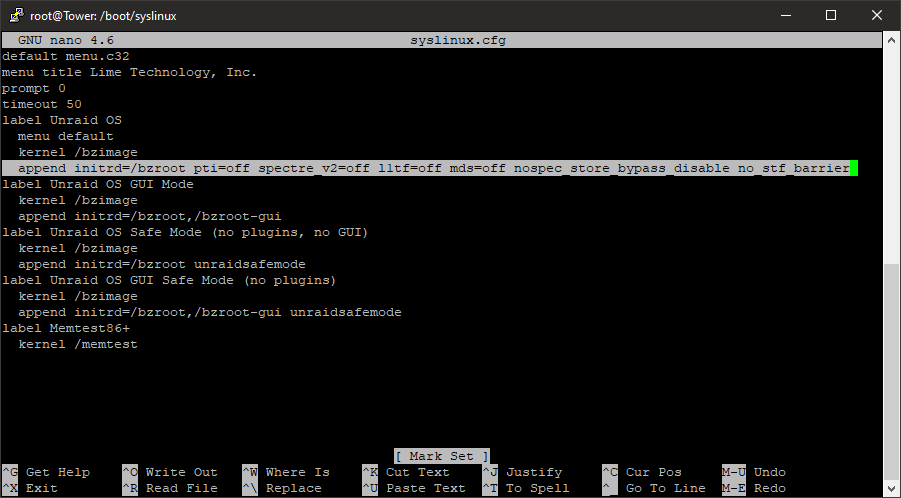
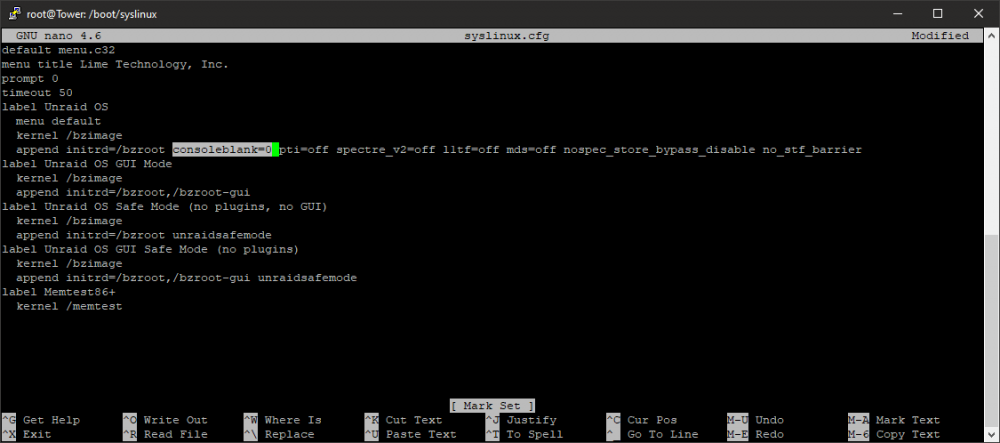
Came here looking for the answer, had to confirm it but yes. NOPE. Apparently this kernel parameter is ignored. Similarly, you should ignore this post and scroll down to my next one, with an answer which seemingly works. ------ https://www.kernel.org/doc/html/v4.14/admin-guide/kernel-parameters.html I'm about to tell you how to edit your kernel parameters, which requires messing with your boot configuration. Don't do this unless you REALLY get it. Back up your files first anyway, because if you mess this up it won't boot. You've been warned. Open up /boot/syslinux/syslinux.cfg with the knowledge that you're safe because you have a backup. I use nano over ssh, ie nano /boot/syslinux/syslinux.cfg or equivalent, you know the deal. Find your boot parameters. Here's mine, YMMV.; You'll note I have security mitigations disabled, and that this has "no performance impact(tm)" on most hardware and that it's generally a stupid idea. Just as an example. What you want to do, is carefully add the entry consoleblank=0 anywhere after initrd=/bzroot with a space around it. No run-on words. Save, exit. In Nano that's Ctrl+X followed by Y and Enter. Reboot, and it shouldn't blank or break. If it did, thankfully you have that backup. You did make that backup, right? NOTES: - I use PUTTY for Windows. There's nothing better if you Just Need SSH(TM) - Since I keep seeing "Most users are okay hitting a key to bring the terminal up" -- WHAT IF IT CRASHED? What if you wanted to see the dieing gasp of a screen? That happened to me A LOT recently and having the console not blank would've been handy, so there ARE valid uses. Stop needing to justify everyone else's desires.
-
Hi there. Happy user of unRAID for an eternity. Well, ish, but it's usually hardware's fault, not unRAID's fault. Usually. I recently had to upgrade my motherboard, and in the process, the ordering of my disk controllers got shuffled. No big deal, I had to change the SMART Settings, 3ware-related values per-disk. I wrote a handy script to identify disks for me under the terminal, just have to retype each one... I entered each value, clicked Done, moved to the Identity section, verified it was the disk it was meant to be, then clicked the right arrow for the next disk. I eventually looped back to the start, as one does. When I scanned through them to verify the changes once more, they were mostly erased and back to default. Literally two disks did not reset themselves, for some reason. So, as I was changing them, it was (seemingly) occasionally eating the config file. I changed a few more, then went back, and they were gone again. I assured myself I would gather logs and submit them, and then ..life happened, and I don't have logs of the event in question. I'll gladly recreate it if required. At the mean time, I wrote a simple Bash one-liner, in order to; - scan three connected 3ware controllers, 12 disks per controller (my configuration) - output the disk serial number in the format used by unRAID to identify my disks - set up their tags in proper format to write into smart-one.cfg It is: - Stupid - Lowest-effort - Functional It is not: - Designed to be copy-pasted blindly by those not understanding exactly every word does adaptive in any way - Adaptive in any way - Likely to help many Sharing it in case anyone needs it. I would imagine not many do, but this might be adapted to work on other controllers, or just more intelligently in general -- honestly this is a "my own tool, works where I need it" sort of thing. for ctl in $(seq 0 2); do for dev in $(seq 0 11); do SER=`smartctl -a /dev/twa$ctl -d 3ware,$dev | grep Serial | awk '{print substr($0,length-7,10)}'`; if [ $SER ]; then echo "[1AMCC_${SER}000000000000]"; echo smType=\"-d 3ware\"; echo smPort1=\"$dev\"; echo smDevice=\"twa$ctl\"; fi; done; done > /boot/config/smart-one.cfg I can't attach a relevant diagnostics.zip file right now because the error in question was actually kind of a long time ago and I forgot to keep it. If required, I will go about recreating it and attach a new diagnostics zip, or more appropriate logs if required/requested. EDIT: Is this also related to this flood of repeated messages? I get this SO MUCH, it literally 100% filled the log partition, it makes checking kernel logs absolutely useless, etc etc... [ 4430.813330] program smartctl is using a deprecated SCSI ioctl, please convert it to SG_IO [ 4430.813566] 3w-9xxx: scsi2: ERROR: (0x03:0x0101): Invalid command opcode:opcode=0x80. [ 4430.813593] 3w-9xxx: scsi1: ERROR: (0x03:0x0101): Invalid command opcode:opcode=0x80. [ 4430.814564] program smartctl is using a deprecated SCSI ioctl, please convert it to SG_IO [ 4430.814844] 3w-9xxx: scsi1: ERROR: (0x03:0x0101): Invalid command opcode:opcode=0x80. [ 4430.815029] program smartctl is using a deprecated SCSI ioctl, please convert it to SG_IO [ 4430.815116] program smartctl is using a deprecated SCSI ioctl, please convert it to SG_IO [ 4430.815293] 3w-9xxx: scsi2: ERROR: (0x03:0x0101): Invalid command opcode:opcode=0x80. [ 4430.815376] 3w-9xxx: scsi1: ERROR: (0x03:0x0101): Invalid command opcode:opcode=0x80. [ 4430.815538] program smartctl is using a deprecated SCSI ioctl, please convert it to SG_IO [ 4430.815748] program smartctl is using a deprecated SCSI ioctl, please convert it to SG_IO [ 4430.815804] program smartctl is using a deprecated SCSI ioctl, please convert it to SG_IO [ 4430.816047] 3w-9xxx: scsi3: ERROR: (0x03:0x0101): Invalid command opcode:opcode=0x80. [ 4430.816068] 3w-9xxx: scsi2: ERROR: (0x03:0x0101): Invalid command opcode:opcode=0x80. [ 4430.816712] program smartctl is using a deprecated SCSI ioctl, please convert it to SG_IO [ 4430.816777] program smartctl is using a deprecated SCSI ioctl, please convert it to SG_IO [ 4430.816942] program smartctl is using a deprecated SCSI ioctl, please convert it to SG_IO [ 4430.817006] 3w-9xxx: scsi3: ERROR: (0x03:0x0101): Invalid command opcode:opcode=0x80. [ 4430.817212] 3w-9xxx: scsi1: ERROR: (0x03:0x0101): Invalid command opcode:opcode=0x80. [ 4430.817290] 3w-9xxx: scsi3: ERROR: (0x03:0x0101): Invalid command opcode:opcode=0x80. [ 4430.817479] program smartctl is using a deprecated SCSI ioctl, please convert it to SG_IO [ 4430.817603] program smartctl is using a deprecated SCSI ioctl, please convert it to SG_IO [ 4430.817739] 3w-9xxx: scsi1: ERROR: (0x03:0x0101): Invalid command opcode:opcode=0x80. [ 4430.817911] 3w-9xxx: scsi3: ERROR: (0x03:0x0101): Invalid command opcode:opcode=0x80. [ 4430.822157] program smartctl is using a deprecated SCSI ioctl, please convert it to SG_IO [ 4430.822451] 3w-9xxx: scsi2: ERROR: (0x03:0x0101): Invalid command opcode:opcode=0x80. [ 4430.822602] program smartctl is using a deprecated SCSI ioctl, please convert it to SG_IO [ 4430.822627] program smartctl is using a deprecated SCSI ioctl, please convert it to SG_IO [ 4430.822879] 3w-9xxx: scsi1: ERROR: (0x03:0x0101): Invalid command opcode:opcode=0x80. [ 4430.822917] program smartctl is using a deprecated SCSI ioctl, please convert it to SG_IO [ 4430.822921] 3w-9xxx: scsi2: ERROR: (0x03:0x0101): Invalid command opcode:opcode=0x80. [ 4430.823180] 3w-9xxx: scsi1: ERROR: (0x03:0x0101): Invalid command opcode:opcode=0x80. [ 4430.825032] program smartctl is using a deprecated SCSI ioctl, please convert it to SG_IO [ 4430.825312] 3w-9xxx: scsi3: ERROR: (0x03:0x0101): Invalid command opcode:opcode=0x80. [ 4430.825334] program smartctl is using a deprecated SCSI ioctl, please convert it to SG_IO [ 4430.825590] 3w-9xxx: scsi3: ERROR: (0x03:0x0101): Invalid command opcode:opcode=0x80. [ 4430.832226] program smartctl is using a deprecated SCSI ioctl, please convert it to SG_IO [ 4430.832556] 3w-9xxx: scsi3: ERROR: (0x03:0x0101): Invalid command opcode:opcode=0x80. [ 4430.832587] program smartctl is using a deprecated SCSI ioctl, please convert it to SG_IO [ 4430.832880] 3w-9xxx: scsi3: ERROR: (0x03:0x0101): Invalid command opcode:opcode=0x80. [ 4430.834260] program smartctl is using a deprecated SCSI ioctl, please convert it to SG_IO [ 4430.834525] 3w-9xxx: scsi2: ERROR: (0x03:0x0101): Invalid command opcode:opcode=0x80. [ 4430.834583] program smartctl is using a deprecated SCSI ioctl, please convert it to SG_IO [ 4430.834874] 3w-9xxx: scsi2: ERROR: (0x03:0x0101): Invalid command opcode:opcode=0x80. [ 4430.836188] program smartctl is using a deprecated SCSI ioctl, please convert it to SG_IO [ 4430.836488] 3w-9xxx: scsi2: ERROR: (0x03:0x0101): Invalid command opcode:opcode=0x80. [ 4430.836535] program smartctl is using a deprecated SCSI ioctl, please convert it to SG_IO [ 4430.836822] 3w-9xxx: scsi2: ERROR: (0x03:0x0101): Invalid command opcode:opcode=0x80. [ 4430.837487] program smartctl is using a deprecated SCSI ioctl, please convert it to SG_IO [ 4430.837752] 3w-9xxx: scsi2: ERROR: (0x03:0x0101): Invalid command opcode:opcode=0x80. [ 4430.837777] program smartctl is using a deprecated SCSI ioctl, please convert it to SG_IO [ 4430.838064] 3w-9xxx: scsi2: ERROR: (0x03:0x0101): Invalid command opcode:opcode=0x80. [ 4430.838086] program smartctl is using a deprecated SCSI ioctl, please convert it to SG_IO [ 4430.838346] 3w-9xxx: scsi2: ERROR: (0x03:0x0101): Invalid command opcode:opcode=0x80. [ 4430.838367] program smartctl is using a deprecated SCSI ioctl, please convert it to SG_IO [ 4430.838625] 3w-9xxx: scsi2: ERROR: (0x03:0x0101): Invalid command opcode:opcode=0x80. [ 4430.839466] program smartctl is using a deprecated SCSI ioctl, please convert it to SG_IO [ 4430.839732] 3w-9xxx: scsi1: ERROR: (0x03:0x0101): Invalid command opcode:opcode=0x80. [ 4430.839754] program smartctl is using a deprecated SCSI ioctl, please convert it to SG_IO [ 4430.840013] 3w-9xxx: scsi1: ERROR: (0x03:0x0101): Invalid command opcode:opcode=0x80. [ 4430.840517] program smartctl is using a deprecated SCSI ioctl, please convert it to SG_IO [ 4430.840780] 3w-9xxx: scsi2: ERROR: (0x03:0x0101): Invalid command opcode:opcode=0x80. [ 4430.840835] program smartctl is using a deprecated SCSI ioctl, please convert it to SG_IO [ 4430.841065] program smartctl is using a deprecated SCSI ioctl, please convert it to SG_IO [ 4430.841093] 3w-9xxx: scsi2: ERROR: (0x03:0x0101): Invalid command opcode:opcode=0x80. [ 4430.841335] 3w-9xxx: scsi2: ERROR: (0x03:0x0101): Invalid command opcode:opcode=0x80. [ 4430.841356] program smartctl is using a deprecated SCSI ioctl, please convert it to SG_IO [ 4430.841613] 3w-9xxx: scsi2: ERROR: (0x03:0x0101): Invalid command opcode:opcode=0x80. [ 4430.843096] program smartctl is using a deprecated SCSI ioctl, please convert it to SG_IO [ 4430.843203] program smartctl is using a deprecated SCSI ioctl, please convert it to SG_IO [ 4430.843377] 3w-9xxx: scsi2: ERROR: (0x03:0x0101): Invalid command opcode:opcode=0x80. [ 4430.843397] program smartctl is using a deprecated SCSI ioctl, please convert it to SG_IO [ 4430.843502] 3w-9xxx: scsi1: ERROR: (0x03:0x0101): Invalid command opcode:opcode=0x80. [ 4430.843527] program smartctl is using a deprecated SCSI ioctl, please convert it to SG_IO [ 4430.843653] 3w-9xxx: scsi2: ERROR: (0x03:0x0101): Invalid command opcode:opcode=0x80. [ 4430.843811] 3w-9xxx: scsi1: ERROR: (0x03:0x0101): Invalid command opcode:opcode=0x80. [ 4430.847624] program smartctl is using a deprecated SCSI ioctl, please convert it to SG_IO [ 4430.848119] 3w-9xxx: scsi3: ERROR: (0x03:0x0101): Invalid command opcode:opcode=0x80. [ 4430.848178] program smartctl is using a deprecated SCSI ioctl, please convert it to SG_IO [ 4430.848449] 3w-9xxx: scsi3: ERROR: (0x03:0x0101): Invalid command opcode:opcode=0x80. [ 4431.062903] 3w-9xxx: scsi3: ERROR: (0x03:0x0101): Invalid command opcode:opcode=0x80. [ 4431.063016] program smartctl is using a deprecated SCSI ioctl, please convert it to SG_IO [ 4431.071819] 3w-9xxx: scsi3: ERROR: (0x03:0x0101): Invalid command opcode:opcode=0x80.



