Graber
Members
-
Joined
-
Last visited
Everything posted by Graber
-
I've had two different containers simply not show up on my list or dashboard after an update (Plex and HomeAssistant), although not on the same day or even month. In both cases, it didn't take too long to re-install, find out out they were "duplicates" somehow, remove them, and then "re-install" them and reconfigure from scratch. My question: is there a way to back up / copy my configuration (or the whole image) to facilitate recovery if this happens again? Mike
-
Hello, I've got a failed flash device. Was able to "repair" it with a Windows machine, but I'm going to be proactive and replace it. When I create a backup and then use the USB Creation Tool (select local zip), the resulting new USB does not have complete contents - only the syslinux folder and the files in the root. It does NOT boot successfully. I'm tempted to just copy the EFI and config folders from the zip manually to the new USB, but is this behavior expected? The new USB DOES boot on a non-UEFI BIOS laptop as-is. Thanks in advance.
-
Hello, I'm a hobbyist (aren't we all?) and currently have a VM running Ubuntu with Apache and Flask for practicing python web development. Does anyone have a docker solution that works well for them? What I have works, I'm just wondering if there's a simpler solution. Thanks in advance, Mike
-
I ran it three times. No luck. I formatted and it is now part of the array. I am restoring data from offsite backup. I will update to v6.12.10 after this restore batch is complete. Thank you for your suggestions.
-
Done. Too much to copy here, but the messages included a TON of correcting imap and xxxxxxxxxxxxxxx: Badness in key lookup (length) and bad agbno 4294967295 in agfl, agno 4 It terminates in: disconnected inode 2400944631, moving to lost+found disconnected dir inode 4294967424, moving to lost+found disconnected dir inode 4294967425, moving to lost+found disconnected dir inode 4294967428, moving to lost+found disconnected dir inode 4294967457, moving to lost+found Metadata corruption detected at 0x45fc12, xfs_dir3_block block 0x100000060 xfs_repair: phase6.c:1062: mv_orphanage: Assertion `err == 2' failed.
-
Diagnostics attached. unregardless-diagnostics-20240419-1328.zip
-
I replaced a failing drive (Disk 4 in my array) with a larger one (8TB > 12 TB) based on these steps: https://docs.unraid.net/legacy/FAQ/replacing-a-data-drive/ The system spent the better part of a day rebuilding (I thought) the drive. It showed as "emulated" for the entire time. The array WAS (8x8TB with 2x12TB parity) 64TB and is now showing as (7x8TB with 2x12 TB) 56TB cannot tell what data I've lost, but the array is now showing as smaller with Disk 4 listed as xfs but "Unmountable: Unsupported or no file system". All drives have a green indicator. I expected the drive rebuild to have the same content as the original, with 4TB of empty space, with a total array size of 68TB. Any ideas how I screwed up? At this point, I'm guessing the data is lost and I need to format the drive.
-
Thanks. All three components are new. I'll use it unassigned for a bit to monitor.
-
This is dated, but I used this as reference for my setup. Are other enclosures/cards recommended?
-
@JorgeBYou are correct - that disk is now appearing in the unassigned devices list. I wonder what changed - the post was after two reboots, but perhaps I just needed to wait longer for detection. Two follow ups - where can you see the reference to the Marvell controller? Is that the controller within the ProBox? The pci card in the tower is a $30 StarTech - also nothing special. I'd love to be able to troubleshoot this myself if it occurs again. Where should I look in the logs? Once you identified the disk, I did some searching for it in the text files, but I cannot infer the error (delay?) from what I found. Thanks for your help!
-
Diagnostics addedunicorn-diagnostics-20211203-0839.zip
-
I've got an external 4x enclosure connected via eSata. The (single for now) drive spins up, and the eSata connection indicator is good. I don't see any unassigned devices in my list, and I'm stuck. This is running on a Dell minitower (i5-4430 / 16GB) with an eSata card added. I haven't tried the unit in USB mode, but i'd prefer not to. Adding - I already have a 3 x 8 TB array with a single 8TB parity drive. Trying to add more storage externally since I'm out of physical space in the chassis. Feedback appreciated.
-
It's working now with the server IP address instead of the name. Despite that I could click and select the server and the share, the log showed the error that it could not resolve the server name on attempting to mount. The server name did show up twice in the pick list (it has two IP addresses), so that could be part of the problem.
-
That did the trick! Thanks.
-
Thanks. The error was ""Mount of '//XPS8930/Music' failed: 'mount error: could not resolve address for XPS8930: Unknown error '."" I changed the server name to the IP address and it worked. Might it be because the machine has multiple NICs and IP addresses?
-
N00b question here. I've got a Plex Server Docker running smoothly, and I thought I'd share some music on my Windows desktop with Plex. I've set up a local Windows account called "plex" that has read permissions. Via the UD web UI, I can click through the Add Remote SMB share dialogs and pick and select the share. When I click on the orange "mount" button, it blinks grey, then goes back to orange. I never see the mount name under /mnt/remotes/. Ideas appreciated. I'm sure I'm missing something basic.

-
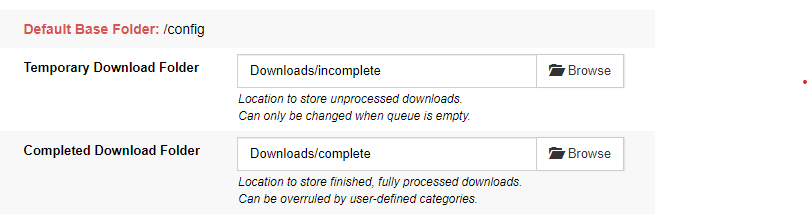
I feel like I'm missing something basic. New to Unraid and Docker, but not SABNzb and Sonarr (used them on Windows machines previously). Sonarr is not seeing/copying/moving downloaded files. Help please? Thanks in advance! Container basics: Sonarr config SABNzb config