





guy.davis
Members
-
Joined
-
Last visited
Everything posted by guy.davis
-
Great, please see the Wiki page for details on plotting with Madmax. When you see an incorrect display in the Plotting page, what does "plotman status" indicate when run at the Docker Console for Machinaris? Does the Plotting page correct itself within 1 minute or so?
-
Nice numbers! Plotting to RAM on Unraid is really effective with Madmax. Thanks for helping above as it showed me the error in my plotman.yaml example. Btw, my plotman migrate script looks to have left a double entry in your plotman.yaml above. You only need one pair of 'farmer_pk' and 'pool_pk' lines. Safe to remove the bottom redundant pair. Thanks again for the assistance!
-
Apologies to @Ystebad and @HATEME for encountering this error in the documentation on my part. The version line of the Madmax-enabled plotman.yaml should be: version: [2] This was incorrectly left at '1' in the Wiki doc example. I have just now corrected it. Please try with that setting. Just be sure to set your Farmer and Pool public keys. Sorry for the trouble and thanks for reporting it!
-
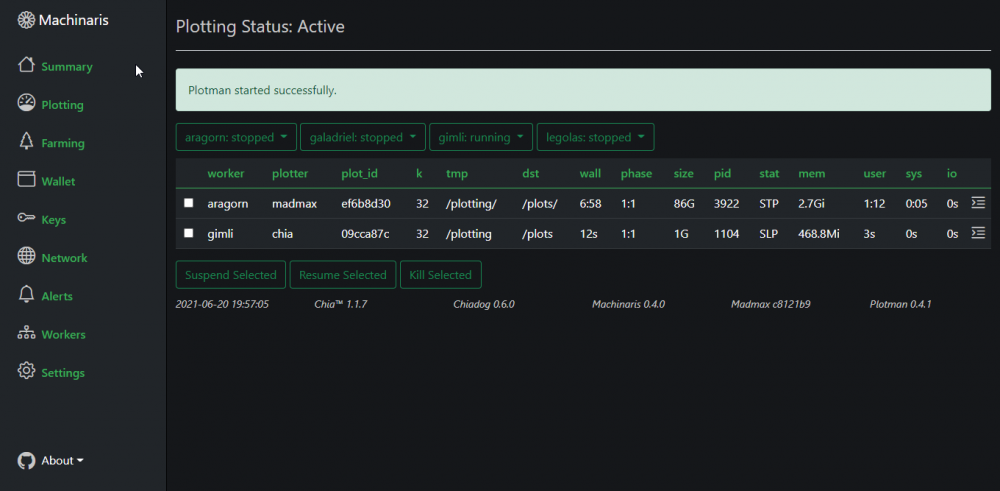
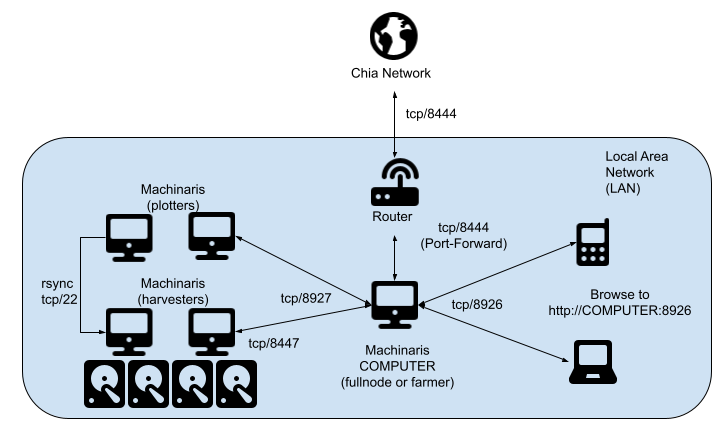
Good day! The next version of Machinaris is now available: v0.4.0. Thanks to all those who tested and provided feedback during the release cycle. All contributions are appreciated! Changes: - Support for the Madmax plotter, in addition to the official Chia plotter. - Manage multiple plotters, harvesters, and farmers across your LAN, all from a single WebUI on one controller system. - A full REST API for developers to extend and integrate with Machinaris. Notes: * Due to configuration file changes in Plotman, you may need to save a new config on your Settings | Plotting page: * --> get a Chia plotter template * --> get a Madmax plotter template
-
Hi, please create an Issue on Github, attaching your full plotman.yaml and also a screenshot showing full browser window with every version number at bottom. That will help me diagnose the issue. Also, drop into the Discord tomorrow for more hand's on help. Thanks for testing! 2021-06-20: Just pushed an updated test image to DockerHub with multiple fixes. Please be sure to pull the latest if you are giving it another try.
-
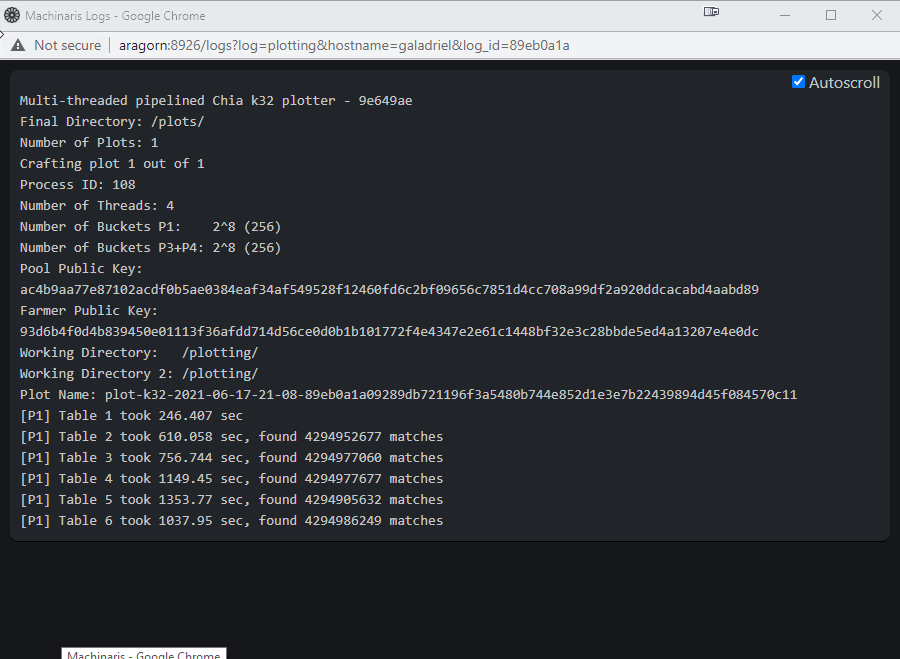
For the adventurous types, the current Machinaris test version offers: Central control of multiple Machinaris workers on your LAN. Madmax plotter integration via customized Plotman Test version image: ghcr.io/guydavis/machinaris:test Please report any issues on Github.
-
Bit of guess, but this is what I found: https://www.chaingreen.org/ https://flaxnetwork.org/ No idea about them, never tried them, so be cautious. Interesting the concept of multiple forks though.
-
Interesting, thanks for bringing them to my attention. Please add an Issue on Github with your thoughts on how this might work. I assume parallel installs in different root folders? Then Machinaris container would have an environment variable that determines which folder gets placed on the path? This would require full-compatibility at the CLI between these projects. OR were you thinking of somehow running more than one blockchain in parallel, farming the same plots to different blockchains? Genuinely interested in how this might work. Thanks!
-
Hmm, could be a corrupted database then. Since it sounds like you just started out, I would recommend a clean re-install. Perform an Unraid uninstall of Machinaris. Then "rm -rf /mnt/user/appdata/machinaris", copy your mnemonic.txt file first if you want to preserve it. Then clean Unraid install of Machinaris again.
-
Good day! Please restart the Machinaris container, which will restart the Chia services within such as the wallet.
-
Hi, when in only plotter-mode, you only need to provide your public farmer and pool keys. No need to add the private key mnemonic in this mode. Hope this helps!
-
Hi, yes. In your attached config, you have 9 (!) temporary plotting folders configured. If SSDs, what are the sizes of each? Have you considered combining them in RAID-0 as a single temp plotting directory? Else are they HDDs? Actually, Machinaris uses a faster-plotter that multi-threads later stages for quicker plot completion. I see your config has: tmpdir_max_jobs = 1 so no more than one plotting job per temp dir at any time, any phase will run. global_max_jobs = 7 so no more than seven plotting jobs total any time, any phase will run. This means only 7 out of 9 of your temp directories will be used. So depending on your answers above, you may want to increase these two values. Let's pretend you're using nine separate SSDs of ~500 GB each. Then leave tmpdir_stagger_phase_major, tmpdir_stagger_phase_minor, tmpdir_stagger_phase_limit all unchanged. You would increase tmpdir_max_jobs to 2 and global_max_jobs to 18. Hope this helps!
-
Interesting, I didn't know you could use hpool with tools such as Machinaris. I suppose hpool only cares about the completed plots though. I checked the Plotman github, but can't find any reference to default plot file permissions. Have you considered using setfacl to set the default permissions of the folder itself so whatever places a file there, it gets the permissions you want? I haven't tried this with Unraid, so not sure if it works. Please let us know what you find!
-
Yes, could be that. Some troubleshooting to try from the Machinaris Docker Console window in Unraid: plotman status chia farm summary df -hT touch /plotting/test_file.txt An error to that last command would mean that a plot job can't write to the in-container /plotting volume mount. Also, take a look at the log file here: /mnt/user/appdata/machinaris/machinaris/logs/webui.log. Hope this helps!
-
At first glance, you have an extra space introduced before farmer_pk. Hope this helps.
-
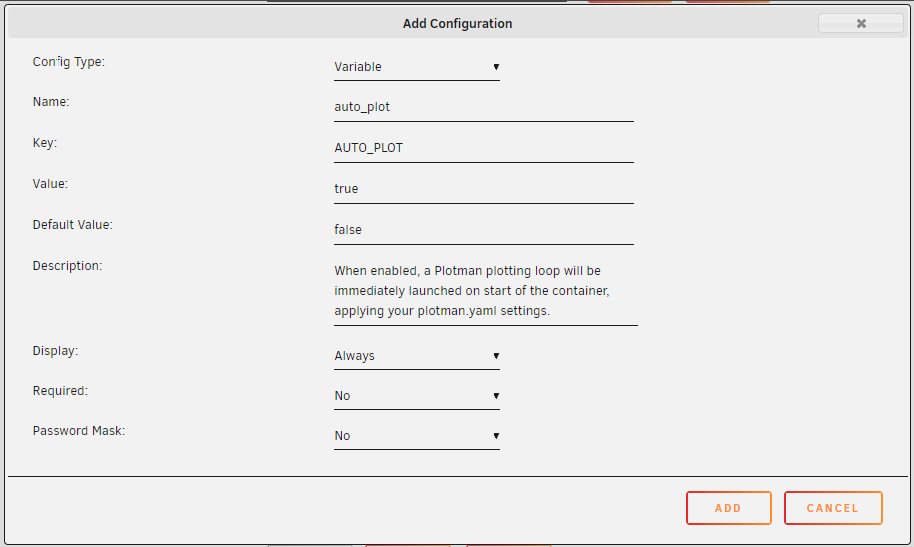
Hi, this is a new feature added by a fellow from New Zealand just recently. Basically, you need to add a new Variable with key=AUTO_PLOT to the Machinaris docker container config like so. Then restart the container and the `plotman plot` command will be run right away, starting a round of plotting.
-
Please attach the full contents of your plotman.yaml after editing and I'll take a look for the syntax issue. I uncommented 3 lines and was able to save as shown:
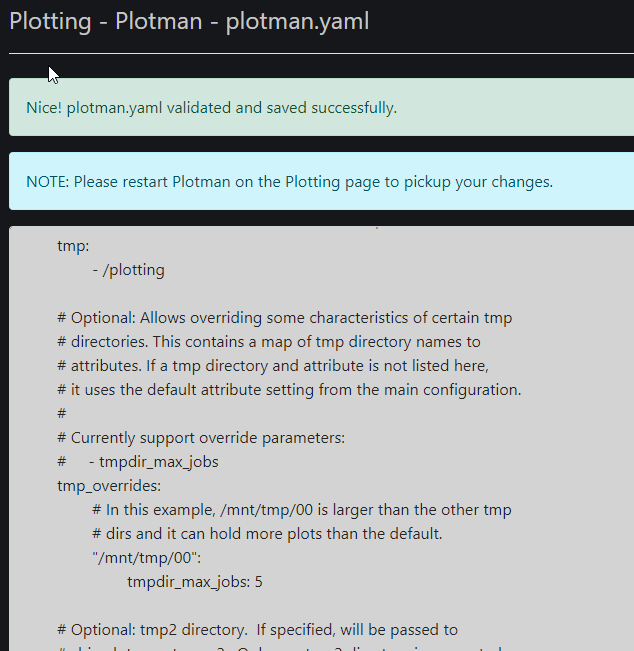
-
Please see the wiki for Plotman.
-
That's interesting. The Summary page is showing the output of "chia farm summary" and the Wallet page is showing the output of "chia wallet show". Please run those commands at the Machinaris Docker Console in Unraid. Do they show the same discrepancy? It sounds like, even with Chia binaries, the "farm summary" is lagging the "wallet show" for some reason.
-
Hi! Interesting suggestion. Could be a good enhancement. Please add an Issue request with all the details to Github. What did the Wallet page show after you made this transaction? These pages are cached for ~60 seconds to limit performance impact, so perhaps take a look after a minute. Interesting one. You may wish to open an Issue on the Chiadog Gitub.
-
Yup, that looks good. Sorry, I should have provided the Unraid-specific details in my earlier response. Mixed up my forums. Sorry, editing such settings in Unraid results in a restart of the Docker container, which is like restarting a VM. In that case, all processes within Machinaris are restarted. Chia offers no way to restart a plot that completely terminates that I am aware of.
-
Hello! Yes, you'll want to mount a host OS path into the Machinaris container to use for your plotman's tmp2 space. For example: -v '/path/to/temp2':'/plotting2':'rw' This mounts /path/to/temp2 on Host, into the container at /plotting2, so Plotman config uses the in-container path.
-
Good day! The next version of Machinaris now available: v0.3.1. Thanks to all those who created Github pull requests with enhancements and logged Github issues after running the test version. Changes: After testing showed between 15% to 30% speedup on plotting, adopting Chiapos multithreaded library. Thanks to `hereisderek` for a great PR containing better rsync support, SSH key import, and optional auto-plot on container restart. Include `paho-mqtt` library to support Chiadog alerts via MQTT by default. Get your update by pulling docker image: ghcr.io/guydavis/machinaris
-
Good question. I've been following the pooling debate and totally understand the renewed interest in hpool. As a software developer myself, I was very skeptical of all promised delivery dates the main dev team offered for pooling last month. Now it seems there is no promised date at all. I have not tried hpool myself, but my understanding is that they use a custom client. As such, I don't think there is any opportunity for integration between hpool and Machinaris. (Correct me if I'm wrong though). I'd be sorry to see users leave Machinaris, but I completely understand the current choice between holding lottery tickets (standard Chia today) and getting small, regular payouts (hpool today). That said, eventually the main dev team will deliver on official pooling (weeks/months?). When that happens I expect many new users for Machinaris as many look to re-plot with pool-portable plots. My goal is to continue building a solid WebUI that is appealing to all users when that happens.
-
Welcome! I'm glad Machinaris is working well for you. To see the full listing on your Farming page, be sure to set a Variable in the Machinaris docker config named 'plots_dir' which is a colon-separated list of all your in-container plots paths. Please note that editing the Machinaris docker in Unraid will cause the container to restart so wait until you are taking a pause from plotting in-container before you change it. Details on the wiki. Hope this helps!



