





guy.davis
Members
-
Joined
-
Last visited
Everything posted by guy.davis
-
Hi there! Sorry to hear you're having this issue. Please check that both of these commands from the Unraid Docker Console window for Machinaris (in-container) show no errors: chia farm summary plotman status They might have a clue as to the problem. Also, please check the logs, as they may be helpful. Write back with your findings and we'll get it sorted out. You could attach logs to a Github issue if that's easier. Thanks!
-
Welcome! Yes, you only want one Chia "fullnode" on your household LAN at a time so you'll need to change your port-forward tcp/8444 at your router to the Machinaris container from the Chia container. Don't the delete the 'Chia' Docker yet, just leave it stopped while you're trying Machinaris' Docker. Machinaris contains the same Chia binaries as the Chia docker image, but adds a plot manager, log monitor, and a WebUI. Details on migrating can be found on the wiki.
-
Hi, glad you like it! So the summary line is the output of "chia farm summary" and that looks good. You're farming. The table rows are a listing of all the plots found at the in-container paths of the "plots_dir" env variable. Did you mount multiple plots volumes? If so, be sure to update "plots_dir" from its default of one at "/plots". See the FAQ, but remember a change to Machinaris docker config in Unraid, will result in a restart of container, killing plotting, so just schedule it when you're ready. Hope this helps.
-
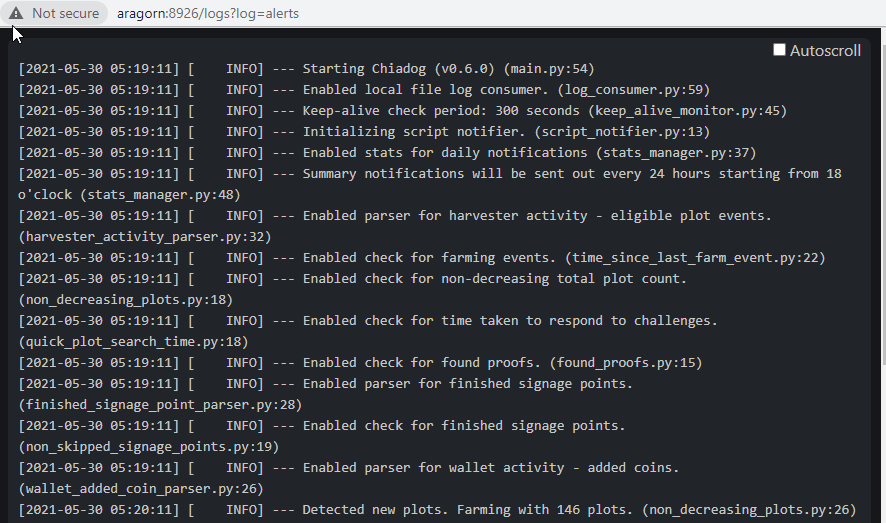
Glad to hear you got the debug.log flowing. Give Chiadog 24 hours to monitor debug.log now that it's logging again. Should see at least the daily summary with some useful values. For context, I'm including the top of my Chiadog log from when it starts up. To view, click the View Log button on top-right of Alerts page. Your log should start similarly. Hope this helps!
-
Hi, glad to hear you got the blockchain synced. (Network | Blockchain page). Does your Wallet page show the Wallet is also synced to the current date? If the wallet is not synced, this may be why you don't see the mojos yet. Also the Wallet page should show your mojos (mine does). The Summary page is definitely rounding .0 so not showing mojos.
-
Thanks, glad you find it useful. Definitely, let's check the logs: Ensure that /mnt/user/appdata/machinaris/mainnet/log/debug.log (on Unraid host) is there and growing every few seconds. Check that Settings | Farming page -> config.yaml has these default values: "logging->log_filename" = 'log/debug.log' AND "logging->log_stdout" = false and "logging->log_level" = INFO. If you need to change these settings, restart Machinaris container but either wait for or kill running plot jobs first. If Chia's debug.log is there and printing out INFO log lines, then Chiadog should be configured to monitor it. Check Settings | Alerts page -> config.yaml has these default values: "chia_logs -> file_log_consumer -> file_path" = '~/.chia/mainnet/log/debug.log'. Also verify "notifier -> script -> script_path" = '/root/.chia/chiadog/notifier.sh' and "notifier -> script -> enabled" = true. Given you're not seeing challenges on the Summary page, I suspect the problem is #1 above. Once debug.log is growing, things should work better for you. Let us know!
-
Yes, I read the "tmpdir_stagger_phase_limit" value to apply to each temp directory separately. In your case, that would allow a total of 6 jobs in phases before phase 2.1 (as you're '3' limit x 2 temp dirs), subject to the 'tmpdir_max_jobs' and 'global_max_jobs' limits you set. For additional insight, check out the Plotman project site.
-
Sorry to hear that. Are the connections in your list anywhere nearby geographically? Copy the IPs you see into a tool like iplocation.net to check. While the Machinaris WebUI offers an Add Connection button, I didn't implement a Remove Connection action. You can do it from the Console though. In Unraid, click on Docker tab, then select Machinaris and choose Console to get an in-container shell. Once there, type: chia show --remove-connection IP_ADDR:PORT replacing the IP address and port of the connection you wish to remove. Hope this helps!
-
Good question. Speaking for myself, I was a huge fan of Unraid before the Chia craze so I'm keeping it for all the other uses. A bit of Chia plotting and farming on the side is a fun little experiment for me. If you're doing anything else besides Chia, Unraid is a very flexible platform with a lot of benefits. Your idea for a separate array with cache and parity disabled also sounds like it could work well, just test your speeds once setup. Unraid offers a nice long trial period so there's time to explore. However, I wouldn't recommend Unraid as solely a Chia rig. On the plotting side, a Docker container will likely be a bit slower than plotting directly in Ubuntu for example. On the farming side, you just want plain JBOD (just-a-bunch-of-disks) to maximize every bit of storage. EDIT: After further discussion on our Discord, I've 100% come round to the idea of Unraid with a separate array (no cache + no parity) for all the drives holding your plots. This is a great idea!
-
Hi, please ensure that your mainnet/config/config.yaml file has "logging: -> log_stdout" set to false. If true, logging goes to the container output which shows up in Unraids Docker tab - Chia Logs view. I agree it's nicer to have it in the debug.log for grepping etc. Hope this helps!
-
Yes, this is a good question as you don't want those long seek times when responding to a blockchain challenges. Have you tried out using Unassigned Disks to hold some/all plots, rather than your main Array? I started on the array too, but am now using a bunch of externals that appear as Unassigned Devices. I'm getting sub-second responses from them. It's possible to extract a disk from the Array and make it Unassigned I believe. The drawback is that copies to these Unassigned shares can be slow from other plotting systems (~15 minutes) as there is no fast cache to speed the write. Definitely a trade-off there. Hope this helps! Edit: It occurs to me that setting your particular Plots share on the Array to "Use cache pool" = No, might be a middle-ground to try first before removing drives from the array. Same trade-off as above though.
-
Sorry, I should have been more clear that a container restart means all plotting is killed. That said, you want to get your volume mounts correct as first step, so it's good you have this working now. Yes, with the settings outlined, as soon as the first plot reaches phase 2:1, the next will be started, up to a max of 4 at any time. If you would prefer more jobs to be running in the same major phase the same time, up to max of 4, then increase "tmpdir_stagger_phase_limit" from 1 to 2, 3, or 4. Just Save and restart Plotman (not the entire container) to pick up this change. You'll need to experiment to find the best settings for you. Yes, you can disable upnp in the Chia config.yaml. It will be picked up on next restart of the container, though you might get away with executing `chia start all -r` in-container (warning: haven't tried this myself). I don't think is critical enough to rush a container restart for, just next time you do one. Hope this helps! Sounds like you're getting closer to an optimum profile for your Unraid server.
-
Thanks! Nice setup, let's get your Plotman tuned up. First off, I assume you are using the two 1 TB plotting drives separately. Follow these directions to get two separate plotting mounts in the Machinaris container. (If they are instead a RAID-0 brtfs cache pool, then just mount a single plotting drive.) Once you have your SSDs mounted in the Machinaris container as /plotting1 and /plotting2 (or similar), then let's go edit the plotman.yaml. Click on the 'Settings | Plotting' page and edit the plotman.yaml there. Here are your changes: Under 'directories:', find 'tmp:' and change the single '/plotting' line to two separate lines of ' - /plotting1' and '- /plotting2'. Check that your 'directories:', 'dst:' line (defaults to /plots) is going to your final destination folder. /plots in-container should be a volume mount to your Unraid host's target plots directory. If you have more than one final plots directory, follow these instructions first. Next, let's tune the plotting settings. Scroll-down to 'scheduling:' and set 'tmpdir_max_jobs' to 4. This tells Plotman it can start up 4 concurrent plot jobs (staggered start times) on each 1 TB SSD. Since you have 2 plot dirs, change 'global_max_jobs:' to 8 which is total concurrent plot jobs. Then hit Save button to validate the changes. You DON'T have to restart the container, so any running plot jobs should continue to run. You DO need to restart only the Plotman process to pickup the changes. Do this from the Plotting page. First click 'Stop Plotman', wait for confirmation, then 'Plot On!' to start it back up. Your existing plots should keep running, but now Plotman will take into account these settings and probably launch new jobs right away, or shortly. You can tune further if needed. Hope this helps! Happy plotting! EDIT: You may want to tweak these settings for even more concurrency: tmpdir_stagger_phase_major: 2 tmpdir_stagger_phase_minor: 1 tmpdir_stagger_phase_limit: 1 Basically above is saying only start one (tmpdir_stagger_phase_limit) job per temp directory until the currently running job clears phase 2:1. Experiment with these, but understand that too many concurrent (5+) per drive might result in it filling up and blocking the plot jobs.
-
Lots of good ideas here. First, and possibly quickest fix for you, is to use this pure Chiadog container. With respect to Machinaris, you can start an instance in harvester-only mode, which will run chiadog and monitor the chia log file. Currently a lan with multiple instances of Machinaris (a fullnode, harvester, and couple plotters) don't talk to each other. You can monitor them with separate browser tabs. I'm looking to improve this with distributed worker support and single monitoring pane on the fullnode. Please add your thoughts to this open Issue on how it might look.
-
That's odd. Well, if the error persists beyond a restart, I would suggest reviewing the Chia logs found in /mnt/user/appdata/machinaris/mainnet/log/. They may have a clue to the issue. Let us know what you find.
-
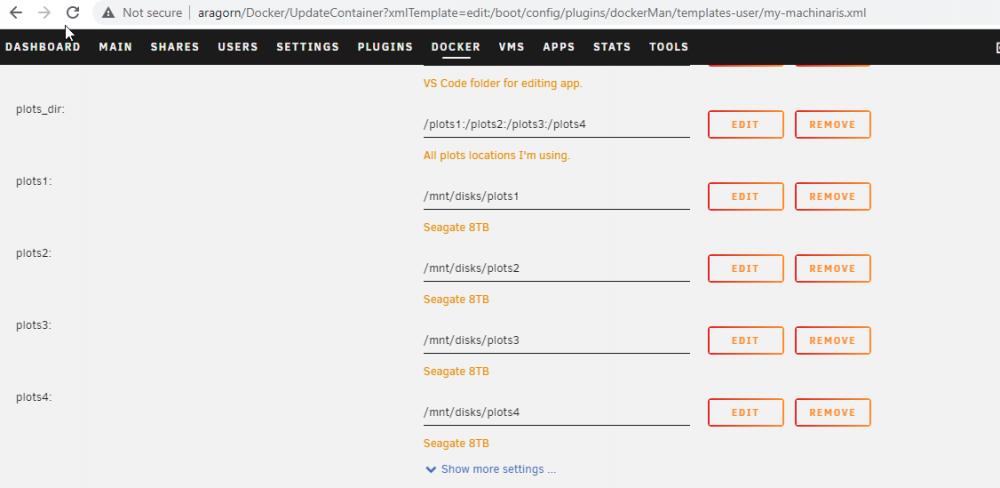
Hi, sorry to hear you're encountering this. Please share your plotman.yaml (in particular your directories:tmp and directories:dst listings). Also, please share a view of your Docker settings such as this example for plot folders and the 'plots_dir' variable: Perhaps a path is misconfigured?
-
Well, just a week after v0.2.1 came out, another big step forward for Machinaris is here: v0.3.0 Huge thanks to all those that ran the test version and logged Github issues. Changes: Integrate the excellent Chiadog project for log monitoring and alerting Plotman Analyze output to show time spent in each plotting phase Log Viewer for Farming, Alerts, and Plotting including logs for running plot jobs Rebase off ubuntu:focal, include nice Dockerfile cleanup by sparklyballs When mode=plotter, autoconfigure Plotman with provided farmer_pk and pool_pk When mode=harvester, auto import of your farmer's CA certificates Get your update by pulling docker image: `ghcr.io/guydavis/machinaris`
-
Hi! You can use an SSH terminal like MobaXterm to SSH into the Unraid server as root, opening multiple sessions on different tabs. Then just 'docker exec -it chia bash' to get into the Chia container. That said, perhaps you would find a WebUI with plot manager a better fit. If so, check out my project: Machinaris.
-
Well, that Network | Connections page shows some decent Down speeds, so something is definitely happening. What does your Network | Blockchain page show? How far back are you on sync... datewise? Mine shows: "Current Blockchain Status: Full Node Synced" with a Peak Time value just a minute or so off current time. Have you tried Network | Connections | Add Connection with one of these?
-
Sorry to hear that you're experiencing syncing problems. It should be possible to restart the chia services from within the container without impacting concurrent plotting jobs. Try this from the Docker console for Machinaris under Unraid (so an in-container command): chia start farmer -r
-
Ha! Yes, at least with Chia v1.1.6 it will eventually sync. I spent nearly a week with v1.1.5 never getting synced. 😢 To monitor in Machinaris, view the Network | Blockchain page which shows the sync status. In particular, look at the date it shows. The farther back in time, the longer the blockchain has to sync. The closer you get to current datetime, the nearer you are to Fully Synced. Hope this helps.
-
Really good question. Ideally if you could robocopy or mtail the logs over from your Windows system to the machine running Machinaris, then you could include them in a volume mount to the container. Unfortunately, it looks like Chiadog does not yet support monitoring more than one Chia debug.log at time. You should open a request though. Alternatively, it is possible to run Machinaris in modes like 'harvester' and 'farmer' with a stripped down webui. In that case, you'd have multiple instances of Machinaris, each with its own Chiadog watching the local debug.log. That doesn't get you a single monitoring Pane however, just a bunch of browser tabs. There is an open Machinaris request to support a distributed reporting mode where a central Machinaris receives status and updates from worker instances doing farmer/harvester/plotter. This idea is just on the drawing board right now though. Please add your thoughts.
-
The next release v0.3.0 will have some improvements about webui display when in plotter mode. Should be available later this week. Thanks for the feedback!
-
Welcome! Good question. The next release coming this week has better display of 'Expected Time to Win' and also status of Blockchain Challenges. Keep an eye out for available updates to Machinaris in your Unraid Docker tab.
-
Good point to raise. The Machinaris project takes wallet security very seriously and we're actively looking to improve the key-handling behavior we inherited from the official Chia docker. All feedback and suggestions are welcomed. This article is a good starting point on how one can best implement their own wallet security practices.



