





final
Members
-
Joined
-
Last visited
Everything posted by final
-
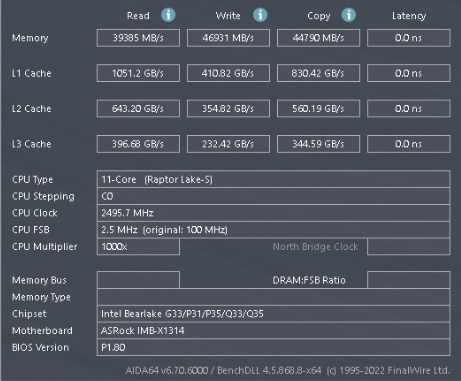
看到你还用了大页 hugepages 是1g的吗?有效果吗?
-
我看了下我的 win10的虚拟机
-
unraid软件库里iSCSI Target 试过没群晖的好用
-
好奇你的 ISCSI 服务是通过什么软件提供出来的
-
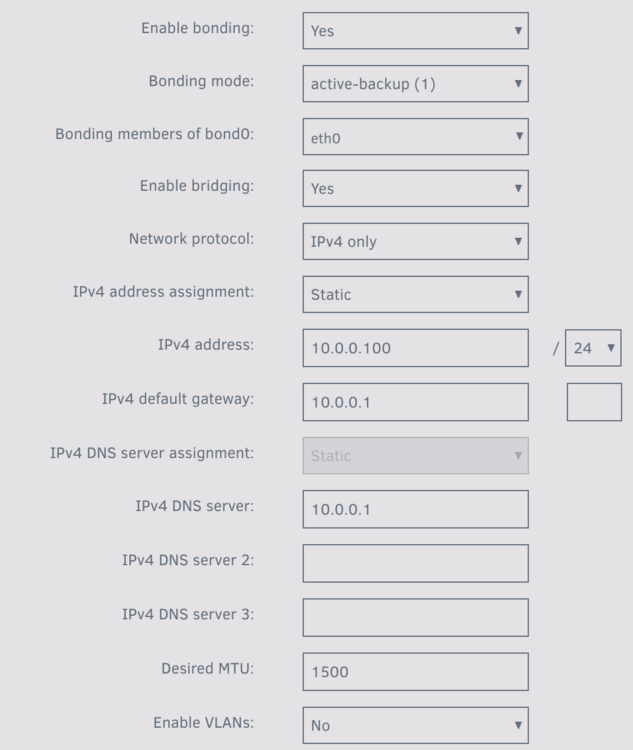
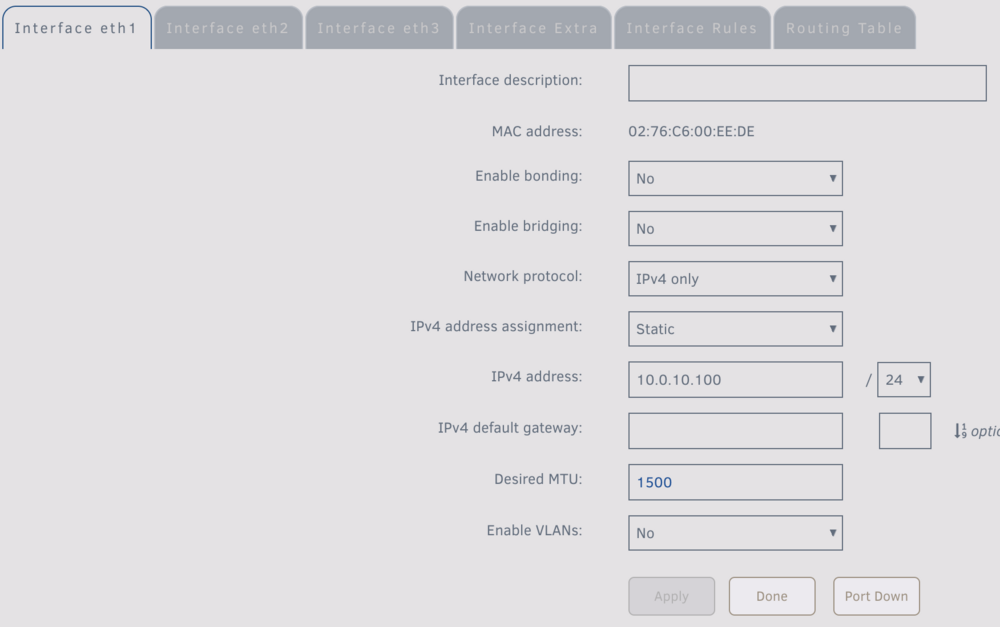
我参照你的设置试了下,pc唯一网口直连万兆eth1,还是无法访问局域网和外网 你的局域网中有192.168.11.1 的另外一个网关?
-
感谢你的回复 这样应该是可以的,但是pc只有一个网口可以连到unraid,所以想在一个网口的情况下实现同时访问unraid和外网,也就是通过unraid去访问局域网和外网 不知道如何实现
-
暂时pc无万兆,unraid主板上只有千兆口,买了pci的万兆口插unraid上 打算跟pc直连 万兆口桥接千兆口的时候pc能连上 但是不能设置单独的ip和mtu 如果万兆口不桥接 设置单独的ip段跟pc直连 pc能连上unraid 但是不能访问局域网其他设备和外网 pc到unraid只有一个网口 如何能实现直连后同时万兆访问unraid和外网呢
-
这样是不是pc需要两个网口 一个插交换机上 一个直连unraid,如果pc只有一个网口直连unraid后 无法访问外网
-
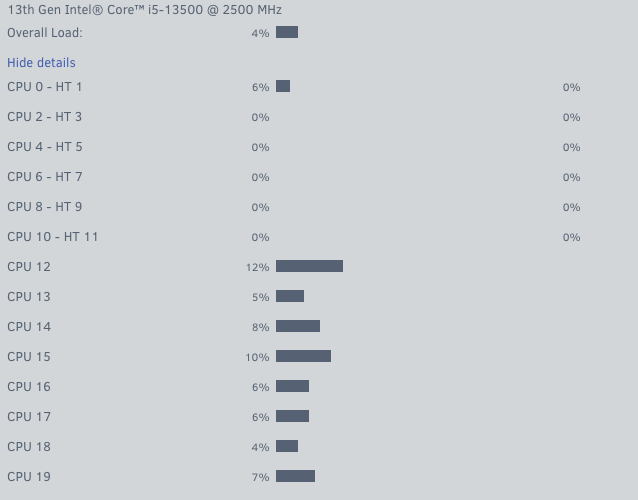
cpu0在隔离的情况下,虚拟机不启动的时候cpu0也有占用
-
BK650M2-CH 直通给黑晖,然后nut连接群晖ups
-
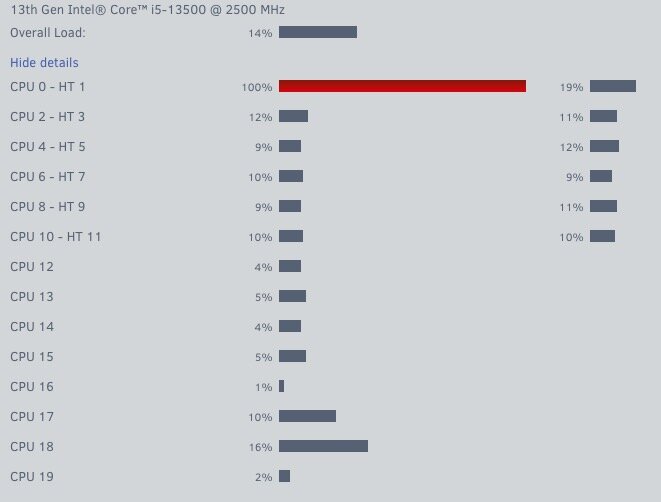
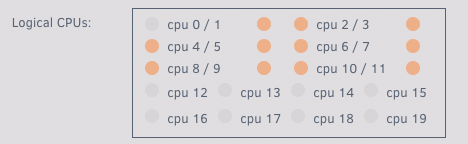
系统目前是7.0.0-beta.2,cpu是13500,为了保证虚拟机的性能,把cpu的大核都隔离了然后打算全部分配给win10虚拟机(包括cpu0),按照理解这些隔离的大核不参与unraid的基础运算,在win10虚拟机不启动的时候,cpu0偶尔有些占用不高,在虚拟机启动后,所有分配的大核都有占用了,其中cpu0经常红色占用满,打游戏串流的时候偶尔会卡,但是在win10下看cpu占用也不是很高,就怀疑是不是cpu0的问题。现在把还是隔离中的cpu0从虚拟机分配中去除,结果cpu0还是占用满,不能理解为啥cpu0在被隔离后,也不分配给虚拟机的情况下还是会有占用,在虚拟机启动后还是会经常占用满

-
重新插拔下又识别到了 这样很不方便啊 不知道什么时候重启又不在了
-
6.12.10 2根西数的 sn520和sn530都正常 升级到7.0只能识别到一块sn520了
-
6.12.8下是不是不能这么用 虚拟机关机后没有调那个脚本呢 日志里看不到信息
-
-
-
限制容器CPU内存占用 这点可以尝试一下 目前13500的u和64G内存
-
unraid是最新系统,qbittorrent用的是商店里linuxserver的最新版本,docker网络用的eth0 macvlan,下pt大包时,下载大概18m左右 上传4m左右 下的正欢 unraid的webui就无法访问了 docker和虚拟机都正常 ssh不进去 卡在那
-
ok thanks i'll keep watching how it goes
-
I deleted the nut.cfg file and uninstalled the plugin and reinstalled the settings
-
nut-diagnostics.dev
-
The ups is connected to the Synology nas, and the unraid is connected through the slave mode. After the nut is updated to the latest version, the status of the ups in the Synology nas is displayed as online, but it is displayed as "On line - The battery is discharging" under unraid
-
Under the latest version: 2023.07.26, the ups is BK650M2-CH, and the status becomes On line - The battery is discharging when the device is plugged into the power supply
-
after upgrading to 6.12.2 and starting the plug-in, the ups in the local area network I connected works normally, but I can see the log unRaid upsmon[4338]: UPS [[email protected]]: connect failed: Connection failure: Connection refused


