





GG73
Members
-
Joined
-
Last visited
-
Been having issues with mover feature since upgrading to R 7.0.0-rc.2 mover not working, manual mover button not working. on reboot, mover button greyed out, string mover is running (but it isn't)
-
since upgrading to 12.6.6 unraid randomly lock up, becomes unresponsive and am unable to communicate/log n to gui. had to roll back to 12.6.4 glens-server-diagnostics-20240112_2208.zip
-
I've been running Unraid now for a few years. Started off with an old Del powered T110i with Intel® Xeon® CPU E3-1230 V2 @ 3.30GHz & 32 GB Ram. I haven't really been able to fault it for what it cost me (apart from the HDD's) I paid around £80 but I now have now space for any additional drives, therefore though it a good time to upgrade to something newer, faster, more power efficient with space for a minimum of 10 drives. I currently have 5 HDD's + Parity + SSD Cache. But dont want to go overkill and spend too much but on the other hand, not go too cheap. I Want it to last a good few years. My use case: Mainly running Plex so would like it to be able to transcode 4K streams without fuss (max 4-5 streams at anyone time) I dont run VM's currently running 13 dockers (all the 'arrs, 1 of them being Shinobi Pro - CCTV docker) After spending quite a bit of time looking for something suitable, the more I look the more undecided I become. One thing I have decided on is the case: Fractal Design Define 7XL, I have plenty of room for it Other things I can decide on: CPU - 13th Gen Intel (but which one???? too many to choose from) PSU - but which one???? too many to choose from) + cooler recommendation Ram - DDR 4 or 5 ? is there much difference? M.2 nvme - any advice on these would be nice! Motherboard - again any recommendation would be good NIC - currently have 1gig up/down service. is 2.5gb enough or would you recommend a 10gb card. Other things: would a new style motherboard run 10+ HDD's or would I need something else added on? Any advice is good advice. Many thanks
-
Updated to latest 6.12.0 stable version. logged on to my GUI and literally everything maxed out and struggling even lo load the GUI pages. Took me a good 5 mins to be able to turn off my dockers 1 by 1. even when all dockers turned off, server was "idling" at approx 30% when usually about 5% when all dockers turned on. typed top in command line and shfs was the top command taking all the resources. Unfortunately had to roll back a version! dhcplog.txt docker.txt syslog.txt wg-quick.txt
-
this worked for me
-
Anyone else getting this error? I'm signed in, checked network settings and confirmed server can be reached remotely. Tried signing in/out (no difference) used: unraid-api report -v command and it reports following:- <-----UNRAID-API-REPORT-----> SERVER_NAME: XXXX-SERVER ENVIRONMENT: production UNRAID_VERSION: 6.11.5 UNRAID_API_VERSION: 2.54.0 UNRAID_API_STATUS: running API_KEY: valid MY_SERVERS: authenticated MY_SERVERS_USERNAME: XXXX CLOUD: STATUS: [ok] IP: [52.40.54.163] RELAY: STATUS: [connected] MINI-GRAPH: STATUS: [disconnected] SERVERS: ONLINE: OFFLINE: GLENS-SERVER[owner="XXXX"] ALLOWED_ORIGINS: http://localhost, http://IPV4ADDRESS, https://IPV4ADDRESS:5443, http://XXXX-server, https://XXXX-server:5443, http://XXXX-server.local, https://XXXX-server.local:5443, https://IPV4ADDRESS.HASH.myunraid.net:5443, NCHAN_MODE: nchan </----UNRAID-API-REPORT-----> root@XXXX-SERVER:~# If I go on to the my servers drop down on GUI page there is a warning triangle stating "not connected to mothership" then if I go on to the My Servers dashboard, it briefly says I'm connected green (maybe a second or 2 before going red and saying offline. Thanks for any input. Cheers
-
Turned off as far as I’m aware
-
type exit and it loads
-
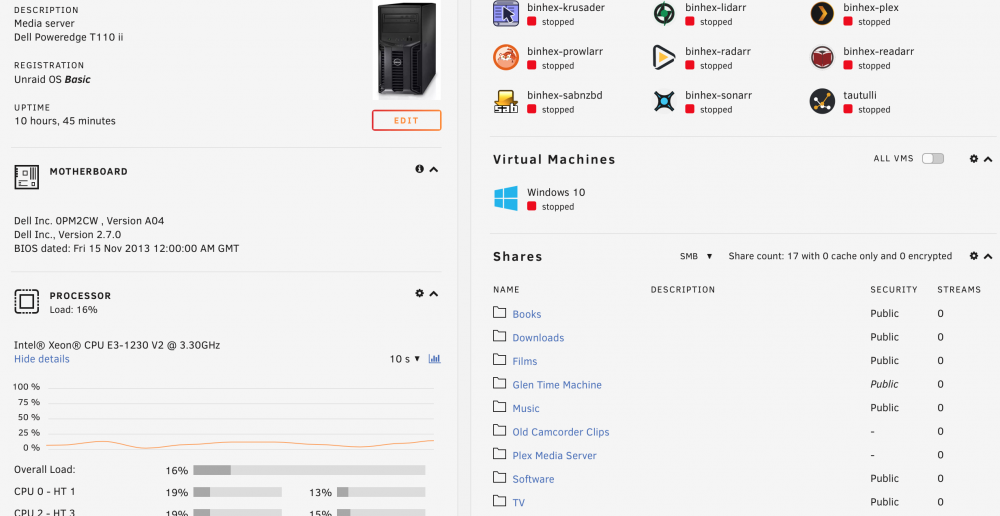
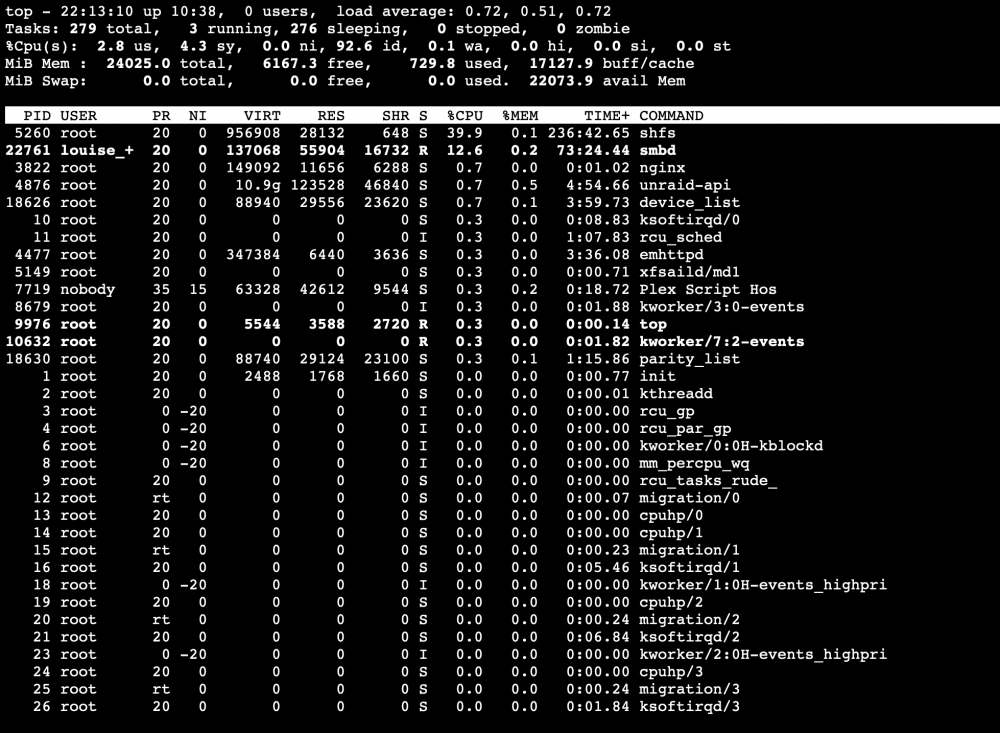
Hi all, apologies in advance for my noob status! I've been trying to get to the bottom of my issue,I have high CPU utilisation even when all dockers and my vm are turned off (16%) and a lot higher when they are turned on I have tried used the 'top' command and shfs seems to be the culprit. I have looked on the forum but can't seem to find a definitive answer other than turning off a plugin (which donthave installed anyway. only recently started doing this ? Any help much appreciated, many thanks unraid-6.10.0-rc4.txt
-
If you go back a few pages, I posted similar thing. It’s been covered several times. I have had no joy as yet getting it to work. Set my windows VM up no problem but Mac one no playing ball!
-
Thanks for your time and effort. I will try again later.
-
Did you try method 1 first?
-
Much appreciated, it’s probably totally fine and it’s more than likely my error but if you could that would be great. Many thanks
-
Once again thanks but still cant get it to work. i don't see how you can use opencore configurator if it wont boot (with it being a mac os program) I've done the above like you said (which seemed to be working until the opencore part) i cant use opencore because its a mac os program. surely big sur needs to be able to boot before i can open a browser and use opencore? forgive my lack of knowledge and understanding.

