IamDan
Members
-
Joined
-
Last visited
-
Hello all. I have just started getting an issue where nordlynx cannot select a server. It was previously working without issue parse error: Invalid numeric literal at line 1, column 7 [migrations] started [migrations] no migrations found [2024-03-18T20:35:37+00:00] Firewall is up, everything has to go through the vpn usermod: no changes ─────────────────────────────────────── _____ __ __ _____ _____ _____ _____ | | | | __|_ _| | | | --| | |__ | | | | | | | | | |_____|_____|_____| |_| |_____|_|_|_| _____ __ __ _ __ ____ | __ | | | | | | \ | __ -| | | | |__| | | |_____|_____|_|_____|____/ Based on images from linuxserver.io ─────────────────────────────────────── To support the app dev(s) visit: Bubuntux: https://github.com/sponsors/bubuntux WireGuard: https://www.wireguard.com/donations/ To support LSIO projects visit: https://www.linuxserver.io/donate/ ─────────────────────────────────────── GID/UID ─────────────────────────────────────── User UID: 911 User GID: 911 ─────────────────────────────────────── [2024-03-19T07:35:37+11:00] Enabling connection to eth0 172.17.0.3/16 [2024-03-19T07:35:37+11:00] Enabling connection to secure interfaces [2024-03-19T07:35:37+11:00] No interface network6 detected [2024-03-19T07:35:37+11:00] Enabling connection to network 192.168.0.0/16 [custom-init] No custom files found, skipping... [ls.io-init] done. [2024-03-19T07:35:37+11:00] Finding the best server... [2024-03-19T07:35:49+11:00] Unable to select a server ¯\_(⊙︿⊙)_/¯ I am unsure what is happening here. Has anyone seen this before? EDIT: I did a forced update and it all fired back up DOUBLE EDIT: Its failed again with the same issue. Tried to force the update but it does not resolve the problem
-
I didnt have to reboot it. There was a container that was hanging on to my old NordVPN network. (I had way to much crap installed). Once I removed the offending container it came good
-
Hey guys. Wondering if someone can help me. I had an problem with my NordVPN docker container last night and found it is depreciated. No problem, ill change over to the newer Nordlynx container. I installed and configured it without a hitch. I think the problem started as I had a custom network point a few other containers to the old NordVPN container. Ive created a new custom network for Nordlynx and pointed the required containers to that network. Im now stuck with a constant red loading ribbon and greyed out options at the bottom of the page. I have stopped and restarted the docker service as well as stopping all containers, the problem remains. I have attached my Diagnostics, Can anyone please point me in the right direction? tower-diagnostics-20230404-0743.zip
-
Any chance you can explain how you changed the UI? I would like to use web control
-
I used this tutorial and it appears to be working well https://www.reddit.com/r/unRAID/comments/ejeo20/how_to_pass_any_docker_container_through_a_vpn_on/ A lot simpler than I thought it would be
-
Perhaps libreelec in a VM? If you use kore on an android phone, hit the 3 dots in the top right hand corner and go to library maintenance to update your library
-
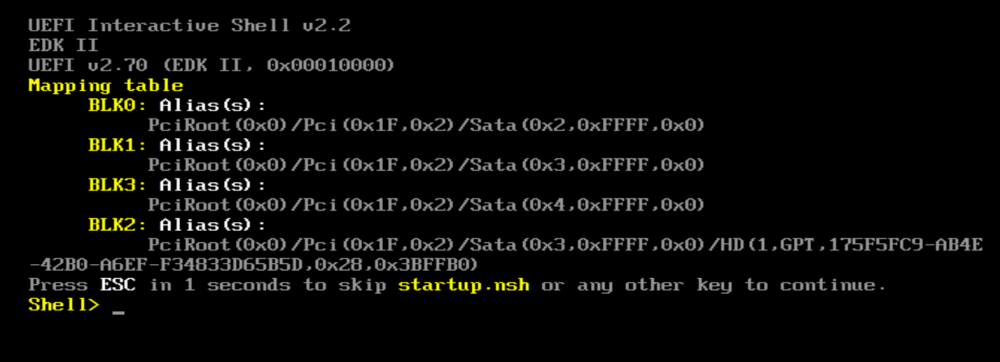
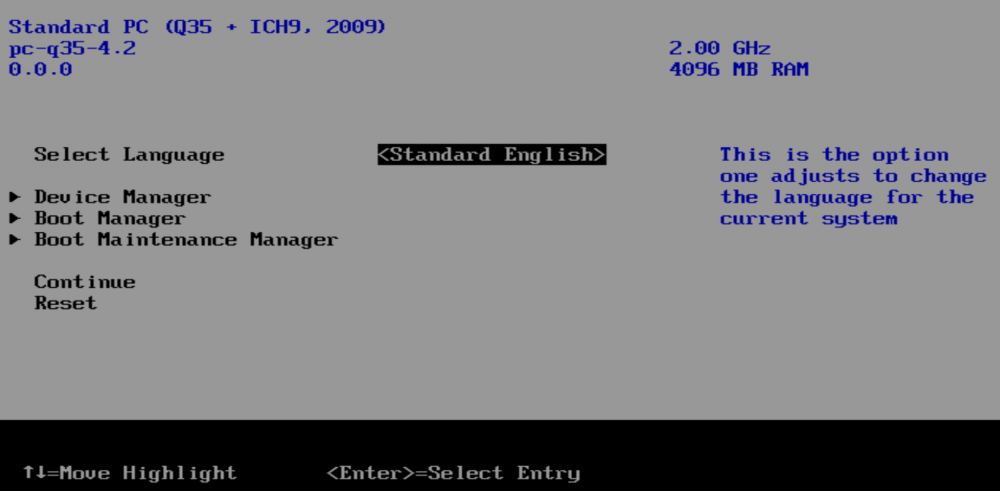
So I added verbose mode and now it boots directly to If I exit I get into the bios ?????🤨 Im starting to think this might go in the to hard basket untill I upgrade my hardware😂
-
So ive been searching around. How do I enable OSX debugging? EDIT: I managed to capture this
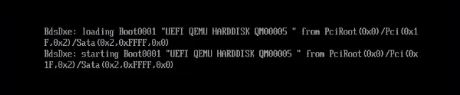
-
Topology has now been removed. Here is my vm log -device pcie-root-port,port=0x10,chassis=1,id=pci.1,bus=pcie.0,multifunction=on,addr=0x2 \ -device pcie-root-port,port=0x11,chassis=2,id=pci.2,bus=pcie.0,addr=0x2.0x1 \ -device pcie-root-port,port=0x12,chassis=3,id=pci.3,bus=pcie.0,addr=0x2.0x2 \ -device pcie-root-port,port=0x13,chassis=4,id=pci.4,bus=pcie.0,addr=0x2.0x3 \ -device ich9-usb-ehci1,id=usb,bus=pcie.0,addr=0x7.0x7 \ -device ich9-usb-uhci1,masterbus=usb.0,firstport=0,bus=pcie.0,multifunction=on,addr=0x7 \ -device ich9-usb-uhci2,masterbus=usb.0,firstport=2,bus=pcie.0,multifunction=on,addr=0x7.0x1 \ -device ich9-usb-uhci3,masterbus=usb.0,firstport=4,bus=pcie.0,addr=0x7.0x2 \ -device virtio-serial-pci,id=virtio-serial0,bus=pci.2,addr=0x0 \ -blockdev '{"driver":"file","filename":"/mnt/user/isos/BigSur-opencore.img","node-name":"libvirt-3-storage","cache":{"direct":false,"no-flush":false},"auto-read-only":true,"discard":"unmap"}' \ -blockdev '{"node-name":"libvirt-3-format","read-only":false,"cache":{"direct":false,"no-flush":false},"driver":"raw","file":"libvirt-3-storage"}' \ -device ide-hd,bus=ide.2,drive=libvirt-3-format,id=sata0-0-2,bootindex=1,write-cache=on \ -blockdev '{"driver":"file","filename":"/mnt/user/isos/BigSur-install.img","node-name":"libvirt-2-storage","cache":{"direct":false,"no-flush":false},"auto-read-only":true,"discard":"unmap"}' \ -blockdev '{"node-name":"libvirt-2-format","read-only":false,"cache":{"direct":false,"no-flush":false},"driver":"raw","file":"libvirt-2-storage"}' \ -device ide-hd,bus=ide.3,drive=libvirt-2-format,id=sata0-0-3,write-cache=on \ -blockdev '{"driver":"file","filename":"/mnt/user/domains/Macinabox BigSur/macos_disk.img","node-name":"libvirt-1-storage","cache":{"direct":false,"no-flush":false},"auto-read-only":true,"discard":"unmap"}' \ -blockdev '{"node-name":"libvirt-1-format","read-only":false,"cache":{"direct":false,"no-flush":false},"driver":"raw","file":"libvirt-1-storage"}' \ -device ide-hd,bus=ide.4,drive=libvirt-1-format,id=sata0-0-4,write-cache=on \ -netdev tap,fd=33,id=hostnet0 \ -device vmxnet3,netdev=hostnet0,id=net0,mac=52:54:00:80:a5:ec,bus=pci.1,addr=0x0 \ -chardev pty,id=charserial0 \ -device isa-serial,chardev=charserial0,id=serial0 \ -chardev socket,id=charchannel0,fd=34,server,nowait \ -device virtserialport,bus=virtio-serial0.0,nr=1,chardev=charchannel0,id=channel0,name=org.qemu.guest_agent.0 \ -device usb-tablet,id=input0,bus=usb.0,port=1 \ -vnc 0.0.0.0:0,websocket=5700 \ -k en-us \ -device qxl-vga,id=video0,ram_size=67108864,vram_size=67108864,vram64_size_mb=0,vgamem_mb=16,max_outputs=1,bus=pcie.0,addr=0x1 \ -device virtio-balloon-pci,id=balloon0,bus=pci.3,addr=0x0 \ -usb \ -device usb-kbd,bus=usb-bus.0 \ -device '************************' \ -smbios type=2 \ -cpu Penryn,kvm=on,vendor=GenuineIntel,+invtsc,vmware-cpuid-freq=on,+pcid,+ssse3,+sse4.2,+popcnt,+avx,+aes,+xsave,+xsaveopt,check \ -sandbox on,obsolete=deny,elevateprivileges=deny,spawn=deny,resourcecontrol=deny \ -msg timestamp=on 2021-06-09 23:43:44.452+0000: Domain id=1 is tainted: high-privileges 2021-06-09 23:43:44.452+0000: Domain id=1 is tainted: custom-argv 2021-06-09 23:43:44.452+0000: Domain id=1 is tainted: host-cpu char device redirected to /dev/pts/0 (label charserial0) Im sorry Im not sure on how to get to the apple boot loader debugging
-
Hey guys Im new to unraid and trying to setup a mac vm, however I cant get past the initial boot Here is my XML <?xml version='1.0' encoding='UTF-8'?> <domain type='kvm' xmlns:qemu='http://libvirt.org/schemas/domain/qemu/1.0'> <name>Macinabox BigSur</name> <uuid>1d5b6e9c-078d-4e99-8de1-28868790da9e</uuid> <description>MacOS Big Sur</description> <metadata> <vmtemplate xmlns="unraid" name="Windows 10" icon="BigSur.png" os="osx"/> </metadata> <memory unit='KiB'>4194304</memory> <currentMemory unit='KiB'>4194304</currentMemory> <memoryBacking> <nosharepages/> </memoryBacking> <vcpu placement='static'>2</vcpu> <cputune> <vcpupin vcpu='0' cpuset='0'/> <vcpupin vcpu='1' cpuset='1'/> </cputune> <os> <type arch='x86_64' machine='pc-q35-4.2'>hvm</type> <loader readonly='yes' type='pflash'>/mnt/user/system/custom_ovmf/Macinabox_CODE-pure-efi.fd</loader> <nvram>/etc/libvirt/qemu/nvram/1d5b6e9c-078d-4e99-8de1-28868790da9e_VARS-pure-efi.fd</nvram> </os> <features> <acpi/> <apic/> </features> <cpu mode='host-passthrough' check='none' migratable='on'> <topology sockets='1' dies='1' cores='2' threads='1'/> <cache mode='passthrough'/> </cpu> <clock offset='utc'> <timer name='rtc' tickpolicy='catchup'/> <timer name='pit' tickpolicy='delay'/> <timer name='hpet' present='no'/> </clock> <on_poweroff>destroy</on_poweroff> <on_reboot>restart</on_reboot> <on_crash>restart</on_crash> <devices> <emulator>/usr/local/sbin/qemu</emulator> <disk type='file' device='disk'> <driver name='qemu' type='raw' cache='writeback'/> <source file='/mnt/user/isos/BigSur-opencore.img'/> <target dev='hdc' bus='sata'/> <boot order='1'/> <address type='drive' controller='0' bus='0' target='0' unit='2'/> </disk> <disk type='file' device='disk'> <driver name='qemu' type='raw' cache='writeback'/> <source file='/mnt/user/isos/BigSur-install.img'/> <target dev='hdd' bus='sata'/> <address type='drive' controller='0' bus='0' target='0' unit='3'/> </disk> <disk type='file' device='disk'> <driver name='qemu' type='raw' cache='writeback'/> <source file='/mnt/user/domains/Macinabox BigSur/macos_disk.img'/> <target dev='hde' bus='sata'/> <address type='drive' controller='0' bus='0' target='0' unit='4'/> </disk> <controller type='usb' index='0' model='ich9-ehci1'> <address type='pci' domain='0x0000' bus='0x00' slot='0x07' function='0x7'/> </controller> <controller type='usb' index='0' model='ich9-uhci1'> <master startport='0'/> <address type='pci' domain='0x0000' bus='0x00' slot='0x07' function='0x0' multifunction='on'/> </controller> <controller type='usb' index='0' model='ich9-uhci2'> <master startport='2'/> <address type='pci' domain='0x0000' bus='0x00' slot='0x07' function='0x1' multifunction='on'/> </controller> <controller type='usb' index='0' model='ich9-uhci3'> <master startport='4'/> <address type='pci' domain='0x0000' bus='0x00' slot='0x07' function='0x2'/> </controller> <controller type='pci' index='0' model='pcie-root'/> <controller type='pci' index='1' model='pcie-root-port'> <model name='pcie-root-port'/> <target chassis='1' port='0x10'/> <address type='pci' domain='0x0000' bus='0x00' slot='0x02' function='0x0' multifunction='on'/> </controller> <controller type='pci' index='2' model='pcie-root-port'> <model name='pcie-root-port'/> <target chassis='2' port='0x11'/> <address type='pci' domain='0x0000' bus='0x00' slot='0x02' function='0x1'/> </controller> <controller type='pci' index='3' model='pcie-root-port'> <model name='pcie-root-port'/> <target chassis='3' port='0x12'/> <address type='pci' domain='0x0000' bus='0x00' slot='0x02' function='0x2'/> </controller> <controller type='pci' index='4' model='pcie-root-port'> <model name='pcie-root-port'/> <target chassis='4' port='0x13'/> <address type='pci' domain='0x0000' bus='0x00' slot='0x02' function='0x3'/> </controller> <controller type='virtio-serial' index='0'> <address type='pci' domain='0x0000' bus='0x02' slot='0x00' function='0x0'/> </controller> <controller type='sata' index='0'> <address type='pci' domain='0x0000' bus='0x00' slot='0x1f' function='0x2'/> </controller> <interface type='bridge'> <mac address='52:54:00:80:a5:ec'/> <source bridge='br0'/> <model type='vmxnet3'/> <address type='pci' domain='0x0000' bus='0x01' slot='0x00' function='0x0'/> </interface> <serial type='pty'> <target type='isa-serial' port='0'> <model name='isa-serial'/> </target> </serial> <console type='pty'> <target type='serial' port='0'/> </console> <channel type='unix'> <target type='virtio' name='org.qemu.guest_agent.0'/> <address type='virtio-serial' controller='0' bus='0' port='1'/> </channel> <input type='tablet' bus='usb'> <address type='usb' bus='0' port='1'/> </input> <input type='mouse' bus='ps2'/> <input type='keyboard' bus='ps2'/> <graphics type='vnc' port='-1' autoport='yes' websocket='-1' listen='0.0.0.0' keymap='en-us'> <listen type='address' address='0.0.0.0'/> </graphics> <video> <model type='qxl' ram='65536' vram='65536' vgamem='16384' heads='1' primary='yes'/> <address type='pci' domain='0x0000' bus='0x00' slot='0x01' function='0x0'/> </video> <memballoon model='virtio'> <address type='pci' domain='0x0000' bus='0x03' slot='0x00' function='0x0'/> </memballoon> </devices> <qemu:commandline> <qemu:arg value='-usb'/> <qemu:arg value='-device'/> <qemu:arg value='usb-kbd,bus=usb-bus.0'/> <qemu:arg value='-device'/> <qemu:arg value='************************'/> <qemu:arg value='-smbios'/> <qemu:arg value='type=2'/> <qemu:arg value='-cpu'/> <qemu:arg value='Penryn,kvm=on,vendor=GenuineIntel,+invtsc,vmware-cpuid-freq=on,+pcid,+ssse3,+sse4.2,+popcnt,+avx,+aes,+xsave,+xsaveopt,check'/> </qemu:commandline> </domain> Any ideas?