fxppc
Members
-
Joined
-
Last visited
Everything posted by fxppc
-
Really fun looking back at the 2014 posts arguing that more than 4 GB is a waste! Personally, I'm running 64GB of DDR4-3433, but more than half of that is used by the VMs. Dockers and unRAID only have about 12GB. I run swap on a fast NVMe drive, and it's normal to have a couple of gigs swapped out. I'd love to go for 96 or more, and I have the slots open for another 2 sticks, but that's not going to happen for a couple of years at least. Glad I upgraded everything in early 2025- 64 DDR4 in the server, 32 DDR5 in the gaming PC, and 32 in the MacBook Air. We saw this coming when Altman announced he's booked 70% of the world's DRAM capacity; I moved up all my upgrades right then!
-
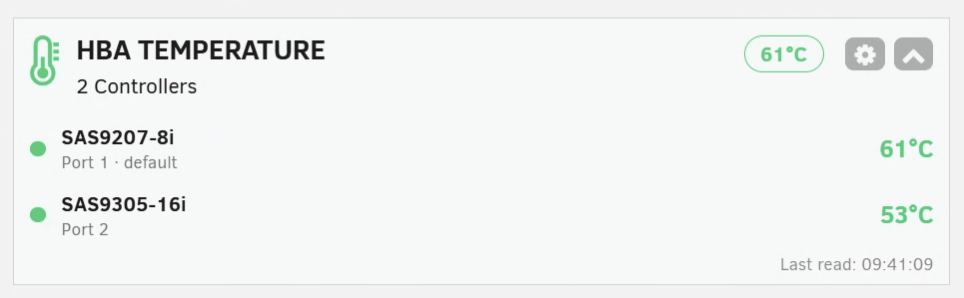
Perfect. No notes. Both of my cards are showing up. Thanks for sharing your work!
-
Brilliant! I love the dashboard widget, too. I have 2 LSI cards- would it be possible to list both in the widget (combined or with a button/tab to switch)?
-
Okay, we clearly need someone from Lime in this thread, preferably with an official workaround and a quick ETA on when the permanent fix is due. I'm in the same predicament. Before the .12 release, I went weeks and months in between reboots. Now I have to do it every couple of days. Waited until the x.x.1 bug fix before updating, but apparently that's giving Lime Inc too much trust!