





Zeench
Members
-
Joined
-
Last visited
-
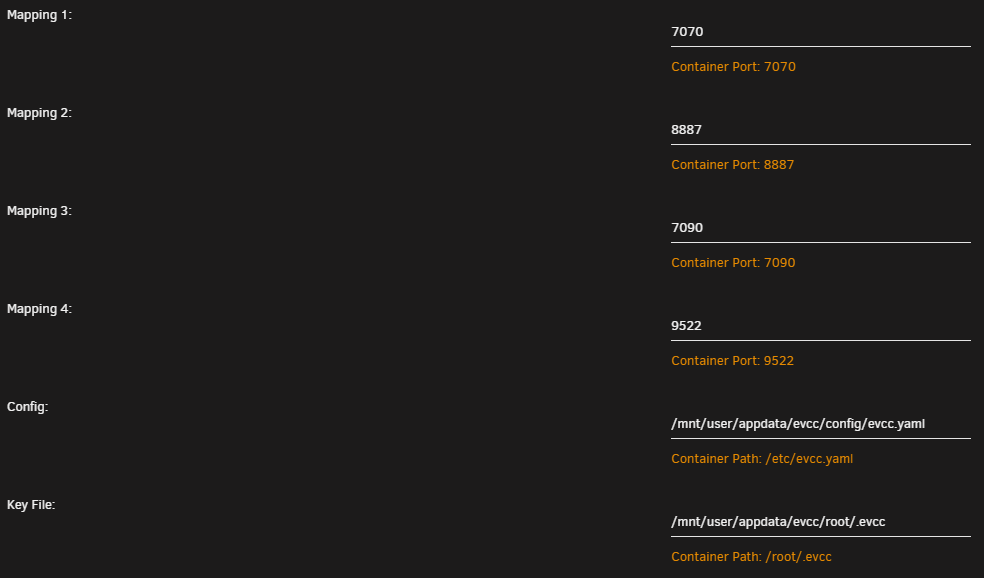
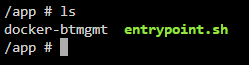
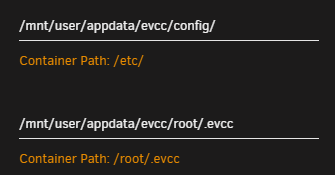
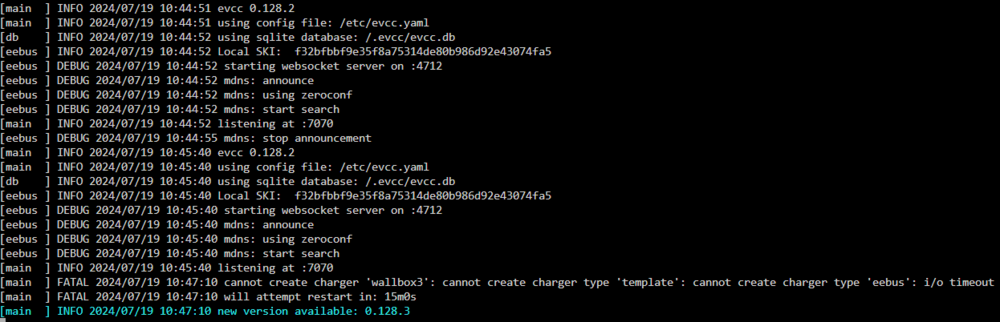
Hi zusammen, ich habe den Thread und die Tips hier gelesen und den Docker zum laufen bekommen. Aber es scheint nicht meine Daten bei der Ersteinrichtung zu nutzen. Sieht fast aus wie eine Demo, denn da tauchen Autos auf "blauer eGolf" "weißer Tesla", die ich nicht habe und nie in die yaml geschrieben habe. Auch sehe ich meine configurierte Wallbox nicht. jemand eine Idee woran das liegen könnte? Bei config und Key File finde ich etwas komisch. Und zwar das Pfad Ende, das ist ja ein Ordner der genauso heißt wie die Datei, zumindest im falle der evcc.yaml. es ist also eigentlich wie folgt: /mnt/user/appdata/evcc/config/evcc.yaml/evcc.yaml Wenn ich aber, wie von @alturismo vorgeschlagen, den Ordner lösche und die evcc.yaml dort direkt hinlege, dann startet der Docker nicht mehr aufgrund von "Bad Parameter". Ich vermute das mein Fehler hier irgendwo liegt. Denn EVCC funktioniert auf meinem Rechner problemlos. Habe die config auch einfach nur in die jeweiligen gemappten Ordner gelegt.... edit: bin wieder ein Stück weiter und das festigt mein obigen Verdacht. In der Dockerconsole wird mir weder die Datei noch ein Ordner angezeigt. Was habt ich hier falsch gemacht? Der Container läuft ja und anscheinend auch mit einer Demo Version. Da müsste ja also mehr drin liegen als das obige, oder? edit2: okay ich habe nun eine Interaktion des Container und meiner evcc.yaml hinbekommen indem ich beim Template die Pfade angepasst habe und das evcc.yaml entfernt hab. Nun erstellt er mir sogar 3 Dateien im config Ordner und das Log zeigt nicht mehr nur haufenweise Debug Nachrichten an sondern was plausibles. Jetzt funzt es auf Seiten von Unraid. Config is noch nicht ganz rund, aber da muss ich im EVCC Forum mal fragen. Was ich hier noch als Tip mitgeben will sind die Mappings die man im Dockertemplate einstellt. Ich habe mich an das gehalten was @Rockikone oben eingestellt hat. Das funktioniert bei mir nicht ganz. Konkret musste ich wie oben beschrieben den Config-Pfad ändern auf "/mnt/user/appdata/evcc/config/" (also ohne das evcc.yaml) Weiterhin musste ich als Networktyp Host verwenden. Damit ging es dann jetzt. Ich lasse hier mal alles stehen, vielleicht hilft das dem ein oder anderen
-
Ist es eigentlich egal, auf welchem Cachedrive mein Dockerimage liegt? Aktuell liegt es auf meinem kleinen Cachedrive, nicht im Dockercachedrive...
-
Okay, also noch ne zweite 1TB SSD Platte kaufen,w enn die mal irgendwo im Angebot ist und dann einen Pool aus den beiden einzelnen machen. Welches FS sollte ich dann gleich nehmen, wenn es soweit ist?
-
Sollte dann ja so richtig sein, oder?

-
Danke, hab jetztd as Secondary Storage rausgenommen. Das orangene Ausrufezeichen ist leider immernoch da, wahrscheinlich weil jetzt gerade noch irgendwas dran gemacht wird? Backup hab ich mit AppdataBackup täglich aufs Array..
-
Ich muss nun nochmal fragen, ist mein Cache richtig eingestellt? Warum auch immer steht ja bei Storage dass das Array auf den Dockercache kopiert wird... Ich möchte ja eigenltich das alle Platten möglichst wenig laufen und der Mover quasi die Appdata alle paar Stunden oder wenn Cache voll ist, auf das Array schiebt. Denn ich habe hier Surveillance laufen und die Daten möchte ich auf dem Array und nicht nur auf dem Cache haben. Das funktioniert soweit auch, aber mich irritiert der Pfeile welche von Array auf Dockercache zeigt. Nvm, das hab ich ja im COntainer eingestellt, das die Media Daten vom NVR auf das Array geschrieben werden und nicht auf den Cache...

-
Danke Archon für die Aufklärung. Auf der Dockercache Platte liegt nur Appdata, welche dann durch den Mover hoffentlich immer aufs Array verschoben wird.
-
Ich glaub ich bin zu sehr Laie dazu. Finde nur englishe Threads mit Problemen dazu. Zu welchen Probs führt es denn, wenn ich das bei BTRFS lasse? Hab mal kurz gegoogelt aber ich verstehe leider nur Bahnhof wenn es um Filesysteme geht. Kann verstehen wenn du/ihr das hier nicht ausführen wollt. Dann einfach sein lassen. Problem ist ja gelöst und das hoffentlich für länger
-
Ich kanns ja gar nicht glauben. Habs sie gerade mal ausgebaut und wieder eingebaut und jetzt geht sie wieder. Ich hätte niemals für möglich gehalten das die Kabel die Ursache sein könnten. Hat das was mit Kontaktkorrosion zu tun, oder wie kommt das? Ich werde mich dort bei Gelegenheit mal einlesen. Aber das Filesystem zu ändern, ist nicht möglich mit den Daten darauf oder? Vielen Dank an euch beide
-
Hallo zusammen, über Nacht sind bei mir einige Docker ausgestiegen. Wollte sie neu starten, was einen Execution Error zur Folge hatte. Naiv wie ich war, dachte ich ein Reboot wird schon helfen.... Nach dem Reboot fehlt nun eine meiner beiden Cachedisks, welche für meine Dockercontainer zuständig war/ist. Leider funktioniert nun gar nix mehr da das Array nicht mehr hochfährt Die SSD die nicht mehr auftaucht, ist die neuste im Rack und erst ca. nen halbes Jahr alt. Kann es sein das sie kaputt ist? Wenn ja kann ich irgendwie meine Docker wieder ans laufen bringen? Die Daten der Container sind ja im Array gespeichert, da brauch ich keine Angst haben oder? Was ist die leichteste Lösung? Ich hab auch kein Problem eine Neue Platte zu kaufen sofern das die einfachste Lösung ist. Diag hab ich mal mit hochgeladen, ich hoffe das mir hier mal wieder geholfen werden kann. Vielen lieben Dank schon im Voraus und beste Grüße Chriz chriznas-diagnostics-20240506-0941.zip

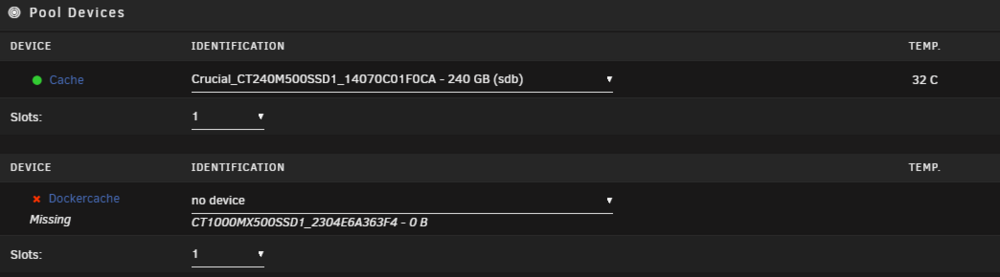
-
ah okay, danke
-
was meisnt du mit MC?
-
hab mich nicht getraut es für alle zu machen 😅, aber für den bestimmten Container hat es geklappt. Danke an alle 👍
-
Ich möchte EVCC als Dockercontainer zum laufen bringen. Dazu muss aber eine config datei importiert werden. Ich habe EVCC vorher in Windows getestet und konfiguriert und möchte diese config nun auf den Container übertragen. TLDR: rüberkopieren einer configdatei
-
Es muss doch eine Lösung geben um dem Container zugriff zu gewähren und mir bzw. einem Nutzer auch, zusätzlich?!


