





MrChip
Members
-
Joined
-
Last visited
Everything posted by MrChip
-
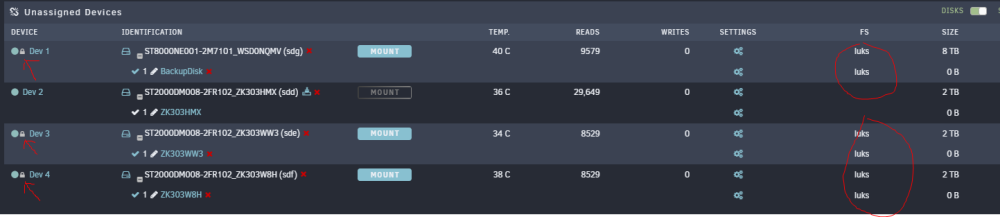
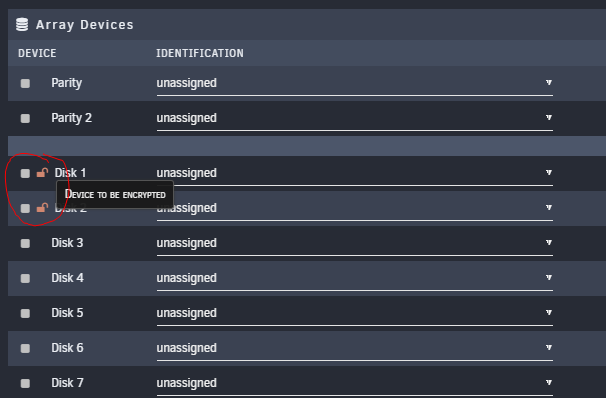
Interesting .... When I unassign the disks again, Unassigned Devices appears to figure out that they are encrypted. But Unraid still thinks that those device slots are to be encrypted.
-
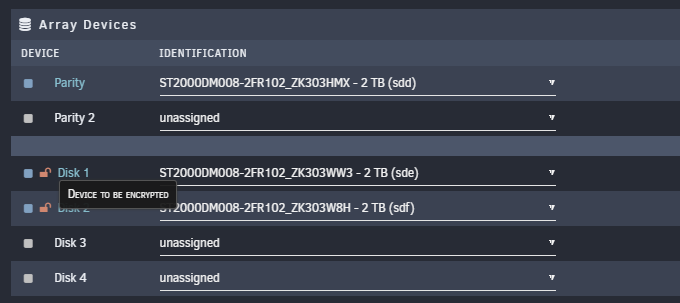
In the GUI I've now assigned the disks according to the DISK_ASSIGNMENTS.txt file in /boot/config - see screen capture below. (This file matches what I have in multiple backup copies, so I believe it's correct.) I believe the parity "should" be fine, but I am seeing a notice that a Parity Sync will be done (not parity check), implying that Unraid doesn't think that there is valid parity. There is a check box to say parity is already valid. And one to enter maintenance mode. I'm inclined check both boxes and run a parity check on the array with the disks unmounted. Is that sane and reasonable? BUT ... BUT ... The array is already encrypted, AND the disk assignment list has icons on both Disk 1 and 2 that indicate the devices will be encrypted. There is also a prompt to enter a new encryption key, not an existing key, to start the array. Encrypting already encrypted disks sounds like a very bad idea to me. So now I'm not inclined to start the array. Any chance Unraid will discover that the disks are already encrypted and not re-encrypt them? Or can I tell it that somehow? I am well backed up, so I can recover from data loss on the array. Here is DISK_ASSIGNMENTS.txt again:


-
They were up to date when the flash drive failed. I'd seen nothing to make me think there was any parity issues prior to then. Can I validate that outside of reassigning them and running a parity check on the assigned array? The 8TB disk is not part of the array or cache. It is always unassigned.
-
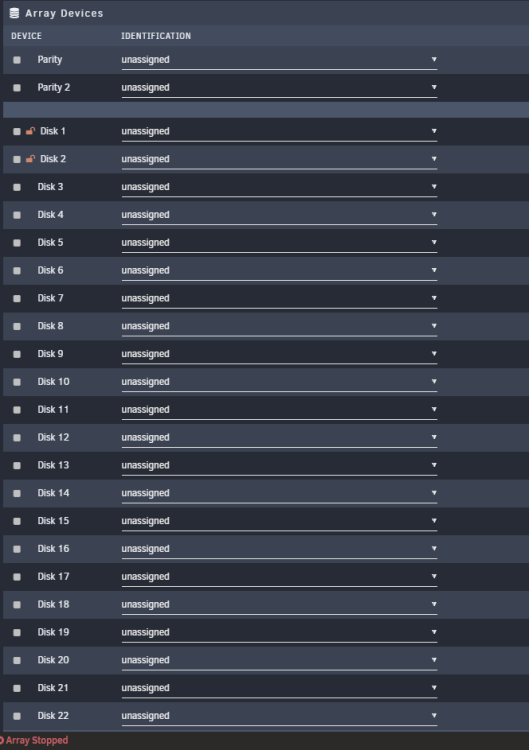
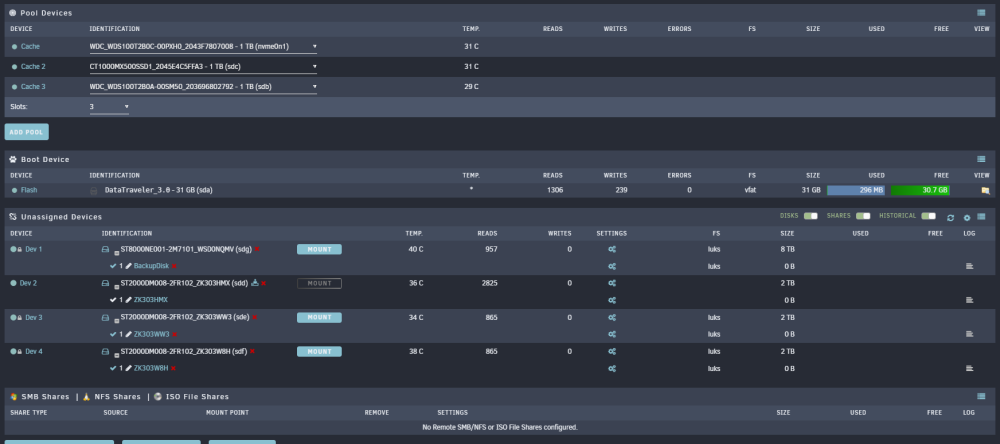
Here are the requested screen captures ...
-
Here are my diagnostics ... chip-un-diagnostics-20230310-2251.zip
-
My flash drive failed, and after replacing it and recovering the backup config, my hard drives are shown as unassigned after the server boots, but the cache drives are assigned correctly. What did I miss when restoring config from backup? Details: 1. My original flash drive failed, and the server would not start the gui after booting. Logging in on the console and inspecting syslog revealed a substantial number of read and write errors on sda, so I determined the flash drive was toast and replaced it. 2. I obtained a new USB flash drive (Kingston DataTraveler Exodia, 32GB, USB 3.2). The USB creator tool would not populate this flash drive, so I followed the manual method. I'm still on 6.9.2 ad I used my 6.9.2 server zip to install the software on the flash drive. 3. I copied my config folder from my latest backup (last night) to the flash drive. 4. I booted the server off the new flash drive. It came up to the GUI on the Main page, and the registration key warning was displayed. 5. I followed the procedure to get and install a new key. The server accepted the new key and the registration shows as: Registered on: Friday, 2023-03-10, 20:08 6. Now the Main page shows all array devices as unassigned. Cache devices are assigned and look fine. The array start button is greyed out with the note "No array data disks have been assigned!" 7. The Unassigned Devices list is showing 4 disks. One is expected. The other 3 appear to be the array drives that should be listed in the array device list. 8. The DISK_ASSIGNMENTS.txt (copied below) file in my config folder from the backup lists the disks as I expect them, but the GUI doesn't match. 9. The list of config files in /boot/config matches the files in the backup copy. The current /boot/config doesn't appear to be missing anything. What might I be missing that would prevent the server from remembering the array disk assignments? Is it safe to re-assign the disks according to DISK_ASSIGNMENTS.txt? I'm grateful for any guidance you may offer! Here is DISK_ASSIGNMENTS.txt off the current flash drive:
-
I'm also getting the Invalid Certificate error from FCP. I don't use self-signed certs but use use Lets Encrypt certs. My home network is all based on a local domain name local.mydomain.tld, and my certs are for myserver.local.mydomain.tld. In settings I had Local TLD set to local, which doesn't match the certificate, but everything was working fine, so I missed this. I changed Local TLD to local.mydomain.tld . I feel that change should work, but I'd like to confirm that there won't be an issue going to 6.10. Perhaps @ljm42 can comment on this? After changing the Local TLD, I now get the same FCP error, but this time it's due to a case mismatch - the certificate uses all lower case domain name, but my Server Name setting uses an upper case letter. I'll change the server name setting, but as host and domain names are case insensitive, I suggest that FCP do a case insensitive match.
-
AMQP looks like overkill for my needs, but the MQTT plugin would be fine. It's not a big deal for me using the current version I guess. My only problem has been that date format, and I can work around that. So, do what suits you. 😎
-
Will there be any updates to the MQTT version? I'm getting an error trying to configure the log timestamp format: Error: Unknown configuration variable "log_timestamp_format". It appears this variable applies to newer versions of the Mosquitto MQTT broker. Current version is now 2.0 on mosquitto.org. Bob
-
Sigh ... Live and learn from silly mistakes. My main board has SATA hot swap settings for each SATA port. I forgot about that. When I set up my server I ignored the SATA port settings for ports I wasn't going to use, so they were at default of no hot swap. When I added the eSATA dock I used one of those ports. I remembered changing the hot swap setting, but forgot that it was per-port and I hadn't done it for all the ports. I fixed that now, and the dock is working as expected when the system is booted with the dock off and no drive in it.
-
I generally do the same - turn the unit off before removing or inserting disks. I did that with the USB dock and I do that with the new one. With this problem I'm experiencing, I've tried the different options - replacing a disk with the unit on, and replacing with the unit off. In either case if there's no disk in it (with the unit powered on) when Unraid boots then any amount of disk swapping doesn't work - the disk doesn't appear in UD. I can change disks with the unit on, or turn it off and swap disks and turn it back on, and in both cases the disk does not appear in UD. But when I boot Unraid with a disk in the unit and the unit powered up then UD shows the disk and it shows each disk change, regardless of whether the unit was on or off during the change. (By that I mean disk changed with the unit on, versus turn off the unit, change the disk, turn on the unit.) If this was another USB dock device, I'd send it back because I'm sure disk changes should be detected regardless of whether there was a disk in it at boot time. But this is an eSATA dock, and I'm not sure how Unraid/SATA should behave when a device appears on a SATA port after power-up. I did some testing and looked at lsscsi output and tried echo "- - -" > /sys/class/scsi_host/host4/scan to see if that helped. It didn't, but here's the details for those interested: Boot with device on and disk inserted The UD device lists shows the disk as unassigned device Dev2 (I have a permanently installed unassigned disk at Dev1) root@Tower:~# lsscsi [0:0:0:0] disk Ut163 USB2FlashStorage 0.00 /dev/sda [1:0:0:0] disk ATA WDC WDS100T2B0A 00WD /dev/sdb [2:0:0:0] disk ATA CT1000MX500SSD1 033 /dev/sdc [4:0:0:0] disk ATA WDC WD10EZRX-00A 1A01 /dev/sdd [7:0:0:0] disk ATA ST2000DM008-2FR1 0001 /dev/sde [7:0:1:0] disk ATA ST2000DM008-2FR1 0001 /dev/sdf [7:0:2:0] disk ATA ST2000DM008-2FR1 0001 /dev/sdg [7:0:3:0] disk ATA ST8000NE001-2M71 EN01 /dev/sdh [N:0:1:1] disk WDC WDS100T2B0C-00PXH0__1 /dev/nvme0n1 -- the disk is: [4:0:0:0] disk ATA WDC WD10EZRX-00A 1A01 /dev/sdd Turn off the dock device and remove the disk -- the disk disappears from the UD list, and the the lsscsi output root@Tower:~# lsscsi [0:0:0:0] disk Ut163 USB2FlashStorage 0.00 /dev/sda [1:0:0:0] disk ATA WDC WDS100T2B0A 00WD /dev/sdb [2:0:0:0] disk ATA CT1000MX500SSD1 033 /dev/sdc [7:0:0:0] disk ATA ST2000DM008-2FR1 0001 /dev/sde [7:0:1:0] disk ATA ST2000DM008-2FR1 0001 /dev/sdf [7:0:2:0] disk ATA ST2000DM008-2FR1 0001 /dev/sdg [7:0:3:0] disk ATA ST8000NE001-2M71 EN01 /dev/sdh [N:0:1:1] disk WDC WDS100T2B0C-00PXH0__1 /dev/nvme0n1 Turn on device, without disk inserted -- no change to lsscsi output, no change to UD device listing Turn off device, insert disk, turn on device -- disk appears in UD and lsscsi becomes root@Tower:~# lsscsi [0:0:0:0] disk Ut163 USB2FlashStorage 0.00 /dev/sda [1:0:0:0] disk ATA WDC WDS100T2B0A 00WD /dev/sdb [2:0:0:0] disk ATA CT1000MX500SSD1 033 /dev/sdc [4:0:0:0] disk ATA WDC WD10EZRX-00A 1A01 /dev/sdd [7:0:0:0] disk ATA ST2000DM008-2FR1 0001 /dev/sde [7:0:1:0] disk ATA ST2000DM008-2FR1 0001 /dev/sdf [7:0:2:0] disk ATA ST2000DM008-2FR1 0001 /dev/sdg [7:0:3:0] disk ATA ST8000NE001-2M71 EN01 /dev/sdh [N:0:1:1] disk WDC WDS100T2B0C-00PXH0__1 /dev/nvme0n1 Then I tried booting without a disk inserted in the dock and the dock powered off. No disk is listed in UD (except the permanent one at Dev1) root@Tower:~# lsscsi [0:0:0:0] disk Ut163 USB2FlashStorage 0.00 /dev/sda [1:0:0:0] disk ATA WDC WDS100T2B0A 00WD /dev/sdb [2:0:0:0] disk ATA CT1000MX500SSD1 033 /dev/sdc [7:0:0:0] disk ATA ST2000DM008-2FR1 0001 /dev/sdd [7:0:1:0] disk ATA ST2000DM008-2FR1 0001 /dev/sde [7:0:2:0] disk ATA ST2000DM008-2FR1 0001 /dev/sdf [7:0:3:0] disk ATA ST8000NE001-2M71 EN01 /dev/sdg [N:0:1:1] disk WDC WDS100T2B0C-00PXH0__1 /dev/nvme0n1 Insert a disk into the dock and power it on. -- No change in UD disk list, nor the lsscsi output root@Tower:~# lsscsi [0:0:0:0] disk Ut163 USB2FlashStorage 0.00 /dev/sda [1:0:0:0] disk ATA WDC WDS100T2B0A 00WD /dev/sdb [2:0:0:0] disk ATA CT1000MX500SSD1 033 /dev/sdc [7:0:0:0] disk ATA ST2000DM008-2FR1 0001 /dev/sdd [7:0:1:0] disk ATA ST2000DM008-2FR1 0001 /dev/sde [7:0:2:0] disk ATA ST2000DM008-2FR1 0001 /dev/sdf [7:0:3:0] disk ATA ST8000NE001-2M71 EN01 /dev/sdg [N:0:1:1] disk WDC WDS100T2B0C-00PXH0__1 /dev/nvme0n1 Force a rescan: root@Tower:~# echo "- - -" > /sys/class/scsi_host/host4/scan No change in UD or lsscsi. root@Tower:~# lsscsi [0:0:0:0] disk Ut163 USB2FlashStorage 0.00 /dev/sda [1:0:0:0] disk ATA WDC WDS100T2B0A 00WD /dev/sdb [2:0:0:0] disk ATA CT1000MX500SSD1 033 /dev/sdc [7:0:0:0] disk ATA ST2000DM008-2FR1 0001 /dev/sdd [7:0:1:0] disk ATA ST2000DM008-2FR1 0001 /dev/sde [7:0:2:0] disk ATA ST2000DM008-2FR1 0001 /dev/sdf [7:0:3:0] disk ATA ST8000NE001-2M71 EN01 /dev/sdg [N:0:1:1] disk WDC WDS100T2B0C-00PXH0__1 /dev/nvme0n1 This was surprising and disappointing - I was hoping that the rescan echo command would be what I needed. But no. I then tried booting with the dock powered on but no disk inserted. No improvement. Same UD and same lsscsi output. I tried the echo "- - -" again, and still no improvement.
-
Hi. I just received a new eSATA docking bay for HDDs. I'm replacing a USB3 dock that works fine with older disks but new disks I just bought aren't recognized by Unraid in that dock. Now, the new dock isn't recognized unless there is a disk in the dock at boot time. Without a disk in it on boot, any disk I put in the dock later just doesn't appear in Unassigned Devices. Nor are there any logs that show a disk being added. With a disk in the unit on boot, that disk is recognized in UD. I can remove it and add another disk and it gets recognized and correctly listed in UD, and there are related log entries. Is this behavior to be expected? Or should it act like the previous USB3 dock and show disks added and removed regardless of whether there was a disk in it at boot time? Is there a way I can trigger the OS to pick up the dock and disk once booted (when I forget to put a disk in the dock on boot, which I'm sure I will, 🙄 )? These are what I bought and added to my server: https://www.amazon.ca/ORICO-External-Docking-SSD(4TB-support/dp/B00A5323NO/ref=sr_1_5?dchild=1&keywords=orico+esata&qid=1628120388&sr=8-5 https://www.amazon.ca/StarTech-com-ESATAPLATE1-1-Port-eSATA-Bracket/dp/B000GX4C7I/ref=sr_1_17?dchild=1&keywords=esata+cable&qid=1628120450&sr=8-17 Thanks for any feedback. Bob
-
And I don't have that record, so I'm out of luck I think to diagnose further at this point. I've configured the syslog server feature to help retain logs going forward. I've put the disk on the shelf, marked as questionable. Thank you for your help and insights.
-
Those messages don't look familiar. What I saw was more like: <date> <time> <hostname> <???> Read error <disk> block=123456789 where I don't recall what was at <???> , and <disk> was either Disk2 or sdc - it unambiguously identified the disk listed on the Main tab. There were thousands of these error logs, all together as a block in the log file with only a handful of other log messages interspersed though the block. The block numbers weren't consecutive, but they appeared to be inside a range. There was a parity check running at the time, so I at first thought that there was a bad spot on the disk that the parity check was reading through at the time. But if that were so, I would anticipate errors to appear on the pre-read portion of the follow-up preclear, but there were no errors reported during any of the preclear. The disks in this server are on the main board SATA ports.
-
Thanks for the info. I don't have syslogs for the read errors. I didn't save a copy prior to shutting down to swap disks - I forgot logs aren't persistent across reboots. What are the specific log messages that distinguish disk issue from connection issues? Maybe I can recognize from memory. The messages I saw were showing a read error followed by a block number, if that helps.
-
Earlier this year I converted an older Ubuntu file server into an Unraid server. It's been fine until I started getting notices about 1 disk. First these: Event: Unraid Disk 2 SMART health [197] Subject: Warning [FLINT-UN] - current pending sector is 2 Description: WDC_WD10EZRX-00L4HB0_WD-WMC4J0164198 (sdc) Importance: warning Event: Unraid Disk 2 SMART health [198] Subject: Warning [FLINT-UN] - offline uncorrectable is 2 Description: WDC_WD10EZRX-00L4HB0_WD-WMC4J0164198 (sdc) Importance: warning I followed another thread here and ran an extended SMART self-test, which finished without showing anything out of the ordinary other than the 197 and 198 attributes at 2. I ran a parity check without corrections and it passed fine. The logs showed no errors on the drive. So I monitored it. Shortly the 198 returned to 0: Event: Unraid Disk 2 SMART message [198] Subject: Notice [FLINT-UN] - offline uncorrectable returned to normal value Description: WDC_WD10EZRX-00L4HB0_WD-WMC4J0164198 (sdc) Importance: normal I continued using the disk, and then this past weekend it started reporting errors: Event: Unraid array errors Subject: Warning [FLINT-UN] - array has errors Description: Array has 1 disk with read errors Importance: warning Disk 2 - WDC_WD10EZRX-00L4HB0_WD-WMC4J0164198 (sdc) (errors 856) The error count went up to about 2700 and then stayed there. This all happened during a scheduled parity check. There haven't been any further errors logged since that parity check. After seeing those read errors, I got myself a new drive and installed it and precleared it. Once precleared I put the new drive in for the old drive. This went smoothly and the rebuild onto the new drive completed without error. The old drive is now in as an unassigned device. I wanted to see what I could learn about it's condition and now it's looking like there's nothing amiss with it (but I don't fully understand all the SMART stats, so I may be missing something). I ran an extended self-test which came back with the current pending sector at 2 as before. So I ran a pre-clear and was anticipating that there would be read errors, but there were none. The preclear completed without error, and the current pending sector has now gone back to 0: Event: Unraid device dev1 SMART message [197] Subject: Notice [FLINT-UN] - current pending sector returned to normal value Description: WDC_WD10EZRX-00L4HB0_WD-WMC4J0164198 (dev1) Importance: normal So now I don't know how to treat the disk. The read errors on the weekend suggested it was bad, but nothing since seems to support that. I'm attaching the latest SMART self tests - the extended one before the pre-clear and a regular one after, and the pre-clear logs and summary. I'm also including an extended self test form Jul 14 when the current pending sector first appeared. What do you think? How would you treat this disk now? Thanks for any feedback. Bob disk-info.zip


