





MedievalKnievel
Members
-
Joined
-
Last visited
-
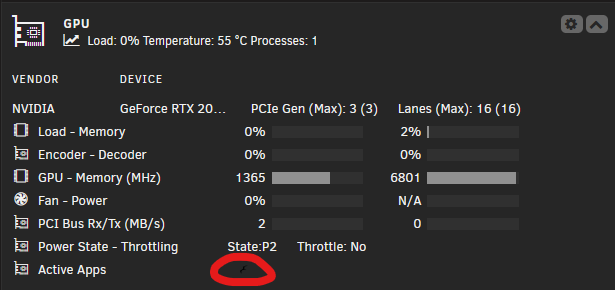
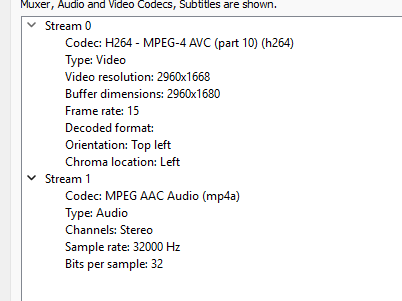
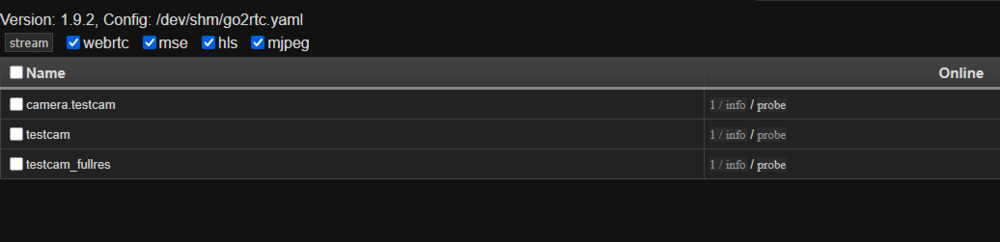
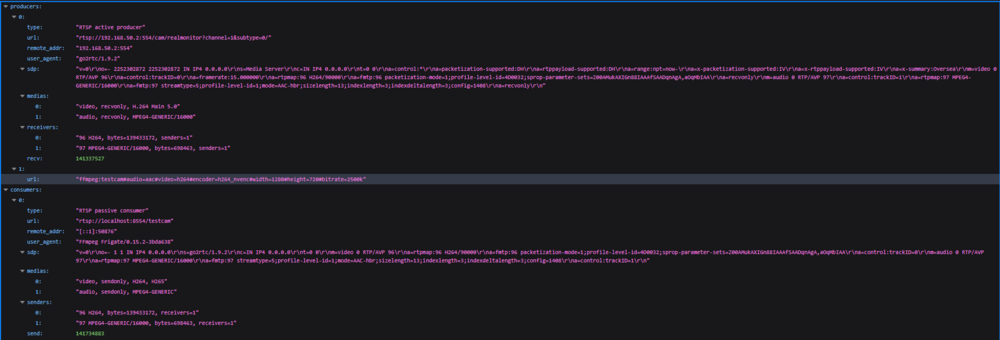
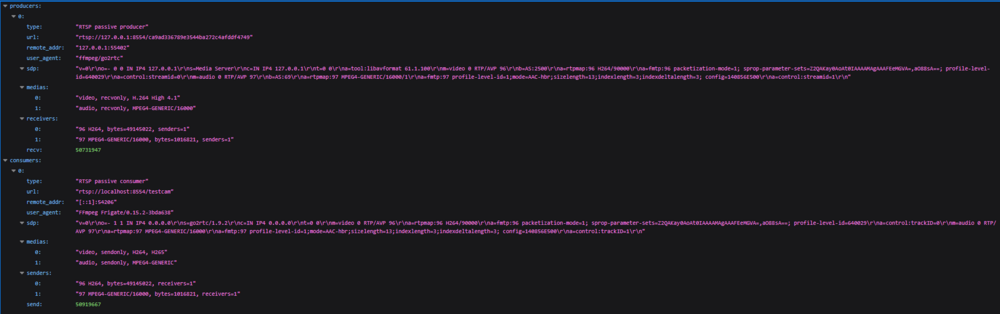
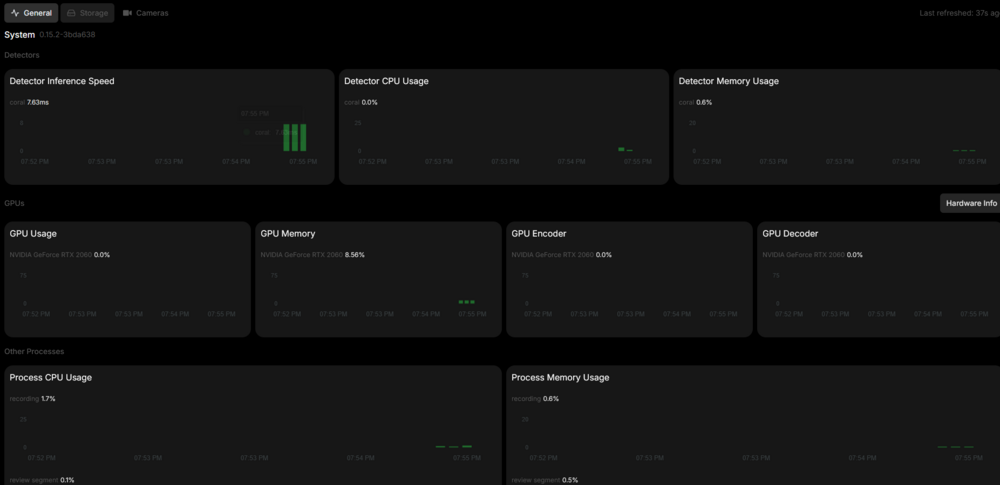
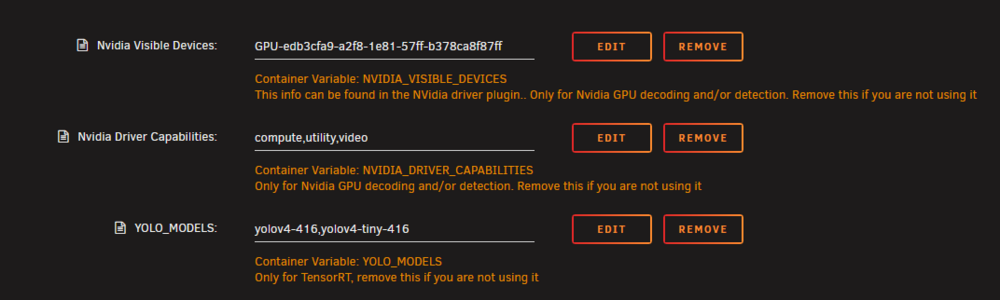
SOLVED!!!! I'll leave the additional details below in case they help anyone in the future but the ticket was adding #hardware to my resize ffmpeg params for the testcam stream: go2rtc: streams: testcam_fullres: - rtsp://{FRIGATE_RTSP_USER}:{FRIGATE_RTSP_PASSWORD}@192.168.50.2:554/cam/realmonitor?channel=1&subtype=0 - ffmpeg:testcam_fullresolution#audio=aac testcam: - ffmpeg:rtsp://{FRIGATE_RTSP_USER}:{FRIGATE_RTSP_PASSWORD}@192.168.50.2:554/cam/realmonitor?channel=1&subtype=0#audio=aac#video=h264#encoder=h264_nvenc#width=1280#height=720#bitrate=2500k#fps=15#preset=llhq#hardware EDIT: please feel free to review the below, but I modified my go2rtc config and theres some progress. Previously my configuration was: go2rtc: streams: testcam_fullres: - rtsp://{FRIGATE_RTSP_USER}:{FRIGATE_RTSP_PASSWORD}@192.168.50.2:554/cam/realmonitor?channel=1&subtype=0 - ffmpeg:testcam_fullresolution#audio=aac testcam: - ffmpeg:rtsp://{FRIGATE_RTSP_USER}:{FRIGATE_RTSP_PASSWORD}@192.168.50.2:554/cam/realmonitor?channel=1&subtype=0#audio=aac#video=h264#encoder=h264_nvenc#width=1280#height=720#bitrate=2500k#fps=15#preset=llhq#ffmpeg=-ar 44100 The above results in a 720p stream to HA, I then modified my go2rtc to: go2rtc: streams: testcam_fullres: - rtsp://{FRIGATE_RTSP_USER}:{FRIGATE_RTSP_PASSWORD}@192.168.50.2:554/cam/realmonitor?channel=1&subtype=0 - ffmpeg:testcam_fullresolution#audio=aac testcam: - rtsp://{FRIGATE_RTSP_USER}:{FRIGATE_RTSP_PASSWORD}@192.168.50.2:554/cam/realmonitor?channel=1&subtype=0 - "ffmpeg:testcam#audio=aac#video=h264#encoder=h264_nvenc#width=1280#height=720#bitrate=2500k" I can now see my GPU being used for decoding, but the stream to HA is back to the fullresolution stream from the camer, it seems the ffmpeg args aren't being applied to the stream? From VLC to rtsp://192.168.0.200:8554/testcam: So I'm wondering if this is just some misconfiguration with my go2rtc and ffmpeg args? Edit 2: Checking go2rtc via port 1984, I see three streams: Checking the producer details of camera.testcam: So the params seem to be on the URL? But theyre not transforming the stream? Edit 3: Reverting my config to 720 via: go2rtc: streams: testcam_fullres: - rtsp://{FRIGATE_RTSP_USER}:{FRIGATE_RTSP_PASSWORD}@192.168.50.2:554/cam/realmonitor?channel=1&subtype=0 - ffmpeg:testcam_fullresolution#audio=aac testcam: - ffmpeg:rtsp://{FRIGATE_RTSP_USER}:{FRIGATE_RTSP_PASSWORD}@192.168.50.2:554/cam/realmonitor?channel=1&subtype=0#audio=aac#video=h264#encoder=h264_nvenc#width=1280#height=720#bitrate=2500k#fps=15#preset=llhq#ffmpeg=-ar 44100 Results in 2-stream in rtc testcam (720p) shows: Hello, Thanks for taking a look! I've removed the YOLO_MODELS as well as the --gpus all extra parameter and it appears to be the same result - 0 gpu activity for encoding/decoding. Regarding logging, this is all the information available to me in logs via Unraid, not sure why that is. As I interact with Frigate, via HA for example, I do see API request get logged, but not much else after startup, would you have any recommendations regarding additional logging? The Frigate UI returns the same logging statements: s6-rc: info: service nginx successfully started s6-rc: info: service certsync: starting s6-rc: info: service certsync successfully started s6-rc: info: service legacy-services: starting s6-rc: info: service legacy-services successfully started 2025-07-27 17:16:16.984157544 [INFO] Starting go2rtc... 2025-07-27 17:16:17.067737312 17:16:17.067 INF go2rtc platform=linux/amd64 revision=b2399f3 version=1.9.2 2025-07-27 17:16:17.067740898 17:16:17.067 INF config path=/dev/shm/go2rtc.yaml 2025-07-27 17:16:17.068138729 17:16:17.068 INF [api] listen addr=:1984 2025-07-27 17:16:17.068204363 17:16:17.068 INF [rtsp] listen addr=:8554 2025-07-27 17:16:17.068312326 17:16:17.068 INF [webrtc] listen addr=:8555/tcp 2025-07-27 17:16:17.575658969 [INFO] Starting certsync... 2025-07-27 17:16:18.855746669 [2025-07-27 17:16:18] frigate.util.config INFO : Checking if frigate config needs migration... 2025-07-27 17:16:18.868999035 [2025-07-27 17:16:18] frigate.util.config INFO : frigate config does not need migration... 2025-07-27 17:16:18.895554684 [2025-07-27 17:16:18] frigate.app INFO : Starting Frigate (0.15.2-3bda638) 2025-07-27 17:16:18.896346798 [2025-07-27 17:16:18] frigate.util.services INFO : Current file limits - Soft: 40960, Hard: 40960 2025-07-27 17:16:18.896374571 [2025-07-27 17:16:18] frigate.util.services INFO : File limit set. New soft limit: 40960, Hard limit remains: 40960 2025-07-27 17:16:18.903793033 [2025-07-27 17:16:18] peewee_migrate.logs INFO : Starting migrations 2025-07-27 17:16:18.904380501 [2025-07-27 17:16:18] peewee_migrate.logs INFO : There is nothing to migrate 2025-07-27 17:16:18.916107481 [2025-07-27 17:16:18] frigate.app INFO : Recording process started: 382 2025-07-27 17:16:18.925019200 [2025-07-27 17:16:18] frigate.app INFO : Review process started: 391 2025-07-27 17:16:18.926952857 [2025-07-27 17:16:18] frigate.app INFO : go2rtc process pid: 98 2025-07-27 17:16:18.941766278 [2025-07-27 17:16:18] detector.coral INFO : Starting detection process: 398 2025-07-27 17:16:18.956788122 [2025-07-27 17:16:18] frigate.app INFO : Output process started: 417 2025-07-27 17:16:18.980374160 [2025-07-27 17:16:18] frigate.app INFO : Camera processor started for testcam: 431 2025-07-27 17:16:18.995085248 [2025-07-27 17:16:18] frigate.app INFO : Capture process started for testcam: 437 2025-07-27 17:16:19.101550732 [2025-07-27 17:16:19] frigate.api.fastapi_app INFO : Starting FastAPI app 2025-07-27 17:16:19.192482597 [2025-07-27 17:16:19] frigate.api.fastapi_app INFO : FastAPI started 2025-07-27 17:16:21.565586554 [2025-07-27 17:16:18] frigate.detectors.plugins.edgetpu_tfl INFO : Attempting to load TPU as usb 2025-07-27 17:16:21.568974113 [2025-07-27 17:16:21] frigate.detectors.plugins.edgetpu_tfl INFO : TPU found 2025-07-27 17:16:26.311426543 [INFO] Starting go2rtc healthcheck service... Within Frigate if i access logs > Go2rtc I see: 2025-07-27 17:16:16.308238201 [INFO] Preparing new go2rtc config... 2025-07-27 17:16:16.984157544 [INFO] Starting go2rtc... 2025-07-27 17:16:17.067737312 17:16:17.067 INF go2rtc platform=linux/amd64 revision=b2399f3 version=1.9.2 2025-07-27 17:16:17.067740898 17:16:17.067 INF config path=/dev/shm/go2rtc.yaml 2025-07-27 17:16:17.068138729 17:16:17.068 INF [api] listen addr=:1984 2025-07-27 17:16:17.068204363 17:16:17.068 INF [rtsp] listen addr=:8554 2025-07-27 17:16:17.068312326 17:16:17.068 INF [webrtc] listen addr=:8555/tcp 2025-07-27 17:16:26.311426543 [INFO] Starting go2rtc healthcheck service... 2025-07-27 17:33:29.942486750 17:33:29.942 INF [streams] create new stream url=rtsp://192.168.0.200:8554/testcam 2025-07-27 17:33:29.944609504 17:33:29.944 INF [streams] create new stream url=rtsp://192.168.0.200:8554/testcam 2025-07-27 17:33:41.904474459 17:33:41.904 INF [streams] create new stream url=rtsp://192.168.0.200:8554/testcam 2025-07-27 17:33:41.905668341 17:33:41.905 INF [streams] create new stream url=rtsp://192.168.0.200:8554/testcam From within the Frigate metrics view: And from within Unraid dashboard: So it definitely appears that the GPU is passed through to Frigate, and Frigate is connected but it just doesn't use the GPU for encode/decode which is why I leaned back towards an error in configuration. I would echo your perspective and was hoping to see SOMETHING more in logs, the lack of information is definitely problematic, not sure why logs are so quiet


-
Howdy, That’s correct. I use coral for detection as it’s much more efficient than a GPU. My purposes for the GPU is to encode/decode my primary camera stream down to a desired resolution to serve to home assistant instance. The out of box substream of my armcrest camera is not to my satisfaction. Thus I resize the stream. This resize operation should be occurring against the GPU which should churn the stream quite easily but as I’ve shown in the images it seems frigate doesn’t leverage the GPU for this encoding/decoding. I’m guessing it’s something related to my config options but I’ve defined a global FFMPEG value for hardware acceleration to use the GPU. With this config applied I had assumed the decode/encode operation being done via my go2rtc stream for “testcam” would append the global setting. Maybe I should try setting hw accel on the go2rtc steam directly? I’d have to check the docs to see if that’s possible but I think all ffmpeg args are supported if I remember correctly
-
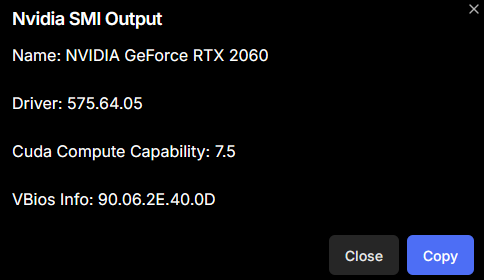
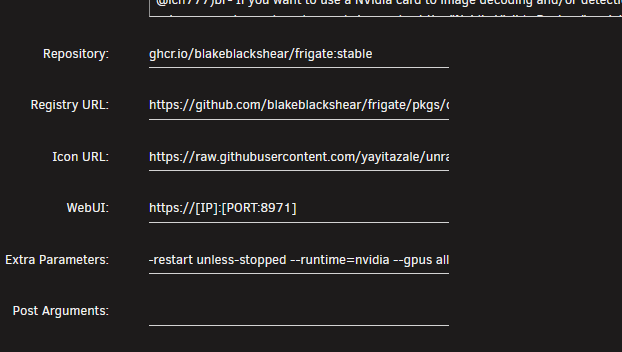
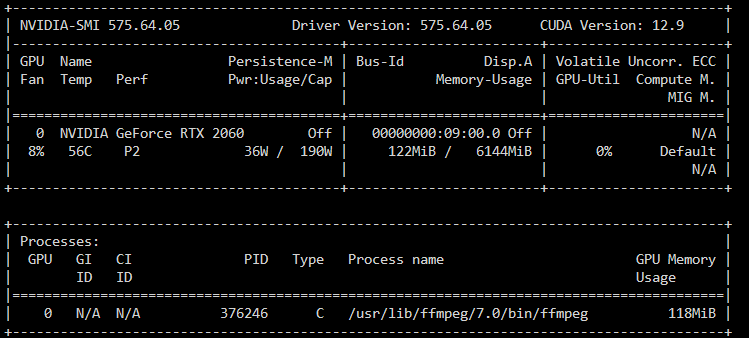
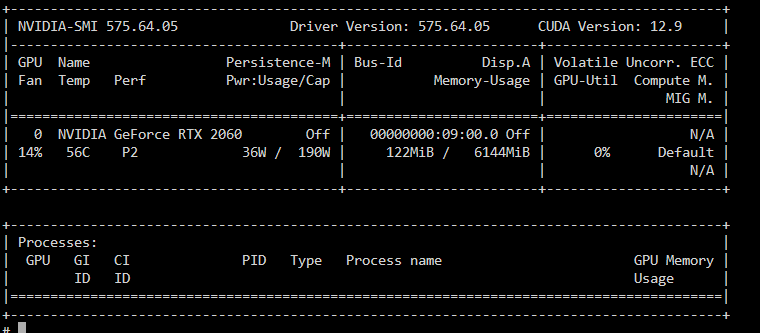
Hey all, Testing our Frigate in Unraid to see if it meets my needs and it seems like my NVIDIA 2060 isn't being used for encoding/decoding and I was wondering if someone could offer a hand? Been pouring over docs, posts, etc the last few days so I'm probably a little blind to a resolution at this point. I'll share some configs below: Frigate config: mqtt: enabled: true host: 192.168.0.200 user: '{FRIGATE_MQTT_USER}' password: '{FRIGATE_MQTT_PASSWORD}' detectors: coral: type: edgetpu device: usb ffmpeg: hwaccel_args: preset-nvidia output_args: record: preset-record-generic-audio-aac go2rtc: streams: testcam_fullres: - rtsp://{FRIGATE_RTSP_USER}:{FRIGATE_RTSP_PASSWORD}@192.168.50.2:554/cam/realmonitor?channel=1&subtype=0 - ffmpeg:testcam_fullresolution#audio=aac testcam: - ffmpeg:rtsp://{FRIGATE_RTSP_USER}:{FRIGATE_RTSP_PASSWORD}@192.168.50.2:554/cam/realmonitor?channel=1&subtype=0#audio=aac#video=h264#encoder=h264_nvenc#width=1280#height=720#bitrate=2500k#fps=15#preset=llhq#ffmpeg=-ar 44100 review: alerts: labels: - person - car detections: labels: - dog - cat cameras: testcam: enabled: true ffmpeg: inputs: - path: rtsp://localhost:8554/testcam_fullres roles: - record - path: rtsp://localhost:8554/testcam roles: - detect detect: enabled: true width: 1280 height: 720 motion: mask: 0.01,0.938,0.009,0.985,0.284,0.987,0.284,0.938 objects: track: - person - car - dog - cat live: stream_name: testcam record: enabled: true retain: days: 5 mode: all alerts: retain: days: 30 mode: motion detections: retain: days: 30 mode: motion snapshots: enabled: true retain: default: 30 objects: person: 30 car: 30 cat: 30 dog: 30 version: 0.15-1 Running nvidia-smi in my unraid dashboard console: Running nvidia-smi in my frigate docker console: Nvidia Driver Version: 575.64.05 Appreciate any help in advance, ty ty!
-
I started to receive this error: godaddypy.client.BadResponse: Response Data: {'code': 'ACCESS_DENIED', 'message': 'Authenticated user is not allowed access'} after using the container for a year+ without issue. After some searching it seems GoDaddy made changes to their API and are limiting interaction with it to user who: The DNS API has some new limitations. • Accounts with 10 or more domains • Accounts with a Discount Domain Club subscription Not sure if others are experiencing the same
-
oh my..i am so embarrassed lol thank you. appreciate all the work you do
-
irssi doesnt seem to automatically start when the container does, it seems i have to launch the console, call irssi then everything is fine. how can i go about getting irssi to auto-run on container start?
-
Hey folks, Summary of my issue: QBitTorrent won't seed but ruTorrent with same WireGuard and Port config from Mullvad does Not sure if i'm overlooking something silly here or not but I'm running unraid with both ruTorrent and QBitTorrent trying to determine which client I want to use for my Radarr/Sonarr/Plex setup. Regardless of the client I'm using Mullvad. In my testing I'm able to both download and seed without issue on ruTorrent using the WireGuard configuration for Mullvad. When I attempt to apply that same configuration to QBitTorrent I am able to download without issue, but I can never seed content. QBitTorrent attempts to seed but no data is actually being transmitted. When testing only ruTorrent or QBitTorrent is on and running at one time. I can flip/flop between them and ruTorrent immediately starts downloading/seeds, and QBitTorrent only downloads. Executing the following curl within QBitTorrent seems to be okay: sh-5.1# curl https://am.i.mullvad.net/port/55310 {"ip":"XX.XX.XX.XX","port":55310,"reachable":true}sh-5.1# Which is the port I have set in Mullvad but again, QBitTorrent doesn't seem to actually seed and in the QBitTorrent logs I see the following upon a restart: (N) 2021-08-16T21:21:53 - Web UI: Now listening on IP: *, port: 8080 (I) 2021-08-16T21:21:53 - Successfully listening on IP: XXXXXXXX, port: TCP/55310 (I) 2021-08-16T21:21:53 - Successfully listening on IP: XXXXXXXX port: UDP/55310 View > Statistics "All-time upload" lists 24 GB but my tracker doesn't show that updated data The connection status for upload speeds in the lower right corner will show 10KiBs, then 0 and this goes back and forth. The indicator is also that of a yellow up arrow. None of my torrents ever show consistent upload speeds whereas they do in ruTorrent. Any suggestions? Fresh logs attached and scrubbed for IP/Username supervisord.log qbittorrent.log


