





wacko37
Members
-
Joined
-
Last visited
-
Just reporting back my resolution to this issue to help any others in a similar situation. Basically any attempt to prevent / disable ASPM on the specific device failed to prevent the errors from occurring or being reported in the syslogs. With the help of AI, I tried Masking the specific errors which also failed to have any effect. Finally solution was to create a syslog filter to prevent only the “correctable” error logs from being reported on the syslogs which are only relative to the device in question, this way all other error will get reported. As I know the original error being reported have zero effect on the stability of the server itself apart from filling the logs over time with unwanted errors which made filtering out new errors etc more difficult this seems the cleanest most efficient way of doing so. I created a new syslog filter via userscript for easier management / monitoring. The script runs once after array start, as the filter file that is created does not persist after a reboot. #!/bin/bash # Create the file with your specific AER ignore lines cat <<EOF > /etc/rsyslog.d/02-blocklist-ignore-aqc107-aer-errors.conf :msg,contains,"pcieport 0000:00:1c.4: AER: Correctable error message received from 0000:06:00.0" stop :msg,contains,"atlantic 0000:06:00.0: PCIe Bus Error: severity=Correctable" stop :msg,contains,"atlantic 0000:06:00.0: device [1d6a:d107] error status/mask=" stop EOF # Restart rsyslog to apply the new filter /etc/rc.d/rc.rsyslogd restart echo "Blocklist created and rsyslog restarted."
-
So I needed to run this script again and I can confirm the previous issue remained with all disks constantly being read @ maximum speeds. I managed to dig deeper into this and worked out the issue is not with the script or defrag process. DFI (DYNAMIX FILE INTEGRITY PLUGIN) was causing this issue and once the process was killed the drive stopped being read. So to prevent this from happening again with this script I will disable DFI while the script is active. @mgutt @DoINeedATag Or maybe there is a way to pause DFI while the script is active within the script? Anyhow I hope this help someone in the future
-
WoW, thankyou for this detailed response once again, legend! This method is much more appealing to me personally... I hope this thread helps others who dont want to global edit. Im away at work atm but will set this up remotely over the next day or 2.
-
@bmartino1 sorry to bring up this old topic again, but I an idea pop into my head today, to alternately stop this log spamming without added "pcie_aspm=off" or the likes. Would be possible to stop the NIC from attempting to enter into a ASPM state by creating a scheduled user script to keep the nic active /live?
-
Mate, I wish i had you as my next door neighbour, youd be sick of me asking you questions....🤪 Just donated you a beer! (Transaction ID: 22C69294F8897324B)
-
WOW, thankyou kindly for your expert advise and detailed explanation. I Have an onboard 10gbe NIC (AQtion AQC107) that gives an error a few times a day which is related to ASPM. It doesn't cause any problems so its not a major issue, just annoying. Feb 4 06:11:43 Wacko-UNRAID kernel: pcieport 0000:00:1c.4: AER: Multiple Correctable error message received from 0000:06:00.0 Feb 4 06:11:43 Wacko-UNRAID kernel: atlantic 0000:06:00.0: PCIe Bus Error: severity=Correctable, type=Physical Layer, (Receiver ID) Feb 4 06:11:43 Wacko-UNRAID kernel: atlantic 0000:06:00.0: device [1d6a:d107] error status/mask=00000041/0000a000 Feb 4 06:11:43 Wacko-UNRAID kernel: atlantic 0000:06:00.0: [ 0] RxErr (First) Feb 4 06:11:43 Wacko-UNRAID kernel: atlantic 0000:06:00.0: [ 6] BadTLP To help clear the logs for easy "error" finding, I was going to add "pcie_aspm=off" But given your above reply, I feel its not worth implementing in my case as I don't really have a major issue apart from a few random error logs.
-
Hi Community / @bmartino1 Sorry to hijack this thread but I had a relatable question regarding "pcie_aspm=off". If this is enabled would it still effect a GPU's power state that has been passed through / VFIO bond to a windows VM?
-
Thanks so much! Now i can put my mind to rest....... hopefully 😁
-
Thanks for the time and expert advice, much appreciated. I worry if "pcie_aspm=off" will have a negative energy efficiency effect on the other devices in the server, as I have a gpu binded to the VFIO for my VM etc. So my question here would be if "pcie_aspm=off" is applied will it prevent the other PCIe from entering a power saving mode and therefore effecting the overall power efficiency of the server? And if the above is indeed correct, would leaving the server in its current state be ok? (Apart from the few error logs a day, i see not other negative effects that im aware of)
-
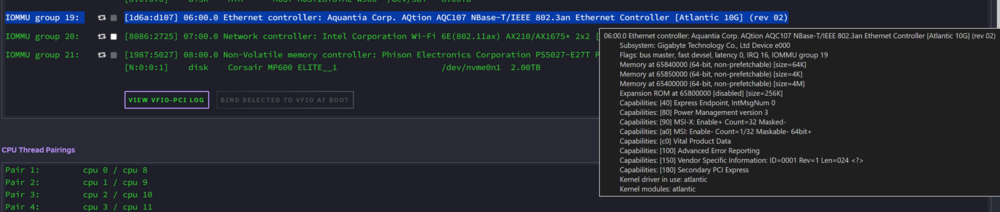
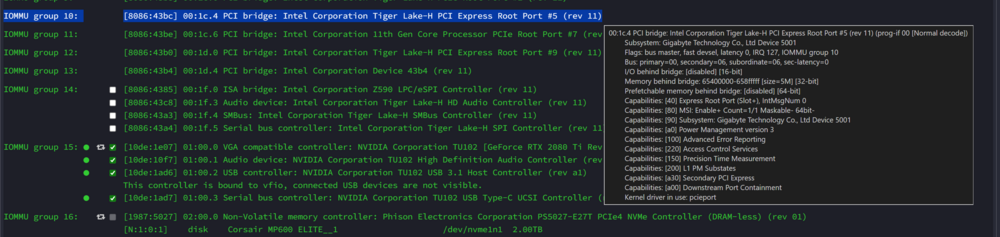
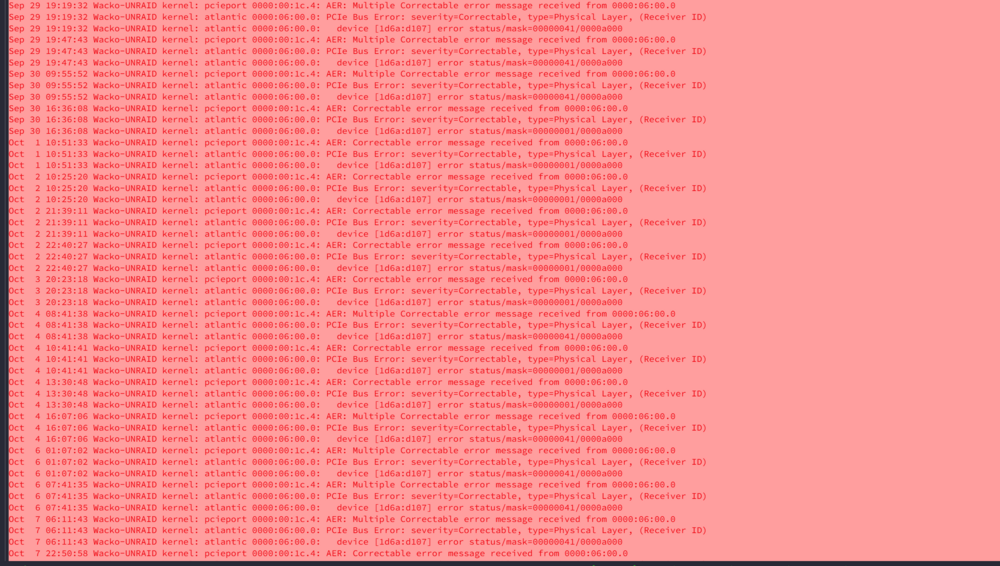
Recently updated my UNRAID Server MB to a Gigabyte Aorus Master Z590 so I could utilise the onboard 10Gbe NIC. This has been working flawlessly and without any obvious issues. Sadly though, I now get random errors in my syslog, sometimes multiple in a 24hr period and others a day or 2 apart. Oct 7 06:11:43 Wacko-UNRAID kernel: pcieport 0000:00:1c.4: AER: Multiple Correctable error message received from 0000:06:00.0 Oct 7 06:11:43 Wacko-UNRAID kernel: atlantic 0000:06:00.0: PCIe Bus Error: severity=Correctable, type=Physical Layer, (Receiver ID) Oct 7 06:11:43 Wacko-UNRAID kernel: atlantic 0000:06:00.0: device [1d6a:d107] error status/mask=00000041/0000a000 Oct 7 06:11:43 Wacko-UNRAID kernel: atlantic 0000:06:00.0: [ 0] RxErr (First) Oct 7 06:11:43 Wacko-UNRAID kernel: atlantic 0000:06:00.0: [ 6] BadTLP From what I have researched and my limited understanding this seems to relate to the ASPM of the device (Power Management) I have tried to enable the ASPM features in the BIOS: PEG ASPM, PCH ASPM and also enabled Native ASPM which allows for OS implementation of ASPM. I did not enable DMI ASPM as I heard this caused issue. Enabling these settings had zero effect on the error. I have searched through the forums and have found suggestions to add “ pcie_aspm=off” to the sys config found here https://forums.unraid.net/topic/118286-nvme-drives-throwing-errors-filling-logs-instantly-how-to-resolve/#findComment-1165004 But I am somewhat reluctant to do so as I don’t understand the full implications of doing so. I have attached screenshots to help identify the system device and of the log error found in Syslog. As always any advise or knowledge on how to proceed etc would be greatly appreciated.

-
@mgutt @DoINeedATag Hi community, I have been running this script for a few years now without issue, Thanks so much! Sadly, since upgrading to Unraid 7.1.2 I have ran into a weird issue. The script was scheduled to run each day for 2hrs but after a few days when there was no more improvements to be defragged, after which the disks got stuck into a boot loop so to speak with all disks constantly being read @ maximum speeds (except the parity drive) Only way to stop the disk reads was to stop the array. I can confirm there was no parity checks being run etc. testing this 2 times with the same results Can anyone confirm. #!/bin/bash # ##################################### # Script: XFS Extended Defragmentation v0.3.1 # Description: Defragmentate only HDDs (SSDs will be ignored) if requirements met for a selectable running time. # Author: Marc Gutt, Computron, DoINeedATag # # Changelog: # 0.3.1 # - Fixed regex finding both /dev/mapper/mdxpy and /dev/mdxpy (DoINeedATag) # - Made it so the notification setting actually did something line 68 # - Only for Unraid version 6.12+ # 0.3 # - 6.12.6+ fix for regex finding drive paths (Updated by Computron & DoINeedATag) # 0.2 # - SSD recognition added # 0.1 # - first release # # ######### Settings ################## # defrag_seconds=7200 : Defrag only for a specific time in seconds (default is 7200 seconds = 2 hours) # defrag_only_sleep=1 : Defrag only when parity is not active (set to 0 to disable) # notification=1 : Notify yourself (set to 0 to disable) defrag_seconds=14400 defrag_only_sleep=1 notification=1 # ##################################### # # ######### Script #################### # make script race condition safe if [[ -d "/tmp/${0///}" ]] || ! mkdir "/tmp/${0///}"; then exit 1; fi; trap 'rmdir "/tmp/${0///}"' EXIT; # defrag only if parity is not spinning if [[ $defrag_only_sleep == "1" ]]; then # obtain parity disk's device id parity_id=$(mdcmd status | grep rdevName.0 | cut -d = -f 2) echo "Parity has device id $parity_id" # we defrag only if parity is not spinning parity_state=$(smartctl -n standby "/dev/$parity_id") if [[ $parity_state != "STANDBY" ]]; then echo "Defragmentation has been skipped because of active parity disk" exit fi fi echo "Search for HDDs..." # parse /etc/mtab and check rotational status declare -a mtab while IFS= read -r -d '' line; do disk_mapper_id_regex="^/dev/mapper/md([0-9]+)p([0-9]+)" disk_id_regex="^/dev/md([0-9]+)p([0-9]+)" if [[ "$line" =~ $disk_mapper_id_regex ]] || [[ "$line" =~ $disk_id_regex ]]; then disk_id=${BASH_REMATCH[1]} part_id=${BASH_REMATCH[2]} rotational=$(cat /sys/block/md${disk_id}p${part_id}/queue/rotational) if [[ "$rotational" == "1" ]]; then mtab+=("$line") echo "Found HDD with id md${disk_id}p${part_id} (added)" continue fi echo "Found SSD with id md${disk_id}p${part_id} (skipped)" fi done< <(cat /etc/mtab | grep -E '^/dev/mapper/md|^/dev/md' | tr '\n' '\0') if [ ${#mtab[@]} -eq 0 ]; then if [ $notification == "1" ]; then /usr/local/emhttp/webGui/scripts/notify -i alert -s "XFS Defragmentation failed!" -d "No HDD found!" fi echo "No HDD found exiting" exit fi printf "%s\n" "${mtab[@]}" > /tmp/.xfs_mtab echo "Content of /tmp/.xfs_mtab:" cat /tmp/.xfs_mtab # defrag xfs_fsr -v -m /tmp/.xfs_mtab -t "$defrag_seconds" -f /tmp/.xfs_fsrlast
-
Everything I can help you with is mentioned in my posts above. In short changing the CPU mode to custom from host-passthrough allowed Microsoft version of Roblox to work for me. Is your CPU is AMD? If so I'm sorry I have no knowledge using AMD.
-
Sadly o have no experience with VMware workstation pro, I'm using the default VM manger within Unraid.
-
When you create/edit a VM, the is a option on the top right corner that says "XML View" select that. Sadly it's not a simple as copy and pasting my XML from above. You will need to edit to suit your hardware/setup.
-
Hi Community, back again but this time it’s very good news. Basically, I’ve gone full circle and now back on (<cpu mode='custom') I’ve been running this setup for 3-4 weeks now and everything is working perfectly with zero instability across all games. When the VM is idle the resource usage almost nothing….. FINALLY a perfect VM!!! Roblox is working via the Windows Store app as mention here: Long story short, “Unraid Share Mode: VirtioFS Mode” was the culprit here and was causing the system to randomly lock up. Once removed all my issues were resolved and as mentioned the VM idle resources are back to near zero. I’m glad in a way, as its forced me to learn more about the XML view by adding necessary features and pinning “emulatorpin” & “iothreadpin” which have also helped drastically with stability. I have attached my XML and will now be marking this thread as resolved. <?xml version='1.0' encoding='UTF-8'?> <domain type='kvm'> <name>Windows 11</name> <uuid>351920c1-41b7-abf6-86a9-df25e7703fa5</uuid> <description>Windows 11 - Gaming VM</description> <metadata> <vmtemplate xmlns="unraid" name="Windows 11" icon="windows11.png" os="windowstpm"/> </metadata> <memory unit='KiB'>10485760</memory> <currentMemory unit='KiB'>10485760</currentMemory> <memoryBacking> <nosharepages/> </memoryBacking> <vcpu placement='static'>6</vcpu> <iothreads>2</iothreads> <cputune> <vcpupin vcpu='0' cpuset='5'/> <vcpupin vcpu='1' cpuset='13'/> <vcpupin vcpu='2' cpuset='6'/> <vcpupin vcpu='3' cpuset='14'/> <vcpupin vcpu='4' cpuset='7'/> <vcpupin vcpu='5' cpuset='15'/> <emulatorpin cpuset='2-4,10-12'/> <iothreadpin iothread='1' cpuset='2-4,10-12'/> <iothreadpin iothread='2' cpuset='2-4,10-12'/> </cputune> <resource> <partition>/machine</partition> </resource> <os> <type arch='x86_64' machine='pc-q35-7.2'>hvm</type> <loader readonly='yes' type='pflash'>/usr/share/qemu/ovmf-x64/OVMF_CODE-pure-efi-tpm.fd</loader> <nvram>/etc/libvirt/qemu/nvram/d566211d-a3fe-da18-b5e2-8ec98fd0e29e_VARS-pure-efi-tpm.fd</nvram> </os> <features> <acpi/> <apic/> <hyperv mode='custom'> <relaxed state='on'/> <vapic state='on'/> <spinlocks state='on' retries='8191'/> <vpindex state='on'/> <synic state='on'/> <stimer state='on'/> <vendor_id state='on' value='none'/> </hyperv> </features> <cpu mode='custom' match='exact' check='full'> <model fallback='allow'>Skylake-Client</model> <topology sockets='1' dies='1' cores='3' threads='2'/> <feature policy='disable' name='hle'/> <feature policy='disable' name='rtm'/> <feature policy='disable' name='mpx'/> <feature policy='require' name='vmx'/> <feature policy='require' name='hypervisor'/> </cpu> <clock offset='localtime'> <timer name='hypervclock' present='yes'/> <timer name='hpet' present='no'/> </clock> <on_poweroff>destroy</on_poweroff> <on_reboot>restart</on_reboot> <on_crash>restart</on_crash> <devices> <emulator>/usr/local/sbin/qemu</emulator> <disk type='file' device='cdrom'> <driver name='qemu' type='raw'/> <source file='/mnt/user/isos/ISOs/Win11_23H2_EnglishInternational_x64v2.iso'/> <target dev='hda' bus='sata'/> <readonly/> <address type='drive' controller='0' bus='0' target='0' unit='0'/> </disk> <disk type='file' device='cdrom'> <driver name='qemu' type='raw'/> <source file='/mnt/user/isos/ISOs/virtio-win-0.1.248-1.iso'/> <target dev='hdb' bus='sata'/> <readonly/> <address type='drive' controller='0' bus='0' target='0' unit='1'/> </disk> <controller type='pci' index='0' model='pcie-root'/> <controller type='pci' index='1' model='pcie-root-port'> <model name='pcie-root-port'/> <target chassis='1' port='0x10'/> <address type='pci' domain='0x0000' bus='0x00' slot='0x02' function='0x0' multifunction='on'/> </controller> <controller type='pci' index='2' model='pcie-root-port'> <model name='pcie-root-port'/> <target chassis='2' port='0x11'/> <address type='pci' domain='0x0000' bus='0x00' slot='0x02' function='0x1'/> </controller> <controller type='pci' index='3' model='pcie-root-port'> <model name='pcie-root-port'/> <target chassis='3' port='0x12'/> <address type='pci' domain='0x0000' bus='0x00' slot='0x02' function='0x2'/> </controller> <controller type='pci' index='4' model='pcie-root-port'> <model name='pcie-root-port'/> <target chassis='4' port='0x13'/> <address type='pci' domain='0x0000' bus='0x00' slot='0x02' function='0x3'/> </controller> <controller type='pci' index='5' model='pcie-root-port'> <model name='pcie-root-port'/> <target chassis='5' port='0x14'/> <address type='pci' domain='0x0000' bus='0x00' slot='0x02' function='0x4'/> </controller> <controller type='pci' index='6' model='pcie-root-port'> <model name='pcie-root-port'/> <target chassis='6' port='0x15'/> <address type='pci' domain='0x0000' bus='0x00' slot='0x02' function='0x5'/> </controller> <controller type='pci' index='7' model='pcie-root-port'> <model name='pcie-root-port'/> <target chassis='7' port='0x16'/> <address type='pci' domain='0x0000' bus='0x00' slot='0x02' function='0x6'/> </controller> <controller type='pci' index='8' model='pcie-root-port'> <model name='pcie-root-port'/> <target chassis='8' port='0x17'/> <address type='pci' domain='0x0000' bus='0x00' slot='0x02' function='0x7'/> </controller> <controller type='pci' index='9' model='pcie-root-port'> <model name='pcie-root-port'/> <target chassis='9' port='0x18'/> <address type='pci' domain='0x0000' bus='0x00' slot='0x03' function='0x0' multifunction='on'/> </controller> <controller type='pci' index='10' model='pcie-root-port'> <model name='pcie-root-port'/> <target chassis='10' port='0x19'/> <address type='pci' domain='0x0000' bus='0x00' slot='0x03' function='0x1'/> </controller> <controller type='pci' index='11' model='pcie-to-pci-bridge'> <model name='pcie-pci-bridge'/> <address type='pci' domain='0x0000' bus='0x01' slot='0x00' function='0x0'/> </controller> <controller type='pci' index='12' model='pcie-root-port'> <model name='pcie-root-port'/> <target chassis='12' port='0x1a'/> <address type='pci' domain='0x0000' bus='0x00' slot='0x03' function='0x2'/> </controller> <controller type='virtio-serial' index='0'> <address type='pci' domain='0x0000' bus='0x03' slot='0x00' function='0x0'/> </controller> <controller type='sata' index='0'> <address type='pci' domain='0x0000' bus='0x00' slot='0x1f' function='0x2'/> </controller> <controller type='usb' index='0' model='qemu-xhci' ports='15'> <address type='pci' domain='0x0000' bus='0x00' slot='0x07' function='0x0'/> </controller> <interface type='bridge'> <mac address='52:54:00:19:a0:d0'/> <source bridge='br0.1'/> <model type='virtio'/> <address type='pci' domain='0x0000' bus='0x02' slot='0x00' function='0x0'/> </interface> <serial type='pty'> <target type='isa-serial' port='0'> <model name='isa-serial'/> </target> </serial> <console type='pty'> <target type='serial' port='0'/> </console> <channel type='unix'> <target type='virtio' name='org.qemu.guest_agent.0'/> <address type='virtio-serial' controller='0' bus='0' port='1'/> </channel> <input type='tablet' bus='usb'> <address type='usb' bus='0' port='1'/> </input> <input type='mouse' bus='ps2'/> <input type='keyboard' bus='ps2'/> <tpm model='tpm-tis'> <backend type='emulator' version='2.0' persistent_state='yes'/> </tpm> <audio id='1' type='none'/> <hostdev mode='subsystem' type='pci' managed='yes'> <driver name='vfio'/> <source> <address domain='0x0000' bus='0x01' slot='0x00' function='0x0'/> </source> <address type='pci' domain='0x0000' bus='0x04' slot='0x00' function='0x0'/> </hostdev> <hostdev mode='subsystem' type='pci' managed='yes'> <driver name='vfio'/> <source> <address domain='0x0000' bus='0x01' slot='0x00' function='0x1'/> </source> <address type='pci' domain='0x0000' bus='0x05' slot='0x00' function='0x0'/> </hostdev> <hostdev mode='subsystem' type='pci' managed='yes'> <driver name='vfio'/> <source> <address domain='0x0000' bus='0x01' slot='0x00' function='0x2'/> </source> <address type='pci' domain='0x0000' bus='0x06' slot='0x00' function='0x0'/> </hostdev> <hostdev mode='subsystem' type='pci' managed='yes'> <driver name='vfio'/> <source> <address domain='0x0000' bus='0x01' slot='0x00' function='0x3'/> </source> <address type='pci' domain='0x0000' bus='0x07' slot='0x00' function='0x0'/> </hostdev> <hostdev mode='subsystem' type='pci' managed='yes'> <driver name='vfio'/> <source> <address domain='0x0000' bus='0x04' slot='0x00' function='0x0'/> </source> <address type='pci' domain='0x0000' bus='0x08' slot='0x00' function='0x0'/> </hostdev> <hostdev mode='subsystem' type='pci' managed='yes'> <driver name='vfio'/> <source> <address domain='0x0000' bus='0x0e' slot='0x00' function='0x0'/> </source> <boot order='1'/> <address type='pci' domain='0x0000' bus='0x09' slot='0x00' function='0x0'/> </hostdev> <memballoon model='none'/> </devices> <seclabel type='dynamic' model='dac' relabel='yes'/> </domain>




