p0p
Members
-
Joined
-
Last visited
Everything posted by p0p
-
Hallo an alle, danke für Eure fleißigen Kommentare 🙂 Ich halte mich auf Grund des Antwortumfangs knapper - bitte seht es mir nach Ja, das habe ich, dabei wurden alle Treiber installiert außer "VPORT0P1" Das ist dann nur rein als VM nicht quasi "durchgeschliffen" (bitte einmal den richtigen Terminus schreiben :D), richtig? Das wird hier gezeigt: Es geht wohl auch die NVMe über VFIO einzubinden. SpaceInvaderOne hat das mal gemacht - dafür wird jedoch ein custom bootloader benötigt. ----------------------------------------- Aha! Also ist das ein "scheinheiliges" pass-through. Es findet ein mount und eine art durchschleifen statt, jedoch mit Einschränkungen? ... und danke für die Info! Lockere Sache eine Antwort von einem der bekanntesten unraid Entwickler zu bekommen, wow! Ich habe noch ein paar Sachen über Nerd Tools am laufen. Daher würde ich noch abwarten, bis Nerd Tools das Update unterstützt 🙂 Wird auf Grund des "Bugs" deswegen meine 2. RX550 random mit dem Fehler 43 im Geräte Manager gemeldet? (vBIOS ist eingetragen) Funktioniert das AMD Vendor Reset Plugin auch mit der 6.9.x Version? Was ist denn der Unterschied wenn ich es "by-id" statt per /dev/ durchschleife/durchreiche (bitte auch hier den korrekten Terminus einmal nennen 🙂 ) Hier mein Output: root@Tower-Buero:~# ls -d /dev/disk/by-id/* /dev/disk/by-id/ata-OCZ-TRION150_16RB46NCK1BU@ /dev/disk/by-id/ata-OCZ-TRION150_16RB46NCK1BU-part1@ /dev/disk/by-id/ata-Samsung_SSD_840_EVO_120GB_S1D5NEBD818433F@ /dev/disk/by-id/ata-Samsung_SSD_840_EVO_120GB_S1D5NEBD818433F-part1@ /dev/disk/by-id/nvme-WDC_WDS100T2B0C-00PXH0_210246474402@ /dev/disk/by-id/nvme-WDC_WDS100T2B0C-00PXH0_210246474402-part1@ /dev/disk/by-id/nvme-WDC_WDS100T2B0C-00PXH0_210246474402-part2@ /dev/disk/by-id/nvme-WDC_WDS100T2B0C-00PXH0_210246474402-part3@ /dev/disk/by-id/nvme-WDC_WDS100T2B0C-00PXH0_210246474402-part4@ /dev/disk/by-id/usb-Generic_MassStorageClass_000000001539-0:0@ /dev/disk/by-id/usb-Generic_MassStorageClass_000000001539-0:1@ /dev/disk/by-id/usb-Intenso_Speed_Line_000000000000000567-0:0@ /dev/disk/by-id/usb-Intenso_Speed_Line_000000000000000567-0:0-part1@ /dev/disk/by-id/wwn-0x500253885006b184@ /dev/disk/by-id/wwn-0x500253885006b184-part1@ /dev/disk/by-id/wwn-0x5e83a972003a8099@ /dev/disk/by-id/wwn-0x5e83a972003a8099-part1@ Also wäre meine Eingabe /dev/disk/by-id/nvme-WDC_WDS100T2B0C-00PXH0_210246474402 Da ich auf diverse WIN Anwendungen angewiesen bin, erst einmal nicht Später, wenn ich mich mit Linux mehr auskenne werde ich mir das überlegen. Danke für deinen Hinweis! Bin am überlegen, ob ich so etwas wie Unraid+WIN10 und WOL + Parsec machen werde... WOL funktioniert bei mir nicht, obwohl im UEFI + Energieereignis bei PCI(e) eingeschaltet. ------- Beim Rest Eurer Kommunikation bin ich raus, das ist noch etwas zu tief für mich 😄 Über eine kurze Aufklärung freue ich mich dennoch, da es sehr informativ scheint Viele Dank! Achja, p0pcorn essen ist gesund

-
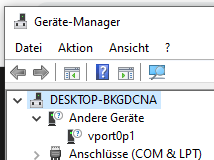
Liebe UNRAID "nicht ausrauben" Gemeinde, mein Name ist p0p, ich bin Ende 30, Student sowie Web Entwickler und Online Marketer. 🙂 Eins meiner Steckenpferde ist die Ladezeitenoptimierung von WordPress Seiten. Meine Hobbies sind SUP-Board fahren, viel Reisen (wenn es die Infektionsschutzmaßnahmen zulassen), Wandern und Techkram. Zu UNRAID bin ich über YouTube durch den Kanal "TheGeekFreaks" gekommen. Mein System CPU: AMD Ryzen 5 5600x Mutterbrett: msi mpg x570 gaming pro carbon wifi GPUs: 2x AMD RX550 RAM: 2x 16GB G.SKILL Speicher: 1x 120 GB Samsung SSD 840, 1x 240 GB OCZ-TRION150, 1x 1TB WD Blue SN550 NVMe SSD (ist eigentlich von Samsung, selber Controller/Speicher) UNRAID OS: 6.9.2 Ziele die ich mit UNRAID verfolge: - MACINABOX für Web/APP Entwicklung, da kein Safari für Windows und iOS Entwicklung | + GPU Passthrough - WIN10 mit NVME passthrough für Arbeiten und bisschen Gaming - (Manjaro) Linux austesten und Skills erweitern, ggf. umsteigen - Ggf. Home und Dokumenten Automation - Ziel entfernt am Horizont: Die PCs an der Uni sind "naja", daher möchte ich mich per Fernwartung auf meinem Rechner aufschalten können um darüber zu arbeiten. Am besten mit Wake On Lan usw. Kaum in der UNRAID Szene angekommen, direkt über Problemchen gestolpert: Zu meinen Fragen: 1. WIN10: VM Einstellung / Q35 5.1 "vergisst" meine NVME --> Boot in EFI Shell Die NVME ist mit Unassigned Devices durchgeschliffen. Jedoch vergisst UNRAID ab und an meine NVME in der VM und die EFI Shell wird gestartet. Erstelle ich eine neue VM, kann ich das WIN10 weiter benutzen. Das ist natürlich ärgerlich. Was muss ich da tun, damit sich das Problem behebt? <?xml version='1.0' encoding='UTF-8'?> <domain type='kvm' id='8'> <name>03 Windows 10</name> <uuid>05e3529e-3925-9896-3d72-2b4ad34649f3</uuid> <metadata> <vmtemplate xmlns="unraid" name="Windows 10" icon="windows.png" os="windows10"/> </metadata> <memory unit='KiB'>20971520</memory> <currentMemory unit='KiB'>20971520</currentMemory> <memoryBacking> <nosharepages/> </memoryBacking> <vcpu placement='static'>7</vcpu> <cputune> <vcpupin vcpu='0' cpuset='6'/> <vcpupin vcpu='1' cpuset='1'/> <vcpupin vcpu='2' cpuset='7'/> <vcpupin vcpu='3' cpuset='2'/> <vcpupin vcpu='4' cpuset='8'/> <vcpupin vcpu='5' cpuset='4'/> <vcpupin vcpu='6' cpuset='10'/> </cputune> <resource> <partition>/machine</partition> </resource> <os> <type arch='x86_64' machine='pc-q35-5.1'>hvm</type> <loader readonly='yes' type='pflash'>/usr/share/qemu/ovmf-x64/OVMF_CODE-pure-efi.fd</loader> <nvram>/etc/libvirt/qemu/nvram/05e3529e-3925-9896-3d72-2b4ad34649f3_VARS-pure-efi.fd</nvram> </os> <features> <acpi/> <apic/> <hyperv> <relaxed state='on'/> <vapic state='on'/> <spinlocks state='on' retries='8191'/> <vendor_id state='on' value='2D76A8B352F1'/> </hyperv> <kvm> <hidden state='on'/> </kvm> <ioapic driver='kvm'/> </features> <cpu mode='host-passthrough' check='none' migratable='on'> <topology sockets='1' dies='1' cores='7' threads='1'/> <cache mode='passthrough'/> <feature policy='require' name='topoext'/> </cpu> <clock offset='localtime'> <timer name='hypervclock' present='yes'/> <timer name='hpet' present='no'/> </clock> <on_poweroff>destroy</on_poweroff> <on_reboot>restart</on_reboot> <on_crash>restart</on_crash> <devices> <emulator>/usr/local/sbin/qemu</emulator> <disk type='block' device='disk'> <driver name='qemu' type='raw' cache='writeback'/> <source dev='/dev/nvme0n1' index='2'/> <backingStore/> <target dev='hdc' bus='scsi'/> <boot order='1'/> <alias name='scsi0-0-0-2'/> <address type='drive' controller='0' bus='0' target='0' unit='2'/> </disk> <disk type='file' device='cdrom'> <driver name='qemu' type='raw'/> <source file='/mnt/user/isos/virtio-win-0.1.190-1.iso' index='1'/> <backingStore/> <target dev='hdb' bus='sata'/> <readonly/> <alias name='sata0-0-1'/> <address type='drive' controller='0' bus='0' target='0' unit='1'/> </disk> <controller type='usb' index='0' model='ich9-ehci1'> <alias name='usb'/> <address type='pci' domain='0x0000' bus='0x00' slot='0x07' function='0x7'/> </controller> <controller type='usb' index='0' model='ich9-uhci1'> <alias name='usb'/> <master startport='0'/> <address type='pci' domain='0x0000' bus='0x00' slot='0x07' function='0x0' multifunction='on'/> </controller> <controller type='usb' index='0' model='ich9-uhci2'> <alias name='usb'/> <master startport='2'/> <address type='pci' domain='0x0000' bus='0x00' slot='0x07' function='0x1'/> </controller> <controller type='usb' index='0' model='ich9-uhci3'> <alias name='usb'/> <master startport='4'/> <address type='pci' domain='0x0000' bus='0x00' slot='0x07' function='0x2'/> </controller> <controller type='scsi' index='0' model='virtio-scsi'> <alias name='scsi0'/> <address type='pci' domain='0x0000' bus='0x02' slot='0x00' function='0x0'/> </controller> <controller type='sata' index='0'> <alias name='ide'/> <address type='pci' domain='0x0000' bus='0x00' slot='0x1f' function='0x2'/> </controller> <controller type='pci' index='0' model='pcie-root'> <alias name='pcie.0'/> </controller> <controller type='pci' index='1' model='pcie-root-port'> <model name='pcie-root-port'/> <target chassis='1' port='0x10'/> <alias name='pci.1'/> <address type='pci' domain='0x0000' bus='0x00' slot='0x02' function='0x0' multifunction='on'/> </controller> <controller type='pci' index='2' model='pcie-root-port'> <model name='pcie-root-port'/> <target chassis='2' port='0x11'/> <alias name='pci.2'/> <address type='pci' domain='0x0000' bus='0x00' slot='0x02' function='0x1'/> </controller> <controller type='pci' index='3' model='pcie-root-port'> <model name='pcie-root-port'/> <target chassis='3' port='0x12'/> <alias name='pci.3'/> <address type='pci' domain='0x0000' bus='0x00' slot='0x02' function='0x2'/> </controller> <controller type='pci' index='4' model='pcie-root-port'> <model name='pcie-root-port'/> <target chassis='4' port='0x13'/> <alias name='pci.4'/> <address type='pci' domain='0x0000' bus='0x00' slot='0x02' function='0x3'/> </controller> <controller type='pci' index='5' model='pcie-root-port'> <model name='pcie-root-port'/> <target chassis='5' port='0x14'/> <alias name='pci.5'/> <address type='pci' domain='0x0000' bus='0x00' slot='0x02' function='0x4'/> </controller> <controller type='pci' index='6' model='pcie-root-port'> <model name='pcie-root-port'/> <target chassis='6' port='0x15'/> <alias name='pci.6'/> <address type='pci' domain='0x0000' bus='0x00' slot='0x02' function='0x5'/> </controller> <controller type='pci' index='7' model='pcie-root-port'> <model name='pcie-root-port'/> <target chassis='7' port='0x16'/> <alias name='pci.7'/> <address type='pci' domain='0x0000' bus='0x00' slot='0x02' function='0x6'/> </controller> <controller type='pci' index='8' model='pcie-root-port'> <model name='pcie-root-port'/> <target chassis='8' port='0x17'/> <alias name='pci.8'/> <address type='pci' domain='0x0000' bus='0x00' slot='0x02' function='0x7'/> </controller> <controller type='pci' index='9' model='pcie-root-port'> <model name='pcie-root-port'/> <target chassis='9' port='0x18'/> <alias name='pci.9'/> <address type='pci' domain='0x0000' bus='0x00' slot='0x03' function='0x0'/> </controller> <controller type='virtio-serial' index='0'> <alias name='virtio-serial0'/> <address type='pci' domain='0x0000' bus='0x03' slot='0x00' function='0x0'/> </controller> <interface type='bridge'> <mac address='52:54:00:11:77:9f'/> <source bridge='br0'/> <target dev='vnet0'/> <model type='virtio-net'/> <alias name='net0'/> <address type='pci' domain='0x0000' bus='0x01' slot='0x00' function='0x0'/> </interface> <serial type='pty'> <source path='/dev/pts/0'/> <target type='isa-serial' port='0'> <model name='isa-serial'/> </target> <alias name='serial0'/> </serial> <console type='pty' tty='/dev/pts/0'> <source path='/dev/pts/0'/> <target type='serial' port='0'/> <alias name='serial0'/> </console> <channel type='unix'> <source mode='bind' path='/var/lib/libvirt/qemu/channel/target/domain-8-03 Windows 10/org.qemu.guest_agent.0'/> <target type='virtio' name='org.qemu.guest_agent.0' state='disconnected'/> <alias name='channel0'/> <address type='virtio-serial' controller='0' bus='0' port='1'/> </channel> <input type='tablet' bus='usb'> <alias name='input0'/> <address type='usb' bus='0' port='3'/> </input> <input type='mouse' bus='ps2'> <alias name='input1'/> </input> <input type='keyboard' bus='ps2'> <alias name='input2'/> </input> <graphics type='vnc' port='5900' autoport='yes' websocket='5700' listen='0.0.0.0' keymap='de'> <listen type='address' address='0.0.0.0'/> </graphics> <video> <model type='qxl' ram='65536' vram='65536' vgamem='16384' heads='1' primary='yes'/> <alias name='video0'/> <address type='pci' domain='0x0000' bus='0x00' slot='0x01' function='0x0'/> </video> <hostdev mode='subsystem' type='pci' managed='yes'> <driver name='vfio'/> <source> <address domain='0x0000' bus='0x2d' slot='0x00' function='0x0'/> </source> <alias name='hostdev0'/> <rom file='/mnt/user/isos/vbios/2d-00-0.rom'/> <address type='pci' domain='0x0000' bus='0x04' slot='0x00' function='0x0'/> </hostdev> <hostdev mode='subsystem' type='pci' managed='yes'> <driver name='vfio'/> <source> <address domain='0x0000' bus='0x24' slot='0x00' function='0x0'/> </source> <alias name='hostdev1'/> <rom file='/mnt/user/isos/vbios/24-00-0.rom'/> <address type='pci' domain='0x0000' bus='0x05' slot='0x00' function='0x0'/> </hostdev> <hostdev mode='subsystem' type='pci' managed='yes'> <driver name='vfio'/> <source> <address domain='0x0000' bus='0x2d' slot='0x00' function='0x1'/> </source> <alias name='hostdev2'/> <address type='pci' domain='0x0000' bus='0x06' slot='0x00' function='0x0'/> </hostdev> <hostdev mode='subsystem' type='pci' managed='yes'> <driver name='vfio'/> <source> <address domain='0x0000' bus='0x24' slot='0x00' function='0x1'/> </source> <alias name='hostdev3'/> <address type='pci' domain='0x0000' bus='0x07' slot='0x00' function='0x0'/> </hostdev> <hostdev mode='subsystem' type='pci' managed='yes'> <driver name='vfio'/> <source> <address domain='0x0000' bus='0x2f' slot='0x00' function='0x4'/> </source> <alias name='hostdev4'/> <address type='pci' domain='0x0000' bus='0x08' slot='0x00' function='0x0'/> </hostdev> <hostdev mode='subsystem' type='usb' managed='no'> <source> <vendor id='0x145f'/> <product id='0x024b'/> <address bus='5' device='3'/> </source> <alias name='hostdev5'/> <address type='usb' bus='0' port='1'/> </hostdev> <hostdev mode='subsystem' type='usb' managed='no'> <source> <vendor id='0x1bcf'/> <product id='0x08a0'/> <address bus='3' device='5'/> </source> <alias name='hostdev6'/> <address type='usb' bus='0' port='2'/> </hostdev> <memballoon model='none'/> </devices> <seclabel type='dynamic' model='dac' relabel='yes'> <label>+0:+100</label> <imagelabel>+0:+100</imagelabel> </seclabel> </domain> 2. WIN10: Nicht erkannter Treiber "vport0p1" Im Gerätemanager befindet sich ein nicht erkanntes Gerät: Welcher Treiber ist das von der virtio-win-0.1.196.iso ? 3. MACINABOX: GPU Passthrough Wenn ich eine meiner RX 550 der MACINABOX VM zuweise, bootet diese VM nicht mehr. Ich habe die entsprechende RX 550 aus der WIN10 VM entfernt und das HELPER SCRIPT neu gestartet. Worauf muss ich da achten und welche Schritte sind wichtig? 4. Geräte temporär ausblenden? Gibt es ein Plugin, mit dem man Geräte in dem VM Form View oder XML View kurzfristig ausblenden/auskommentieren kann? Mir geht das ein und ausgetrage schon arg auf den Senkel 😞 😄 5. Weitere Schritte...? Ich habe das WIN10 OS am laufen - bis auf die Dinger die ich oben geschildert habe. GraKas sind in WIN10 durchgeschliffen. Aktivierung von WIN10 steht noch aus. Was sollte ich an WIN10 durchschleifen? bsp. den SMBus? PCI Devices and IOMMU Groups IOMMU group 0: [1022:1482] 00:01.0 Host bridge: Advanced Micro Devices, Inc. [AMD] Starship/Matisse PCIe Dummy Host Bridge IOMMU group 1: [1022:1483] 00:01.1 PCI bridge: Advanced Micro Devices, Inc. [AMD] Starship/Matisse GPP Bridge IOMMU group 2: [1022:1483] 00:01.2 PCI bridge: Advanced Micro Devices, Inc. [AMD] Starship/Matisse GPP Bridge IOMMU group 3: [1022:1482] 00:02.0 Host bridge: Advanced Micro Devices, Inc. [AMD] Starship/Matisse PCIe Dummy Host Bridge IOMMU group 4: [1022:1482] 00:03.0 Host bridge: Advanced Micro Devices, Inc. [AMD] Starship/Matisse PCIe Dummy Host Bridge IOMMU group 5: [1022:1483] 00:03.1 PCI bridge: Advanced Micro Devices, Inc. [AMD] Starship/Matisse GPP Bridge IOMMU group 6: [1022:1482] 00:04.0 Host bridge: Advanced Micro Devices, Inc. [AMD] Starship/Matisse PCIe Dummy Host Bridge IOMMU group 7: [1022:1482] 00:05.0 Host bridge: Advanced Micro Devices, Inc. [AMD] Starship/Matisse PCIe Dummy Host Bridge IOMMU group 8: [1022:1482] 00:07.0 Host bridge: Advanced Micro Devices, Inc. [AMD] Starship/Matisse PCIe Dummy Host Bridge IOMMU group 9: [1022:1484] 00:07.1 PCI bridge: Advanced Micro Devices, Inc. [AMD] Starship/Matisse Internal PCIe GPP Bridge 0 to bus[E:B] IOMMU group 10: [1022:1482] 00:08.0 Host bridge: Advanced Micro Devices, Inc. [AMD] Starship/Matisse PCIe Dummy Host Bridge IOMMU group 11: [1022:1484] 00:08.1 PCI bridge: Advanced Micro Devices, Inc. [AMD] Starship/Matisse Internal PCIe GPP Bridge 0 to bus[E:B] IOMMU group 12: [1022:790b] 00:14.0 SMBus: Advanced Micro Devices, Inc. [AMD] FCH SMBus Controller (rev 61) [1022:790e] 00:14.3 ISA bridge: Advanced Micro Devices, Inc. [AMD] FCH LPC Bridge (rev 51) IOMMU group 13: [1022:1440] 00:18.0 Host bridge: Advanced Micro Devices, Inc. [AMD] Matisse Device 24: Function 0 [1022:1441] 00:18.1 Host bridge: Advanced Micro Devices, Inc. [AMD] Matisse Device 24: Function 1 [1022:1442] 00:18.2 Host bridge: Advanced Micro Devices, Inc. [AMD] Matisse Device 24: Function 2 [1022:1443] 00:18.3 Host bridge: Advanced Micro Devices, Inc. [AMD] Matisse Device 24: Function 3 [1022:1444] 00:18.4 Host bridge: Advanced Micro Devices, Inc. [AMD] Matisse Device 24: Function 4 [1022:1445] 00:18.5 Host bridge: Advanced Micro Devices, Inc. [AMD] Matisse Device 24: Function 5 [1022:1446] 00:18.6 Host bridge: Advanced Micro Devices, Inc. [AMD] Matisse Device 24: Function 6 [1022:1447] 00:18.7 Host bridge: Advanced Micro Devices, Inc. [AMD] Matisse Device 24: Function 7 IOMMU group 14: [15b7:5009] 01:00.0 Non-Volatile memory controller: Sandisk Corp WD Blue SN550 NVMe SSD (rev 01) [N:0:1:1] disk WDC WDS100T2B0C-00PXH0__1 /dev/nvme0n1 1.00TB IOMMU group 15: [1022:57ad] 20:00.0 PCI bridge: Advanced Micro Devices, Inc. [AMD] Matisse Switch Upstream IOMMU group 16: [1022:57a3] 21:01.0 PCI bridge: Advanced Micro Devices, Inc. [AMD] Matisse PCIe GPP Bridge IOMMU group 17: [1022:57a3] 21:02.0 PCI bridge: Advanced Micro Devices, Inc. [AMD] Matisse PCIe GPP Bridge IOMMU group 18: [1022:57a3] 21:04.0 PCI bridge: Advanced Micro Devices, Inc. [AMD] Matisse PCIe GPP Bridge IOMMU group 19: [1022:57a3] 21:06.0 PCI bridge: Advanced Micro Devices, Inc. [AMD] Matisse PCIe GPP Bridge IOMMU group 20: [1022:57a4] 21:08.0 PCI bridge: Advanced Micro Devices, Inc. [AMD] Matisse PCIe GPP Bridge [1022:1485] 2a:00.0 Non-Essential Instrumentation [1300]: Advanced Micro Devices, Inc. [AMD] Starship/Matisse Reserved SPP [1022:149c] 2a:00.1 USB controller: Advanced Micro Devices, Inc. [AMD] Matisse USB 3.0 Host Controller Bus 001 Device 001: ID 1d6b:0002 Linux Foundation 2.0 root hub Bus 001 Device 002: ID 8087:0029 Intel Corp. Bus 002 Device 001: ID 1d6b:0003 Linux Foundation 3.0 root hub Bus 002 Device 002: ID 0000:0000 Innostor Intenso Speed Line [1022:149c] 2a:00.3 USB controller: Advanced Micro Devices, Inc. [AMD] Matisse USB 3.0 Host Controller Bus 003 Device 001: ID 1d6b:0002 Linux Foundation 2.0 root hub Bus 003 Device 002: ID 05e3:0610 Genesys Logic, Inc. 4-port hub Bus 003 Device 003: ID 1462:7b93 Micro Star International MYSTIC LIGHT Bus 003 Device 004: ID 05e3:0608 Genesys Logic, Inc. Hub Bus 003 Device 005: ID 1bcf:08a0 Sunplus Innovation Technology Inc. Bus 004 Device 001: ID 1d6b:0003 Linux Foundation 3.0 root hub Bus 004 Device 002: ID 05e3:0612 Genesys Logic, Inc. Hub Bus 004 Device 003: ID 05e3:0749 Genesys Logic, Inc. USB3.0 Card Reader IOMMU group 21: [1022:57a4] 21:09.0 PCI bridge: Advanced Micro Devices, Inc. [AMD] Matisse PCIe GPP Bridge [1022:7901] 2b:00.0 SATA controller: Advanced Micro Devices, Inc. [AMD] FCH SATA Controller [AHCI mode] (rev 51) IOMMU group 22: [1022:57a4] 21:0a.0 PCI bridge: Advanced Micro Devices, Inc. [AMD] Matisse PCIe GPP Bridge [1022:7901] 2c:00.0 SATA controller: Advanced Micro Devices, Inc. [AMD] FCH SATA Controller [AHCI mode] (rev 51) [9:0:0:0] disk ATA Samsung SSD 840 DB6Q /dev/sdd 120GB [10:0:0:0] disk ATA OCZ-TRION150 12.3 /dev/sde 240GB IOMMU group 23: [1b21:0612] 23:00.0 SATA controller: ASMedia Technology Inc. ASM1062 Serial ATA Controller (rev 02) IOMMU group 24: [1002:699f] 24:00.0 VGA compatible controller: Advanced Micro Devices, Inc. [AMD/ATI] Lexa PRO [Radeon 540/540X/550/550X / RX 540X/550/550X] (rev c7) [1002:aae0] 24:00.1 Audio device: Advanced Micro Devices, Inc. [AMD/ATI] Baffin HDMI/DP Audio [Radeon RX 550 640SP / RX 560/560X] IOMMU group 25: [8086:1539] 26:00.0 Ethernet controller: Intel Corporation I211 Gigabit Network Connection (rev 03) IOMMU group 26: [8086:2723] 28:00.0 Network controller: Intel Corporation Wi-Fi 6 AX200 (rev 1a) IOMMU group 27: [1002:699f] 2d:00.0 VGA compatible controller: Advanced Micro Devices, Inc. [AMD/ATI] Lexa PRO [Radeon 540/540X/550/550X / RX 540X/550/550X] (rev c7) [1002:aae0] 2d:00.1 Audio device: Advanced Micro Devices, Inc. [AMD/ATI] Baffin HDMI/DP Audio [Radeon RX 550 640SP / RX 560/560X] IOMMU group 28: [1022:148a] 2e:00.0 Non-Essential Instrumentation [1300]: Advanced Micro Devices, Inc. [AMD] Starship/Matisse PCIe Dummy Function IOMMU group 29: [1022:1485] 2f:00.0 Non-Essential Instrumentation [1300]: Advanced Micro Devices, Inc. [AMD] Starship/Matisse Reserved SPP IOMMU group 30: [1022:149c] 2f:00.3 USB controller: Advanced Micro Devices, Inc. [AMD] Matisse USB 3.0 Host Controller Bus 005 Device 001: ID 1d6b:0002 Linux Foundation 2.0 root hub Bus 005 Device 003: ID 145f:024b Trust Trust Wired Keyboard Bus 006 Device 001: ID 1d6b:0003 Linux Foundation 3.0 root hub IOMMU group 31: [1022:1487] 2f:00.4 Audio device: Advanced Micro Devices, Inc. [AMD] Starship/Matisse HD Audio Controller Eigene Erfahrungen / Probleme die ich selbst behoben habe: - Bei einem Clean Install von Win10 muss für die NVME ein SCSI Treiber aus dem Virtio image installiert werden. Dieser liegt im x64 Ordner. - Der AMD Grafikkartentreiber konnte, auch mit "Werksreset", nur nach einer komplett Bereinigung mit Display Driver Uninstaller installiert werden. Dafür musste ich eine VNC Session laufen lassen, da die Monitore an den GraKas kein Bild ausgegeben haben. Die neusten Non-WHQL Treiber funktionieren nicht. (Upgrade steht noch aus) Die zweite GraKa hat trotz durchgeschliffenen Soundgerät einen Code 43 gehabt. Musste im Geräte Manager den Treiber manuell updaten - System hatte zwar einen Frostanfall und reagierte nicht mehr. Jedoch wurde nach einem Hardreset (Force Stop) der VM und Neustart der Treiber richtig erkannt. Ich freue mich sehr über Eure Hilfe und Anregungen 🙂 Hab nur gutes über die UNRAID Community gehört Viele Grüße p0p
-
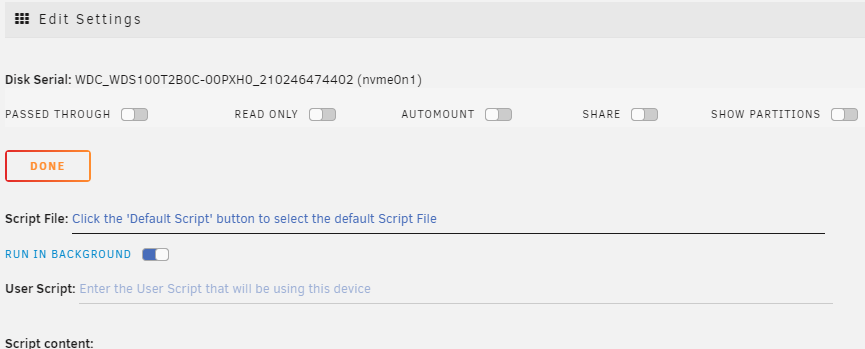
@dlandon I've got a strange issue with your fairly awesome plugin (thanks for your work ❤️ ) Maybe it's... my fault (in case of everything went wrong, it's always the user) a UX/UI Problem a Bug My goal was to passthrough my NVME (nvme0on1) for bare metal NVME Power to my WIN10 OS. The settings are somehow "reverted": If I unchoose (grey out) the toogles "PASSED THROUGH" and "SHOW PARTITIONS", the NVME is passed through and the partitions are shown. Config of my Win10 OS: <?xml version='1.0' encoding='UTF-8'?> <domain type='kvm' id='8'> <name>03 Windows 10</name> <uuid>05e3529e-3925-9896-3d72-2b4ad34649f3</uuid> <metadata> <vmtemplate xmlns="unraid" name="Windows 10" icon="windows.png" os="windows10"/> </metadata> <memory unit='KiB'>20971520</memory> <currentMemory unit='KiB'>20971520</currentMemory> <memoryBacking> <nosharepages/> </memoryBacking> <vcpu placement='static'>7</vcpu> <cputune> <vcpupin vcpu='0' cpuset='6'/> <vcpupin vcpu='1' cpuset='1'/> <vcpupin vcpu='2' cpuset='7'/> <vcpupin vcpu='3' cpuset='2'/> <vcpupin vcpu='4' cpuset='8'/> <vcpupin vcpu='5' cpuset='4'/> <vcpupin vcpu='6' cpuset='10'/> </cputune> <resource> <partition>/machine</partition> </resource> <os> <type arch='x86_64' machine='pc-q35-5.1'>hvm</type> <loader readonly='yes' type='pflash'>/usr/share/qemu/ovmf-x64/OVMF_CODE-pure-efi.fd</loader> <nvram>/etc/libvirt/qemu/nvram/05e3529e-3925-9896-3d72-2b4ad34649f3_VARS-pure-efi.fd</nvram> </os> <features> <acpi/> <apic/> <hyperv> <relaxed state='on'/> <vapic state='on'/> <spinlocks state='on' retries='8191'/> <vendor_id state='on' value='2D76A8B352F1'/> </hyperv> <kvm> <hidden state='on'/> </kvm> <ioapic driver='kvm'/> </features> <cpu mode='host-passthrough' check='none' migratable='on'> <topology sockets='1' dies='1' cores='7' threads='1'/> <cache mode='passthrough'/> <feature policy='require' name='topoext'/> </cpu> <clock offset='localtime'> <timer name='hypervclock' present='yes'/> <timer name='hpet' present='no'/> </clock> <on_poweroff>destroy</on_poweroff> <on_reboot>restart</on_reboot> <on_crash>restart</on_crash> <devices> <emulator>/usr/local/sbin/qemu</emulator> <disk type='block' device='disk'> <driver name='qemu' type='raw' cache='writeback'/> <source dev='/dev/nvme0n1' index='2'/> <backingStore/> <target dev='hdc' bus='scsi'/> <boot order='1'/> <alias name='scsi0-0-0-2'/> <address type='drive' controller='0' bus='0' target='0' unit='2'/> </disk> <disk type='file' device='cdrom'> <driver name='qemu' type='raw'/> <source file='/mnt/user/isos/virtio-win-0.1.190-1.iso' index='1'/> <backingStore/> <target dev='hdb' bus='sata'/> <readonly/> <alias name='sata0-0-1'/> <address type='drive' controller='0' bus='0' target='0' unit='1'/> </disk> <controller type='usb' index='0' model='ich9-ehci1'> <alias name='usb'/> <address type='pci' domain='0x0000' bus='0x00' slot='0x07' function='0x7'/> </controller> <controller type='usb' index='0' model='ich9-uhci1'> <alias name='usb'/> <master startport='0'/> <address type='pci' domain='0x0000' bus='0x00' slot='0x07' function='0x0' multifunction='on'/> </controller> <controller type='usb' index='0' model='ich9-uhci2'> <alias name='usb'/> <master startport='2'/> <address type='pci' domain='0x0000' bus='0x00' slot='0x07' function='0x1'/> </controller> <controller type='usb' index='0' model='ich9-uhci3'> <alias name='usb'/> <master startport='4'/> <address type='pci' domain='0x0000' bus='0x00' slot='0x07' function='0x2'/> </controller> <controller type='scsi' index='0' model='virtio-scsi'> <alias name='scsi0'/> <address type='pci' domain='0x0000' bus='0x02' slot='0x00' function='0x0'/> </controller> <controller type='sata' index='0'> <alias name='ide'/> <address type='pci' domain='0x0000' bus='0x00' slot='0x1f' function='0x2'/> </controller> <controller type='pci' index='0' model='pcie-root'> <alias name='pcie.0'/> </controller> <controller type='pci' index='1' model='pcie-root-port'> <model name='pcie-root-port'/> <target chassis='1' port='0x10'/> <alias name='pci.1'/> <address type='pci' domain='0x0000' bus='0x00' slot='0x02' function='0x0' multifunction='on'/> </controller> <controller type='pci' index='2' model='pcie-root-port'> <model name='pcie-root-port'/> <target chassis='2' port='0x11'/> <alias name='pci.2'/> <address type='pci' domain='0x0000' bus='0x00' slot='0x02' function='0x1'/> </controller> <controller type='pci' index='3' model='pcie-root-port'> <model name='pcie-root-port'/> <target chassis='3' port='0x12'/> <alias name='pci.3'/> <address type='pci' domain='0x0000' bus='0x00' slot='0x02' function='0x2'/> </controller> <controller type='pci' index='4' model='pcie-root-port'> <model name='pcie-root-port'/> <target chassis='4' port='0x13'/> <alias name='pci.4'/> <address type='pci' domain='0x0000' bus='0x00' slot='0x02' function='0x3'/> </controller> <controller type='pci' index='5' model='pcie-root-port'> <model name='pcie-root-port'/> <target chassis='5' port='0x14'/> <alias name='pci.5'/> <address type='pci' domain='0x0000' bus='0x00' slot='0x02' function='0x4'/> </controller> <controller type='pci' index='6' model='pcie-root-port'> <model name='pcie-root-port'/> <target chassis='6' port='0x15'/> <alias name='pci.6'/> <address type='pci' domain='0x0000' bus='0x00' slot='0x02' function='0x5'/> </controller> <controller type='pci' index='7' model='pcie-root-port'> <model name='pcie-root-port'/> <target chassis='7' port='0x16'/> <alias name='pci.7'/> <address type='pci' domain='0x0000' bus='0x00' slot='0x02' function='0x6'/> </controller> <controller type='pci' index='8' model='pcie-root-port'> <model name='pcie-root-port'/> <target chassis='8' port='0x17'/> <alias name='pci.8'/> <address type='pci' domain='0x0000' bus='0x00' slot='0x02' function='0x7'/> </controller> <controller type='pci' index='9' model='pcie-root-port'> <model name='pcie-root-port'/> <target chassis='9' port='0x18'/> <alias name='pci.9'/> <address type='pci' domain='0x0000' bus='0x00' slot='0x03' function='0x0'/> </controller> <controller type='virtio-serial' index='0'> <alias name='virtio-serial0'/> <address type='pci' domain='0x0000' bus='0x03' slot='0x00' function='0x0'/> </controller> <interface type='bridge'> <mac address='52:54:00:11:77:9f'/> <source bridge='br0'/> <target dev='vnet0'/> <model type='virtio-net'/> <alias name='net0'/> <address type='pci' domain='0x0000' bus='0x01' slot='0x00' function='0x0'/> </interface> <serial type='pty'> <source path='/dev/pts/0'/> <target type='isa-serial' port='0'> <model name='isa-serial'/> </target> <alias name='serial0'/> </serial> <console type='pty' tty='/dev/pts/0'> <source path='/dev/pts/0'/> <target type='serial' port='0'/> <alias name='serial0'/> </console> <channel type='unix'> <source mode='bind' path='/var/lib/libvirt/qemu/channel/target/domain-8-03 Windows 10/org.qemu.guest_agent.0'/> <target type='virtio' name='org.qemu.guest_agent.0' state='disconnected'/> <alias name='channel0'/> <address type='virtio-serial' controller='0' bus='0' port='1'/> </channel> <input type='tablet' bus='usb'> <alias name='input0'/> <address type='usb' bus='0' port='3'/> </input> <input type='mouse' bus='ps2'> <alias name='input1'/> </input> <input type='keyboard' bus='ps2'> <alias name='input2'/> </input> <graphics type='vnc' port='5900' autoport='yes' websocket='5700' listen='0.0.0.0' keymap='de'> <listen type='address' address='0.0.0.0'/> </graphics> <video> <model type='qxl' ram='65536' vram='65536' vgamem='16384' heads='1' primary='yes'/> <alias name='video0'/> <address type='pci' domain='0x0000' bus='0x00' slot='0x01' function='0x0'/> </video> <hostdev mode='subsystem' type='pci' managed='yes'> <driver name='vfio'/> <source> <address domain='0x0000' bus='0x2d' slot='0x00' function='0x0'/> </source> <alias name='hostdev0'/> <rom file='/mnt/user/isos/vbios/2d-00-0.rom'/> <address type='pci' domain='0x0000' bus='0x04' slot='0x00' function='0x0'/> </hostdev> <hostdev mode='subsystem' type='pci' managed='yes'> <driver name='vfio'/> <source> <address domain='0x0000' bus='0x24' slot='0x00' function='0x0'/> </source> <alias name='hostdev1'/> <rom file='/mnt/user/isos/vbios/24-00-0.rom'/> <address type='pci' domain='0x0000' bus='0x05' slot='0x00' function='0x0'/> </hostdev> <hostdev mode='subsystem' type='pci' managed='yes'> <driver name='vfio'/> <source> <address domain='0x0000' bus='0x2d' slot='0x00' function='0x1'/> </source> <alias name='hostdev2'/> <address type='pci' domain='0x0000' bus='0x06' slot='0x00' function='0x0'/> </hostdev> <hostdev mode='subsystem' type='pci' managed='yes'> <driver name='vfio'/> <source> <address domain='0x0000' bus='0x24' slot='0x00' function='0x1'/> </source> <alias name='hostdev3'/> <address type='pci' domain='0x0000' bus='0x07' slot='0x00' function='0x0'/> </hostdev> <hostdev mode='subsystem' type='pci' managed='yes'> <driver name='vfio'/> <source> <address domain='0x0000' bus='0x2f' slot='0x00' function='0x4'/> </source> <alias name='hostdev4'/> <address type='pci' domain='0x0000' bus='0x08' slot='0x00' function='0x0'/> </hostdev> <hostdev mode='subsystem' type='usb' managed='no'> <source> <vendor id='0x145f'/> <product id='0x024b'/> <address bus='5' device='3'/> </source> <alias name='hostdev5'/> <address type='usb' bus='0' port='1'/> </hostdev> <hostdev mode='subsystem' type='usb' managed='no'> <source> <vendor id='0x1bcf'/> <product id='0x08a0'/> <address bus='3' device='5'/> </source> <alias name='hostdev6'/> <address type='usb' bus='0' port='2'/> </hostdev> <memballoon model='none'/> </devices> <seclabel type='dynamic' model='dac' relabel='yes'> <label>+0:+100</label> <imagelabel>+0:+100</imagelabel> </seclabel> </domain> I had to figure this out the hard way. My OS was keep booting into EFI Shell because the NVME was not found in the Bootmenu. It cost me two days two figure this out ^^ All the best p0p