





Jules0815
Members
-
Joined
-
Last visited
Everything posted by Jules0815
-
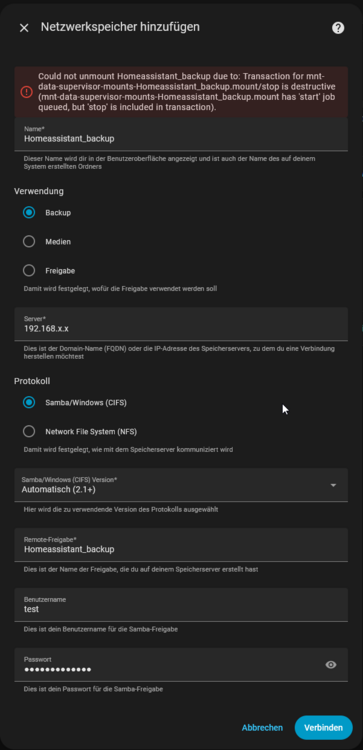
Hallo community Ich bin von Homeassistant auf einem Lenovo Futro nun auf den HomeAssistant_inabox docker von spaceinvaderone gewechselt, da sich der Futro verabschiedet hat. Läuft mittlerweile, soweit so gut. Ich möchte die Backups entsprechend auf meinem Unraid Share speichern. Leider laufe ich immer in den folgenden Fehler (siehe auch Screenshot): "Could not unmount Homeassistant_backup due to: Transaction for mnt-data-supervisor-mounts-Homeassistant_backup.mount/stop is destructive (mnt-data-supervisor-mounts-Homeassistant_backup.mount has 'start' job queued, but 'stop' is included in transaction)." Ich habe alle Variationen durchprobiert: Backup/Freigabe CIFS oder NFS separater Share nur für die Backups Separater user Die Fehlermeldung hatte ich über Google vor allem bei Reddit gefunden aber es gab keine Lösung. Als Workaround wäre es für mich auch ok, wenn ich wüsste wie ich an die Backups ran komme und würde täglich ein Skript laufen lassen, um die Backups nochmal wegzusichern. Wenn ich das aber richtig sehe kommt man dort aber wegen der VM nicht dran? Vielen Dank vorab Jules
-
Rebooting Router changed nothing on both issues. I corrected the time manually, NTP was not working. Still Docker versions not available and Apps section resolves in the error mentioned above. .... As suggested in the message (see attached) I set the static DNS addresses in the settings of Unraid. This is how it worked for me: ----------------------------------------------------- 1.) Go to Settings -> Docker -> Enable Docker: change to no, apply 2.) Go to Settings -> VM Manager -> Enabkle VMs: change to no, apply 3.) Go to Settings -> Network Settings -> IPv4 DNS server assignment: change to Static Enter the following addresses: IPv4 DNS server: 208.67.222.222 IPv4 DNS server 2: 208.67.220.220 IPv4 DNS server 3: <IP of your router> -> Apply 4.) Go to Settings -> Docker -> Enable Docker: change to yes, apply 5.) Go to Settings -> VM Manager -> Enabkle VMs: change to yes, apply After that, Apps section, time sync via NTP and Docker versions and updates are possible again. Issues solved

-
Hi Jorge Cannot find how to do that. Can you help me? I found two other issues which maybe lead to the source of the issue. 1.) Time is wrong, although the time zone is correct, the time is +2 hours. 2.) If I go to Apps section it loads for nearly a minute and resolves in an error, see attached. thanks in advance

-
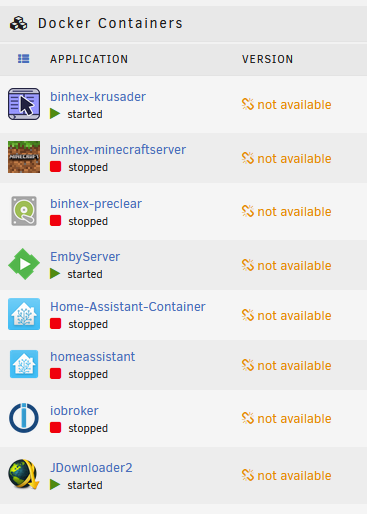
Hi community Since upgrading on 7.0.0, the docker versions are not available and I am not able to update them anymore (see picture attached). Reboot does not help. Is this a known issue? Logs attached, thanks in advance. Jules tower-diagnostics-20250209-1502.zip
-
It worked! Many thanks
-
Thanks for your fast answer. Rebuild is running, I will report if it worked.
-
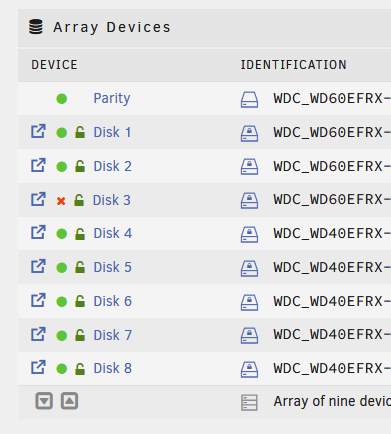
Hi community, I am facing a disk issue with Disk 3 since today. What I already tried: Reboot Changed power cable port of the drive Changed SATA cable of the drive SMART short self-test -> Completed without error Drive is spinning up after it gets power. I am running a system with 2 LSI cards where HDD Array drives are connected via SAS->SATA cables. SSDs are connected to SATA ports of the mainboard. Diagnostics attached. Many thanks in avdance Jules tower-diagnostics-20241107-2032.zip
-
Thanks! I formatted the drive with "Unassigned Devices" plugin before adding to array and there is only xfs option. Stopping array -> change drive format by clicking on drive -> getting format option for drive down below in "array operations" --> format -> done :).
-
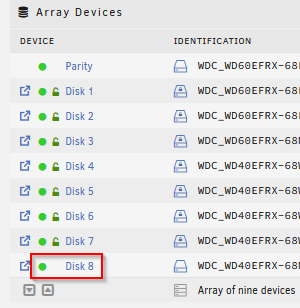
Hi folks, I added a new drive to the array, it's formatted in xfs and is running. Paritiy rebuild and parity check are done. Data is already on the drive but it seems to be not encrypted like the other ones. Do I miss something? Is this normally not done automatically? Already tried to stop and start the array. Thanks in advance.
-
SOLUTION: LSI 9211-8i with IT-mode. No issues so far
-
After two hours because of the PAL error I managed to flash the LSI 9211 to IT-mode via EFI. ... Data rebuild is running, will let you know if it works fine in the next days/weeks.
-
Ok. I got a LSI 9211-8i which I will set to IT-mode. Waiting just for cables and give it a try with that one. Thanks
-
I was too optimistic ... After writing data to the drive again, it stopped working. Diagnostics attached, no reeboot done. Thanks in advance tower-diagnostics-20230816-1927.zip
-
Thanks Jorge, your link did the job
-
I followed the steps, looks better now, rebuild progress is running. I will let you know when it is finished if everything worked. Thanks
-
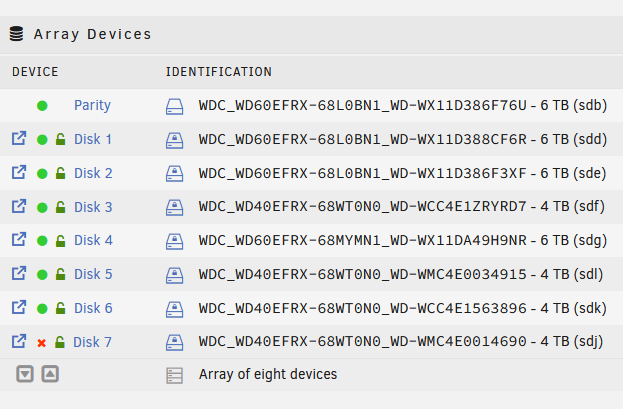
Hi guys, suddenly I am facing an issue with Disk7. It is marked as ""Device is disabled, contents emulated". Fortunately, as it was the last disk of the array, there was no data on the disk yet. I run a self build Unraid server with mainboard an two SATA cards in it. Did I made any changes? Yes, I added two SSD to create a cache pool. Those were connected to the same controller. But first everything went fine. 1 or 2 weeks later Disk7 stopped working. What I did to fix the issue? Checked if the drive spins up when connecting power to it -> yes I tried the same drive on another controller + on mainboard sata port (a port which works for another drive) with several shutdown/restarts inbetween -> no change Tried 3 different sata cables -> no change I connected the drive under windows, drive is available, I deleted the volume, installed again in the Unraid server, I got an option for formatting the drive in Unraid, did the format but still, if I add it in the stopped array, still the red cross for "device is disabled". In the meantime I bought a LSI SAS9211-8i Controller to replace my two controllers in the next days as I do not fully trust them. But on the other hand drive was also not working on a sata port of the mainboard where another drive runs fine. Hope you guys can help me solve this. Attached the diagnostics. Thanks in advance tower-diagnostics-20230815-1024.zip
-
Hi Frank1940 Strange behaviour ... I get no issue in Windows anymore but permissions change anyhow from all folders leading to the file from drwxrwxrwx 1 jules users to drwxrwx---+ 1 jules users and the file itself to -rw-rw----+ 1 jules users But no error in Windows regarding access. Permission screenshots attached. Everyone = jeder, my windows is in german. jules is the SMB user which should have full persmissions. I am wondering a bit how many users and groups have permission. What is that 3006 group? Thanks in advance permissions.zip
-
Changed ownership of folders and files of all subfolders and files of the Share "Data" back to the SMB-user
-
The user I created which has the share connected via SMB on Windows as a network drive. I tested the issue now with one of the files. The permissions on the file did not change, what changed is the permission on the Main folder on the share: "drwxrwx---+ 1 nobody users 14 Aug 23 16:05" The files are located on the Share "Data", subfolders are like "Documents"/"Excel". When the issue occurs, permissions change on folder Documents and subfolder Excel to drwxrwx---+. The nobody user thing was a previous try to fix the issue as I thought the issue is located to the user. The file itself is owned by the user for SMB access even after the issue.
-
Thanks for replying so fast Diagnostics ZIP attached tower-diagnostics-20210824-1227.zip
-
Hi folks I am happy choosing Unraid instead of a oob NAS some years ago but I am currently faced with a very annoying issue. Cache drive is used and configured to move the files to HDDs nightly. When I am working on my documents, especially Excel, I daily get permission issues as soon as I am trying to save the file. I get the message from Windows that I have no permissions to access this folder/file. When I check the permissions on console, I can see that the permissions changed to "drwxrwx---+", before it was "drwxrwxrwx". To solve this, I have to modify the rights with "chmod 777". It seems to be similar like this post: I already tried to remove ACL as mentioned there but did not solved the issue. I think I could isolate the issue to the cache drive. I put the files I work daily with to a share where only one HDD is included and Cache drive is excluded, no issues. No changes where made on the Cache drive hardware and no changes as I can remember on Unraid. The only thing I can remember which should be in the timeframe of the issue occuring is that I had to reset my main computer to worksettings and setting it up new. My first thought was that it is connected to this but I checked with another computer and faced the same issues. Hope you could help me. Logfile attached, issue occured today on 24th of August. Thanks in advance! syslog



