





MrFrizzy
Members
-
Joined
-
Last visited
Everything posted by MrFrizzy
-
Anyone having issues with high memory usage? I thought I was having intermittent stability issues with my server again but it actually turned out that docker was consuming all of my RAM causing everything to timeout (web interface, dockers, VMs, console, etc.). After a bit of troubleshooting, I found it was just this particular image as both of my containers were using as much RAM as they could (over 40GiB between the two of them). Prior to the update, I was only ever seeing 1-3GiB of usage on either container at any given time. Now, I have memory limits put in place (8G and 4G) and both containers are hitting them causing processes in the container to get killed to reset the memory usage back to a few hundred MiB before growing over the course of a few hours. I didn't change any settings and didn't see any settings that would make a difference (both apps are set to a 2GiB memory limit in the advanced tab).
-
For anyone who comes across this, if your memory modules have temp sensors on them and the correct driver modules are loaded, you should be able to see the reported temps through the terminal. Run the "sensors" command, find the chip(s) for your memory modules, and the temp should be listed under each. If you don't see what you are after then either your memory modules don't have temp sensors or you don't have the correct modules loaded. To figure out if you need to load some modules, open the terminal and run "sensors-detect". It should be safe to answer all of the prompts with the default answer (just press enter), but definitely read the prompts and proceed at your own risk. At the end, it will tell you if there any drivers that could be loaded to access the various hardware monitoring sensors it finds. To load the modules for testing, just copy, paste, and execute the "modprobe" commands it lists out. For example: "modprobe i2c-dev" If that gets you access to the temp sensors that you want, then you can load those modules on boot so you don't have to add them back in each time you reboot the system. Just add each of those "modprobe" lines to the "go" file at: /boot/config/go. Here is an example: #!/bin/bash # Start the Management Utility /usr/local/sbin/emhttp & # Load some modules <--- this line and the following lines are manually added to this file modprobe your-module-name-here modprobe another-module-name modprobe a-third-module-name
-
So, your sensors are working as they should in the terminal but the System Temp plugin is not able to read them for some reason. Seems like the Auto Fan Control plugin is working fine though since the fan speeds are showing up. At no point have I had the "detect" button not working at all so bear with me as I am learning as I go. Running `sensors-detect` in the terminal works for you without any errors, correct? Can you confirm what version of Perl is installed? You can run `perl -v` in the terminal to get the version (I assume UnRAID 7 has it built-in, 6.12 does, but always good to confirm). I have been poking around in the PHP files to understand how this plugin works in attempt to modify it to display more temps such as those from memory and VRM. I'm pretty new to stuff like this. I'll keep at it and see if I can figure out where things could be going wrong for you.
-
Have you tried to manually specify the same drivers as were in use before? The "DETECT" button doesn't always get things right. coretemp nct6775
-
That is the commanded PWM percentage. If you don't use a PWM fan or PWM control then the value will be 0% regardless of the actual RPM. You need to specify the drivers manually in the "Available drivers" field. k10temp does the CPU and it87 does the motherboard temps. k10temp it87 Once those are in there, be sure to click the "LOAD DRIVERS" button. You should then be able to select the processor and mainboard temps in the sensors drop-down. DO NOT HIT "DETECT" ONCE YOU HAVE THIS WORKING. Doing that will overwrite the config and break things.
-
Updated from 6.10.3 > 6.12.10 > 6.12.11 just fine. The 6.10 to 6.12 update complained about the plugins I had that were not up to date (because they were on the last version that supported 6.10) and ones that were incompatible with the new version (ZFS plugins and nerdpack). After removing the incompatible plugins, I proceeded to update with VMs and Dockers disabled, the array spun down and set to not auto-start. Went well, then I could update the out of date plugins. I had to change from MACVLAN to IPVLAN for the dockers. Also had to setup my existing ZFS pool as a new UNRAID pool. The shares that were imported from my ZFS pool were incorrect as they were set to use the main array instead of only the new ZFS pool. After that quick change, things were working as they did in 6.10.3. For whatever reason, the 6.12.11 update would not show up for me so I had to use the .plg link to manually update (https://stable.dl.unraid.net/unRAIDServer.plg).
-
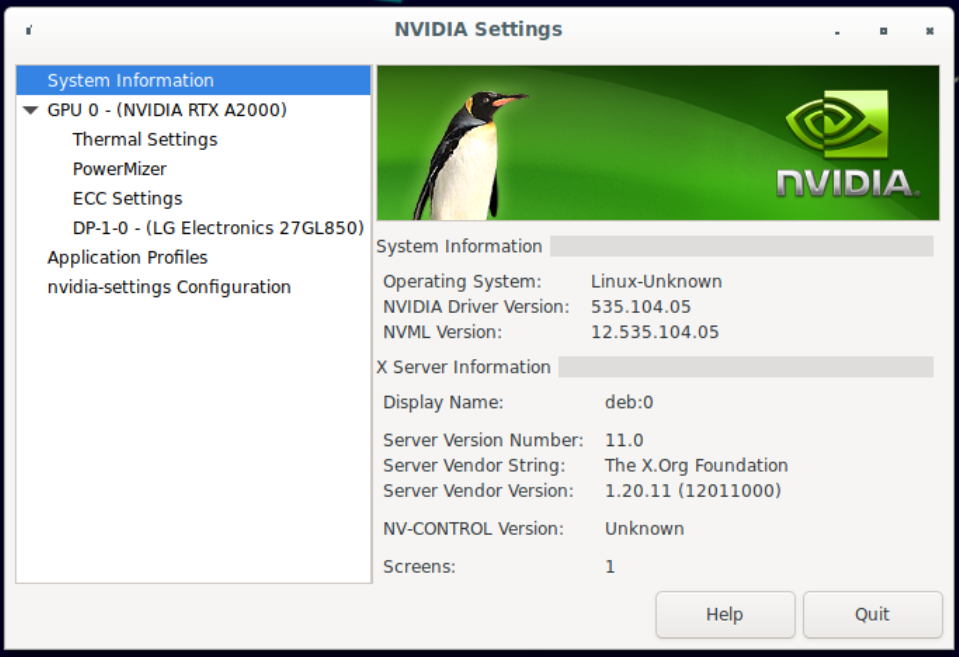
UnRAID 6.10.3 Debian 11 VM Ryzen 5600G RTX A2000 My Debian 11 VM has no video hardware acceleration and I cannot seem to figure out where I am going wrong. The GPU is detected, the drivers are installed, but the system keeps complaining about there not being video hardware acceleration and I have no output on my monitor connected to the GPU directly. I first followed the info in this post to set the primary GPU as VNC and the A2000 as the second GPU. I also followed the second method from this website to install the Nvidia drivers. I installed the drivers at first using the proprietary option without cuda, found that didn't fix my problem, uninstalled everything, then chose the proprietary option with cuda which didn't make a difference. The first method mentioned in that article doesn't work for me because nvidia-detect doesn't say there is a compatible driver. Also, if I install both the proprietary and the open source drivers, then the GPU no longer shows up in the NVIDIA X Server Settings. In the BIOS, I have the system set to use the igfx as the primary video device. Upon booting UnRAID, the console is output through the motherboard's HDMI port so that is working correctly. In Under Tools > System Devices, both the A2000 GPU and audio device are part of the same IOMMU group without anything else in the group, and the two are bound to vfio-pci on boot. Under the VM settings, I have the first GPU as VNC and the second GPU as the A2000 (1:00:0) with the sound card being the audio device (1:00:1) in the A2000. I've tried with and without a vBIOS ROM supplied. The ones I have tried are an unmodified one from Techpowerup and one that I modified to not have the header in it as Spaceinvader One mentions in this video: https://www.youtube.com/watch?v=1IP-h9IKof0. I have also tried with and without specifying in the XML under the destination source that the GPU is "multifunction" (multifunction='on') while marking the audio device as the same bus as the GPU ('0x05') with a function of '0x1'. None of the VM setting changes seem to change what happens in the VM. In the Debian 11 VM, running `lscpci` shows the GPU and audio are detected but as `05:00.0 VGA compatible controller [0300]: NVIDIA Corporation Device [10de:2531] (rev a1)` for the GPU. No matter what I've tried, I cannot get it to show up like it does in the "System Devices" of UnRAID: `01:00.0 VGA compatible controller: NVIDIA Corporation GA106 [RTX A2000] (rev a1)`. `nvidia-detect` shows the same info as above and says the "...card is not supported by any driver version up to 535.104.05." However, the driver is installed and the NVIDIA X Server Settings app shows the correct info (below). So, it seems that the GPU passthrough is working to some extent, but the fact that it doesn't show up as `GA106 [RTX A2000]` has me thinking there is something I am missing with UnRAID. Any insight is appreciated. I've been trying to get this working on and off for months now with no luck. Here is the XML config for the VM: Below are screenshots from the NVIDIA X Server Settings. I can provide diagnostics files via DM. I don't wish to post them publicly.
.thumb.png.b8eee65d13129f6bde9ff1f81bf753df.png)
.thumb.png.b7294b751d0da49aaf939a40e4d9d589.png)
-
Thanks for the examples, that makes a lot of sense! It seems that every distro uses ZFS a little differently and there is no one way to go about things.
-
I agree. I don't expect the scrub to come back with any errors but it's always good to be certain. After 2 days of researching this issue, it seems that the disk partitions created by ZFS are deterministic. Do you have any insight on that? At least for drives that have 512-byte logical sector sizes (even if the physical sector size is 4096), the sources I can find within the last few years all seem to show that ZFS will align the first partition to sector 2048 and the last partition to exactly 8MiB before the last full 2048 sector chunk of the disk. I didn't really find any info on drives with 4096-byte logical sectors (4K Advanced Format) so I would imagine the behavior there is different. I don't have any 4096-byte logical sector drives to test with and even if I did, my SAS2008 HBA doesn't support 4K logical sectors, only 512 physical and emulated. By my math that means the partition start and end points can be calculated based purely on the total sector count of a given drive. That could save someone who didn't have a spare identical drive or a working identical drive still in the pool. It would also mean no need to create a sparse qemu-img somewhere of the same sector count as the drive in question just to create a new zpool on it in order to grab the partition info (which didn't work for me). For 512-byte logical sector drives, calculate the end of partition 9: 1. Total sector count of drive / 2048 2. Get rid of everything after the decimal point 3. Multiply by 2048 4. Subtract 1 For example: 1. 5860533168 / 2048 = 2861588.46094 2. 2861588 3. 2861588 * 2048 = 5860532224 4. 5860532224 - 1 = 5860532223 = part9 end sector Then get the partition 9 start sector: 1. Take the partition 9 end sector and subtract 16383 (in this example: 5860532223 - 16383 = 5860515840) Lastly, get the partition 1 end sector by subtracting 1 from the partition 9 start sector (in this example: 5860515840 - 1 = 5860515839) Thoughts?
-
Update time! I added the spare 3TB drive to my system and created a new zpool on it using: zpool create pool /dev/sdl Then ran fdisk to get the partition info: fdisk -l /dev/sdl Disk /dev/sdl: 2.73 TiB, 3000592982016 bytes, 5860533168 sectors Disk model: Hitachi HDS5C303 Units: sectors of 1 * 512 = 512 bytes Sector size (logical/physical): 512 bytes / 512 bytes I/O size (minimum/optimal): 512 bytes / 512 bytes Disklabel type: gpt Disk identifier: 018D37A8-E21E-DC4B-AC14-7D3B1CB9CBFA Device Start End Sectors Size Type /dev/sdl1 2048 5860515839 5860513792 2.7T Solaris /usr & Apple ZFS /dev/sdl9 5860515840 5860532223 16384 8M Solaris reserved 1 Then ran sgdisk to copy that info over to the 3 other drives: sgdisk -n1:2048:5860515839 -t1:BF01 -n9:5860515840:5860532223 -t9:BF07 /dev/sdi sgdisk -n1:2048:5860515839 -t1:BF01 -n9:5860515840:5860532223 -t9:BF07 /dev/sdj sgdisk -n1:2048:5860515839 -t1:BF01 -n9:5860515840:5860532223 -t9:BF07 /dev/sdk EDIT: Forgot to include that I had to re-import the pool first before the scrub: zpool import -a Then started a scrub. The data seems to be intact so far, but the scrub is going to take more than 12 hours looking at the average disk speeds.
-
Ah, the command line is the way I did it before and the only way I know how to. Should be pretty straightforward to create a new zpool on the spare and copy the partition info over. We'll see how it goes later today, time permitting. Any idea how this could have happened in the first place? It would be one thing to have the pool not mount upon boot, or have an issue with a drive or two, but having the partition info randomly deleted on all 3 drives is not something I can explain. That is unless all of that information was never written to the drives or otherwise saved anywhere besides memory? Would that be possible?
-
They are connected directly to a SAS2008 HBA via a HD mini-SAS to (4) SATA cable along with the (4) drives in my main array on a second HD mini-SAS to (4) SATA cable. The main array shows no signs of anything wrong. My other drives are plugged into the motherboard directly: (2) 500GB SATA drives for cache, (1) 250GB SATA via Unassigned Devices, and a 1TB NVME drive as a second BTRFS pool device. No issues to report with those either. I don't recall exactly, but I do know that it was RAIDZ and what name I used for the pool. Once I have all 3 drives imaged, I'll shut everything down, add my spare 3TB drive, and start testing the procedure with creating and copying the partition tables over. The data on the ZFS pool isn't critical, I don't bother backing it up, but it would be nice to also not lose 5TB of data just because I restarted my machine.
-
Unraid 6.10.3 zfs-2.1.5-1 zfs-kmod-2.1.5-1 If you need my diagnostics file, please let me know so I can send it to you via DM. I don't wish to post it publicly. A few months ago I added a ZFS pool to my system (before Unraid 6.12 was released). It included (3) 3TB drives in what I believe was raidz. Well, I had not rebooted my system after it was all working until a few days ago and now the ZFS pool is gone. zpool status zpool import zpool import -a zpool import -D -f [poolname] zfs list all come back saying there is no pool available to import or no datasets available. Using ls -l /dev/disk/by-id/ I get the below for the 3 disks in question: lrwxrwxrwx 1 root root 9 Jul 3 18:01 ata-Hitachi_HDS5C3030ALA630_MJ1311YNG39DAA -> ../../sdg lrwxrwxrwx 1 root root 9 Jul 3 18:01 ata-Hitachi_HDS5C3030ALA630_MJ1313YNG1PTSC -> ../../sdh lrwxrwxrwx 1 root root 9 Jul 3 18:01 ata-Hitachi_HDS5C3030ALA630_MJ1313YNG244VC -> ../../sdf fdisk -l Returns: Disk /dev/sdf: 2.73 TiB, 3000592982016 bytes, 5860533168 sectors Disk model: Hitachi HDS5C303 Units: sectors of 1 * 512 = 512 bytes Sector size (logical/physical): 512 bytes / 512 bytes I/O size (minimum/optimal): 512 bytes / 512 bytes Disk /dev/sdg: 2.73 TiB, 3000592982016 bytes, 5860533168 sectors Disk model: Hitachi HDS5C303 Units: sectors of 1 * 512 = 512 bytes Sector size (logical/physical): 512 bytes / 512 bytes I/O size (minimum/optimal): 512 bytes / 512 bytes Disk /dev/sdh: 2.73 TiB, 3000592982016 bytes, 5860533168 sectors Disk model: Hitachi HDS5C303 Units: sectors of 1 * 512 = 512 bytes Sector size (logical/physical): 512 bytes / 512 bytes I/O size (minimum/optimal): 512 bytes / 512 bytes I also cannot seem to find any zpool.cache files anywhere in /etc or /usr. I presume I need to first recover the partitions on each of the 3 drives before I can even attempt to get them re-imported, but I am not sure how to do that. I've seen other posts talk about using sgdisk and specifying the partition start and end points, but I don't know what those values would be on my drives or where to find that info. Many other posts talk about using tools that I can't seem to find for Unraid or paid for tools that are simply out of the question here. Can anyone provide me some guidance on how to recover the partitions and how to prevent this from happening in the future? I'll likely upgrade the OS to 6.12 after I can get the pool working again (even if I have to blow the whole thing out and lose the data). EDIT: gdisk -l /dev/sdg Returns: GPT fdisk (gdisk) version 1.0.8 Partition table scan: MBR: not present BSD: not present APM: not present GPT: not present Creating new GPT entries in memory. Disk /dev/sdg: 5860533168 sectors, 2.7 TiB Model: Hitachi HDS5C303 Sector size (logical/physical): 512/512 bytes Disk identifier (GUID): 7E12C536-4BE0-497C-9432-B1E75D2C4AB5 Partition table holds up to 128 entries Main partition table begins at sector 2 and ends at sector 33 First usable sector is 34, last usable sector is 5860533134 Partitions will be aligned on 2048-sector boundaries Total free space is 5860533101 sectors (2.7 TiB) Number Start (sector) End (sector) Size Code Name dd if=/dev/sdg bs=512 count=2048 2>/dev/null | hexdump -C | grep EFI.PART Returns nothing at all. Considering I do have a spare one of those 3TB Hitachi drives, I could create a new ZFS pool on it, check the partition table positions, and then use sgdisk to reconstruct the partition table on the 3 other drives, correct? I'll probably use clonezilla to image the drives before doing anything just in case.
-
I should have included more details in the original post. I have no issues with saving the files, I have weeks worth saved on my array. It is just the 64MB temporary location that the container uses for the videos that randomly fills up and causes the stream to crash. I am using the "shinobi-cctv-pro" template which uses the shinobicctv/shinobi:latest repository. Everything is default other than the video storage location (/mnt/user/Secondary/Shinobi/Videos/ [on the main array]) and the "Streams" cache (/mnt/user/appdata/streamCache, which is supposed to be /dev/shm/Shinobi/streams in the container but clearly isn't). After much more research, I found out that /dev/shm is the "shared memory device", a temp location that is stored in RAM. By default, it is 1/2 of the total system RAM capacity, however, within docker containers, /dev/shm defaults to 64MiB. That is exactly what I was running into. I reverted the "Streams" path back to "dev/shm/Shinobi/streams" and started messing with different ways to get the shm size to increase. After a bunch of trial an error, I was finally able to increase it by adding "--shm-size=256m" to the "extra parameters" section of the container template. It took me a while to find that as it is only shown when the "advanced" option is selected. Once I did that and restarted the container, I had a 256MiB /dev/shm! No crashes as of yet!
-
I am running Shinobi in a docker for some IP cameras. I am running into an issue where the camera streams will periodically "die" with an error in the log about not enough space. watch df -h /dev/shm Using the above, I have this single mount point within the docker container run out of space just before the logs show the error. It is only 64MB in size. What doesn't make sense to me is that in the docker container configuration, that location is supposed to be mapped to a folder inside of appdata, but no data ever ends up in that location despite what the watch command above says. Clearly something isn't adding up and I must be using the wrong keywords to search around because I can't find any info on what to do. Can anyone give me some insight as to why /dev/shm is only 64MB in size when the container config for that path is set to a directory with 100+ GB of available space? How can I increase the size of /dev/shm inside the docker container? I appreciate any help I can get!
-
@JorgeB Thank you for all your help these last few days! Everything seems to be happy and stable now! You've undoubtedly saved me hours if not days of troubleshooting and headache, so again, thank you for the help!
-
To be clear, the second btrfs pool does not push files to the array. The shares on the second pool will only ever use the (2) drives in that pool, not the cache and not the array. The scrub is still running on the second pool, but I have gotten some errors like the below which don't point to a file as far as I can tell. Any clue how I can address those? Feb 24 10:45:55 Tower kernel: BTRFS error (device sdb1): bdev /dev/sdb1 errs: wr 0, rd 0, flush 0, corrupt 48, gen 0 Feb 24 10:45:55 Tower kernel: BTRFS error (device sdb1): bdev /dev/sde1 errs: wr 0, rd 0, flush 0, corrupt 49, gen 0 Feb 24 10:45:55 Tower kernel: BTRFS error (device sdb1): unable to fixup (regular) error at logical 12169646080 on dev /dev/sdb1 Feb 24 10:45:55 Tower kernel: BTRFS error (device sdb1): unable to fixup (regular) error at logical 12169646080 on dev /dev/sde1 Feb 24 10:45:55 Tower kernel: BTRFS error (device sdb1): bdev /dev/sdb1 errs: wr 0, rd 0, flush 0, corrupt 49, gen 0 Feb 24 10:45:55 Tower kernel: BTRFS error (device sdb1): bdev /dev/sde1 errs: wr 0, rd 0, flush 0, corrupt 50, gen 0 Feb 24 10:45:55 Tower kernel: BTRFS error (device sdb1): unable to fixup (regular) error at logical 12169650176 on dev /dev/sdb1 Feb 24 10:45:55 Tower kernel: BTRFS error (device sdb1): unable to fixup (regular) error at logical 12169650176 on dev /dev/sde1 EDIT: From the researching I've done, it seems that whatever was there has been deleted or overwritten but there is some reference to the extent that contains that block. I ran the below command and got the shown result. I also shifted the logical address +/- 5,000 then +/- 100,000, but got the same return for all 4 of those as that seen below. btrfs inspect-internal logical-resolve -v -P 12169746080 /mnt/[secondpool] ioctl ret=0, total_size=65536, bytes_left=65520, bytes_missing=0, cnt=0, missed=0 At this point, do I just need to move forward with rebuilding the csum tree (--init-extent-tree --init-csum-tree) and see if I end up with any messed up files? Or should I format the pool and move everything back over from backups?
-
2 out of 4 matched sticks have errors. I have no idea how long those have been failing, but it has to have been quite some time. Even some files from backups are failing checksum. I've pulled out the bad DIMMs, added my one spare DIMM, and passed a full run of memtest. I've also pulled off all of the "bad" files from the second pool (since they are the same as what I have backed up) and am running another scrub to see if any more errors come up. The main cache pool passes scrub no problem, even before finding the bad DIMMs. The parity check is passing every time I run it. Does the main array not compare checksums like the btrfs pools?
-
I'm having a lot of problems with this second pool. Each time I do a scrub, more uncorrectable errors are found. This 3rd scrub is the first one to complete and not terminate early. Since there are uncorrectable, the balance fails as well. I am copying off all of the data now and am getting read corrections in the logs for files that have not come up in the scrub or balance. Not sure what is going on, but I am reaching the ends of my wits here. What should have been a simple file recovery has turned into 3 days of headache. I plan to copy all of the data off, blow out that second pool, recreate it from scratch, and repopulate the drive from the copy and backups (where needed). I will also implement some sort of scheduled scrub to help maintain data integrity.
-
@JorgeB The cache pool is working as expected now! Correct size and free space is shown! The second pool is also showing the correct capacity and free space after running a scrub and balance. It did have a few files fail checksum of which I have removed, but the second balance has erred out on another csum failed message for a file that does not exist (both find /mnt/[secondpool] -inum 946 and btrfs inspect-internal inode-resolve 946 /mnt/[secondpool] fail to find the file). I am trying the scrub again to see if that can fix anything but it will likely take an hour or two take over 3 hours to complete. [43939.203266] BTRFS error (device sdb1): bdev /dev/sdb1 errs: wr 0, rd 0, flush 0, corrupt 44, gen 0 [43939.203270] BTRFS error (device sdb1): bdev /dev/sdb1 errs: wr 0, rd 0, flush 0, corrupt 45, gen 0 [43939.252058] BTRFS warning (device sdb1): csum failed root -9 ino 946 off 199262208 csum 0xe16b1f3e expected csum 0x0b5860dc mirror 1 [43939.252064] BTRFS error (device sdb1): bdev /dev/sde1 errs: wr 0, rd 0, flush 0, corrupt 57, gen 0 [43939.252201] BTRFS warning (device sdb1): csum failed root -9 ino 946 off 199262208 csum 0x90983c1a expected csum 0x0b5860dc mirror 2 [43939.252214] BTRFS error (device sdb1): bdev /dev/sdb1 errs: wr 0, rd 0, flush 0, corrupt 46, gen 0 [43941.686335] BTRFS info (device sdb1): balance: ended with status: -5 I do have a few questions for you. Does Unraid ever do a scrub and/or balance on btrfs drives? There really isn't a need to unless there is a RAID1 pool, right? Should I script out a scrub and/or rebalance once a month alongside the parity check on the array?
-
I removed the 9 uncorrectable files, ran a successful scrub, and a successful rebalance. Running the same procedure on the second pool now.
-
@JorgeB The rebalance to RAID1 errs out on the cache pool and the process is still running on the second pool. Below is the error I am getting. ERROR: error during balancing '/mnt/cache': Input/output error Output of dmesg | tail [21077.202819] BTRFS error (device sdj1): bdev /dev/sdj1 errs: wr 0, rd 0, flush 0, corrupt 297, gen 694 [21077.202838] BTRFS error (device sdj1): bdev /dev/sdj1 errs: wr 0, rd 0, flush 0, corrupt 298, gen 694 [21077.208635] BTRFS warning (device sdj1): csum failed root -9 ino 586 off 855498752 csum 0x20dbc7d1 expected csum 0x55eff1d8 mirror 1 [21077.208637] BTRFS error (device sdj1): bdev /dev/sdl1 errs: wr 0, rd 0, flush 0, corrupt 183, gen 0 [21077.208792] BTRFS warning (device sdj1): csum failed root -9 ino 586 off 855498752 csum 0x26049628 expected csum 0x55eff1d8 mirror 2 [21077.208795] BTRFS error (device sdj1): bdev /dev/sdj1 errs: wr 0, rd 0, flush 0, corrupt 299, gen 694 [21080.116515] BTRFS info (device sdj1): balance: ended with status: -5 Considering that the cache drive also has my VMs and docker containers, certainly some files changed between the last time it was in a valid RAID 1 and the current rebalance since I have both in auto-start, right? I have found and removed the uncorrectable file (all of Krusader actually) and am trying another rebalance. The process on the second pool also failed with the same error, but the ino listed is on the cache pool so I don't quite understand that one. I will wait for the rebalance to complete successfully on the cache pool before I try it again on the second pool.
-
The restore was successful. I ran the command on the same drive (the deleted one) with success. I then noticed that my Debian 11 VM recognized both drives, let me mount them, and everything seems to be intact. I didn't run the command on the drive with the "btrfs component partition". I moved them back into the Unraid machine, booted, up and found that the array and cache were both up along with the dockers and VMs. However, my second pool was missing the first drive so I shut the machine back down, checked the connections, booted back up, and now the second pool is doing the same thing the first one is. It shows RAID 1, but the total capacity and free capacity values are definitely wrong. Attached is the diagnostic zip. I am letting the parity check and rebalance run (usually takes about 24 hours for the main array).
-
I will certainly try that once the restore of the data to a backup drive has completed. What is interesting is that the drive I deleted the file system on is the one that I can get a restore going on without any trouble. The drive that has a "btrfs component partition" (according to UFS Explorer) refuses to do anything I have tried so far.
-
I deleted a folder from one of my unassigned drives and wanted to see if I could recover it. I shut down the machine, pulled the drive out, and tried a recovery through my Windows machine (since the drive is NTFS). I was not successful so I put the drive back into the machine and powered up. Once in Unraid, I noticed that both that unassigned drive and one of my cache pool drives were not showing up. I powered back down and found that I had unplugged the two SATA cables at the controller card. Plugged those back in, booted back up, and noticed that my dockers and VMs would not start up. Dockers kept complaining about something refusing the request and the VMs couldn't talk with libvrt. Turns out, my cache pool that was in RAID 1 was showing a capacity of 1TB (500GB + 500GB) with over 400GB free which is very wrong, it was acting more like RAID 0. When using the terminal to try and access my cache pool, I would just get a message about "wrong fs type, bad option, bad superblock on /dev/sdl1, missing codepage or helper program, or other error.". I tried a scrub which didn't fix the issue. I tried turning off the array and then bringing it back online with no change. I removed one of the cache drives from the pool and started the array with no change. I tried adding the drive back into the cache pool and it did say it would overwrite the data, but I proceeded anyway which made things worse I think. The system keeps throwing messages about both of the cache pool drives being missing though they are there (probably because they are inaccessible/unmountable). Since I couldn't get anything working even after following this page: https://forums.unraid.net/topic/46802-faq-for-unraid-v6/page/2/?tab=comments#comment-543490, I pulled the drives out of the unraid machine and attached them to my Debian virtual machine hosted on my Windows desktop. I have not been able to get anywhere on there either. Using UFS Explorer pro on Debian, the software recognizes that both drives do not have a file system. One drive does show to have a "Btrfs component partition" while the other shows nothing partition wise. Running a scan on both drives shows the correct data and folder structure for both drives (they are identical). Since I do not have a license for this software, I can't recover/copy any of the data off to another drive. If I could do that, I would just wipe the drives afterwards, create a new cache pool, and move the data back over. Can anyone help direct me on what to try next? Is there a way to rebuild/restore the file system so the drives are accessible again? Do I need to somehow rebuild the RAID 1 with these drives and then try the previously linked post again? I don't have the drives in the Unraid machine, but can put them back if that makes things easier (I am much more familiar with Debian than I am with Unraid and it's interface). Thanks!

.png.3ad3c53f0fcffde21e9b4d76a453ff5c.png)
.png.0f44da7783956ae3c7103aa350f25987.png)
