





Renegade605
Members
-
Joined
-
Last visited
-
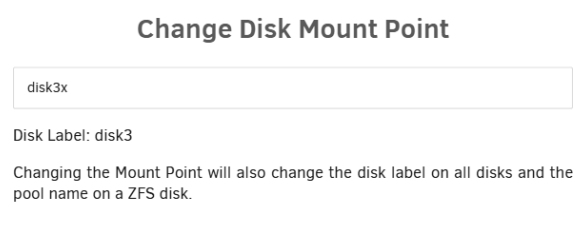
I'm currently having issues mounting a disk that was removed from my array. Partition 1 was labeled as disk3 and I expected that to be a problem, so I changed it to disk3x. However, when I did that, the array was in the middle of stopping, so that may be the root of this problem. It's now named disk3x according to Unassigned Devices, but the disk label is still disk3. Trying to mount this, I get the following errors in syslog: Aug 26 07:37:00 Global-Dynamics unassigned.devices: Mounting partition 'sde1' at mountpoint '/mnt/disks/disk3x'... Aug 26 07:37:00 Global-Dynamics unassigned.devices: Warning: Cannot determine Pool Name of '/dev/sde1' Aug 26 07:37:00 Global-Dynamics unassigned.devices: Partition 'disk3' cannot be mountedI thought that being interrupted by the array going down may have resulted in this inconsistency, so I thought I would name it back to disk3 and then change it to disk3x a second time, but that fails as well: Aug 26 07:37:09 Global-Dynamics unassigned.devices: Error: Device '/dev/sde1' mount point 'disk3' - name is reserved, used in the array or a pool, or by an unassigned device.I also tried changing it to disk3old, which reports successful, but gives me the same errors trying to mount. How can I get this disk to mount?
-
Have you tried znapzend? I know some people are wary because the project looked abandoned or whatever, but I've been using it for years now and it still works just fine. The only workaround I had to implement was a cron job to check if it was running and restart it if it wasn't because sometimes it would stop.
-
I do this too when I add new disks because I want to spread the I/O load across all disks instead of having the new disk be responsible for every new file until it's as full as the rest. I use unbalanced to do it by first setting the minimum free space (unbalanced setting) to free space on the array in total divided by number of disks. Eg. 5TB free and 10 disks = 500GB minimum free. Then I put together a quick Javascript macro to randomly select a bunch of files on disk 1 to transfer to the new disk. Rinse and repeat for all disks. It's not super elegant, but it works. I don't subscribe to the common philosophy around here of spinning down disks as much as possible. All of mine are always spinning and an equally random chance that any given file is on any particular disk gives the best chance that the file I need can be read from a disk that isn't busy, on average.
-
The new notifications slide-out should leverage the History API so that pressing the back button will close the notifications rather than navigating back a page. This is especially true on mobile, where the notifications slide-out covers the entire screen, appearing to be a new page for all intents and purposes. https://developer.mozilla.org/en-US/docs/Web/API/History/pushState
-
Tonight I went to reboot one of my servers and couldn't figure out why it was waiting. There was a scrub running on the zfs cache pool (the only pool, no array). Depending on the array, this guarantees exceeding the graceful shutdown timeout. Rebooting should cancel scrubs.
-
I didn't think so, but I was trying anything at that point lol. Thanks! I didn't realize Rufus could do anything without a specific image to flash. This completely solved the problem on the first try.
-
Hello, it's been a while since I had to change any server hardware and I've either forgotten what I'm doing, things are different now, or something is broken. I could use some help figuring out what's going on. System is an HP DL380 G10, intended to replace a G7. The G7 gave me a lot of trouble getting boot from USB to work reliably, so I expected some headaches getting the G10 to do it as well, but I'm not sure if the problem is with the machine or the USB. (Note: I have misplaced the boot drive for the G7, so I can't try a "known working" boot drive. I am trying to boot to a new key never used for Unraid before.) What I've tried: Unraid USB Creator (latest version) Same but run make_bootable.bat Same but rename "./EFI" to "./EFI-" and run make_bootable.bat All these 3 but with version 7.0.0 Copy backup of old boot drive (v7.0.1) to USB and run make_bootable.bat Same but rename "./EFI-" to "./EFI" and run make_bootable.bat Unraid USB Creator (v7.0.0), delete "./EFI", copy backup to drive, rename "./EFI-" to "./EFI" Same as above but run make_bootable.bat Trying all these options and flipping the server BIOS from UEFI to legacy boot and vice versa, trying to let it boot from the boot order and manually selecting the USB drive in the one-time boot menu, and multiple USB ports, no booting has ever happened. I thought I'd try booting from this key on my laptop to confirm that it works, and I can't boot my laptop from it either. This laptop is the first machine I've ever owned with Win11 and all the secure boot nonsense that comes with that. So, once again, I don't know if it's the drive or if something different is required to boot that machine from USB. The server does boot into VMWare if I slap in one of the SSDs that it came with. (Even though I was pretty sure I had disabled all boot options except USB, which is making me think even more that HP BIOS really sucks.) I don't feel like I've exhausted every option, because the POST on a server like this takes forever and I was already at it for hours before I called it a night. I have an older laptop to try and my desktop if I unpack it (just moved, hence the lack of working boot drive, etc.), will try a different USB drive and/or creating a bootable live image of a different Linux, etc. But, I'm hoping someone is going to tell me I missed some really obvious step before I spend hours on it again tonight. Thanks in advance for any help.
-
Unmount the dataset first by setting mountpoint to "none" or stopping the array.
-
I opted to destroy and recreate the docker dataset and reinstall all containers and the first nightly auto-update succeeded without issue. Having had to recreate a docker folder several times in the last year, it really feels like there ought to be a faster way to do it though. Time will tell if the problem returns.
-
Thanks for your reply. Fair enough, but we can see kernel panic; is there really no memory dump or any other way to see why? Does this have to do with the new overlay2 storage driver? I can give this a shot on the weekend. My original understanding of the choice was that directory/dataset has advantages over image on zfs. Is that still correct but maybe has issues sometimes? I have a second machine also with zfs and the same configuration (albeit with far fewer containers) which has not exhibited this issue.
-
Should I edit my original post to have no details and no attached diagnostics? Those posts seem to get a ton of responses.
-
So of course this still isn't resolved. I'm unable to enable Docker Auto Update due to it crashing the server overnight. I'd love to have some help figuring out what to do here. Apr 4 02:30:01 Global-Dynamics Docker Auto Update: Community Applications Docker Autoupdate running Apr 4 02:30:01 Global-Dynamics Docker Auto Update: Checking for available updates Apr 4 02:30:22 Global-Dynamics Docker Auto Update: Found update for Authelia. Not set to autoupdate Apr 4 02:30:22 Global-Dynamics Docker Auto Update: Found update for plex. Not set to autoupdate Apr 4 02:30:22 Global-Dynamics Docker Auto Update: Stopping bazarr Apr 4 02:30:25 Global-Dynamics kernel: docker0: port 20(vethcd308af) entered disabled state Apr 4 02:30:25 Global-Dynamics kernel: vethb6c9664: renamed from eth0 Apr 4 02:30:25 Global-Dynamics kernel: docker0: port 20(vethcd308af) entered disabled state Apr 4 02:30:25 Global-Dynamics kernel: vethcd308af (unregistering): left allmulticast mode Apr 4 02:30:25 Global-Dynamics kernel: vethcd308af (unregistering): left promiscuous mode Apr 4 02:30:25 Global-Dynamics kernel: docker0: port 20(vethcd308af) entered disabled state Apr 4 02:30:26 Global-Dynamics Docker Auto Update: Stopping ESPHome Apr 4 02:35:26 Global-Dynamics Docker Auto Update: Stopping immich Apr 4 02:35:30 Global-Dynamics kernel: docker0: port 12(veth40921f5) entered disabled state Apr 4 02:35:30 Global-Dynamics kernel: veth009fde1: renamed from eth0 Apr 4 02:35:30 Global-Dynamics kernel: docker0: port 12(veth40921f5) entered disabled state Apr 4 02:35:30 Global-Dynamics kernel: veth40921f5 (unregistering): left allmulticast mode Apr 4 02:35:30 Global-Dynamics kernel: veth40921f5 (unregistering): left promiscuous mode Apr 4 02:35:30 Global-Dynamics kernel: docker0: port 12(veth40921f5) entered disabled state Apr 4 02:35:30 Global-Dynamics Docker Auto Update: Stopping music-assistant Apr 4 02:35:32 Global-Dynamics Docker Auto Update: Stopping overseerr Apr 4 02:35:35 Global-Dynamics kernel: docker0: port 19(veth7539012) entered disabled state Apr 4 02:35:35 Global-Dynamics kernel: veth3260ec0: renamed from eth0 Apr 4 02:35:35 Global-Dynamics kernel: docker0: port 19(veth7539012) entered disabled state Apr 4 02:35:35 Global-Dynamics kernel: veth7539012 (unregistering): left allmulticast mode Apr 4 02:35:35 Global-Dynamics kernel: veth7539012 (unregistering): left promiscuous mode Apr 4 02:35:35 Global-Dynamics kernel: docker0: port 19(veth7539012) entered disabled state Apr 4 02:35:35 Global-Dynamics Docker Auto Update: Stopping pihole Apr 4 02:35:39 Global-Dynamics kernel: vethd6c1ee3: renamed from eth0 Apr 4 02:35:39 Global-Dynamics Docker Auto Update: Stopping readarr Apr 4 02:35:40 Global-Dynamics kernel: docker0: port 21(vethaf1b36e) entered disabled state Apr 4 02:35:40 Global-Dynamics kernel: vetha8f5422: renamed from eth0 Apr 4 02:35:40 Global-Dynamics kernel: docker0: port 21(vethaf1b36e) entered disabled state Apr 4 02:35:40 Global-Dynamics kernel: vethaf1b36e (unregistering): left allmulticast mode Apr 4 02:35:40 Global-Dynamics kernel: vethaf1b36e (unregistering): left promiscuous mode Apr 4 02:35:40 Global-Dynamics kernel: docker0: port 21(vethaf1b36e) entered disabled state Apr 4 02:35:42 Global-Dynamics kernel: BUG: kernel NULL pointer dereference, address: 0000000000000030 Apr 4 02:35:42 Global-Dynamics kernel: #PF: supervisor read access in kernel mode Apr 4 02:35:42 Global-Dynamics kernel: #PF: error_code(0x0000) - not-present page Apr 4 02:35:42 Global-Dynamics kernel: PGD 800000018fb21067 P4D 800000018fb21067 PUD 25660c067 PMD 0 Apr 4 02:35:42 Global-Dynamics kernel: Oops: 0000 [#1] PREEMPT SMP PTI Apr 4 02:35:42 Global-Dynamics kernel: CPU: 31 PID: 3534951 Comm: lsof Tainted: P O 6.6.78-Unraid #2 Apr 4 02:35:42 Global-Dynamics kernel: Hardware name: Supermicro Super Server/X10DRi-T4+, BIOS 1.0b 01/29/2015 Apr 4 02:35:42 Global-Dynamics kernel: RIP: 0010:ovl_encode_fh+0x8b/0x34a Apr 4 02:35:42 Global-Dynamics kernel: Code: 23 58 ff ff 48 85 c0 75 08 84 db 0f 84 39 02 00 00 48 89 ef e8 38 58 ff ff 48 85 c0 0f 84 34 02 00 00 48 8b 45 38 48 8b 40 68 <48> 3b 68 30 0f 84 22 02 00 00 48 89 ef e8 eb 57 ff ff 48 85 c0 74 Apr 4 02:35:42 Global-Dynamics kernel: RSP: 0018:ffffc9002f237bb8 EFLAGS: 00010286 Apr 4 02:35:42 Global-Dynamics kernel: RAX: 0000000000000000 RBX: ffff8892ab510800 RCX: 0000000000000000 Apr 4 02:35:42 Global-Dynamics kernel: RDX: ffffc9002f237c14 RSI: ffffc9002f237c20 RDI: ffff88922b513800 Apr 4 02:35:42 Global-Dynamics kernel: RBP: ffff8892ab510848 R08: 0000000000000002 R09: 0000000000000020 Apr 4 02:35:42 Global-Dynamics kernel: R10: 00000000ffff1000 R11: 00000000e3488c33 R12: ffff88810a278f78 Apr 4 02:35:42 Global-Dynamics kernel: R13: 0000000000000000 R14: ffffffff812ecd2a R15: ffff88922b512a80 Apr 4 02:35:42 Global-Dynamics kernel: FS: 000014d4cf2b9f00(0000) GS:ffff88903fcc0000(0000) knlGS:0000000000000000 Apr 4 02:35:42 Global-Dynamics kernel: CS: 0010 DS: 0000 ES: 0000 CR0: 0000000080050033 Apr 4 02:35:42 Global-Dynamics kernel: CR2: 0000000000000030 CR3: 000000017c1d0001 CR4: 00000000001706e0 Apr 4 02:35:42 Global-Dynamics kernel: Call Trace: Apr 4 02:35:42 Global-Dynamics kernel: <TASK> Apr 4 02:35:42 Global-Dynamics kernel: ? __die_body+0x1a/0x5c Apr 4 02:35:42 Global-Dynamics kernel: ? page_fault_oops+0x329/0x376 Apr 4 02:35:42 Global-Dynamics kernel: ? search_bpf_extables+0x5d/0x68 Apr 4 02:35:42 Global-Dynamics kernel: ? exc_page_fault+0xf9/0x116 Apr 4 02:35:42 Global-Dynamics kernel: ? asm_exc_page_fault+0x22/0x30 Apr 4 02:35:42 Global-Dynamics kernel: ? __pfx_inotify_fdinfo+0x10/0x10 Apr 4 02:35:42 Global-Dynamics kernel: ? ovl_encode_fh+0x8b/0x34a Apr 4 02:35:42 Global-Dynamics kernel: ? ovl_encode_fh+0x7a/0x34a Apr 4 02:35:42 Global-Dynamics kernel: ? __pfx_inotify_fdinfo+0x10/0x10 Apr 4 02:35:42 Global-Dynamics kernel: show_mark_fhandle+0x4c/0xc4 Apr 4 02:35:42 Global-Dynamics kernel: ? __pfx_inotify_fdinfo+0x10/0x10 Apr 4 02:35:42 Global-Dynamics kernel: ? seq_vprintf+0x2d/0x49 Apr 4 02:35:42 Global-Dynamics kernel: ? seq_printf+0x53/0x6e Apr 4 02:35:42 Global-Dynamics kernel: ? preempt_latency_start+0x2b/0x46 Apr 4 02:35:42 Global-Dynamics kernel: inotify_fdinfo+0x83/0xaa Apr 4 02:35:42 Global-Dynamics kernel: show_fdinfo.isra.0+0x66/0xab Apr 4 02:35:42 Global-Dynamics kernel: seq_show+0x155/0x173 Apr 4 02:35:42 Global-Dynamics kernel: seq_read_iter+0x171/0x353 Apr 4 02:35:42 Global-Dynamics kernel: seq_read+0x91/0xbb Apr 4 02:35:42 Global-Dynamics kernel: vfs_read+0xa7/0x1d1 Apr 4 02:35:42 Global-Dynamics kernel: ? __do_sys_newfstat+0x34/0x5c Apr 4 02:35:42 Global-Dynamics kernel: ksys_read+0x74/0xc0 Apr 4 02:35:42 Global-Dynamics kernel: do_syscall_64+0x57/0x7b Apr 4 02:35:42 Global-Dynamics kernel: entry_SYSCALL_64_after_hwframe+0x78/0xe2 Apr 4 02:35:42 Global-Dynamics kernel: RIP: 0033:0x14d4cf5516ed Apr 4 02:35:42 Global-Dynamics kernel: Code: 21 87 0e 00 f7 d8 64 89 02 b8 ff ff ff ff eb bb 66 2e 0f 1f 84 00 00 00 00 00 0f 1f 00 80 3d 59 0b 0f 00 00 74 17 31 c0 0f 05 <48> 3d 00 f0 ff ff 77 5b c3 66 2e 0f 1f 84 00 00 00 00 00 48 83 ec Apr 4 02:35:42 Global-Dynamics kernel: RSP: 002b:00007ffe82035108 EFLAGS: 00000246 ORIG_RAX: 0000000000000000 Apr 4 02:35:42 Global-Dynamics kernel: RAX: ffffffffffffffda RBX: 000000000043f600 RCX: 000014d4cf5516ed Apr 4 02:35:42 Global-Dynamics kernel: RDX: 0000000000000400 RSI: 0000000000472d60 RDI: 0000000000000007 Apr 4 02:35:42 Global-Dynamics kernel: RBP: 000014d4cf6391f0 R08: 0000000000000001 R09: 0000000000000000 Apr 4 02:35:42 Global-Dynamics kernel: R10: 0000000000000000 R11: 0000000000000246 R12: 000014d4cf6390a0 Apr 4 02:35:42 Global-Dynamics kernel: R13: 0000000000000000 R14: 0000000000001000 R15: 000000000043f600 Apr 4 02:35:42 Global-Dynamics kernel: </TASK> Apr 4 02:35:42 Global-Dynamics kernel: Modules linked in: af_packet bluetooth ecdh_generic ecc rfkill rpcsec_gss_krb5 nfsv4 dns_resolver nfs veth xt_CHECKSUM ipt_REJECT nf_reject_ipv4 ip6table_mangle iptable_mangle vhost_net tun vhost vhost_iotlb tap ipvlan xt_nat xt_tcpudp xt_conntrack xt_MASQUERADE nf_conntrack_netlink nfnetlink xfrm_user ip6table_nat iptable_nat nf_nat nf_conntrack nf_defrag_ipv6 nf_defrag_ipv4 xt_addrtype br_netfilter nvidia_uvm(PO) nfsd auth_rpcgss lockd grace sunrpc md_mod ntfs3 tcp_diag inet_diag ipmi_devintf lm75 regmap_i2c ip6table_filter ip6_tables iptable_filter ip_tables x_tables efivarfs bridge 8021q garp mrp stp llc bonding tls mlx4_en mlx4_core ixgbe xfrm_algo mdio intel_rapl_common iosf_mbi x86_pkg_temp_thermal intel_powerclamp coretemp nvidia_drm(PO) kvm_intel nvidia_modeset(PO) zfs(PO) nvidia(PO) kvm crct10dif_pclmul crc32_pclmul crc32c_intel ghash_clmulni_intel sha512_ssse3 sha256_ssse3 sha1_ssse3 aesni_intel crypto_simd cryptd ast drm_shmem_helper video i2c_algo_bit rapl spl(O) ipmi_ssif drm_kms_helper Apr 4 02:35:42 Global-Dynamics kernel: intel_cstate mpt3sas drm i2c_i801 intel_uncore mei_me ch341 backlight i2c_smbus input_leds led_class joydev usbserial i2c_core ahci mei intel_pch_thermal raid_class libahci scsi_transport_sas wmi acpi_ipmi ipmi_si acpi_power_meter acpi_pad button [last unloaded: mlx4_core] Apr 4 02:35:42 Global-Dynamics kernel: CR2: 0000000000000030 Apr 4 02:35:42 Global-Dynamics kernel: ---[ end trace 0000000000000000 ]--- Apr 4 02:35:42 Global-Dynamics kernel: pstore: backend (erst) writing error (-28) Apr 4 02:35:42 Global-Dynamics kernel: RIP: 0010:ovl_encode_fh+0x8b/0x34a Apr 4 02:35:42 Global-Dynamics kernel: Code: 23 58 ff ff 48 85 c0 75 08 84 db 0f 84 39 02 00 00 48 89 ef e8 38 58 ff ff 48 85 c0 0f 84 34 02 00 00 48 8b 45 38 48 8b 40 68 <48> 3b 68 30 0f 84 22 02 00 00 48 89 ef e8 eb 57 ff ff 48 85 c0 74 Apr 4 02:35:42 Global-Dynamics kernel: RSP: 0018:ffffc9002f237bb8 EFLAGS: 00010286 Apr 4 02:35:42 Global-Dynamics kernel: RAX: 0000000000000000 RBX: ffff8892ab510800 RCX: 0000000000000000 Apr 4 02:35:42 Global-Dynamics kernel: RDX: ffffc9002f237c14 RSI: ffffc9002f237c20 RDI: ffff88922b513800 Apr 4 02:35:42 Global-Dynamics kernel: RBP: ffff8892ab510848 R08: 0000000000000002 R09: 0000000000000020 Apr 4 02:35:42 Global-Dynamics kernel: R10: 00000000ffff1000 R11: 00000000e3488c33 R12: ffff88810a278f78 Apr 4 02:35:42 Global-Dynamics kernel: R13: 0000000000000000 R14: ffffffff812ecd2a R15: ffff88922b512a80 Apr 4 02:35:42 Global-Dynamics kernel: FS: 000014d4cf2b9f00(0000) GS:ffff88903fcc0000(0000) knlGS:0000000000000000 Apr 4 02:35:42 Global-Dynamics kernel: CS: 0010 DS: 0000 ES: 0000 CR0: 0000000080050033 Apr 4 02:35:42 Global-Dynamics kernel: CR2: 0000000000000030 CR3: 000000017c1d0001 CR4: 00000000001706e0
-
Updating to add that the WebGUI unresponsiveness through reverse proxy is definitely atypical.
-
Yesterday afternoon, a user reported that my Plex server was behaving oddly (buffering, stuttering playback, etc.). Upon trying to investigate, I was unable to load the Docker tab of the WebGUI (infinite loading icon). Some containers appeared to still be working (I was accessing the WebGUI from work through NginxProxyManager for example). I attempted to restart Plex manually from the command line, but it would not work (message something like "stop command sent but no response from container"). I then attempted to restart the entire daemon (/etc/rc.d/rc.docker restart) but this also sat there forever and never restarted. At this point I was unable to perform anymore actions from work as it brought down NPM. When I got home, I attempted to restart the daemon again, which also appeared to sit there doing nothing. I sent a ^C break command and a bunch of messages from containers saying "context terminated" (or similar) appeared, and then bash sent normal looking messages about shutting down the daemon. When this completed, the server appeared functional, but I could not manually restart the docker daemon either from the command line or by switching Enable Docker to No and back to Yes in the WebGUI. I attempted to restart the server. The reboot button on the main tab sent a log message that the server was going down but then did nothing for some time. Pressing the physical power button caused the server to start unmounting disks (or trying to) but the cache/system/docker dataset was busy and would not unmount. My only option was a hard shutdown. Once back up, all appeared normal. An hour or so later, I attempted to update a docker container and the same lock-up occurred. All the same symptoms and the same resolution. The system again appeared normal. Overnight, several containers attempted to auto-update, and the same thing happened once again. I awoke this morning to the same symptoms and had to take the same action to resolve it. Now all appears functional again*. The attached diagnostics were retrieved right before the hard shutdown this morning. (*The WebGUI through reverse proxy has been a little slow, but that is not uncommon on my work network so probably not relevant.) On the morning of March 31, the new version of ca.mover.tuning crashed/hung and I could not get it working again. I have yet to make a bug report on this, but it may be related. To get mover tuning working again, I gracefully rebooted the server, which also completed an OS upgrade from 7.0.0 to 7.0.1. I doubt this is related as a friend also has 7.0.1 and has no such issues with his Docker even with container auto-updates enabled. global-dynamics-diagnostics-20250402-0636.zip
-
It's worth knowing in general these differences and how they're displayed. Linux is quite good at showing the correct unit names: K/M/G/T or K/M/G/TiB means IEC units, K/M/G/TB means SI units. I assume MacOS is the same because it's Unix based, but I don't know that for sure. Windows, annoyingly, is very bad at this. It says K/M/G/TB but uses IEC units. If I were going to convert, I would rather convert Unraid's main page to all IEC so everything would match.
