




Skip to content
View in the app

A better way to browse. Learn more.

Unraid

A full-screen app on your home screen with push notifications, badges and more.

To install this app on iOS and iPadOS
  1. Tap the Share icon in Safari
  2. Scroll the menu and tap Add to Home Screen.
  3. Tap Add in the top-right corner.
To install this app on Android
  1. Tap the 3-dot menu (⋮) in the top-right corner of the browser.
  2. Tap Add to Home screen or Install app.
  3. Confirm by tapping Install.

GH0ST2117

Members
  • Joined

  • Last visited

  1. i fixed it by using the permissions tool i didnt know i had lol thank you guys sorry for the bother and thanks for a great docker man its fantastic
  2. in my case they are there but empty i found the files are in the tmp files i did notice when installing i had issues with any help would be appreciated i am an new user to unraid
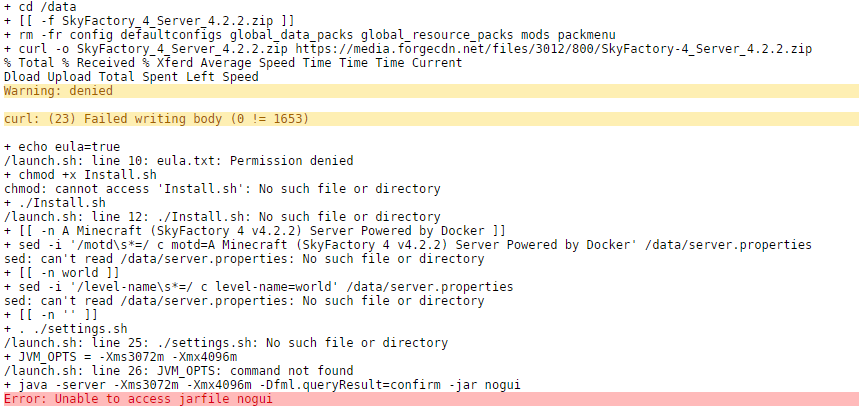
  3. im having trouble finding the servers files for sf1 and sf4 i want to adjust the server.properties file so i can let in modded players that dont have verified usernames this is the particular command or line i want (online-mode=false)
  4. GH0ST2117 started following ich777
  5. id really like an altis life arma 3 docker id even be willing to possibly donate to someone that could make this happen

Account

Navigation

Search

Search

Configure browser push notifications

Chrome (Android)
  1. Tap the lock icon next to the address bar.
  2. Tap Permissions → Notifications.
  3. Adjust your preference.
Chrome (Desktop)
  1. Click the padlock icon in the address bar.
  2. Select Site settings.
  3. Find Notifications and adjust your preference.