





arretx
Members
-
Joined
-
Last visited
Everything posted by arretx
-
What about something like Zoneminder, which by default stores its events in the docker container itself, along with the instance of mysql that is automatically installed. These two things were the first challenge I ever faced because my 20GB docker image limit was quickly reached because of the RTSP camera feeds. I've since re-directed those feeds to the array, but not the mysql data, as I'm not sure how to do that.
-
So I made the mistake of not understanding the importance of mapping data outside of docker to a share when I first started, and as a result, ended up with a full docker image. So I blew it and bumped it up to 200GB, which I've been reading might be super stupid big. In fact, it is sorta super stupid big because I can't back up the image quickly. So, I'm wondering if a) I can reduce the size safely, and b) how to determine how much space I actually need so I don't hose myself by reducing the size. Ideas? Thanks!
-
I've gone through some growing pains here as one of my cache drives failed and I wasn't sure how to handle it. In the process I've lost databases and had to re-install some docker containers. I currently have docker and vm's disabled. I've set Prefer:Cache for /appdata, /domains, /isos, and /system, yet each of these shares have files both in the cache pool and disk1. The mover reports a bunch of existing files, and ultimately leaves some files on disk1 when it's complete. If this is normal, I'm okay with it, but what I don't know about is what would happen if I ran a restore from my CA_backup from a week or so ago before this all happened. When the cache pool failed, I set the cache for these folders to Yes, shut everything down, then ran a move to get everything off the cache. The problem was that I re-enabled the VM's and Docker before setting cache to NO, so the cache started to populate with data again, so now there's information split between the two. Any advice on the next steps to take to clean up the mess? I'd like /appdata, /domains, /isos, and /system to be 100% on the cache so I can run a backup routine on it every night and ensure that I get everything. Thanks!
-
Help me out here. Not sure where this would have occurred. Are you referring to the data path configured in the docker container?
-
The Problem Postgresql reports missing folders when attempting to start the service after replacing a bad cache drive. What I had running: 2 NMVe SSD drives, each 1TB, configured as a cache pool. /appdata, /Databases, /Documents, /system, and /isos were all set to Prefer Cache. I'm running various docker containers, one of which is postgresql14. The database directory for postgresql is set to /mnt/cache/appdata/postgresql14 What happened: One of my cache drives failed. When that happened, I set all of the above shares to Yes:Cache, disabled all of the dockers and running vm, and ran a manual move to get all of the data moved to the array...it took a loooooong time, unfortunately. I also removed that drive from the cache pool. Here's where I think I screwed up, but correct me if I'm wrong. Before re-starting those containers and vm, I didn't set the cache preference for those shares to No. I left them at Yes:Cache. At that point, I was waiting for a replacement drive, but needed the system up and running. So now I see files split between the cache and disk(whatever) for the cache share. Again, not sure if this is actually an issue. What I did next: When I received the replacement drive, I shut down the system, put the drive in, rebooted, stopped the array, assigned the new drive to the cache pool, fired up the array, and all seemed well until I noticed that Zoneminder was down. Zoneminder uses postgresql14. I also noticed that postgresql14 was down. When I attempted to start it, I found that it was unable to locate the pg_notify folder. Incidentally, the pg_notify folder is actually on the system but it's not in the /mnt/cache/appdata/postgresql14 path. It's in /mnt/user/appdata/postgresl14 path. As an experiment: I created a temporary folder so I could first sync what was in /mnt/cache/appdata/postgresql14 to the temp folder. Then I used rsync to sync the contents of /mnt/user/appdata/postgresql14 to the existing /mnt/cache/appdata/postgresql14 folder. I started postgresql and Zoneminder and they both seem to be working. Final Question: How could I have avoided this experience and thus risky maneuver?
-
Ironically, it's already on its way. Still copying files from the cache disk to the array...it's taking forever. Not sure what to expect regarding re-building. I have data backed up so I can re-create, but a copy and re-start would be much more convenient.
-
I'm not sure what to search for to solve this problem, nor exactly what to do to limit the impact if it happens again in the future, but here's the run-down: We lost power a few days ago. Today, things started to fail. My VM's wouldn't start due to missing files, or non-existent paths in the Cache. So, I looked into it and it appeared everything was okay except for the errors when starting the VM's. So, I shut down and rebooted the server. After booting, I noticed that the Cache Pool reports Unmountable: No file system. (Yikes, that's bad.) I have two 1TB SSD 970 NVMe drives in my system in what I recall to be a Raid 1 configuration and they're both part of the cache pool. In my list of devices, I see "Pool Devices" and under that I see `Cache` and `Cache 2` for these two drives. The FS for this pool is obviously btrfs. (Sidenote: I thought that a mirrored array was supposed to show up as a single Cache drive.) Steps I've Taken: 1. I created a mount point in my main array /mnt/user/temp/ and successfully mounted /dev/nvme1n1 to that folder and was able to read the disk. I'm currently running rsync to duplicate everything from that disk into the main array in a temporary folder. From this point, once the files have been copied, what are my next steps to restore this pool properly, as though it's being installed for the first time, and then get the data back to where it's supposed to be? Thanks!
-
I'm running an ASRockRack X470D4U which supports 8 drives. There are 3 PCIe 3.0 slots on board and one of them is occupied by a 10G network card leaving two remaining @ 8X each. I have two needs. 1. I'll need to add a USB card to expand the number of available USB ports for Virtual Machines and, 2. I'd like to expand to an external hard drive enclosure so I can add more drives to my system. Is #2 possible, and if so, what do I need to achieve that goal?
-
After installing the Nacho-Rclone-Native-GUI docker app, I was able to successfully connect to my S3 bucket as well as mount my /mnt/user/Media share to the container's /data path. Now I can easily copy to the S3 bucket...but what I was hoping to accomplish was the ability to automatically sync the files daily or every 12 hours from the /data path to the S3 bucket. Do I need to abandon the GUI and just use the command line and then install that command as a cron job IN the rclone container, or is there another way I should be doing this? Also, will Rclone allow me to simply add new files to already existing files that have been transferred and allow me to prevent deletion of files that are deleted locally on the server? That's the whole point actually...to backup things that are here in case they are inadvertently removed.
-
I have a board with 3 ethernet ports built in. One is for the management console, so I really have only two. To beef up the system, I added a 10G NIC which shows up in its own IOMMU group and this is currently the only one connected to my switch. With the 10G interface connected, what would happen if I connected the unraid host on-board port to my switch at the same time? Will it issue a 2nd IP from DHCP, or do the on-board adapters work as redundant backups...or does it balance the load? Not sure. Thanks.
-
According to the system tools report, the 10G NIC that I added to the system is in its own group. All 3 on-board NICs are in one group separate from the 10G. Given that information, is it possible to designate one of the 3 to pass through, or am I looking at needing to use the BIOS to make changes so the on-board NIC's can be in their own groups, or does it not work that way?
-
I know, I know...why would you want to do this? I have a Dante AVIO Ethernet Adapter on my switch to deliver audio over ethernet to my 6-Zone house amp. I have Dante Virtual Sound Card running on my MacBook. The AVIO adapter runs at 1G, and the adapter on my MacBook is 10G and I connect Unraid via a single 10G NIC. For some reason, I've not been able to get Dante to synchronize between the two speeds. The only solution is to switch the MacBook back to 1G Ethernet, but that defeats the purpose of having 10G for video editing. So, I figured I could run Windows VM on Unraid and pass through a 1G nic on the motherboard so I could ensure that Spotify is sending audio to the AVIO adapter. So, I'm trying to figure out how to allocate one of these ports to a Windows VM. Any ideas? I can't seem to simply switch the settings in the VM setup screen to use one of the NIC's because the only options are Virtual. Ideas?
-
I would presume that there's a way to expand a motherboard to have external PCIe slots that could be populated with additional expansion cards, yes?
-
I'm not sure how sound cards work with VM's in Unraid, or Docker Containers for that matter. I have an Unraid box running on the ASROCK X470D4U motherboard which does not have built-in sound. If I wanted to add sound capabilities to my Unraid box, could I add an external USB Audio Interface that could be used by any of the VM's or Docker containers running in Unraid? If so, if the interface has multiple channels, is it possible for one VM to send audio to one L/R output while another sends to a different output on the same interface? Just learning about how to do this type of stuff. Perhaps there's a PCI audio interface that has more than one sound card built in? Anyway, your expertise is appreciated. Thanks.
-
Normally I just type `ssh tower` and viola, I'm in. I could also do `ssh root@tower` and the same result. I just tried to SSH into my unraid box and I get prompted for a password. I had previously run ssh-copy-id to make it faster to login, which worked, but now it's not working. Did something change recently in an update?
-
When it's like this, no. But if I wait a while, whatever is eating up the system stops and I can access everything. I disabled the Syncthing container and it hasn't happened since. I think I have something misconfigured in syncthing or I've created a file sync loop of sorts or something. Either way, with Syncthing disabled, the problem seems to have stopped. I'll keep my eye on it. What am I looking for in Diagnostics?
-
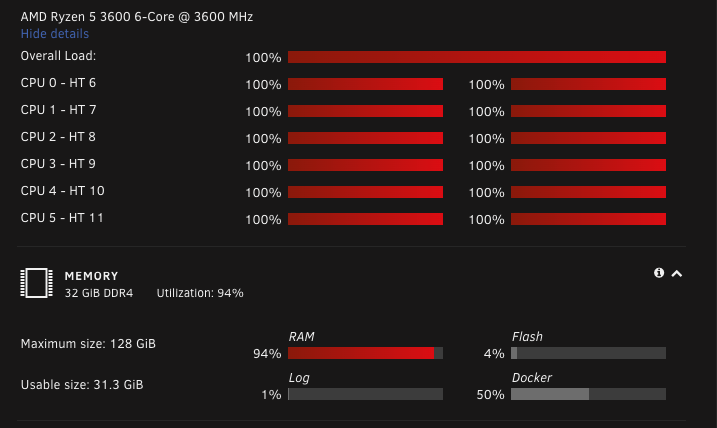
I woke up this morning to this. It's out of the ordinary and nothing has been changed since everything was working perfectly as expected. Now I can't do anything with unraid or any of the containers or VMs. How do I begin to troubleshoot this? What happens if I unplug my server and restart it? Whether or not the following is a correlation or cause is unknown to me, but the activity that I most recently began before today was an rsync from my MacBook to a shared folder in Unraid. I'm copying an external USB-C drive full of video to a shared folder so it's on the network and not clogging up my working external SSD drive (used for video editing.) During that rsync, it would repeatedly fail, which seemed to coincide with a slow-down in network performance ( I have a 10GB connection between my MacBook and the Unraid box). I switched to FileZilla as an FTP client with ProFTPd on the server and began copying the files that way instead. The problem didn't go away and I woke up to the 100% problem this morning. The strange thing is that after about 5 minutes or so, whatever is locking the system resources up is released and everything seems to be back to normal. Then, it ramps up again and locks up for a bit. It seems to be a pattern, but I can't figure out what's going on. Docker Containers I'm running the following: * Docuwiki * Mariadb * Postgres * ZoneMinder VM's * Home Assistant (2 cores / 4096 mem) * Ubuntu 20.04 (2 cores / 4096 mem) Is there anything you see that's a red flag?
-
I have a 6-drive array in a hot-swap configuration, and the parity drive is 8TB. One of the array drives is 500GB and the rest are 8TB. Disk 1 is an 8TB drive that was shucked from a seagate external hard drive. It's old and there's a "thumbs down" on it under the "SMART" column on the dashboard. I have a new 8TB Ironwolf drive sitting on the shelf. If I were to simply pull the drive from the hot swap cage and plug in the new one, will I lose any of the data that was on the disk I pulled?
-
This is in fact exactly the problem. In my XML, I also had `type=raw` which when changed back to `qcow2` yielded a successful startup.
-
Specifically, I installed the Binhex Rclone container. It fired up, but the webui fails to load at http://192.168.1.103:5572. The network settings for the container look correct: 172.17.0.4:5572/TCP <-> 192.168.1.103:53682 172.17.0.4:5572/TCP <-> 192.168.1.103:5572 192.168.1.103 is the unraid host machine's address. Seems to me that I should be able to access the webui, so the first question I would ask is whether or not there's a firewall running on unraid by default, and if so, how to allow 5572...and why it doesn't configure automatically when the docker container is fired up? Thanks for your insights!
-
Not remote as in WAN. Remote as in not localhost.
-
Well, I managed to get it installed and was able to login as root, but then, even after granting full permissions to a new user from any host, the port 3306 is not open on the system and I can't figure out how to open it up so I can connect from my remote laptop.
-
I first tried installing mysql from the Docker repository as explained on a few different youtube videos, but that failed every time. So, I went with the Bungy's Repository version, installed it with what I thought was a simple process, but after the container fires up, in the console and from any SQL tools, I'm denied access. In console if I type `mysql -u root -p` then enter the root password as I defined it during installation, I'm given the big "Access denied for user 'root'@'localhost' (using password: YES)" Stumped. What am I doing wrong?
-
Unraid Status: n00b I have two external USB drives attached to my ProxmoxVE and both of them are passed through to a single instance of Ubuntu 20.04 and are used for storage. They are both part of their own LV so I don't have more than one physical drive assigned to the volume. I'm using rsync to transfer files from that machine to my new Unraid box and it's mind numbingly slow due to the age of the ProxmoxVE host (USB 2.0). I'm on 110 hours of transfer at 7.45MB/s with only 60% completed. I'd like to just shuck the drive from the external enclosure and throw it in the Unraid box so I either have access to those files or am able to move them from that drive to the array. Can this be done?
-
Lol...a smarter person. A smarter process would not require a reload. Of course, I'm here because I'm not a smarter person and I have persistent notifications that won't go away...hold on, let me reload the page... ...oh holy bananas. They're gone now. Yeesh. Can I have another beer?
