





Karyudo
Members
-
Joined
-
Last visited
-
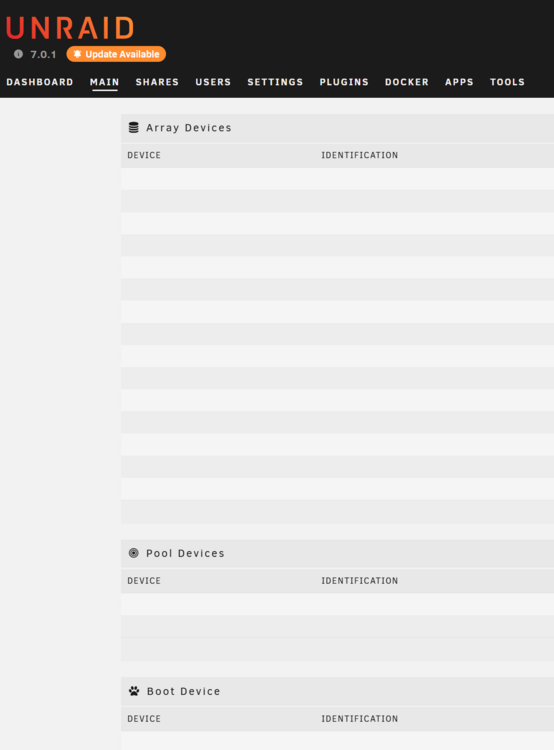
Why does this keep happening?! The UI loads, but all the drives are missing. Docker page won't load. But everything is working. It's just the UI that's screwed. This is happening more and more often. What the actual is wrong with Unraid? (It's not my hardware.)
-
Found a bug in Krusader: Every time I open Krusader, it puts the pair of windows about another row of text higher, so that now it's completely unusable because it's impossible to grab the top bar and move it down/around.
-
Yesterday I found out that 'mover' has not been moving anything for a while — maybe since I upgraded to v7.0.0 a couple of weeks back? — which became apparent as sabNZBd ground to a halt after using up all the space on the 1TB, two-SSD, BTRFS cache pool. I solved the 'mover won't move even when manually requested' error by removing Mover Tuning plugin. However, now several Docker containers are showing 'not available' under version, and some (Plex and Sonarr, for example) won't start at all. Sonarr, specifically, is now throwing a 'database disk image is malformed' error. How can this be fixed? (I do have auto backup turned on for appdata and specific apps that allow it.) Also: System Log shows only Feb 11 11:23:01 <server_name> kernel: BTRFS error (device loop2: state EA): bad tree block start, mirror 2 want 1095876608 have 0 Feb 11 11:23:01 <server_name> kernel: BTRFS error (device loop2: state EA): bad tree block start, mirror 1 want 1095876608 have 0 ...every 10 seconds until the end of the file. shinagawa-diagnostics-20250211-1514.zip
-
Posting this to document a "mover not moving" problem I was able to solve after reading similar threads. Updated to v7.0.0 recently; no obvious issues. I have two 1 TB NVMe BTRFS cache drives. Noticed yesterday (via sabNZBd) that cache drive pool was full. Tried to invoke mover manually; didn't seem to do anything. Hmm. Read some posts here that suggested a possible corrupted boot flash drive. Backed up flash, just in case. Ordered new flash drive. Read another post that suggested uninstalling Mover Tuning plugin. Uninstalled, reinvoked mover manually, and... success! Have now reinstalled Mover Tuning (newest version; there are somehow two different ones available in Apps "store"). Guess I can return the new flash drive I ordered... or maybe I'll hang on to it as a spare.
-
Hmm... I have not proceeded (yet).
-
Ah! That's something I didn't try, of course, having been scared off by the warning when I moved the first. I'll give that a try. Thanks!
-
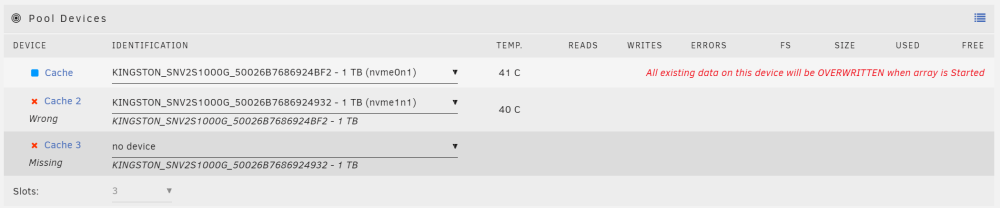
Recently, my single 500 GB SATA SSD btrfs cache drive (identified by Unraid as 'Cache') had a minor SMART error, so I upgraded by adding two 1 TB NVMe m.2 btrfs drives to the cache pool ('Cache2' and 'Cache3'). I then followed instructions to remove the original drive. Now I'm left with a Cache Pool that shows three slots, with only slots 2 and 3 populated. Like this: https://imgur.com/a/oAb1Xx6 I tried to move 'Cache2' to 'Cache', but Unraid reported that all data on the drive would be erased. Umm... that doesn't seem right! How can I tidy this up so that the two 1 TB drives are correctly seen as 'Cache' and 'Cache2' in a two-slot cache pool?

-
I have the same error (that's why I'm here), and I haven't yet taken any steps to try to fix it, but I wonder if file/folder permissions have something to do with it? On the same day I believe my Sonarr started not grabbing things and throwing this error, I had Unraid support do some maintenance, including running chmod and chown on all my files.
-
Oof. Thanks for the quick diagnosis. Guess I'll either have to solve it on a Windows machine, or copy everything off the drive.
-
OK, so now I have two problems: my original problem, and I don't know what "look at the log" means. I definitely didn't do anything on purpose to mount the drive RO. I'm now also increasingly sure that I got the drive back from the data recovery place with it write-protected. Alright, I found the log, and it says, "Jan 17 09:13:56 <servername> unassigned.devices: Mount warning: The disk contains an unclean file system (0, 0). Metadata kept in Windows cache, refused to mount. Falling back to read-only mount because the NTFS partition is in an unsafe state. Please resume and shutdown Windows fully (no hibernation or fast restarting.) Could not mount read-write, trying read-only"
-
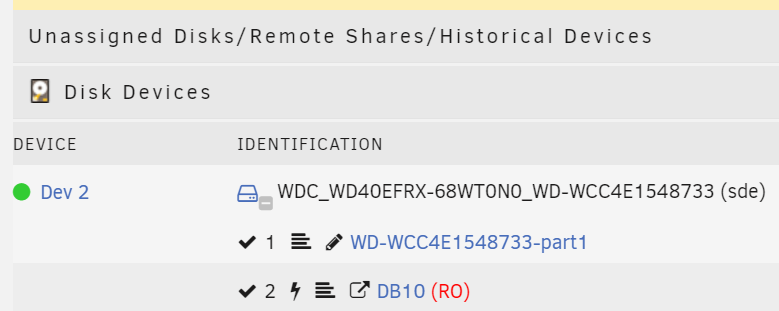
Today I mounted an NTFS drive that I got back from a data recovery service probably a year or so ago, which I received write-protected. I see in UD that it's mounted as 'RO'. How can I un-write-protect this drive, so it mounts read/write in UD?
-
For about two months now, my Plex server (in Docker) doesn't parse new materials from -arr Docker instances and add them from the unRAID file structure. A second Plex server on separate hardware (non-Docker) has no issues. It's like the Docker instance is read-only, even though I don't see anything that explicitly says "your Docker instance of Plex is now read-only." This all used to work just fine. I didn't change anything. Can someone please help me step through a fix? Thanks!
-
Yes... ish. There's important and irreplaceable, and then there's IMPORTANT AND IRREPLACEABLE. Personal photos and documents, hell yes I've got other backups! 40+ TB of Linux ISOs that are going to take forever to redownload? No—considering the size and fact they're technically replaceable, parity is my reasonable hedge against loss.
-
Ah, good to know! Thanks. And yeah, I guess that makes sense. Sort of collapses steps 1, 3, and 4, and saves a bunch of time. I usually preclear new drives to fend off infant mortality, but considering the drives being added were until recently healthy parity drives, that shouldn't be an issue.
-
OK, more detail... I have four disks in my system right now: 2x 4TB array drive, BTRFS 2x 10TB former parity drives I want to end up with those same drives in this configuration: 2x 10TB array drive, XFS 2x 4TB drives retired from system Current parity is two 18TB drives, just rebuilt last week (one at a time) as I swapped out the 10TB drives. There is just over 6.5TB free in the array currently, with each of the 4TB drives at 3.69 TB full. My plan would be: 1) Stop array. Use New Config to remove both 4TB BTRFS drives. 2) Restart array, and wait for parity to rebuild (about 40 hours). Not thrilled I'll be without any parity protection at all for nearly two days, but I guess that can't be helped. 3) Can I preclear the two 10TB former parity drives at the same time the parity is being rebuilt, while they're Unassigned Devices? 4) Stop array. Add both 10TB former parity drives as array drives. Format XFS. 5) Mount both removed 4TB BTRFS drives in UD. 6) Using Krusader (sorry, Midnight Commander: I think it's going to be easier to copy things to the right places with a GUI...) copy data from 4TB drives back into the array. Seems tedious but not complicated. Unless I'm missing some finer point like, "do this important step at the beginning, otherwise several irreversible steps later you won't be able to do something crucial, and you'll lose a whole bunch of data." Or has BTRFS matured enough that it's now at least as good a choice as XFS? If so, maybe I change my plans and just swap in the 10TB drives in place of the 4TB drives, and rebuild from parity...?




