manrw
Members
-
Joined
-
Last visited
Everything posted by manrw
-
Hi, thanks for the question. This looks to me like your ISP is blocking the request. Can you execute the following two commands and post the output here?
-
Hi, thanks for the question. The current version of the template has this mounting point: https://github.com/manuel-rw/unraid-templates/blob/8dbfed6e4d30850456da3ec31f8d9f9cb0d32b5e/templates/dashdot/dashdot.xml#L37 Do you maybe run an older version of the template? If you don't mind, can you post a screenshot of your mount points here?
-
You can use a proxy to forward HTTPS requests to the HTTP Dash. Or you could both downgrade them to HTTP as well. You just need to avoid mixing them up - that won't work. You need to do this outside of Homarr and Dash.. So it's unlikely that I can help you with your exact setup.
-
Thanks for letting me know. Updated: https://github.com/manuel-rw/unraid-templates/pull/8
-
But it will not update the icon from the template repository? So everyone that uses the old template has to update it manually?
-
Hi, the support in this thread has been discontinued, because the original maintainer did not wish to continue providing support for Unraid Apps. The solution has been posted in the new thread: Can you let me know, if this fixes it for you? Did the incorrect Icon prevent you from starting Homarr?
-
Sorry for the late response. Yes, that is the correct way of fixing it. Did it prevent you from starting the container, when it was invalid? @Squid what are the proper procedures to update outdated icon URLs?
-
Information to all participants in this conversation & new users: The original author has moved their template to a repository maintained by the official developers. Therefore, all future support requests must be posted in the appropriate new thread. Thank you for your understanding!
-
Hi, I don't have a fixed release schedule. If there are enough changes, I'll make a new release. You can see all releases (including source code) here: https://github.com/manuel-rw/jellyfin-discord-music-bot/releases . And yes, there was one 2 weeks ago. If you do not wish to receive notifications and disable the network communication, you can disable it like this: https://github.com/manuel-rw/jellyfin-discord-music-bot/wiki/📄-Environment-Variables
-
Can confirm that this worked for me. Thanks for providing the fix.
-
Welcome 👋 This is the official support thread for the following community apps: - Homarr (https://homarr.dev) - Jellyfin Discords Bot (https://github.com/manuel-rw/jellyfin-discord-music-bot) - Dash. (https://getdashdot.com/) Please post your questions and issues here. We'll not be able to help you with application specific issues (eg. application bugs, security issues or non-template related issues). You should report them to the maintainers. Consider to donate, if these templates helped you: https://ko-fi.com/manicraft1001
-
I have learned from this and back up appdata and other directories with Duplicatli weekly. Thank you for your input
-
It worked, thank you. I'll close this topic now. Thank you for your help!
-
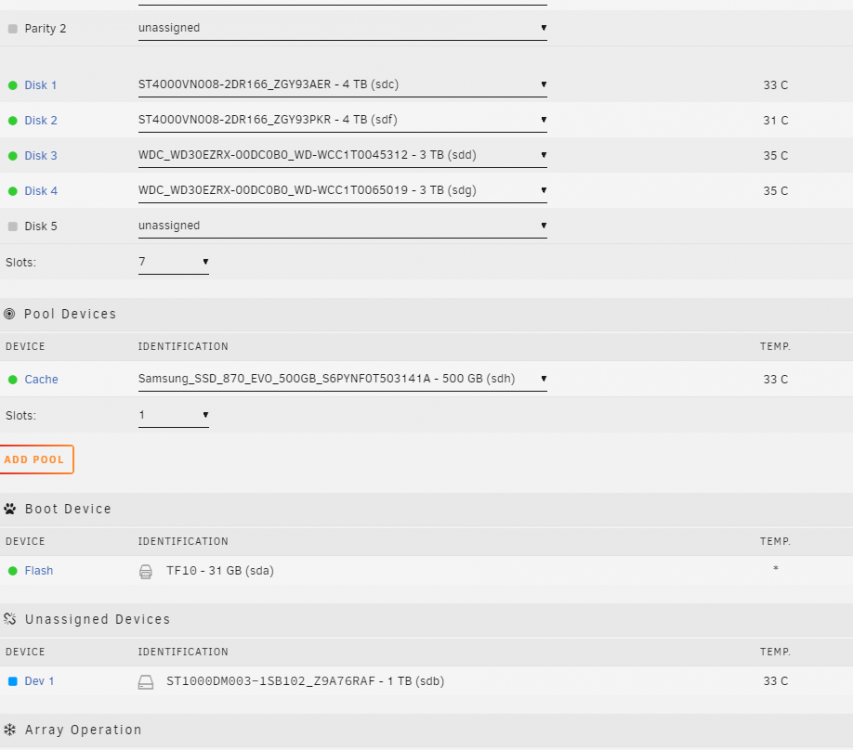
Quick Update: - I bought an additional 1 TB SSD which will store all docker containers and my VMs - I have restored some of my data (reverse proxy, nextcloud, ...). I also found some backups of important tools! - I made several copies of the backups and made a disk image of the entire 1 TB HDD - I completly removed the 1 TB HDD from the system and will keep it like this for now - I bought 5 TB external backup storage, which I will backup to using Duplicati I should be ready to turn it on and plug the new 1 TB SDD in. Will you assist me for configuration, that I don't break something again?
-
No worries, I'll try it out. Can I come back at you when I'm done, for setting up the array?
-
That would be fine. Would you be willing to assist me for the recovery process, when the copy of the disk has been finished?
-
Would I need to take the drive out for that? Also, 500€ is over my budget - Am I looking at the wrong version? Without that we won't be able to further restore the data?
-
That's probably somewhat what I have to accept. I'll make a quick backup of the entire disk to an external SSD and inspect them locally. Is there some way to further restore the data? I've heard about UFS Explorer. Would I need a license for recovering? Would it be possible to restore the rest of the files and the directory structure? EDIT: The data im most after are my docker containers. This is where most important data was located.
-
I clicked on "MOUNT" and checked "/mnt/" for contents. This is what I can see: There is a ton of these random directories with files in it
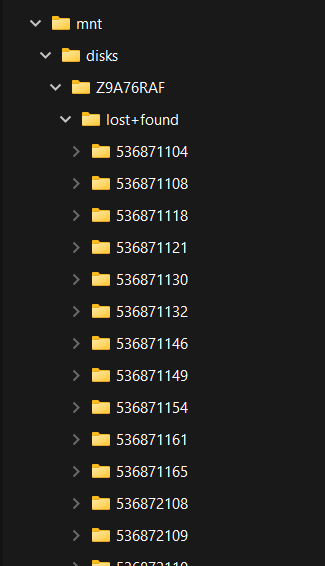 Great News 🎉! I've never done that before. Should I mount it there using the button "MOUNT"?
 There is just too much in the log, that it started to truncate. Here is the tail:/dev/sda1: LABEL_FATBOOT="UNRAID" LABEL="UNRAID" UUID="2732-64F5" BLOCK_SIZE="512" TYPE="vfat" /dev/loop1: TYPE="squashfs" /dev/sdf1: UUID="b04f4818-fa42-4da1-9d44-d56c39aba205" BLOCK_SIZE="512" TYPE="xfs" PARTUUID="7ae93f10-56fc-4e11-bdb9-2a1d14e781f2" /dev/sdd1: UUID="4fb4ad62-08ff-46b3-b533-4e001f9a7dd6" BLOCK_SIZE="512" TYPE="xfs" PARTUUID="79044cb3-4b43-49da-9465-121b5e962c96" /dev/sdg1: UUID="7a1405e2-cfe9-4dc6-94db-9f444b8bf904" BLOCK_SIZE="512" TYPE="xfs" PARTUUID="9cd29b16-cd87-4347-8f63-801e04bbced4" /dev/loop0: TYPE="squashfs" /dev/sde1: PARTUUID="dbb0904a-b5b2-495c-8652-d1e53d6d2e94" /dev/sdc1: UUID="5e73a3cf-2d6c-442e-8a9b-f91703dd0789" BLOCK_SIZE="512" TYPE="xfs" PARTUUID="5951d0ed-97a4-4167-ad67-0891e35db9b2" /dev/sdh1: UUID="964a2b87-38a2-420e-90ba-3ad526c3e177" BLOCK_SIZE="512" TYPE="xfs"No, sadly I do not. Disk 5 was sourced from my old PC. When I built that array, I already had all disks in it - so I made no upgrades until recently, if that helps. EDIT: I do have several backups of the flash drive if that helpsI downloaded almost 100 GB of important data. I have stopped the array. The Disk 5 is unmounted. Let me know what I should do now