






KluthR
Community Developer
-
Joined
-
Last visited
Everything posted by KluthR
-
False. I found an issue regarding the defaults for containers. Please update and either remove the mentioned config.json and start again or set their values back to "Uwe default". The settings should no longer switch back to the real default values. Sorry! But I still cant reproduce the schedule-resets-itself issue
-
Thanks for testing Cannot reproduce. Just installed it fresh again, just giving it a source and the daily option (and set one container to Verify: no) -> Saved, Page reloaded: My cronjob settings are as set. The per docker setting "Verify?" is still no, as set. Could you share your /boot/config/plugins/appdata.backup.beta/config.json file? There are just a few things I can migrate so I currently chose to migrate nothing. The base settings are a good start, you just have to set a destination. Since fine tuning on the containers is needed, I did not added some migration (yet).
-
I flipped some bits and bytes and I think Iam now ready to let you participate: The public beta is here! Ehm, not here, but there: ANY beta discussion should be posted there. If Unraid and this plugin becomes stable, I close this topic. Please share your thoughts (not here but there )
-
Please always attach the DEBUG(!) log if you have issues. You can find it inside the Status / Log tab!
-
Appdata.Backup BETA Support Thread Here we can discuss about beta testing results. Please note, this is the BETA/TEST version of the plugin and should not be tested on a productive server! If you search the stable version: https://forums.unraid.net/topic/137710-plugin-appdatabackup/ Install beta plg via: https://raw.githubusercontent.com/Commifreak/unraid-appdata.backup/master/appdata.backup.beta.plg (or via CA Apps)
-
Thats a harder one as well. There were some reports about „Server error“ when the related docker container process seem to work but the container is marked down. You should try to restart docker (or the whole system). You could also try to kill the found plex process and start the container. those are states produced from something else, the backup script just tells the system „hey, stop/start xxx“ via the same methods the docker overview page does. Obe additional thing is the AutoUpdate feature. maybe the new update brings better behavior. If not, Iam more than thrilled to do detailed analysis
-
Yours is a harder one: the mentioned container changed its ImageID during backup. AutoUpdate enabled? The error code inside „Error stopping container“ comes directly from docker. This issue should be retested with the new update.
-
Same here: you dont stop all containers and wanted valid backups. Thats not possible. turn off verification or allow all containers to stop.
-
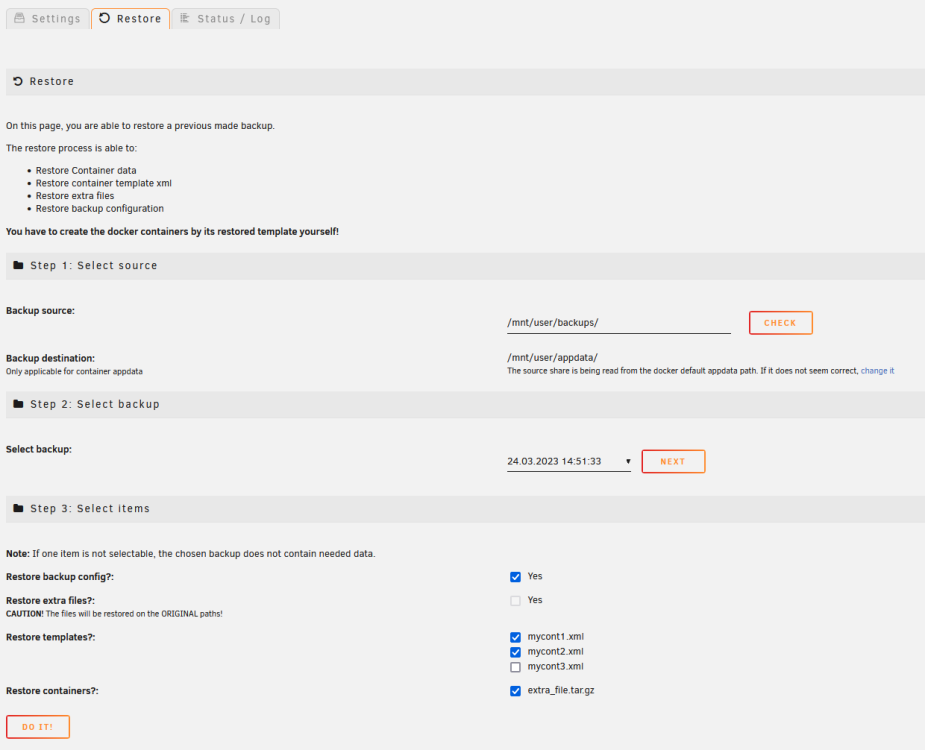
Update: I finished the main part: backup All is working well (at least it seems so). Currently working on last things for the restore: Beta very soon. Please also note, that backups created via previous plugin versions are NOT supported! The first things beta testers should do: test this in any other browser than Firefox. I just tested everything in FF for now...
-
There is an update in preparation for 6.12. I hope to release it just before Unraid 6.12 becomes stable.
-
Thats a simple one: tar verify complains about changed files within HA. And it is set to be not stopped while backup. case closed.
-
Oh, no, no. Setting it „No“ could cause ot (because not being verified). If the main tar process say its all ok, the chances are very low that it is broken. Just a extra layer of security. The wording is wrong and already fixed for the upcoming update.
-
Please share the log from the status tab.
-
If no updates are offered then its the latest (for now). I work hard on the new one, compatible with Unraid 6.12. beta soon
-
Please post the backup log from the status tab.
-
Thats correct. As mentioned in the first/second post, there will be a complete rewrite.
-
@ljm42 just noted, that with semver, one could not choose a version. How can users choose a version with date versioning
-
Users can choose the version?
-
Okay, thats good. Thanks for the calrification.
-
Which browser? For the rest: Here a small update for the new rewrite: I didnt had many time the last weeks but this week its all about the plugin. I made great progress, all the docker logic work even better than ever. In case we hit a Paused container, there is no error thrown anymore. I test the backup procedure with all its new settings currently and write the new flash backup method. I assume we can beta test soon. 6.12 rc is required, because the plugin will NOT run on 6.11. Sidenote: I try to make a semi-automatic upgrade, since the internal plugin changes this time. I'll figure some way out. Stay tuned!
-
Hmm. I wanted to switch to semantic versioning, seems, that is something thats not supported then?
-
Is that still the case?
-
That is a weird issue some user have. Container is stopped but something is accessing some of its files. A user noticed, that some docker exec commands were still running which caused that. The new update has some diag tools to check some things.
-
No, thats just right. Both setting can lead to broken backups. First one if backups are not verified and second if errors occur which will be discarded silently. the BackupMainV2 name will be gone with the new version.
-
You should not backup the docker.img. I wonder why some people seem to have such strange configs. please share your configured source directory.



