






KluthR
Community Developer
-
Joined
-
Last visited
Everything posted by KluthR
-
Yep, post the complete log please. A single verification error would trigger an error at the end.
-
Syntax is ok and no, you dont need quotes.
-
No, thats not true. There is no connection between your source folder and the containers being stopped. ALL containers will be stopped (unless they are excluded, Paused or Stopped). Exactly! In detail: Yes, the old version verified but the result was not correctly returned back to the plugin. Like: tar verify ok: plugin sees: all ok! tar verify failed: plugin sees: all ok! So, if after the update, the plugin starts to complain about verifying failed, it was an issue before the update as well but simply not detected.
-
@MammothJerkThis looks like some filesystem issues here. tar itself is reporting this. Are you able to browse to those folders and open any file?
-
You could also try to manually start the backup - you should see some log output immediately. No. Hmm. I dont know here. @Squid What would cause it to say those things in that case?
-
@Revan335 Please take a look inside the „Status“ tab inside the plugin settings. Whats stated there?
-
Did you uninstalled the old version first? Please take a look inside the log file You backup your docker.img? Why? Also, its being changed, because ca.backup2 writes the logfile into it, so it never worked before, but the error was being suppressed ca.backup2 does not stop plex neither JD. Only two containers are being stopped: [07.12.2022 07:20:01] Stopping pihole... done! (took 4 seconds) [07.12.2022 07:20:05] Stopping SyncoveryRS... done! (took 7 seconds) Dumb question but: Were the containers started? I think I will add some more (debug) info for the next release to track that down. The just released update should fix this - sorry!
-
Hear, hear! I already offered, now I am offering again. The CA app should offer a donation link - But I can post it here as well: If you like, PayPal is the way to go https://paypal.me/robinkluth
-
Thats currently true. Those folders MUST be named with the generated date/time format. ALL OTHER namings would be ignored (such with the -error suffix for instance)
-
Added to the todo list as well
-
Nice idea which would require a link between docker container and its volumes. This link is already on my list. Your idea would work then. I extended my notices with that 😉
-
Yes, @Squid told me, that users must uninstall/reinstall to get the forked version. Fix Common Problems would raise a concern otherwise. @boiler1979 I cannot evaluate this issue, maybe @Squid could take a look?
-
Hi, Just some thoughts: Does anyone ever start thinking "I wonder, if users use function X of my plugin"? If yes, does anyone implemented some kind of statistic feature to your plugin? I would add an opt-in option which sends specific things to an external server for anonymous statistic purposes. Is such feature allowed?
-
Just published an update. I tested all cases multiple times - I would say, it should fix all open issues
-
Either you wait for the todays update or you simply delete the log file.
-
Are you sure, that not just a folder with same name exists in your source folder? The mentioned log should be copied to the destination after the run. Addiotionally, you could also take a look into the Backup status tab. Could you do that and post the result? A bit embarrassing: I cant remember, if the plugin copies it in case of failure as well, Ill check that as well.
-
I want to pick up this thread by its original question. Currently, I do dev and testing on my prod server (Plugins). I would rather install a new unraid just for dev - but I have to purchase a new license key for that. Is there any best practice for a dev env? Special license key or smth like that?
-
Okay. As said, I will look into this later this day. Stay tuned! Maybe I can get the file selector to also offer subfolders (in an even newer release in the future).
-
Morning! Oof, some things happened during the night - lets start! This message should also appear in the status tab then. Whenever an error is detected, Appdata Backup will simply not try to delete old backup sets. Thats all. Could you spot any error message inside the status tab? The plugin does not do anything with BTRFS, so I cant say anything about those messages. Just as said: The plugin will simply not delete old archives at the end (its a housekeeping feature). Thats just a notice. The real error must happened before this line (tar creation, tar veriffication or/and docker starts). Thats interesting as well. I doesnt touched code here, sure it is disabled/empty? Thats even more interesting and I already think I know whats going on! I - personally - experienced the exclude list as folder list from the perspective from inside the source folder. Because I changed some handling during the "multiple archives" feature, I touched the parts, responsible for the exclusion and only catched that perspective. It seems, that you manually typed in deeper levels of exclusion, is that right? And yes, that case is currently ignored. I never thought someone will use it that way (just because, the UI does not offer it directly). 😁 However, if this confirms to be the case, I will - of course - fix this behavior! (later today) In future issues, please attach (parts of) the logfile, displayed inside the status tab. Sometimes it gives a few hints.
-
Please post the line number which is missing on your error report Could you also please open a terminal and run: ls -lh /var/lib/docker/unraid/ca.backup2.datastore/appdata_backup.log ? EDIT2. Ahh, I see - the previous version logged every tar output which could grow very large. It also only gave the last x lines of output back. I changed that. The new version displays the whole log. So, if you still have a "old" logfile, it could be very large - too large to load. Could you please confirm: The error message only appears on the Backup status page? A manual (or automatic run) sorts the issue out? Basically this error message disappears after the first run after the update. Not all users are affected.
-
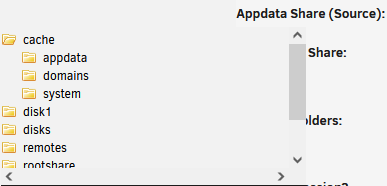
Nope, sorry . cannot replicate this issue. I checked the FileTree component which is used inside the plugin: Its a common unRAID feature. CA Backup just registers a call, when you hit the input field. unRaid is doing all the rest.
-
With latest 2022.12.04?? If you have 2022.12.02, please update, there was an permissions issue. I just tested it, it works on my side: The FileTree is also not a part of the plugin and should work independently from it.
-
This issue should be fixed now by installing the update I just released. SORRY for the inconveniences!
-
I swear it was working 😂 Let me check some things again but I need some hours since Iam not home. I release a fix definitively today!
-
Yes. I did it this way. Make a backup if smth. goes wrong.



