





sharrensen
Members
-
Joined
-
Last visited
-
reading thru all of your guys's experiences, and a few from other forums, a question that i keep coming back to is: "are all of the EXOS drives everyone is referencing actually the same model/type ?" and by that i mean, some might be referencing EXOS X20 "standard/off-the-shelf" drives, others might be talking about Seagate shucked drives that had EXOS X20 drives in them but with altered/modified firmware (because they were actually to be used as external HDDs), others might even have refurbished/recertified/re-whatever drives and those could also be running a different version firmware from the "default" firmware. So it might be that it's the same model overall, but with different firmwares. Not saying its this, just putting it out there as a possible explanation as to why some need to apply workarounds and others had no problems/challenges at all. just my 2 cents...
-
yep, it worked! thanks for the confirmation and help!
-
Hi everyone, Hopefuly, quick question - if i were to restore from a USB backup, from a couple of days ago, to the same USB stick currently used as my UNRAID boot USB stick, would that preserve the UNRAID license key, or would i still need to request a UNRAID license transfer ? Thanks in advance for the answers!
-
Thank you very much for taking the time to reply @bmartino1, but after reading thru what you're saying it seems like one wrong move and i've lost my data and i don't trust my knowledge to make certain that doesn't happen. I will just rebuild the cache pool with new SSDs and start installing docker, VM, etc and configuring it back up. Then, i will consider doing a fresh UNRAID build at some point and then copying all the data over to the new build, thus guaranteeing no data loss. Again, thnak you very much for taking the time to help!
-
Hi Everyone, After suffering a total loss of my cache pool hosting docker, VMs, etc, thru a combination of back luck and bad choices in a moment of desperation, i'm thinking of rebuild my UNRAID from scratch, with everything set up fresh, thus eliminating any lingering issues/bad configs/etc lurking in the background. My specific question is the following, i have about 40TB of data, stored across 4x data disks and 1x parity drive, if i were to use a new USB to install a fresh UNRAID image, import my key to this new USB, can i then add my existing data disks to the new UNRAID install, while keeping my data instact and being able to access it normaly ? What i was thinking of doing is: 1. create new UNRAID USB stick 2. set up as trial version (initially) 3. add my 4x data disks to the new UNRAID install as data disks (with no parity drive) 4. start the array (and check that all my data is still there) 5. stop array 6. add parity drive to array 7. start array and let it build parity 8. start installing new docker, VM images and start configuring everything As you might have realised, my uncertainty is regarding adding my existing data disks to this new UNRAID install, without UNRAID formating the drives. If this plan is totally wrong and its not possible that way, and i would end up loosing all my data, please let me know! But if there is a way of "transplanting" my existing data disks to a new UNRAID Install, please let me know, because the only other way i could think of is adding a new data disks to the new UNRAID install and then copying over the data from my "old" UNRAID data disks. Thank you very much in advance for any advice on this, and if my noobness on this topic is annoying, please excuse that as well!
-
hey everyone, just like the title says, after updating the (linuxserver) deluge container a couple of hours ago, it seems new torrents aren't downloading anymore... anyone else having this issue ?
-
Hi! Replacement key resent by support in notime, thank you very much!
-
Hey there, Needed to swap the USB because the old one went bad and requested a replacement key for the new USB earlier today, but unfortunately i still havent received any email reply (checked in JUNK as well) - it might be that i've requested the replacement be sent to my (ancient) hotmail address ? PS: Email sent to [email protected] just now. Thanks!
-
at first glance, that sounds perfect but given the difference in the output of the xfs-repair operations, isnt that indicative of something being "wrong" ? and if you know how to interpret that output i pasted above, does it say its "all okay" or does it say that something was "wrong" ?
-
Yes, i have also looked for the "lost+found" directory, both thru the UI aswell as thru krusader, just in case it wasnt showing up in the UI (for whatever reason) and i couldnt find such folder.
-
Yes, i removed the "-n" and added "-v" Also, is the output im getting indicative of something being "wrong", i assume ?
-
from the UI, is that problematic ?
-
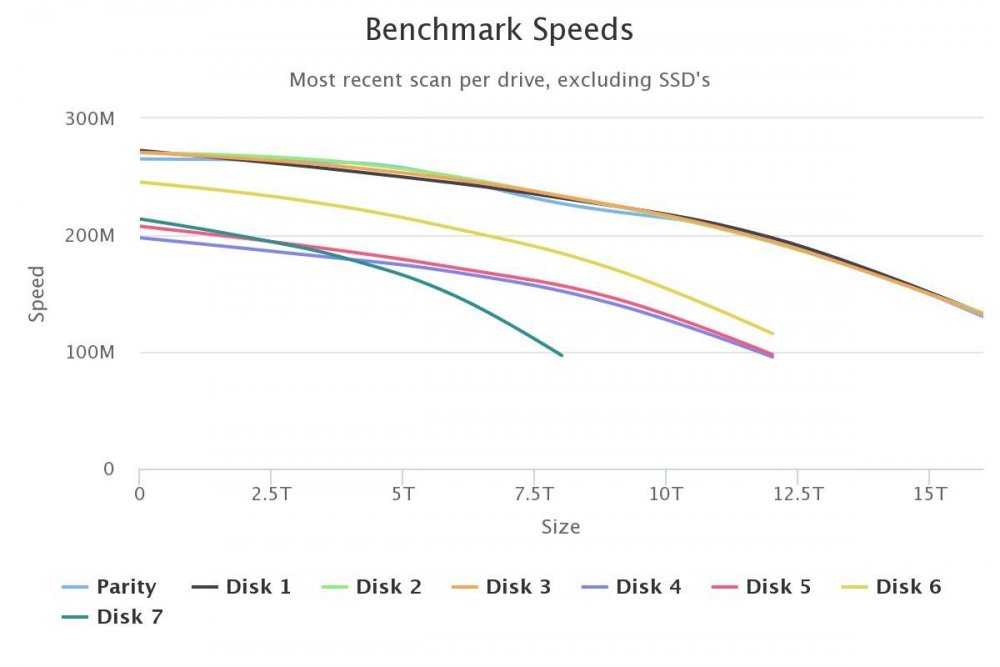
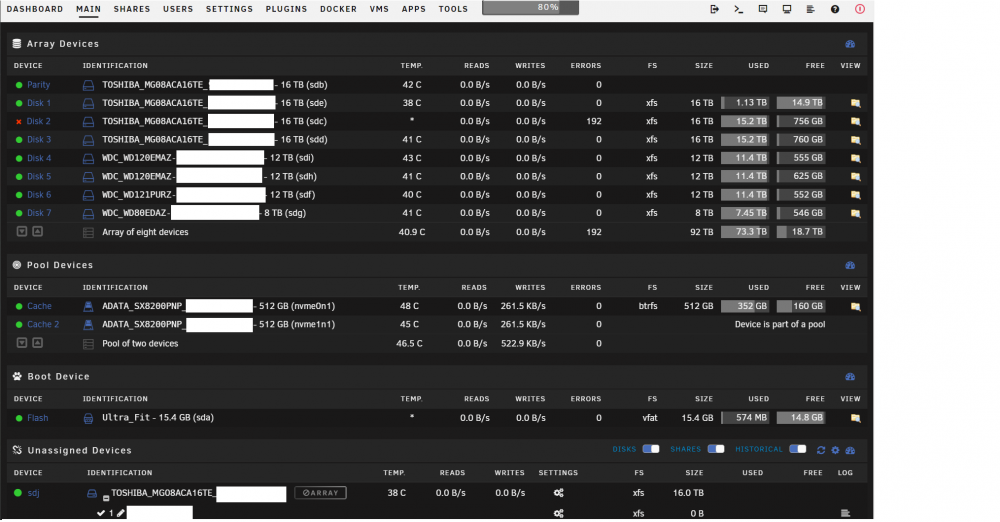
Hi, Its been quite a while since i posted about this and trurl replied but due to various reasons, only now did i get around to tackling it - unfortunatelly, the story is a bit more complicated now... In the months that passed since i wrote about it, everything went well and i had no issues. However, a couple of days ago, i found that DISK1 was "UNMOUNTABLE: not mounted" and after trying to figure out what happend (with little success) i decided to just format the drive and be done with it. Also, previously i had all the WD drives connected to the LSI and the Toshiba drives to the SATA ports on the mobo and i decided to connect the Toshiba drives to the LSI aswell. Only after formating and everything did i find out that XFS corruptions can cause the "UNMOUNTABLE: not mounted" behaviour and how to run an xfs repair... So after DISK1 was formated and added to the array again as an empty drive, i thought of running the XFS-repair check just to see what comes up and this is the output: After that, i ran it on another one of my Toshiba drives, which i picked randomly as DISK3 and the same result came up and after researching a bit and cross-referecing with what other people had as output i concluded "it looks good" - please correct me if im wrong So i left my unraid alone and went about my business. The very next morning when i woke up however, i found that DISK2 had somehow been "disconnected", but then magically reconnected again, but of course it was showing in my Unassigned Devices now and the contets for DISK2 were being "emulated". I also found a notification that there was a power outage that mornining and the UPS (APC BR1200GI) had kicked in (the UPS is connected to my unraid and management is active): Im not sure if the power outage and flipping to the UPS had somehow caused this, but i really doubt it as i've had several power outages and there were no problems with the UPS kicking in. So i shut down my unraid, rechecked everything was plugged in correctly, i even decided to move DISK2 off of the LSI again and onto the SATA port on the mobo, connected thru a cable i had used in the past and was sure it worked fine (just in case the LSI SAS to SATA was "bad"). I then readded DISK2 to the array and the parity check started and also completed successfully running at expected speeds. After everything was "okay" again, i've installed and ran the DiskSpeed to see if this would indicate anything problematic with any of the DISKs and this was the output: If you ask me, it looks "good" and there doesnt seem to be an issue here. I've also ran controller benchmarks on both the LSI and the mobo integrated controller and the results were "good" aswell, as there were no differences in speeds shown between single disk and array operations, also the speeds were "as expected". I then decided to run an XFS-repair check and repair with verbose (-v) on DISK2 and this was the output: Given the results were different from what i had seen with DISK1 and DISK3 (which are also Toshiba drives), i figured there was "something" that was "repaired" so i ran the XFS-repair check verbose expecting the result to be as it was with DISK1 and DISK3 now but it was not and everytime i run the XFS-repair, the same output is given. So either the output is saying "everything okay" or there is a problem that its not getting fixed, but unfortunately i cant tell. If anyone can make heads or tails of my situation and is willing to take the time and explain it to me, i would REALLY appreciate it! PS: Again... sorry for the long post!
-
for people that need a little more help on how to do it exactly: 1. click on the deluge container and select EDIT 2. under Repository, modify it from the default linuxserver/deluge to linuxserver/deluge:amd64-2.0.3-2201906121747ubuntu18.04.1-ls127 and click APPLY
-
Thank your for the quick reply Trurl, i will go over the post you linked and see what comes out of it. Will come back with an update as soon as i have one.



