





1971camaroguy
Members
-
Joined
-
Last visited
-
Cool, I have been looking at the AMD EPYC CPU's and a Asrock Rack ROMED8-2T. I picked up a 7532 earlier off eBay. 32 Cores / 64 Threads I think this will do what I need to do, fingers crossed. Cool thing I think the 128gb of ram from my current set-up might work on this board, it's 2400 speed and the board specs at 3200....but I think it will still boot and just be capped off at 2400....that way I don't have to give up a kidney for memory right now.
-
Trying to upgrade my old SuperMicro X10DRi-TR013 Motherboard with two E5-2680v4 + 128gb PC4-2400T DIMM ECC Server Memory and overhwelmed. I am pretty sure I am going to need a server class board but I have these requirements and correct me if I am off. This is in a supermicro 24 bay 846 chassis. two x8 pci-e for my sas cards (24 drives) three nvme slots for my NVME storage drives two sata connectors for my internal parity drives 10gb nic, built in or another PCI-e slot for the card I have Possibly an x16 pci slot for a video card A consumer class board won't cut it I need enough speed and bandwidth to run 8-10 dockers and maybe 4-5 VM's, + my pooled drive storage. I know memory is stupid expensive right now, but in my stash from previous builds I have the DDR4 server memory from my current build, 64gb of ddr4 computer memory, and 64gb of ddr5 memory. If I can re-use any of that it would be awesome. Any ideas or suggestions? I am overwhelmed with what to buy. I was looking at some cyber mondays deals and can get this. https://www.newegg.com/gigabyte-mc62-g40-supports-amd-ryzen-threadripper-pro-5000wx-series-processors-supports-amd-ryzen-threadripper-pro-3000wx-series-processors/p/N82E16813145570 With that I might be able to "possibly" use my current 2400 speed server ram even though the specs starts at 3200....but at $1200 I don't want to impulse buy and run into some snags, like trying to install windows 11 and it's TPM restrictions. On my current set-up I can get past everything but the CPU that is in the server, it's too old. Even with registry edits it's would let me install. Any ideas on or suggestions? Even a server class board that has sas built in would be great and i can ditch the pci-e cards...it's just a lot trying to decide on something Thanks again!
-
Did you ever get this resolved? I am having the exact same issue right now, I tried all of the same things you did (reboot pfsense router, switch, tried rebuilding docker img, dns, nothing works It just started doing this on it's own yesterday, no clue why. we did have a power surge / blackout friday night and my battery ups failed on me, but it was working fine saturday. I can ping outside the network just fine so I know unraid is getting out to the internet....it just can't resolve unraid.net and reach it for some reason. I'm at a loss right now on what happened, I do have pfsense and openvpn (nordvpn) running...but like I said I can reach outside the network with the machine, it's getting out. EDIT: I went in and removed openvpn completly from my pfsense box, and will just install it on select machines and docker instead.....removing it fixed my issue. I have comunity apps again

-
Need some help, I am trying to add a windows VM in docker and I keep getting an error. I ran it through AI and this is what it is telling me. "The error you're encountering suggests that QEMU is attempting to start a virtual machine with PCI passthrough for a device (0000:01:00.1), but it fails because the IOMMU group that the device belongs to is not viable for passthrough. This usually means that other devices in the same IOMMU group are not bound to the vfio-pci driver, which is a requirement for successful passthrough." I have no clue how to resolve this, and I keep getting suggestions to run scripts to bind it to vfio-pci driver, but that is over my head. If anyone has a quick and easy explanation for the Linux-Impaired that would be awesome. Thanks!
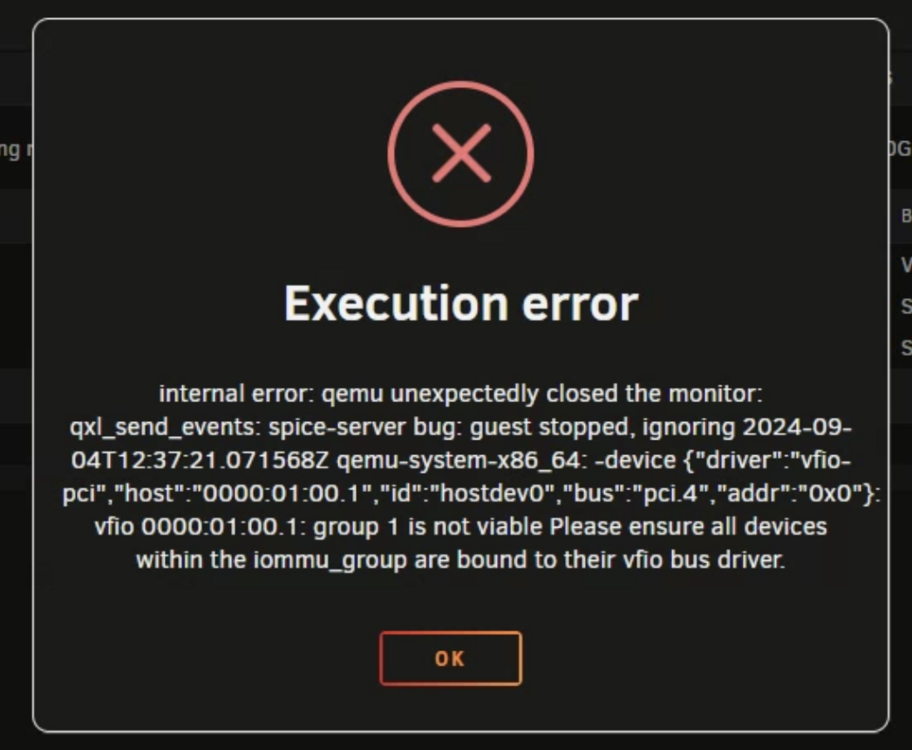
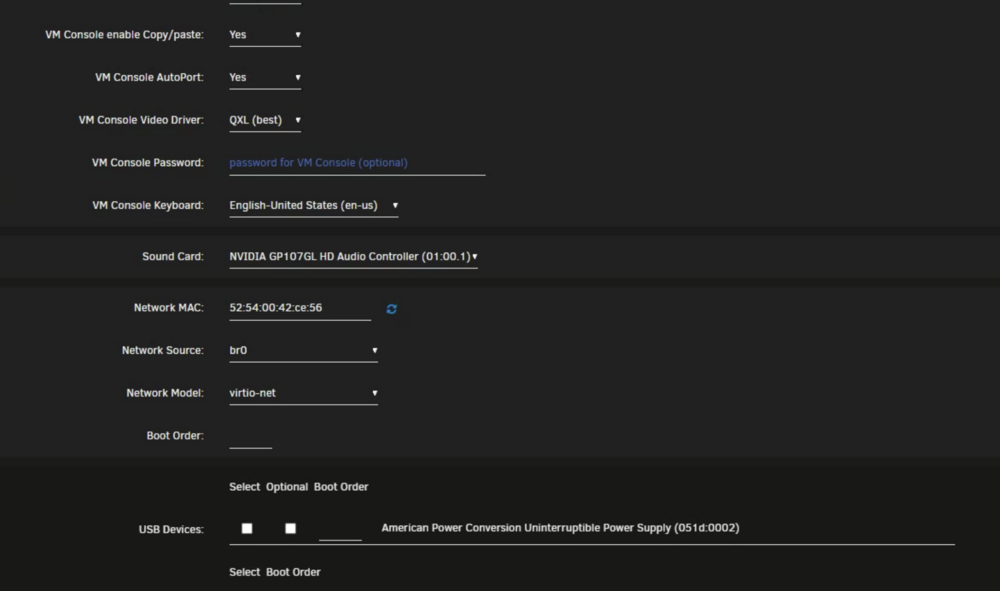
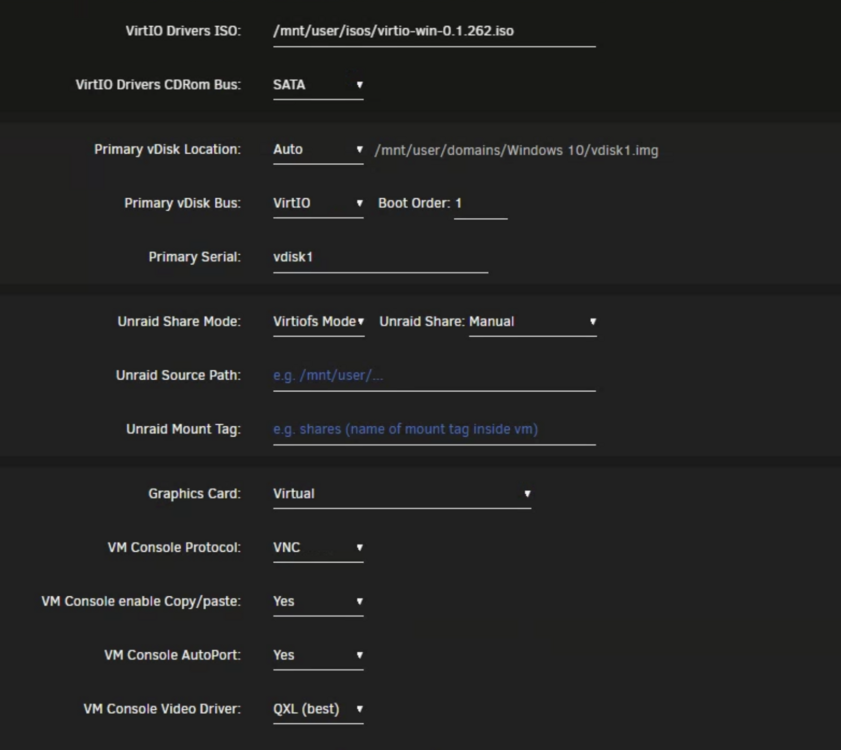
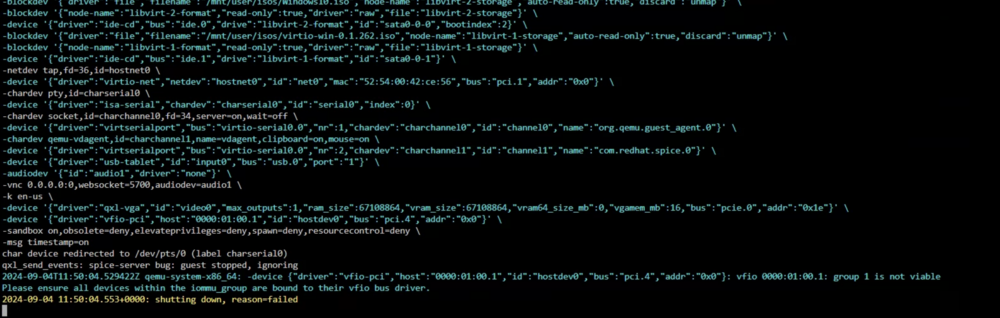
-
I finally got around to messing with this again, I’m at a loss as the rear backplane still won’t see the drives. What I have done: 1. Tried the daisy chain method with a single 2 port HBA card, front works…rear doesn’t 2. Bought another HBA card and ran one card to the front and one to the back, front still works and rear doesn’t. 3. I swapped cables from front the front backplane to the rear to rule out a bad cable, front works and rear doesn’t. Cables are good. 4. I verified power on the rear back plane, it’s getting power and lights the red lights at boot. Just doesn’t see the drives. 5. I went into the sas controllers at boot and the front is showing all the drives and locations. The rear only shows that it sees the second sas controller, it has all the same firmware updates as the other one. 6. Went into the bios and both controllers are being recognized, but one only sees the front backplane. The other one connected to the rear just sees the controller. 7. All the drives are sata, I am not mixing sas and sata. I have tried everything I know; I feel like this rear backplane has some issues. Don’t know what else to do other than send this chassis back, I can’t use it if the rear doesn’t work. I already an 846 chassis, I can just put everything back in that.
-
Ok, I'll do that in a bit. Thanks for looking at the log. I do have one question, the only two drives in the backplane are the two parity drives. Those are the only ones that didn't show up when I moved my motherboard to the new chassis. The only difference is in my old chassis these were connected via sata directly to the motherboard. I had them in drive cages inside the case. I wasn't able to do that on the swap, because the new chassis is essentially a 2U so I put them in two of the rear drive bays. When I booted unraid for the first time in the new chassis is when I noticed they were being seen. Right now I have both drives laying loose in the cavity underneath the motherboard tray connected the way they were directly to the motherboards sata ports...I def don't want to leave it like that. I'll try the cable swap, and I may try and throw some random drives in the rear and see if those are picked up in unraid.
-
Here's the diagnostics, thanks again! diagnostics-20240825-0634.zip
-
Hey Everyone I have a supermicro 847 chassis that has 24 bays on front and 12 on back. I'm moviing my current installtion from a 846 chassis to this one. I am using a Inspur LSI YZCA-00424-101 Raid Card 12Gbps HBA Controller Low Profile 9300-8i IT this time with the mini-sas connectors. The mini sas cables that came with the chassis is in a daisy chain configuration between the front and and rear backplane. All I had to do was plug the two mini sas connectors into my hba card. Problem is that when I boot unraid I am seeing all of the drives just fine in the front, even mapped correctly. But I am not seeing the rear drives, which are my two parity drives I moved from the inside of my old chassis, they were connected with sata and mounted with the drive cages you can get from supermicroi. Not sure what is going on, do I need another hba card? Or is there a bios setting I am missing? Do I need a specific hba card for daisy chaining backplanes on one card? Thanks for any help you can provide!
-
On the fence here, trying to consolidate my physical machines onto my Unraid system as VM's. I currently have a Asus CS 246 Pro motherboard, 9th gen i7 processor and 32gb of DDR4 memory. I plan on running 2-3 VM's on it's own 1TB nvme drive in one of the M2 slots. My cache for the array is in the other m2 slot and it's a 2 TB nvme drive. The board is also capable of running a xeon processor and server grade ECC Ram......would that make that much a difference or would I even need it? Trying to justify the additional expense of buying ECC ram and a Xeon cpu if what I currently have would be sufficent. I haven't ran any VM's yet but I have been running this unraid server on the i7 and std ddr4 computer grade ram for a few years now and it's been pretty reliable. Thanks!
-
Hey Everyone, I have a supermicro X11DPH-T motherboard that I am putting in a 847 chassis that currently has stock 7000rpm (I think) fans. I figure this will sound like a jet engine when I get everything together. I've done the noctua 80mm swap in my 846 and not interested in building fan walls. I am just learning about IPMI and this board has it. I am moving my current unraid install to this new board and chassis. I will get the board tomorrow and this will be my weekend project. I was wondering if anyone is using IPMI to manage the fan speeds in thier chassis, and if it possible to slow them down 30% - 50%? I have seen some dockers that will integrate with IPMI and wonder if that will be a good option? I'm fully aware slowing down the speeds will mess with the cooling capability. I plan on getting cpu coolers with fans on them and I currently use a 3x 140mm AC infinity fan shroud on the front of my 846, I am moving it over to the 847. SI have some backup things up my sleeve to help the cooling. I just have my server in a cubby next to the kitchen and I don't want this to running stock 7000-9000 RPM fans at full speed at any given moment. I can tolerate something around 3000rpm. Thanks!
-
I may be misunderstanding what this does, would it fix an issue when I browse the movie folder share on a windows machine it takes 1-2 seconds to load all the movie folders......it's not the end of the world, I just wanted it to be more instant when I open the movie folder to browse. When I open it I can see some of the folders, like G-P movie names and then the rest load up. I can see it counting, and the progress bar at the top is adding them Once it loads all the movie folders it's fine, but right at first I can only see a portion of them when makes me feel like some drives aren't spinning up quick enough? I'm not sure. I have 24 drives in a supermicro hot swap case Thanks in advance
-
I just orderered a 3D printed fan wall brackets off of etsy and grabbed the wrong one. Seller had an 846 and 848 version and looked really similar and I was going back and forth looking at listings and thought I grabbed the right one. Got an 848 and needed an 846 so I am going to have to modify it. It's on it's way and I was preparing myself on what I have to do to modify it Thanks!
-
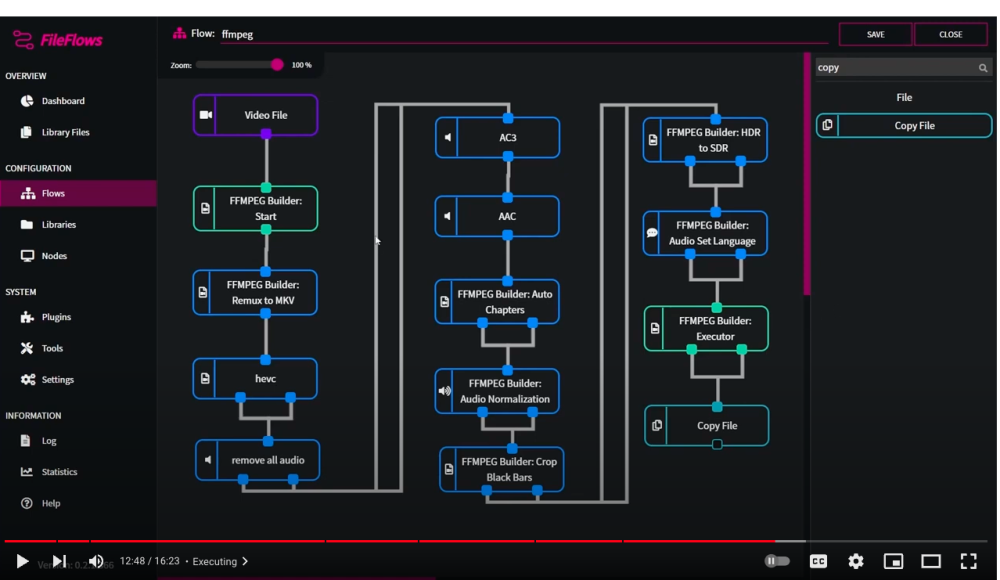
Been playing with Tdarr this past weekend and really liking it. My only issue is getting that "keep native audio and english" plugin to work lol. Doesn't work at the moment. But it's nice to be able to run it in a docker, and I have the node docker installed and running it all off my server at the moment. But on my quest for knowledge I stumbled on something similar called fileflows...and it has a way to remove all audio but native and / or english as well as a lot of other things tdarr doesn't appear to do. One cool thing is to be able to build "flows" by dragging and dropping so you can get a visual of what's going to happen. And you can build and save several flows depending on what you want to happen. Been watching the few youtube videos about it out there and the forum doesn't have a huge amount of activivity as I think it's a relativily new app. https://www.youtube.com/@fileflows204 Anyone else using it? I don't know a lot about it, but it took me a few days to get comfortable with tdarr, this one seems like it won't be too hard to figure out. I like that there is a docker for it and pretty easy to set up.
-
Been messing with tdarr all weekend to tweak my movies, remove non-english subtitles, and languages I don't need....clean some things up. Just discovered and started using it and seems to work great. But one issue, a lot of my rips have a native language, such as chinese with an english dub, I have some shawscope movies that way, and plenty others in itialian like giallio movies and korean horror. I don't want to remove those audio tracks if that's how they were filmed originally. I really want to keep the native language along with english dub if there is one. Tdarr has plugin for that, but it doesn't work now and throws an error everytime I try and run it, something is broke in the code. It's called something like "keep naitive lang and english" and uses api keys from TMDB and radarr to scan for the "original language" flags. There is another plugin that only keeps english, but if there if there is only just a non-english track it skips it. I had one movie it had a chinese track and a english commentary track, it removed the chinese track and kept the one with just two dudes talking in english the whole time about the movie. I had to do a remove commentary plugin before the remove everything but english to fix that. Found another app called file flow that will work in a docker and have read it can do something similar, but there isn't any documentation on that I can find that relates to this task. Any ideas or suggestions? I am up a creek and have to live with english dubs on everything if that was an option on the file? Thanks for any help or input anyone can provide? If I can sort this out I'll have this working like a charm and really clean up those files and save some space in the process.
-


