





gretachini
Members
-
Joined
-
Last visited
Everything posted by gretachini
-
Everything is slow. Loading any tab such as VM, Plugins, will at times take 10 to 15 seconds. I had to SSH in to grab a backup in case of having to revert to an older version, and half way through the connection froze and I was disconected. Even when grabbing these diag files, even get smart information like the command below took about 30 seconds for each one. smartctl -x '/dev/sdh' 2>/dev/null|todos >'/chonker-diagnostics-20250510-0123/smart/WDC_WUH721414ALE6L1_X0HJMD1G-2025-02-25 disk2 (sdh).txt' I'm not too concerned about troubleshooting because I'm just going to revert back to 7.0.1, but I thought this info might be useful. edit -- confirmed downgrading to 7.0.1 fixed this issue. I understand that plugins should be disabled / start in safe mode to troubleshoot, but unfortunately I don't have the time to do that at the moment. If this issue needs to be troublshooted because others are having the same issues, I can upgrade to 7.1.1 again and remove plugins to see if that is causing this slowness. chonker-diagnostics-20250510-0123.zip
-
@Rysz, just a huge thank you for developing and maintainig this project. Nerdtools was abandoned, and recently I had to reinstall a package but was getting a nasty error, which I learned was due to having an older version. WARNING: Retrying (Retry(total=4, connect=None, read=None, redirect=None, status=None)) after connection broken by 'SSLError("Can't connect to HTTPS URL because the SSL module is not available.")': /simple/pip/ WARNING: Retrying (Retry(total=3, connect=None, read=None, redirect=None, status=None)) after connection broken by 'SSLError("Can't connect to HTTPS URL because the SSL module is not available.")': /simple/pip/ WARNING: Retrying (Retry(total=2, connect=None, read=None, redirect=None, status=None)) after connection broken by 'SSLError("Can't connect to HTTPS URL because the SSL module is not available.")': /simple/pip/ WARNING: Retrying (Retry(total=1, connect=None, read=None, redirect=None, status=None)) after connection broken by 'SSLError("Can't connect to HTTPS URL because the SSL module is not available.")': /simple/pip/ WARNING: Retrying (Retry(total=0, connect=None, read=None, redirect=None, status=None)) after connection broken by 'SSLError("Can't connect to HTTPS URL because the SSL module is not available.")': /simple/pip/ Could not fetch URL https://pypi.org/simple/pip/: There was a problem confirming the ssl certificate: HTTPSConnectionPool(host='pypi.org', port=443): Max retries exceeded with url: /simple/pip/ (Caused by SSLError("Can't connect to HTTPS URL because the SSL module is not available.")) - skipping Fortunately you made installing Python a literal click of a button and saved myself a great number of hours that would have otherwise been spent on figuring out how to get Python on Unraid. Thanks a ton!
-
I'm getting this error soon after installing: aunchProcess: failed to execvp: xdg-settings [885:0407/022052.035416:ERROR:bus.cc(392)] Failed to connect to the bus: Failed to connect to socket /var/run/dbus/system_bus_socket: No such file or directory [885:0407/022052.036564:ERROR:bus.cc(392)] Failed to connect to the bus: Could not parse server address: Unknown address type (examples of valid types are "tcp" and on UNIX "unix") [885:0407/022052.036587:ERROR:bus.cc(392)] Failed to connect to the bus: Could not parse server address: Unknown address type (examples of valid types are "tcp" and on UNIX "unix") [885:0407/022052.068951:ERROR:bus.cc(392)] Failed to connect to the bus: Could not parse server address: Unknown address type (examples of valid types are "tcp" and on UNIX "unix") (node:885) electron: The default of nativeWindowOpen is deprecated and will be changing from false to true in Electron 15. See https://github.com/electron/electron/issues/28511 for more information. (Use `@joplinapp-desktop --trace-warnings ...` to show where the warning was created) [959:0407/022052.088747:ERROR:viz_main_impl.cc(162)] Exiting GPU process due to errors during initialization [1004:0407/022052.110154:ERROR:gpu_init.cc(441)] Passthrough is not supported, GL is swiftshader [1004:0407/022052.114461:ERROR:sandbox_linux.cc(374)] InitializeSandbox() called with multiple threads in process gpu-process. Gtk-Message: 02:20:53.666: GtkDialog mapped without a transient parent. This is discouraged. Any help would be wonderful
-
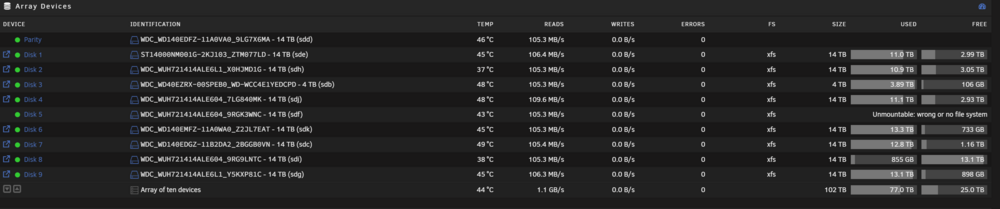
Here are the results. Doesn't seem to be too much relative to how much data is residing on it currently. Calculate Occupied Space Name: lost+found Location: disk5 Last modified: 54 minutes ago Total occupied space: 3.48 GB in 4 folders and 6 files
-
I appreciate the followup! Here are the diagnostics. chonker-diagnostics-20250406-2109.zip
-
Went ahead and performed it. It fixed the disk and it's mounted. Thank you so much!
-
@trurl Here is the output upon clicking Fix: Phase 1 - find and verify superblock... Phase 2 - using internal log - zero log... ERROR: The filesystem has valuable metadata changes in a log which needs to be replayed. Mount the filesystem to replay the log, and unmount it before re-running xfs_repair. If you are unable to mount the filesystem, then use the -L option to destroy the log and attempt a repair. Note that destroying the log may cause corruption -- please attempt a mount of the filesystem before doing this.
-
No, nothing irreplaceable. I'll proceed with clicking Fix and get back to you with the output.
-
@trurl Here is the output of the command. It was quite long so I saved it in a text file. After running this in the GUI, a "Fix" button popped up. If it's safe to proceed with clicking that, I will. Thanks for your help. disk5.txt
-
Title says it all. Unraid 7.0.1. I've found a few topics regarding this, but it seemed wise to check with you guys before doing anything that can't be undone. Thanks! chonker-diagnostics-20250406-1944.zip
-
Do you mean physically connecting a monitor/keyboard to my server?
-
Unraid version: 6.12.4 This has happened twice. I'm watching a movie via Plex on my Apple TV, and the movie suddenly stopped. The first time it happened, after an hour or so, I was able to connect to Unraid again. Everything was operational. The second time happened tonight: - I couldn't connect to the Unraid UI nor SSH in. I am on the local network. - I could ping the Unraid server from a local Windows client. I pressed the physical power button, and almost right after I pressed it, I was able to connect to Unraid momentarily until Unraid continued the shut down process. When I did connect, everything seemed fine. All my containers were still up and running. I grabbed the diagnostics zip file after I rebooted. I confirmed the log files contained are both before and after the physical shut down. The physical shut down was performed on 4/6 21:55. I waited over an hour or so, so I assume the connection issue happened around 21:00 or prior. Unfortunately the only thing appearing in the syslog are mover entries. From syslog.txt: Apr 6 20:00:14 chonker root: skip: /mnt/cache/video/tv/Grimsburg/Season 1/Grimsburg.S01E03.1080p.WEB.h264-BAE.mkv [2b,714b4c7] /video/downloads/tv/Grimsburg.S01E03.1080p.WEB.h264-BAE.mkv [-1] Apr 6 20:00:14 chonker root: skip: /mnt/cache/video/tv/The Great North/Season 4/The.Great.North.S04E03.1080p.WEB.h264-BAE.mkv [2b,714b4c6] /video/downloads/tv/The.Great.North.S04E03.1080p.WEB.h264-BAE.mkv [-1] Apr 6 20:00:14 chonker root: skip: /mnt/cache/video/tv/The Daily Show/Season 29/The.Daily.Show.2024.03.27.Byron.Tau.1080p.WEB.h264-EDITH.mkv [2b,714b518] /video/downloads/tv/The.Daily.Show.2024.03.27.Byron.Tau.1080p.WEB.h264-EDITH.mkv [-1] Apr 6 20:00:14 chonker root: skip: /mnt/cache/video/tv/BMF - Black Mafia Family/Season 3/bmf.s03e05.2160p.web.h265-lazycunts.mkv [2b,714b527] /video/downloads/tv/bmf.s03e05.2160p.web.h265-lazycunts.mkv [-1] Apr 6 20:00:14 chonker root: skip: /mnt/cache/video/tv/Loot/Season 2/Loot.S02E01.Space.for.Everyone.2160p.ATVP.WEB-DL.DDP5.1.Atmos.DV.HDR.H.265-FLUX.mkv [2b,714b5bd] /video/downloads/tv/Loot.S02E01.Space.for.Everyone.2160p.ATVP.WEB-DL.DDP5.1.Atmos.DV.HDR.H.265-FLUX.mkv [-1] Apr 6 20:00:14 chonker root: mover: finished Apr 6 21:55:03 chonker elogind-daemon[1260]: Power key pressed. Apr 6 21:55:03 chonker elogind-daemon[1260]: Powering Off... Apr 6 21:55:03 chonker init: Switching to runlevel: 0 Apr 6 21:55:08 chonker elogind-daemon[1260]: Delay lock is active (UID 0/root, PID 16152/libvirtd) but inhibitor timeout is reached. Apr 6 21:55:08 chonker elogind-daemon[1260]: System is powering down.. It seems that the diagnostics info I am attaching may not be sufficient, so if there is anything I can do to set up further tracing the next time this issue happens, I would be happy to do so. Thank you chonker-diagnostics-20240406-2156.zip
-
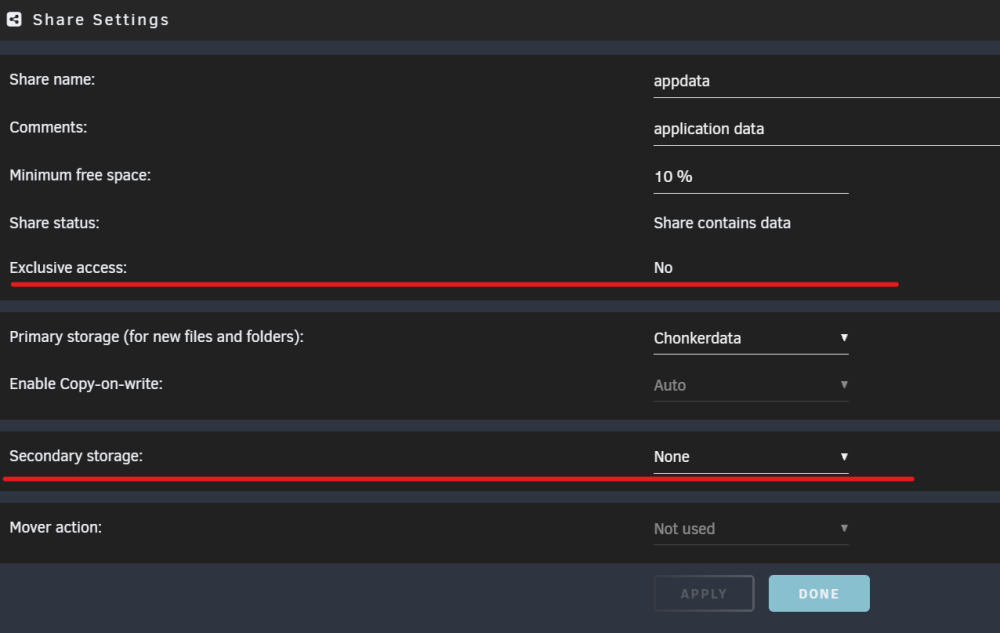
I did have an empty folder! I deleted it and it and exclusive access turned from no to yes. Thank you!
-
I think this may be causing the issue. I checked my logs and noticed this: Jun 18 02:21:07 chonker root: Fix Common Problems: Warning: Share appdata set to use pool chonkerdata, but files / folders exist on the cache pool Would this be causing the issue? And if it is, how can I resolve it? To my knowledge, I don't have any files on my cache pool corresponding to this share.
-
Thanks for the reply. I enabled this as well as restricting the DHCP pool, as this seemed to help when reading another topic. It's been up for a couple hours so far. Hoping it stays up!
-
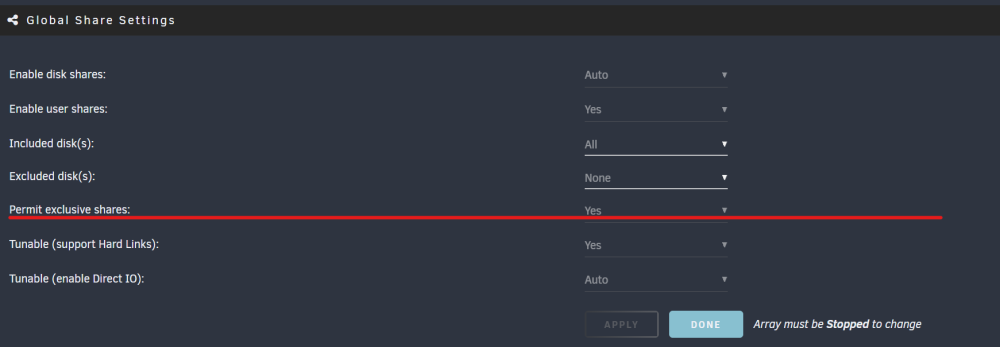
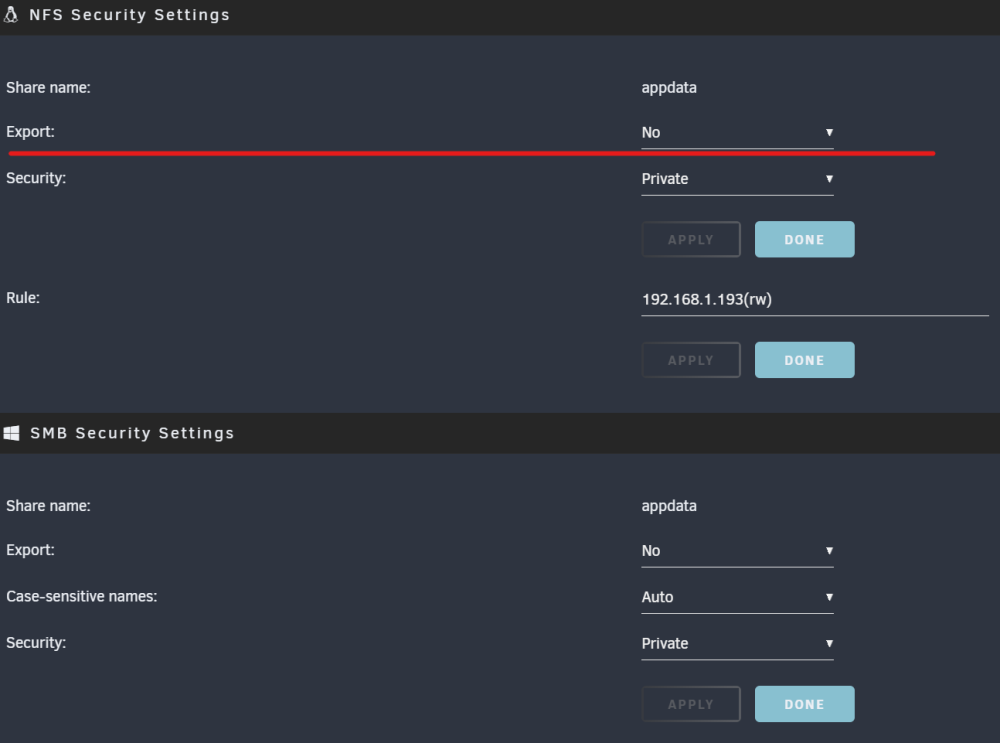
I have performed the following operations in hopes of enabling exlusive access for a share: - Disabled secondary storage - Disabled the NFS share (as well as SMB) - Enabled Permit exclusive shares in Global Share settings I also tried stopping/starting the array after doing this, but no luck. Am I missing something? Thanks
-
After upgrading from 6.11.5 to 6.12.0, after a bit of time passes, I can no longer connect to Unraid. Rebooting also doesn't allow connections: I have to completely reformat my USB drive and run from a backup. The last time it happened I ran tail -f on the system log, and this is what showed up before crashing: Jun 16 00:18:36 chonker kernel: general protection fault, probably for non-canonical address 0xe68b5cc41347210e: 0000 [#1] PREEMPT SMP NOPTI Jun 16 00:18:36 chonker kernel: CPU: 11 PID: 18932 Comm: Network Tainted: P W O 6.1.33-Unraid #1 Jun 16 00:18:36 chonker kernel: Hardware name: Micro-Star International Co., Ltd. MS-7C82/MAG B460M MORTAR WIFI (MS-7C82), BIOS 1.41 12/03/2020 Jun 16 00:18:36 chonker kernel: RIP: 0010:nf_nat_setup_info+0x14a/0x7d1 [nf_nat] Jun 16 00:18:36 chonker kernel: Code: 4c 89 ff e8 1e f8 ff ff 48 8b 15 4a 6a 00 00 89 c0 48 8d 04 c2 4c 8b 30 4d 85 f6 74 2a 49 81 ee 90 00 00 00 eb 21 8a 44 24 46 <41> 38 46 46 74 21 49 8b 96 90 00 00 00 48 85 d2 0f 84 56 ff ff ff Jun 16 00:18:36 chonker kernel: RSP: 0018:ffffc90000340738 EFLAGS: 00010282 Jun 16 00:18:36 chonker kernel: RAX: ffff888142bf4806 RBX: ffff8881507ef400 RCX: 911c2f2f43b23fd7 Jun 16 00:18:36 chonker kernel: RDX: e68b5cc413472158 RSI: da422dc5bff567b6 RDI: c25dba15011f0e06 Jun 16 00:18:36 chonker kernel: RBP: ffffc90000340800 R08: 732d2524b7231a5f R09: 4aa4027e1fcf3267 Jun 16 00:18:36 chonker kernel: R10: a0dff80207ea819e R11: ffffc90000340710 R12: ffffc90000340814 Jun 16 00:18:36 chonker kernel: R13: 0000000000000000 R14: e68b5cc4134720c8 R15: ffffffff82a11440 Jun 16 00:18:36 chonker kernel: FS: 00001552cc6c2b30(0000) GS:ffff88901f4c0000(0000) knlGS:0000000000000000 Jun 16 00:18:36 chonker kernel: CS: 0010 DS: 0000 ES: 0000 CR0: 0000000080050033 Jun 16 00:18:36 chonker kernel: CR2: 0000000000537d30 CR3: 0000000453404002 CR4: 00000000007706e0 Jun 16 00:18:36 chonker kernel: PKRU: 55555554 Jun 16 00:18:36 chonker kernel: Call Trace: Jun 16 00:18:36 chonker kernel: <IRQ> Jun 16 00:18:36 chonker kernel: ? __die_body+0x1a/0x5c Jun 16 00:18:36 chonker kernel: ? die_addr+0x38/0x51 Jun 16 00:18:36 chonker kernel: ? exc_general_protection+0x30f/0x345 Jun 16 00:18:36 chonker kernel: ? asm_exc_general_protection+0x22/0x30 Jun 16 00:18:36 chonker kernel: ? nf_nat_setup_info+0x14a/0x7d1 [nf_nat] Jun 16 00:18:36 chonker kernel: ? nf_nat_setup_info+0x128/0x7d1 [nf_nat] Jun 16 00:18:36 chonker kernel: ? krealloc+0x82/0x93 Jun 16 00:18:36 chonker kernel: nf_nat_masquerade_ipv4+0x114/0x13c [nf_nat] Jun 16 00:18:36 chonker kernel: masquerade_tg+0x48/0x66 [xt_MASQUERADE] Jun 16 00:18:36 chonker kernel: ipt_do_table+0x51b/0x5bf [ip_tables] Jun 16 00:18:36 chonker kernel: ? xt_write_recseq_end+0xf/0x1c [ip_tables] Jun 16 00:18:36 chonker kernel: ? __local_bh_enable_ip+0x56/0x6b Jun 16 00:18:36 chonker kernel: ? ipt_do_table+0x57a/0x5bf [ip_tables] Jun 16 00:18:36 chonker kernel: nf_nat_inet_fn+0x123/0x1a8 [nf_nat] Jun 16 00:18:36 chonker kernel: nf_nat_ipv4_out+0x15/0x91 [nf_nat] Jun 16 00:18:36 chonker kernel: nf_hook_slow+0x3a/0x96 Jun 16 00:18:36 chonker kernel: ? __ip_finish_output+0x144/0x144 Jun 16 00:18:36 chonker kernel: nf_hook+0xdf/0x110 Jun 16 00:18:36 chonker kernel: ? ethnl_put_bitset32+0x250/0x328 Jun 16 00:18:36 chonker kernel: ? __ip_finish_output+0x144/0x144 Jun 16 00:18:36 chonker kernel: ip_output+0x78/0x88 Jun 16 00:18:36 chonker kernel: ? __ip_finish_output+0x144/0x144 Jun 16 00:18:36 chonker kernel: ip_sabotage_in+0x4f/0x60 [br_netfilter] Jun 16 00:18:36 chonker kernel: nf_hook_slow+0x3a/0x96 Jun 16 00:18:36 chonker kernel: ? ip_rcv_finish_core.constprop.0+0x3e8/0x3e8 Jun 16 00:18:36 chonker kernel: NF_HOOK.constprop.0+0x79/0xd9 Jun 16 00:18:36 chonker kernel: ? ip_rcv_finish_core.constprop.0+0x3e8/0x3e8 Jun 16 00:18:36 chonker kernel: __netif_receive_skb_one_core+0x77/0x9c Jun 16 00:18:36 chonker kernel: netif_receive_skb+0xbf/0x127 Jun 16 00:18:36 chonker kernel: br_handle_frame_finish+0x438/0x472 [bridge] Jun 16 00:18:36 chonker kernel: ? br_pass_frame_up+0xdd/0xdd [bridge] Jun 16 00:18:36 chonker kernel: br_nf_hook_thresh+0xe2/0x109 [br_netfilter] Jun 16 00:18:36 chonker kernel: ? br_pass_frame_up+0xdd/0xdd [bridge] Jun 16 00:18:36 chonker kernel: br_nf_pre_routing_finish+0x2c1/0x2ec [br_netfilter] Jun 16 00:18:36 chonker kernel: ? br_pass_frame_up+0xdd/0xdd [bridge] Jun 16 00:18:36 chonker kernel: ? NF_HOOK.isra.0+0xe4/0x140 [br_netfilter] Jun 16 00:18:36 chonker kernel: ? br_nf_hook_thresh+0x109/0x109 [br_netfilter] Jun 16 00:18:36 chonker kernel: br_nf_pre_routing+0x236/0x24a [br_netfilter] Jun 16 00:18:36 chonker kernel: ? br_nf_hook_thresh+0x109/0x109 [br_netfilter] Jun 16 00:18:36 chonker kernel: br_handle_frame+0x277/0x2e0 [bridge] Jun 16 00:18:36 chonker kernel: ? br_pass_frame_up+0xdd/0xdd [bridge] Jun 16 00:18:36 chonker kernel: __netif_receive_skb_core.constprop.0+0x4fa/0x6e9 Jun 16 00:18:36 chonker kernel: ? select_task_rq_fair+0xb94/0xbaa Jun 16 00:18:36 chonker kernel: ? rcu_sched_clock_irq+0x9b2/0xa37 Jun 16 00:18:36 chonker kernel: __netif_receive_skb_one_core+0x40/0x9c Jun 16 00:18:36 chonker kernel: process_backlog+0x8c/0x116 Jun 16 00:18:36 chonker kernel: __napi_poll.constprop.0+0x28/0x124 Jun 16 00:18:36 chonker kernel: net_rx_action+0x159/0x24f Jun 16 00:18:36 chonker kernel: ? rcu_nocb_unlock_irqrestore+0x17/0x40 Jun 16 00:18:36 chonker kernel: __do_softirq+0x126/0x288 Jun 16 00:18:36 chonker kernel: do_softirq+0x7f/0xab Jun 16 00:18:36 chonker kernel: </IRQ> Jun 16 00:18:36 chonker kernel: <TASK> Jun 16 00:18:36 chonker kernel: __local_bh_enable_ip+0x4c/0x6b Jun 16 00:18:36 chonker kernel: ip_finish_output2+0x36a/0x39d Jun 16 00:18:36 chonker kernel: __ip_queue_xmit+0x2d8/0x31f Jun 16 00:18:36 chonker kernel: __tcp_transmit_skb+0x841/0x8b1 Jun 16 00:18:36 chonker kernel: tcp_connect+0x7e4/0x86f Jun 16 00:18:36 chonker kernel: tcp_v4_connect+0x41a/0x47d Jun 16 00:18:36 chonker kernel: __inet_stream_connect+0xdd/0x314 Jun 16 00:18:36 chonker kernel: inet_stream_connect+0x39/0x52 Jun 16 00:18:36 chonker kernel: __sys_connect+0x68/0xa7 Jun 16 00:18:36 chonker kernel: __x64_sys_connect+0x14/0x1b Jun 16 00:18:36 chonker kernel: do_syscall_64+0x68/0x81 Jun 16 00:18:36 chonker kernel: entry_SYSCALL_64_after_hwframe+0x63/0xcd Jun 16 00:18:36 chonker kernel: RIP: 0033:0x1552ce1124a3 Jun 16 00:18:36 chonker kernel: Code: c3 8b 07 85 c0 75 24 49 89 fb 48 89 f0 48 89 d7 48 89 ce 4c 89 c2 4d 89 ca 4c 8b 44 24 08 4c 8b 4c 24 10 4c 89 5c 24 08 0f 05 <c3> e9 c7 d1 ff ff 41 54 b8 02 00 00 00 49 89 f4 be 00 88 08 00 55 Jun 16 00:18:36 chonker kernel: RSP: 002b:00001552cc6c1058 EFLAGS: 00000246 ORIG_RAX: 000000000000002a Jun 16 00:18:36 chonker kernel: RAX: ffffffffffffffda RBX: 00001552cc6c2b30 RCX: 00001552ce1124a3 Jun 16 00:18:36 chonker kernel: RDX: 0000000000000010 RSI: 00001552c708d99c RDI: 0000000000000084 Jun 16 00:18:36 chonker kernel: RBP: 00001552cbb420e0 R08: 0000000000000000 R09: 0000000000000000 Jun 16 00:18:36 chonker kernel: R10: 0000000000000000 R11: 0000000000000246 R12: 000000000000002a Jun 16 00:18:36 chonker kernel: R13: 0000000000000010 R14: 0000000000000000 R15: 00001552cc7890f8 Jun 16 00:18:36 chonker kernel: </TASK> Jun 16 00:18:36 chonker kernel: Modules linked in: tcp_diag udp_diag inet_diag xt_CHECKSUM ipt_REJECT nf_reject_ipv4 ip6table_mangle ip6table_nat iptable_mangle vhost_net tun vhost vhost_iotlb tap xt_nat xt_tcpudp veth macvlan xt_conntrack nf_conntrack_netlink nfnetlink xfrm_user xfrm_algo xt_addrtype br_netfilter xfs dm_crypt dm_mod md_mod nfsd auth_rpcgss oid_registry lockd grace sunrpc zfs(PO) zunicode(PO) zzstd(O) zlua(O) zavl(PO) icp(PO) zcommon(PO) znvpair(PO) spl(O) iptable_nat xt_MASQUERADE nf_nat nf_conntrack nf_defrag_ipv6 nf_defrag_ipv4 wireguard curve25519_x86_64 libcurve25519_generic libchacha20poly1305 chacha_x86_64 poly1305_x86_64 ip6_udp_tunnel udp_tunnel libchacha ip6table_filter ip6_tables iptable_filter ip_tables x_tables efivarfs af_packet 8021q garp mrp bridge stp llc bonding tls i915 x86_pkg_temp_thermal intel_powerclamp coretemp kvm_intel kvm iosf_mbi drm_buddy i2c_algo_bit ttm drm_display_helper drm_kms_helper crct10dif_pclmul crc32_pclmul crc32c_intel ghash_clmulni_intel Jun 16 00:18:36 chonker kernel: sha512_ssse3 drm aesni_intel crypto_simd cryptd btusb mei_hdcp mei_pxp i2c_i801 btrtl intel_gtt rapl btbcm i2c_smbus btintel agpgart intel_cstate wmi_bmof intel_wmi_thunderbolt mxm_wmi r8169 nvme bluetooth intel_uncore mei_me i2c_core joydev nvme_core ahci mei ecdh_generic syscopyarea realtek libahci ecc sysfillrect sysimgblt thermal fb_sys_fops fan video wmi backlight intel_pmc_core acpi_pad acpi_tad button unix [last unloaded: md_mod] Jun 16 00:18:36 chonker kernel: ---[ end trace 0000000000000000 ]--- Jun 16 00:18:36 chonker kernel: RIP: 0010:nf_nat_setup_info+0x14a/0x7d1 [nf_nat] Jun 16 00:18:36 chonker kernel: Code: 4c 89 ff e8 1e f8 ff ff 48 8b 15 4a 6a 00 00 89 c0 48 8d 04 c2 4c 8b 30 4d 85 f6 74 2a 49 81 ee 90 00 00 00 eb 21 8a 44 24 46 <41> 38 46 46 74 21 49 8b 96 90 00 00 00 48 85 d2 0f 84 56 ff ff ff Jun 16 00:18:36 chonker kernel: RSP: 0018:ffffc90000340738 EFLAGS: 00010282 Jun 16 00:18:36 chonker kernel: RAX: ffff888142bf4806 RBX: ffff8881507ef400 RCX: 911c2f2f43b23fd7 Jun 16 00:18:36 chonker kernel: RDX: e68b5cc413472158 RSI: da422dc5bff567b6 RDI: c25dba15011f0e06 Jun 16 00:18:36 chonker kernel: RBP: ffffc90000340800 R08: 732d2524b7231a5f R09: 4aa4027e1fcf3267 Jun 16 00:18:36 chonker kernel: R10: a0dff80207ea819e R11: ffffc90000340710 R12: ffffc90000340814 Jun 16 00:18:36 chonker kernel: R13: 0000000000000000 R14: e68b5cc4134720c8 R15: ffffffff82a11440 Jun 16 00:18:36 chonker kernel: FS: 00001552cc6c2b30(0000) GS:ffff88901f4c0000(0000) knlGS:0000000000000000 Jun 16 00:18:36 chonker kernel: CS: 0010 DS: 0000 ES: 0000 CR0: 0000000080050033 Jun 16 00:18:36 chonker kernel: CR2: 0000000000537d30 CR3: 0000000453404002 CR4: 00000000007706e0 Jun 16 00:18:36 chonker kernel: PKRU: 55555554 Network error: Software caused connection abort I'm not sure what comes up if I try booting Unraid because checking would require lugging my server over to my monitor and plugging it in, but if doing that iis required for troubleshooting I'd be more than happy to. Or if other logs are required, please let me know how to obtain them and I'll throw them up here. Thank you






