





KittenMittons
Members
-
Joined
-
Last visited
Everything posted by KittenMittons
-
I assume you're talking about this part? Where am supposed to be running this commands? The console for the frigate container?
-
attached a copy of the log after restarting the container in unraid frigate-logs.txt
-
Yessir
-
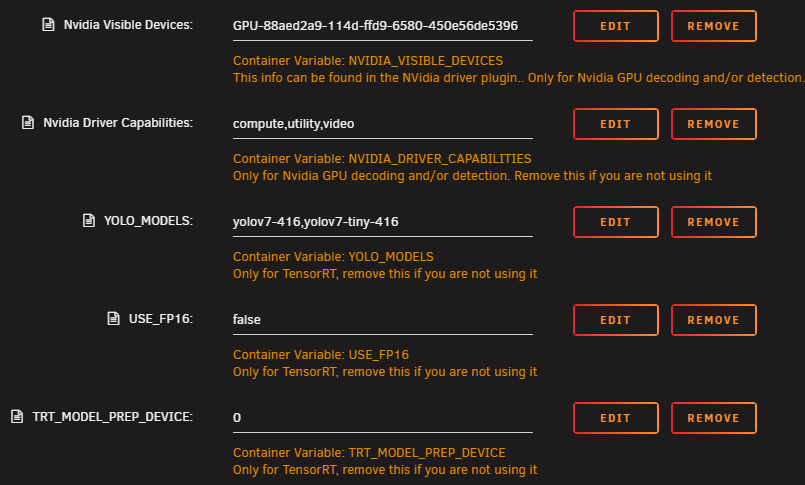
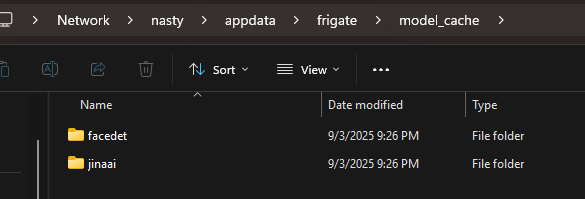
okay so I re-installed the tensor version. I am able to get it up and running and add a camera. It it showing the Nvidia GPU as passed through. This is the yolo version I have set in the template (however I've tried multiple versions and it never generates the models): However, it's not loading any of the models in the appdata folder: and if I try to add the tensorrt detector to my config, frigate just bootloops until I remove it detectors: tensorrt: type: tensorrt device: 0 do I need to manually create those model folders/files?
-
I installed the tensor version, but it seems tensor is no longer supported in version 16. So I installed the normal stable release (through the unraid apps section) I also don't see a models folder in my appdata folder on the frigate appdata folder. Can I create those or are they supposed to be created automatically?
-
So I finally got a chance to switch the cards around. The 1050ti still works perfectly for plex transcoding, and the HD7770 is now getting passed through to my macOS VM
-
I was able to get it working by simply switching the HD7770 to another PCIE slot and passthrough is now working fine!
-
Sounds good, I'll give it a shot tonight when I get home and we'll see how it goes
-
I'm running a 1050ti and an HD7770 on my server. The 1050ti is working great for HW transcoding in Plex using this plugin, but I'm having some issues passing through the HD7770 to a macos VM. Going to try swapping the PCIE slots the GPUs are plugged into. Is that going to mess up the nvidia driver config? Will I have to re-configure anything?
-
I really need to stop messing with this lol. I got it running with GPU passthrough by adding the radpg=15 boot arg, however I switched to a new case/mobo, added another GPU (an nividia) and am having trouble passing through the HD7770 again. I am able to get it to boot by enabling PCIe ACS override, however, when trying to pass through the GPU, the VM says it starts, but it just pegs 1 of the 8 cores I have assigned to it and I cannot connect to it. Any ideas?
-
My saga continues. Got Apple services going, now trying to passthrough my Radeon HD 7770. Haven't played around with it too much, but when I tried it killed the VM and when I tried to switch back to VNC it said "user has not initialized the display (yet)). Got back in by re-creating the VM, but If anyone has any suggestions I'd appreciate it! Otherwise everything is working great
-
This finally got me up and running. I was able to get Moterey booted with the correct SMBIOS and remove the other two vdisks. Now to try and get Apple services working...
-
Well I managed to get Monterey running, however I did not create the SMBIOS with opencore configurator, just moved the EFI files to the main disk. It boots, but is very slow and I can't connect any Apple services still. Is there a way to update the SMBIOS with the right info without running OC config? I'm scared because that's always when it breaks lol
-
I tried this last night but got the same issue after trying to create the SMBIOS with opencore configurator. So you're saying I should just skip that part of the guide? Where do I stop following the main guide? After moving the EFI files?
-
sorry just saw it now. Will give it a shot
-
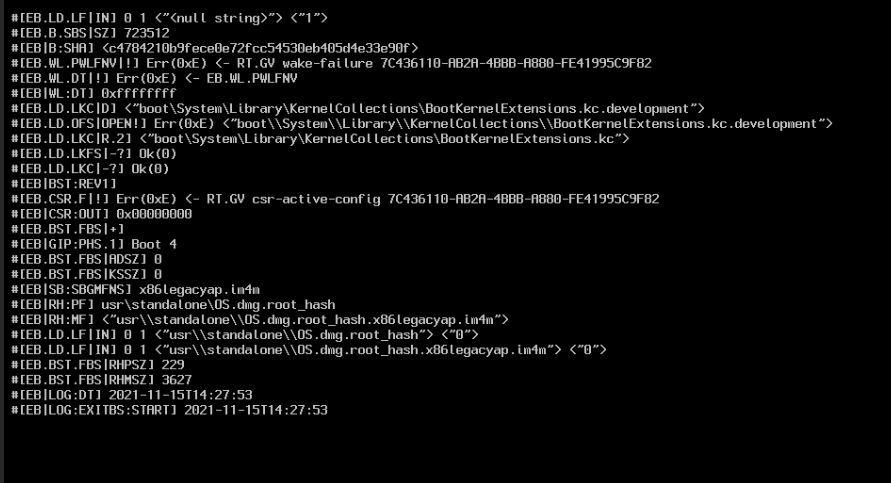
How did you get this to work? Every time I move the EFI folders, and delete the other vDisks, I get the attached error
-
I selected Big Sur but it installed Monterey, is this normal? welp - macos installs fine, and I can go through the initial setup. But once I download opencore configurator and move the EFI files, then change the paths in the VM, it refuses to boot. Am I missing something that changed for monterey?


