





WoRie
Members
-
Joined
-
Last visited
-
So simply switching the tag from 2.3.2 to latest or 3.0.2 for the repository will not result in a working setup i guess? I'm just planning to upgrade my 7.4 cluster to 8 and thought about updating pbs as well, as i'm unsure whether the new pve version will work with the older pbs server
-
After some initial issues with the setup in the beginning, this has been running flawless so far. Thanks for the great work! Are there any plans to update the package to PBS 3?
-
Hi, after wasting a quarter of a year due to a broken GPU and subsequent issues due to this, I replaced the GPU (RTX 4090, water cooled) and was finally able to use the VM as intended. I passed through 32 of the 64 gigs of my RAM, and all but one core/HT core from my xeon CPU. Everything is running fine, even for several hours, even with breaks in between sessions for several hours. I can either connect completly local with an HDMI cable connected to the passedthrough GPU as if I weren't running everything through virtualization in Unraid, or through parsec. However, if I don't shut down the vm and leave it idling for longer periods, say over night for example, I come back to my system running all passed through CPU cores on 100% and the VM unresponsive. I then have to hard shutdown the vm through unraid (which works fine), my CPU usage drops back down to normal values. I can then reboot the VM and use it as before, no issues whatsoever. The event viewer in windows only shows an error, that windows was shut down unexpectedly the last time, but nothing else in the period where the crash would have occured. The most recent one was at 02:03 in the morning, where I was fast asleep. Any idea where I could start the trouble shooting? Diags are attached. wonas-diagnostics-20230824-0928.zip
-
Hi, I have 5 80mm Arctic 4 pin PWM fans installed, all connected to my MB. 2 of the 5 are connected in series but then to the mb, the last one in the screenshot is a smaller noctua fan. I set all low temp / high temp points for the disks and minimal PWM values. The values are being displayed in the bottom bar of Unraid. However, some show up as 0% duty cycle, while others correctly display the current level. I hit detect on each of the controllers again and adjusted all points, but the results are the same. Any idea what the problem is? Also, can I rename these fans somehow. It's hard to remember, which fan cools which part.

-
disk 5 had problems negotiating a link, even with new cables. Now after some up and down the array is up. disk 10 reports as being emulated and i only can perform a read check but no rebuild of disk 10... I think if i will be able to restore the array in full, i immediatly should move all files from these old disks, some from 2011 to the newer 18tb drives... Can I rebuild disk10 which currently appears empty in the array or should I wipe it and readd it? wonas-diagnostics-20230625-1811.zip
-
Here you go. Started the array in maintenance with new cables fresh out the box. wonas-diagnostics-20230625-1733.zip
-
Both disks completed the extend test without error. wonas-diagnostics-20230625-1128.zip
-
I changed disk10 to xfs and started the array. Disk10 shows as unsupported file system. I don't know about the read errors. When the hba became instable I saw reported write errors, than cleaned up after an reboot. wonas-diagnostics-20230623-2212.zip
-
Here are the new diagnostics. How would I go about rebuilding disk10 now, if (hopefully) everything is fine again? wonas-diagnostics-20230623-1834.zip
-
Yes, Disk8 suddendly showed up as dead. How can I force it back into the array? I believe parity should still be valid and the disks should be fine. The issue was the HBA. In my old case it was directly cooled through a case fan that was near it, in the new case this fan is missing and it was 30° C the last few days. I believe that was the culprit and the HBA died. I zip tied a small Noctua to the new HBA to be safe in the future
-
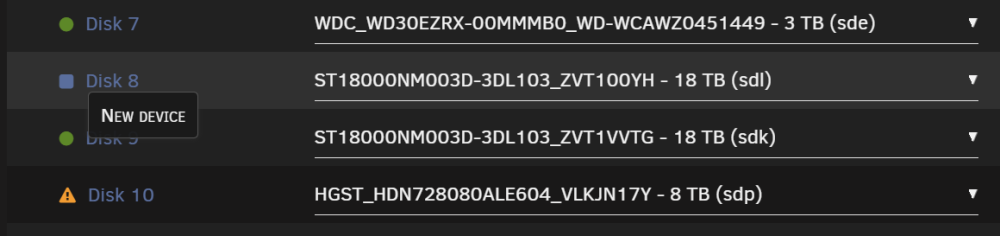
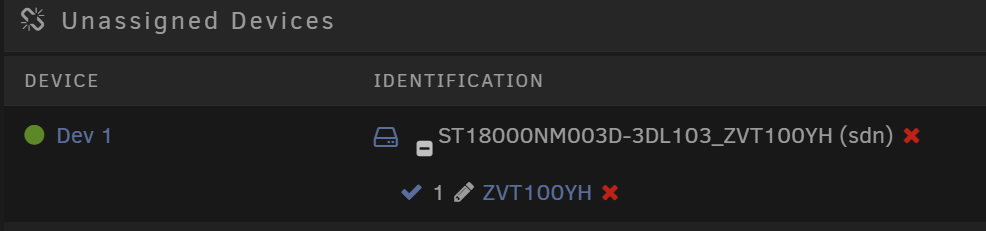
I know, thats why I'm a bit scared It's showing up as new. The data on it is still accessible when mounted through unassigned devices, but I cannot reintroduce it into the array like this. And I also can't check the filesystem, because if i assign both, I cannot start the array due to 2 missing/new disks with single parity.
-
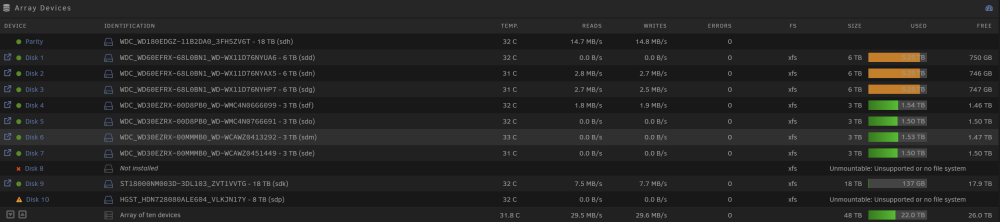
There you are. I've just installed a new HBA, it says Data Rebuild but the two discs affected by the outage show up as unmountable wonas-diagnostics-20230623-1637.zip
-
Hi JorgeB, so, i think I f*cked up... I pulled the HBA and repasted the heatspreader on the chip. The old thermal compound was completely dry, solid and oozed a solidified liquid that looked like treesap. After reassembling, i booted unraid and started the rebuild of disk 10 (as referred in the screenshot). During this, the connection broke down again. I believe the card is toast and dies when getting too warm (it's pretty warm here the last few days), even with new thermal compound and a directly attached fan. The issue now is, that the rebuild of disk 10 hasn't finished and disk 8 showed also suddenly as "disabled - content emulated." And this is where I made a mistake I think... I stopped the array, set the failed disk 8 to "disabled", started the array in maintenance, stopped it again and tried reassigning the disk to slot 8. But now it shows as a new device... I can power up the array only when i set disk 8 to unassigned, otherwise too many disks are missing / changed. I don't want to carry on with the rebuild of disk 10 with this shot HBA, a new one should arrive tomorrow. However, will I be able to fix this situation at all and what would be the best course of action? Will I be able to correctly reassign disk 8 after disk 10 has been rebuilt, or is the data on disk 8 gone and I have to add it as a new device? The partition is still there in unassigned devices and my array is only 30% full, so if I can save the files somehow, that would be great. The files are not irreplacable, but nevertheless would be a hassle to aquire again.
-
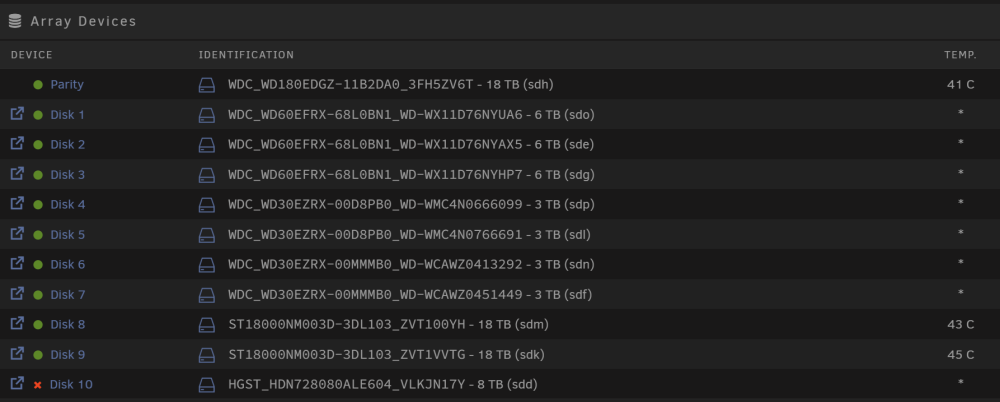
there you are. I've since disabled anything APSM related in the BIOS. But now again all disks are spun down and won't come up again. wonas-diagnostics-20230619-2019.zip
-
Hi I ran the 6.12 rc5 before updating to the final and I now encounter errors with my lsi 9300 hba. If everything is freshly booted and spun up, all is fine. However, when disks spin down, the gui still shows a green dot for the disks connected to the hba, while the ones connected to my mainboard sata controller have the correct grey dot. This wouldn't bother me, but the hba disks also suddenly report read errors after some time, which again are fixed after rebooting the host until the disks enter standby. Could this be due to power management of the pci e devices? Or is my hba on the way out?


