




Skip to content
View in the app

A better way to browse. Learn more.

Unraid

A full-screen app on your home screen with push notifications, badges and more.

To install this app on iOS and iPadOS
  1. Tap the Share icon in Safari
  2. Scroll the menu and tap Add to Home Screen.
  3. Tap Add in the top-right corner.
To install this app on Android
  1. Tap the 3-dot menu (⋮) in the top-right corner of the browser.
  2. Tap Add to Home screen or Install app.
  3. Confirm by tapping Install.

Milk.Daddy

Members
  • Joined

  • Last visited

  1. I am unable to connect to the webui despite having the port open any suggestions?
  2. Yes. I get a "windows cannot run a disk checking on this volume because its write protected".
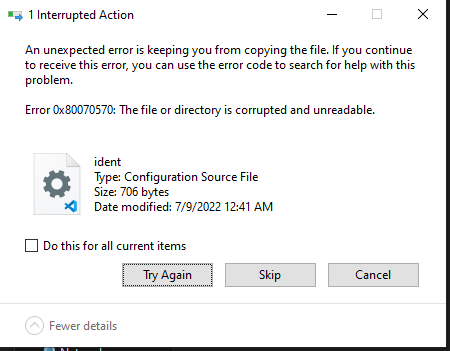
  3. I recently had a power outage and attempted to reboot my unraid system. I was met with select usb and restart at the system message. I unplugged my usb drive to switch it to another USB drive and I am unable to copy the config file. I get the message below. If I choose to skip this file folder I get not enough system memory error. Any suggestions?
  4. tower-diagnostics-20211230-0223.zip
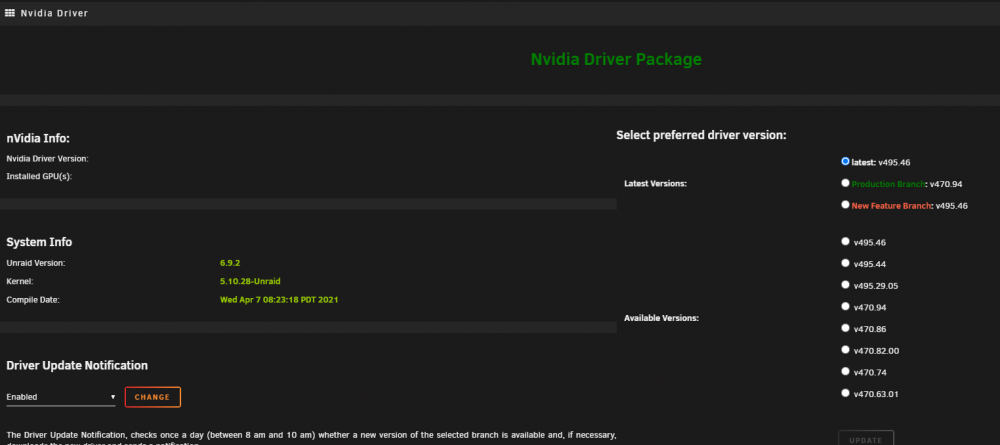
  5. I followed the instructions for installing the driver. I did see my p400 show up under the driver information, but coming back a couple days later to set it up I no longer see any information on my card. Any suggestions?
Account

Navigation

Search

Search

Configure browser push notifications

Chrome (Android)
  1. Tap the lock icon next to the address bar.
  2. Tap Permissions → Notifications.
  3. Adjust your preference.
Chrome (Desktop)
  1. Click the padlock icon in the address bar.
  2. Select Site settings.
  3. Find Notifications and adjust your preference.