





StephenCND
Members
-
Joined
-
Last visited
Everything posted by StephenCND
-
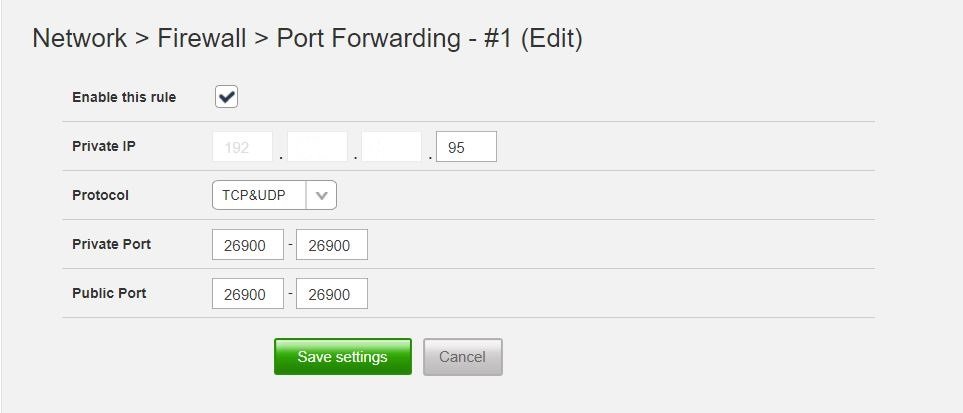
I'm pretty new to all of this and was hoping someone could provide a helping hand. I installed ich777's "7DaysToDie" docker on my headless Unraid Nas server and it seems to have installed ok. *I've included the log below). However when I launch Steam from my desktop and run the game, Steam does see my 7dtd server but eventually after attempting to connect, it returns the error message "Could not retrieve server information". I suspect I botched the port forwarding on my router. The Nas is on a static IP address. I did do port forwarding on it but maybe I did the ports wrong. I'm a bit confused about "Private Port" and the "Public Port" settings. Should the Public port be 8080? . Included screen cap of port forwarding settings. Anyways, if you require additional info., please do not hesitate to ask. Any assistance would be appreciated. Waiting for client config...OK Waiting for user info...OK ---Update Server--- Redirecting stderr to '/serverdata/Steam/logs/stderr.txt' [ 0%] Checking for available updates... [----] Verifying installation... Steam Console Client (c) Valve Corporation - version 1654574676 -- type 'quit' to exit -- Loading Steam API...OK Logging in user '********' to Steam Public...OK Waiting for client config...OK Waiting for user info...OK Success! App '294420' already up to date. CWorkThreadPool::~CWorkThreadPool: work processing queue not empty: 1 items discarded. ---Prepare Server--- ---SaveGameFolder location correct--- ---Savegame location found--- ---UserDataFolder location correct--- ---UserDataFolder location found--- ---Server ready--- ---Start Server--- Found path: /serverdata/serverfiles/7DaysToDieServer.x86_64 ---Ensuring UID: 99 matches user--- usermod: no changes ---Ensuring GID: 100 matches user--- usermod: no changes ---Setting umask to 000--- ---Checking for optional scripts--- ---No optional script found, continuing--- ---Taking ownership of data...--- ---Starting...--- ---Update SteamCMD--- Redirecting stderr to '/serverdata/Steam/logs/stderr.txt' [ 0%] Checking for available updates... [----] Verifying installation... Steam Console Client (c) Valve Corporation - version 1654574676 -- type 'quit' to exit -- Loading Steam API...OK Logging in user '********' to Steam Public...OK Waiting for client config...OK Waiting for user info...OK ---Update Server--- Redirecting stderr to '/serverdata/Steam/logs/stderr.txt' [ 0%] Checking for available updates... [----] Verifying installation... Steam Console Client (c) Valve Corporation - version 1654574676 -- type 'quit' to exit -- Loading Steam API...OK Logging in user '********' to Steam Public...OK Waiting for client config...OK Waiting for user info...OK Success! App '294420' already up to date. Work thread 'CJobMgr::m_WorkThreadPool:1' is marked exited, but we could not immediately join prior to deleting -- proceeding without join ---Prepare Server--- ---SaveGameFolder location correct--- ---Savegame location found--- ---UserDataFolder location correct--- ---UserDataFolder location found--- ---Server ready--- ---Start Server--- Found path: /serverdata/serverfiles/7DaysToDieServer.x86_64
-
My bad ... a bit unsure that I could go that route. Thanks for the heads-up.
-
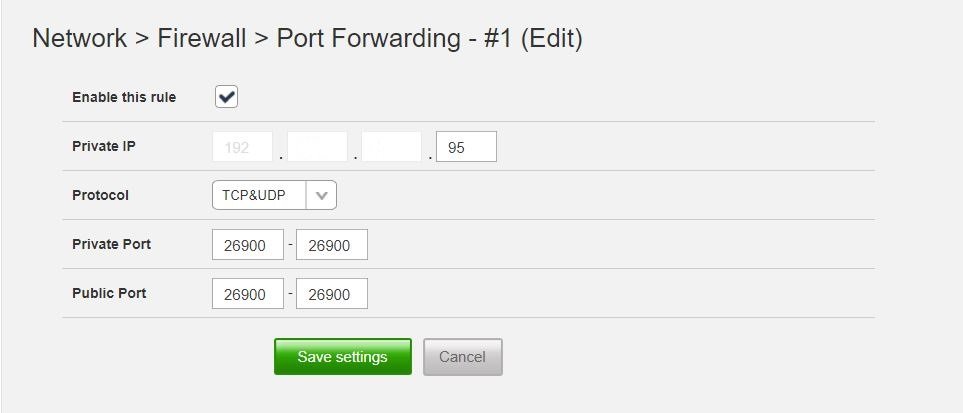
I'm pretty new to all of this and was hoping someone could provide a helping hand. I installed ich777's "7DaysToDie" docker on my headless Unraid Nas server and it seems to have installed ok. (See attached log file called "log_file_7dtd.txt" ). However when I launch Steam from my desktop and run the game, Steam does see my 7dtd server but eventually after attempting to connect, it returns the error message "Could not retrieve server information". I suspect I botched the port forwarding on my router. The Nas is on a static IP address. I did do port forwarding on but maybe I did the ports wrong. I'm a bit confused about "Private Port" and the "Public Port" settings. (Should the Public port be 80?) . Anyways, if you require additional info., please do not hesitate to ask. Any assistance would be appreciated.
-
I'm very interested in this docker, but unfortunately I do not have an Nvidia GPU. (Old AMD Radeon HD 5800). Is there any way I can install this docker? I tried installing but it failed regardles of the "branch" I selected. (I did see the note about "turn on Advanced View and remove '--runtime=nvidia' from Extra Parameters, and remove NVIDIA_VISIBLE_DEVICES or set it to 'void'", but couldn't figure out how to do so. Any assistance would be greatly appreciated.
-
I just embarrassed myself. I needed to "Add Pool". Head down in shame.
-
Greetings everyone. I am in the process of setting up Unraid v 6.9.2 and have run into an issue. I have set up my parity disks as well as my data array, however, I see no area where i can set up the drives I want for the cache. Supposed to be at the bottom of the page (Main tab), but they are not. I am very new to this by the way, and although I searched in the forums and have done my due diligence, I cannot seem to find an answer. Any assistance will be greatly appreciated.
-
Thanks folks, Somehow, I am able to boot from USB. I have NO idea how come all of a sudden I can. I have been pulling out hard drives and re-arranging things so maybe there was some loose connection somewhere.. Anyways, everything looks stable so I am able to go forward. A big thanks to everyone for their assistance
-
Thanks Squid, but been there, done that. MB has latest Bios version. Played with the boot order, to no success. Under Integrated Peripherals, Legacy USB and USB Storage are enabled. Am reluctant to re-flash Bios to an older version, or re-flash to newest version. Will keep that as a lasted option, but I really don't think the bios is an issue. It's a head scratcher
-
Greetings all. I've decided to put together a NAS from spare parts I have accumulated over the years. My system seems to meet the hardware requirements (see below). It will be used principally as a media server for occasional use and a place to back up some files. It will not be on 24/7 or see heavy use. The only parts I needed were some hard drives, and therein lies the problem. I invested in 6 x WD 4TB SMR drives with the intention of using them under Truenas. I learned after the fact that SMR and Truenas file system (ZFS) do not play nicely together, so I have gone in search of a Nas OS that does. I believe it can be done under Unraid, if the data is mostly read only and my parity drive is a CMR of the same size (4TB). Is this in fact doable? The second issue is Unraid requires the ability to boot from a USB stick: That is a problem for me: For some reason, I cannot get my system to boot from a USB device. The motherboard should be able to boot from a USB device, but for some reason it will not. If I plug in a USB device at any point of the POST process, the system will lock up. If i boot without a USB device plugged in, and go into the bios, at any time if i plug in a USB device, the Bios will freeze up. Strangely, there is no issue with my USB keyboard or mouse being plugged in. So this is another hurdle I must clear before considering Unraid (or is there a way to run Unraid on anything else (ie a SSD). My research says no, at least, no simple way to do so. Unraid seems to be very flexible, intuitive and I am hoping I can go ahead with this project. Any recommendation on these two issues would be greatly appreciated. Sys. specs CPU: i5-750 GPU: 525W Motherboard: Gigabyte P55A-UD4P rev. 01 Bios: Award Modular Bios v 6.00PG (non-UEFI) F14 Memory: DDR3 1333 - 2 x 8GB HD's: 6 x WD Red SMR 4TB drives, 1 x WD Red Plus CMR drive

