





Revan335
Members
-
Joined
Everything posted by Revan335
-
Sorry no changes for this three Directorys in Safe Mode. @Frank1940
-
Have you any Idea for this?
-
OK, with what Command? chmod /mnt/user/Share Name 777 For every Share? By the Shares with -r?
-
Sorry, the Permissions are the same of this three Directorys. We can do this? With the Dynamix FileManager? I must exclude some Directorys for example appdata and? How can I do this?
-
The don't working Array ...: ~# testparm Load smb config files from /etc/samba/smb.conf lpcfg_do_global_parameter: WARNING: The "null passwords" option is deprecated Loaded services file OK. Weak crypto is allowed by GnuTLS (e.g. NTLM as a compatibility fallback) Server role: ROLE_STANDALONE Press enter to see a dump of your service definitions # Global parameters [global] disable netbios = Yes disable spoolss = Yes load printers = No logging = syslog@0 map to guest = Bad User max open files = 40960 multicast dns register = No ntlm auth = ntlmv1-permitted null passwords = Yes passdb backend = smbpasswd printcap name = /dev/null security = USER server min protocol = SMB2 server string = MCP show add printer wizard = No smb1 unix extensions = No workgroup = WORKGROUP with Ü in his Name fruit:nfs_aces = No idmap config * : range = 3000-7999 idmap config * : backend = tdb access based share enum = Yes acl allow execute always = Yes aio read size = 0 aio write size = 0 create mask = 0777 directory mask = 0777 hide unreadable = Yes include = /etc/samba/smb-shares.conf invalid users = root map archive = No map readonly = yes use sendfile = Yes wide links = Yes [Test] path = /mnt/user/Test valid users = test testb dumkopf write list = test testb dumkopf [Test1] path = /mnt/user/Test1 valid users = test testb dumkopf write list = test testb dumkopf [Test2] guest ok = Yes path = /mnt/user/Test2 read only = No The working Array ...: ~# testparm Load smb config files from /etc/samba/smb.conf lpcfg_do_global_parameter: WARNING: The "null passwords" option is deprecated Loaded services file OK. Weak crypto is allowed by GnuTLS (e.g. NTLM as a compatibility fallback) Server role: ROLE_STANDALONE Press enter to see a dump of your service definitions # Global parameters [global] disable netbios = Yes disable spoolss = Yes load printers = No logging = syslog@0 map to guest = Bad User max open files = 40960 multicast dns register = No ntlm auth = ntlmv1-permitted null passwords = Yes passdb backend = smbpasswd printcap name = /dev/null security = USER server min protocol = SMB2 server string = MCP show add printer wizard = No smb1 unix extensions = No workgroup = WORKGROUP with Ü in his Name fruit:nfs_aces = No idmap config * : range = 3000-7999 idmap config * : backend = tdb access based share enum = Yes acl allow execute always = Yes aio read size = 0 aio write size = 0 create mask = 0777 directory mask = 0777 hide unreadable = Yes include = /etc/samba/smb-shares.conf invalid users = root map archive = No map readonly = yes use sendfile = Yes wide links = Yes [Test] path = /mnt/user/Test valid users = test testb dumkopf write list = test testb dumkopf root@Raster:~# The don't working Array ...: ~# ls -al /mnt total 28 drwxr-xr-x 11 root root 220 Mar 3 15:49 ./ drwxr-xr-x 20 root root 420 Mar 2 00:30 ../ drwxrwxrwx 5 nobody users 50 Mar 3 17:47 cache/ drwxrwxrwx 1 nobody users 16 Mar 3 17:47 cachebtrfs/ drwx------ 19 nobody users 4096 Mar 3 17:47 disk1/ drwxrwxrwx 12 nobody users 223 Mar 3 17:47 disk2/ drwxrwxrwt 3 nobody users 60 Mar 2 23:41 disks/ drwxrwxrwt 4 nobody users 80 Mar 2 23:41 remotes/ drwxrwxrwt 2 nobody users 40 Mar 1 01:43 rootshare/ drwx------ 1 nobody users 4096 Mar 3 17:47 user/ drwx------ 1 nobody users 4096 Mar 3 17:47 user0/ root@Raster:~# ls -al /mnt/user total 12 drwx------ 1 nobody users 4096 Mar 3 17:47 ./ drwxr-xr-x 11 root root 220 Mar 3 15:49 ../ drwxrwxrwx 1 nobody users 70 Dec 25 00:01 Altes\ NAS/ drwxrwxrwx 1 nobody users 57 Feb 10 01:04 Backup_E*/ drwxrwxrwx 1 nobody users 80 Oct 2 18:05 Backup_Mobil/ drwxrwxrwx 1 nobody users 41 Dec 24 17:00 Backup_PC-42/ drwxrwxrwx 1 nobody users 47 Feb 10 01:15 Backup_PC-84/ drwxrwxrwx 1 nobody users 31 Jan 18 21:21 Backup_Vu+/ drwxrwxrwx 1 nobody users 20 Jan 2 13:59 Borg/ drwxrwxrwx 1 nobody users 29 Jan 1 13:22 Cache/ drwxrwxrwx 1 nobody users 63 Jan 22 21:03 D*/ drwxrwxrwx 1 nobody users 6 Feb 7 21:51 Downloads/ drwxrwxrwx 1 nobody users 262 Mar 3 12:14 Logs/ drwxrwxrwx 1 nobody users 163 Nov 13 00:59 Multimedia/ drwxr-xr-x 1 nobody users 6 Jul 8 2022 Pictures/ drwxrwxrwx 1 nobody users 4096 Nov 13 22:06 Public/ drwxrwxrwx 1 nobody users 6 Mar 28 2022 SHARE/ drwxrwxrwx 1 nobody users 58 Jan 22 21:03 Share_E*/ drwxrwxrwx 1 nobody users 113 Mar 3 12:33 Test/ drwxrwxrwx 1 nobody users 34 Feb 26 21:18 Test1/ drwxrwxrwx 1 nobody users 56 Mar 1 00:11 Test2/ drwxr-xr-x 1 nobody users 51 Feb 7 21:46 Transcode/ drwxrwxrwx 1 nobody users 4096 Mar 3 00:16 appdata/ drwxrwxrwx 1 nobody users 32 Feb 27 13:22 domains/ drwxrwxrwx 1 nobody users 235 Feb 6 21:27 isos/ drwxrwxrwx 1 nobody users 35 Feb 15 07:10 system/ The working Array ...: ~# ls -al /mnt total 48 drwxr-xr-x 8 root root 160 Mar 3 18:50 ./ drwxr-xr-x 20 root root 420 Mar 2 00:30 ../ drwxrwxrwx 1 nobody users 16 Mar 3 18:47 disk1/ drwxrwxrwt 3 nobody users 60 Mar 2 23:41 disks/ drwxrwxrwt 4 nobody users 80 Mar 2 23:41 remotes/ drwxrwxrwt 2 nobody users 40 Mar 1 01:43 rootshare/ drwxrwxrwx 1 nobody users 16 Mar 3 18:47 user/ drwxrwxrwx 1 nobody users 16 Mar 3 18:47 user0/ root@Raster:~# ls -al /mnt/user total 16 drwxrwxrwx 1 nobody users 16 Mar 3 18:47 ./ drwxr-xr-x 8 root root 160 Mar 3 18:50 ../ drwxrwxrwx 1 nobody users 50 Mar 3 12:14 Logs/ drwxrwxrwx 1 nobody users 8 Mar 3 12:33 Test/ Many Thanks to all! Greetings!
-
Yes, its the same Server with the same Boot Drive. I used the New Configuration Tool under Tools for the Change. Yes, SMB.... Works on My Backup Server. But there is not on the Screenshots....
-
No, Default Workgroup Mode.
-
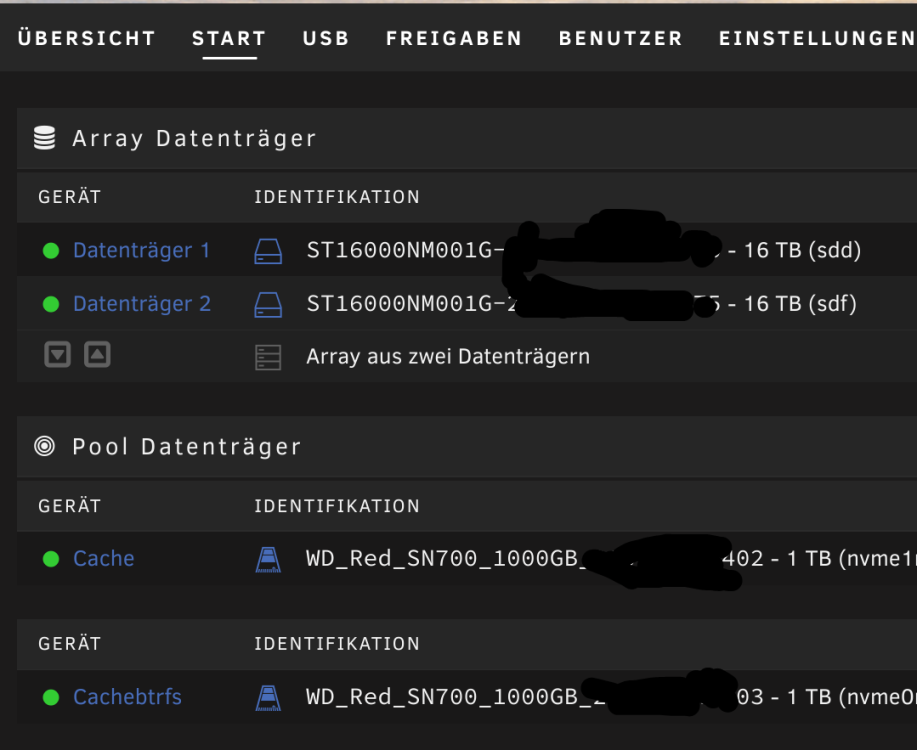
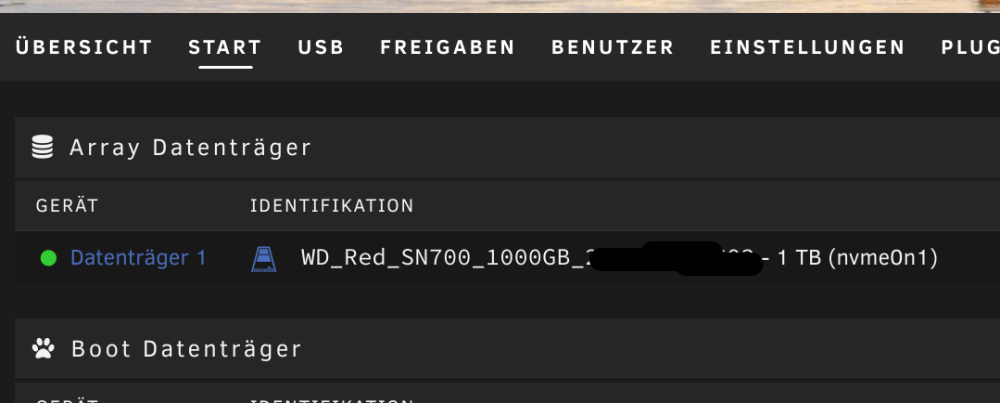
Not Working: Working:
-
Yes, this only Test Shares for Tests. And deleted after working SMB......
-
Sorry! @Frank1940 I used a New Test Disk in this case the second empty (from a old Backup Pool) NVMe for a New Array. This new Array/Array Configuration have only this one NVMe/Device and no Cache, Pool ....
-
Ich bin mehr als nur verwirrt! Ich hab ne Test Disk in diesem Fall die leere zweite NVMe als neues Array verwendet. Den Test Share erstellt, und 🎉 tada, der Zugriff des Test Users inkl. Private Share und Login funktioniert. WTF!? Was stimmt nur nicht mit den xfs HDDs und dessen Daten/Shares?
-
I am more than confused! @Frank1940@dlandon I used a New Test Disk in this Fall the second empty NVMe for a New Array. Create the Test Share, and 🎉 tada, the Access with SMB its working with test User Private Settings and Credentials. WTF!? What's wrong with the xfs HDDs and his Data?
-
Hallo, wie kann man dem Nextcloud Docker Container Zugriff auf die Shares geben, damit diese in Nextcloud zur Verfügung stehen und Änderungen und neue Daten ... auch wieder dort landen und nicht im User Verzeichnis des Nextcloud Users? Vielen Dank! Viele Grüße Revan335
-
No, don't working.
-
Hello, i won't to used NFS as a Alternative to the buggy SMB on my Mainserver. I can mount the NFS Share but he has no Write Access, only Read. For what is the Rule Section on the Share Settings? The Share is Private and Exported. I used this for mount Test: ~$ sudo mount -t nfs4 server:/mnt/user/Test ~/Mountpoints/NFS/Test ~$ sudo mount -t nfs -o nfsvers=4 server:/mnt/user/Test ~/Mountpoints/NFS/Test With this i became mount.nfs: an incorrect mount option was specified as Error. ~$ sudo mount -t nfs -o nfsvers=4,uid=1000,gid=1000 server:/mnt/user/Test ~/Mountpoints/NFS/Test With this in the fstab, becomes the same Error: server:/mnt/user/Test /home/username/Mountpoints/NFS/Test nfs nfsvers=4,rw,all_squash,anonuid=1000,anongid=1000 0 0 Please help! Many Thanks! Greetings Revan335
-
Mit all_squash,anonuid=1000,anongid=1000 bekommt man leider Invalid argument bzw. an incorrect Mount Option was specified als Fehlermeldung. Dies ist der fstab Eintrag: server:/mnt/user/Test /home/username/Mountpoints/NFS/Test nfs nfsvers=4,rw,all_squash,anonuid=1000,anongid=1000 0 0
-
Krass finde ich auch:
-
Aegis is a OpenSource Alternative: https://github.com/beemdevelopment/Aegis
-
Ganz deine Meinung! Es besteht also noch Hoffnung! Synology nutzt soweit ich weiß auch nicht alle btrfs Funktionen.
-
Ja, wundert mich auch. Vermutlich weil xfs kein RAID kann. Anderes Linux als Basis, Versionen, Konfigurationen würde ich vermuten als Ursache.
-
Aegis 2FA working.
-
On Android no Change. I tried in Win/Linux later. The working flash was tested on Linux Mint.
-
Sehr seltsam! Der Private Share von flash funktioniert inkl. User Login und Schreibzugriff. Kann das Array/Disks ne Macke haben und die Wurzel des Übels sein?
-
Strange the Private Share of flash (Unraid USB) its working included Login. Can the Array/Disks have a "Macke"/Problem with anything that's are the Root of this Evil?
-
Hallo, ich würde gerne da SMB bei mir spinnt. Über NFS auf meinen Unraid Server zugreifen. NFS 4 ist dort aktiviert, der Share Exportiert und mit ~$ sudo mount -t nfs4 server:/mnt/user/Test ~/Mountpoints/NFS/Test ~$ sudo mount -t nfs -o nfsvers=4 server:/mnt/user/Test ~/Mountpoints/NFS/Test Funktioniert auch das Mounten. Allerdings kann man nicht schreiben. Man hat nur Lesezugriff. Ich vermute das liegt an den unterschiedlichen UID/GID von Server und Client. Wie kann ich die Ubuntu oder Manjaro UID/GID 1000 beim mounten nutzen um auch Schreibzugriff zu bekommen? Bei ~$ sudo mount -t nfs -o nfsvers=4,uid=1000,gid=1000 server:/mnt/user/Test ~/Mountpoints/NFS/Test Gibt es nur den Fehler: mount.nfs: an incorrect mount option was specified Wenn es klappt, läuft das über fstab für Mounten beim booten. Ggf. auch Autofs. Vielen Dank! Viele Grüße Revan335



