





Tpole
Members
-
Joined
-
Last visited
Everything posted by Tpole
-
perfect, ok copied this, i'll let it run for a tad and see if this fixes all my import and access issues! thanks so much for all the help <3
-
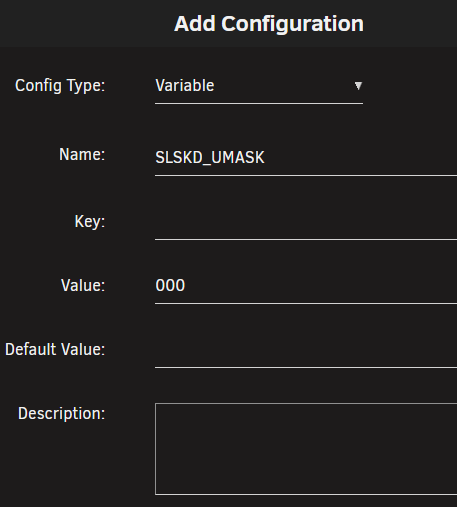
Sorry last one, just because im stil fairly new at tinkering like this, do i add these values like below?
-
I havent currently, i'll add these in now. Yes windows, i've tried playing with the paths, i THINK i may have susssed the issue, i'm just trying to confirm now. I think the issue is the folder im trying to copy to was created with slskd and had inherited the old no write perms, however after i have changed them manually its still not allowing the copying. literally running this as we speak trying to confirm the above suspicion.
-
Sorry one other question, i added that and it saves as nobody which is good, but it still saves as "-rw-rw-rw" so i cant read or write it, how do i fix this? It now saves as nobody but i still cant copy the files? quick edit: i should also note i cant even manually change the perms to read/write for all via the unraid file explorer, it doesnt apply the perms change second edit: sorry, looking into it more, it seems it does have the right perms for read write, but im still getting file access errors when i attempt to copy it. Unsure what the issue is now....
-
This is correct! sorry i had only ever had it happen with SLSKD so thought it was related to it, thanks for the fix by linking!
-
Hi, Ive started having issues with SLSKD, it runs fine for about a week then i get an error when i try to start it "execution error, no such container exists" Nothing has changed, i can see the files are still at the install location. I had this happen before, deleted and reinstalled, and it worked fine again for a few weeks and had the same error. Any ideas?
-
Hey @JPDVM2014 I have just installed Soularr, follow the guide as best i could, but i seem to have run into issues, log posted below, any idea what may be the cause? Is it an API or perms issue? [INFO|soularr|L374] 2025-07-06T14:31:47+1000: Searching album: Appearance Disappear [ERROR|soularr|L793] 2025-07-06T14:31:47+1000: Traceback (most recent call last): File "/app/soularr.py", line 791, in <module> failed = grab_most_wanted(wanted_records) ^^^^^^^^^^^^^^^^^^^^^^^^^^^^^^^^ File "/app/soularr.py", line 375, in grab_most_wanted success = search_and_download(grab_list, query, all_tracks, all_tracks[0], artist_name, release) ^^^^^^^^^^^^^^^^^^^^^^^^^^^^^^^^^^^^^^^^^^^^^^^^^^^^^^^^^^^^^^^^^^^^^^^^^^^^^^^^^^^^^^ File "/app/soularr.py", line 255, in search_and_download search = slskd.searches.search_text(searchText = query, ^^^^^^^^^^^^^^^^^^^^^^^^^^^^^^^^^^^^^^^^^^^^^^ File "/usr/local/lib/python3.11/site-packages/slskd_api/apis/searches.py", line 69, in search_text response = self.session.post(url, json=data) ^^^^^^^^^^^^^^^^^^^^^^^^^^^^^^^^^ File "/usr/local/lib/python3.11/site-packages/requests/sessions.py", line 637, in post return self.request("POST", url, data=data, json=json, **kwargs) ^^^^^^^^^^^^^^^^^^^^^^^^^^^^^^^^^^^^^^^^^^^^^^^^^^^^^^^^^ File "/usr/local/lib/python3.11/site-packages/requests/sessions.py", line 589, in request resp = self.send(prep, **send_kwargs) ^^^^^^^^^^^^^^^^^^^^^^^^^^^^^^ File "/usr/local/lib/python3.11/site-packages/requests/sessions.py", line 710, in send r = dispatch_hook("response", hooks, r, **kwargs) ^^^^^^^^^^^^^^^^^^^^^^^^^^^^^^^^^^^^^^^^^^^^^ File "/usr/local/lib/python3.11/site-packages/requests/hooks.py", line 30, in dispatch_hook hookdata = hook(hook_data, **kwargs) ^^^^^^^^^^^^^^^^^^^^^^^^^ File "/usr/local/lib/python3.11/site-packages/slskd_api/client.py", line 60, in <lambda> session.hooks = {'response': lambda r, args, *kwargs: r.raise_for_status()} ^^^^^^^^^^^^^^^^^^^^ File "/usr/local/lib/python3.11/site-packages/requests/models.py", line 1026, in raise_for_status raise HTTPError(http_error_msg, response=self) requests.exceptions.HTTPError: 401 Client Error: Unauthorized for url: http://192.168.1.254:5030/api/v0/searches [ERROR|soularr|L794] 2025-07-06T14:31:47+1000: Fatal error! Exiting... EDIT-- thanks to help on discord i managed to get this sorted! the issue was the API key was commented out! once the # was removed it worked!
-
I have the same bug, have for about a month or two now. Unsure how to resolve, but as you noted, if you type in the address it works, if you click the icon and hit web view, nothing loads Also, another issue i currently have, unsure what may have caused it. all the plug-ins i had added within the Search area seem to have been cleared, and i cannot add any now, it seems that whole area is broken for me currently, is this a current issue for others, or a me thing?
-
How do i revert this in unraid? i havent rolled back to a previous one before.
-
Im getting this same error "Error: error sending query: Error creating socket" since the update, using PIA via OpenVPN, i know someone else who is using PIA via wireguard with the same issue too.
-
absolute legend that fixed it! thanks so much!
-
I force updated and still have the same error. Anything i can supply that may assist?
-
Did this and got the expected print result of ctrl-verify x4
-
Im having the same issue as above since the last update on Unraid due to PIA.
-
I still havent managed to get this to work as well, so any help on this would be great!
-
yep i've rebooted and no joy, do i just hit enable now, or save to config then enable? I've done both before a restart, and each on their own before a restart and none of the 3 have worked
-
Great! that installed! but now i can seem to get it to add any VFs, no matter what i change, or clicking enable, i just stays like this, and i cant see any added VFs in the VMs setup

-
Is this working with 6.12.6? i keep getting below when i try to download the plugin ----------Downloading i915-sriov module Package for kernel v6.1.64---------- ---------This could take some time, please don't close this window!----------- --------Can't download i915-sriov module Package for kernel v6.1.64----------- plugin: run failed: '/bin/bash' returned 1 Executing hook script: post_plugin_checks
-
Im getting an issue where i see the GPU stats most of the time, but maybe once every 5 seconds i get "vendor command returned no data" which hangs around from anywhere between 1 second to 10. Sometime its just strobes between showing data and this issue. Currently my intel_top_command has the values you current have in the image of .500 .600. Its a iGPU 12500. EDIT: I'm also getting data returned but not enough received
-
Have you had any luck getting this working? This seems to be very very similar to an issue im currently facing
-
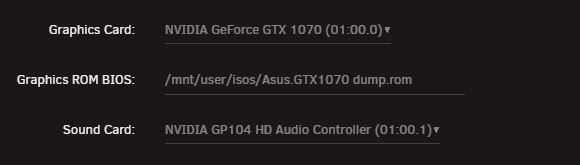
Hey All, I have done my best to watch vids on how to set the VM up within unraid and have GPU passthrough set, but i have hit my ability to diagnose the issue. Currently the Win10 VM works perfectly with RDP when graphics are set to virtual, however when i set it to GPU passthrough (1070) it refuses to boot. Things i have tried so far, ACS override set to downstream to split the GPU out I added the ROM, and followed the spaceinvader one guide on removing the header within the ROM Here is the diagnostic print out, i dont know what else to try at this point to get it to work. tower-diagnostics-20230615-1049.zip Thanks for any help you can give!

-
I'm having the same issue with Lidarr, however I've been running 6.10.2 for a week and it was fine, it just wont run now as of last night. Any solutions to this? So far its giving permission errors for the config and db file.
-
I never had to do it, so i cant advise, once i reupgraded it was sorted. Have you tried re-upgrading?
-
ok so update, i upgraded again (3rd time) and this time it just worked... I'm unsure why this is happening, but with 6.9> 6.10.1 and now 6.10.1 > 6.10.2 the errors seem to fix after trying a downgrade and re-upgrade a few times... The NVidia driver is definitely installed this time, i never checked before, so maybe that was the issue, and a backend update since my last upgrade attempt meant the driver stayed after the upgrade? unsure, either way, it seems to have resolved itself but i would like to find out why this keeps happening so i can stop it from occurring with future updates.
-
Yes i am, and no i didnt try that! Will try this and get back if it worked or not!




