





Timbiotic
Members
-
Joined
-
Last visited
Everything posted by Timbiotic
-
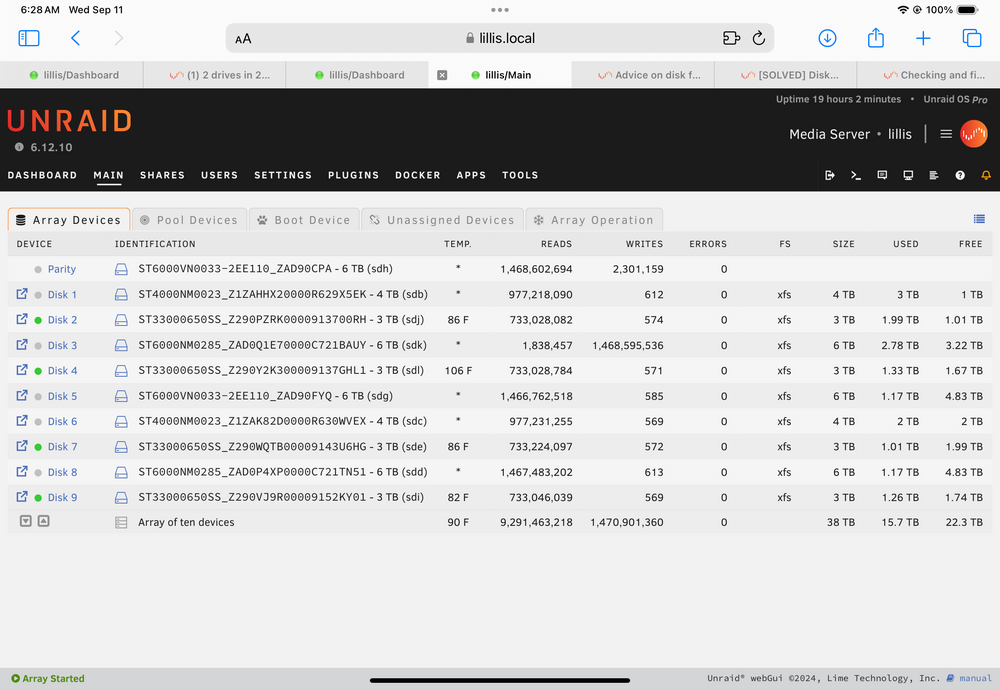
Before you said power or cable , do you think it’s actual disk? I switched cable and rebuilt and so far no errors
-
What do you see that indicated that? That is what my gut is saying too
-
Changed cables and am rebuilding so far no errors
-
From description or do you see something in diag?
-
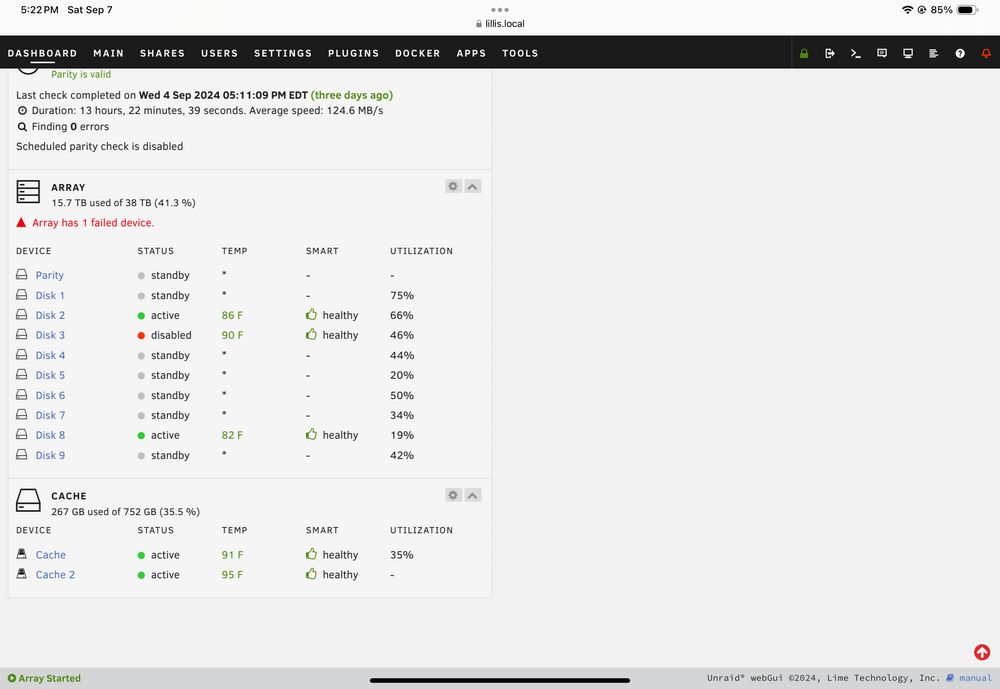
Running test now but it’s at 34% . But doesn’t this mean it’s dead ?
-
What about all the errors ?
-
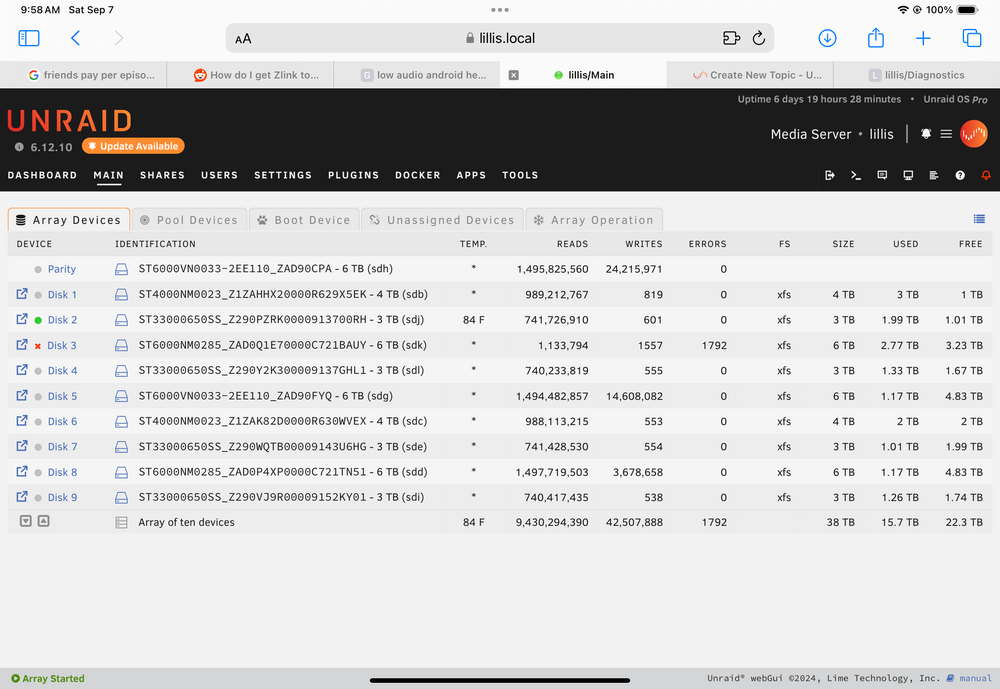
This is my 2nd 6tb drive that has died in past two months. Can they be saved or do I just keep replacing? Is it possibly the physical connection? lillis-diagnostics-20240906-1805.zip
-
is this project gone? I keep searching community applications and cant find it. If it is , is there another network monitoring tool people recommend? I can access switch/firewall snmp or send netflow.
-
Checking for tg3 driver and IOMMU enabled Issue Found: It appears that you have an ethernet adapter using the tg3 driver and IOMMU enabled. This combination has been found to potentially cause serious data corruption issues. Disable IOMMU in the BIOS So i went into my bios and there is no iommu controller option. I am currently on 6.9.2, should I proceed to upgrade or is it too dangerous? Might it be named something else in my mobo? here is link to my manual for it (ch.2 is BIOS) https://download.gigabyte.com/FileList/Manual/mb_manual_ga-z170xp-sli_e.pdf?v=c3aa1583bc7a6bf8e1a2dbe69372e3b2
-
might be ok, it spun down later from the plugin i think, going to add it to the array and see if it still works. The button in unassigned devices didnt appear to work but i think the schedule and plugin did.
-
I also have this drive and it will not spin down in 6.9.2 on spindown .86. I have not added it to the array so i am attempting to spin down from unassigned devices. Does that make a difference? here is sys log from time Mar 24 18:01:47 lillis SAS Assist v0.86: Spinning down device /dev/sde Mar 24 18:02:05 lillis emhttpd: read SMART /dev/sde Mar 24 18:12:55 lillis emhttpd: spinning down /dev/sde Mar 24 18:12:55 lillis SAS Assist v0.86: Spinning down device /dev/sde Mar 24 18:13:13 lillis emhttpd: read SMART /dev/sde None of my sas disks were spinning down until i installed .86 plugin in 6.9.2. Now they all do but this one. Again, its not in the array yet if that matters.
-
I was looking at system messages today and noticed its upset about old tag, and old version. I am on 3.0.5 from about a year ago and it says there is 3.0.6.1342 available. Is this version available for unraid? Or a newer one? It says docker has to be updated.
-
mine works when i manually fire it on 0.3.4
-
nevermind, i just gave up and ran the profile forge 1.16.5 in mineos then put that in the resourcepacks folder as a mod. Kids are happy again
-
if anyone can get this jar to run in minecraftserver without it being 1.17.1 please let me know how. it worked until cave update using MAIN_EXECUTABLE variable. Now i cannot get it to start to save my life. 1.16.5-OptiFine_HD_U_G6.zip
-
actually after deleting log entries i think it just doesnt like my jar file or know where it is at "Error: Could not find or load main class net.minecraft.client.Main"
-
how do i make it start ANYTHING but 1.17? Crafty, and Minecraftserver only want to start 1.17 even when explicitly naming 1.16.5 custom jar "[19:19:07] [Server thread/INFO]: Starting minecraft server version 1.17.1"
-
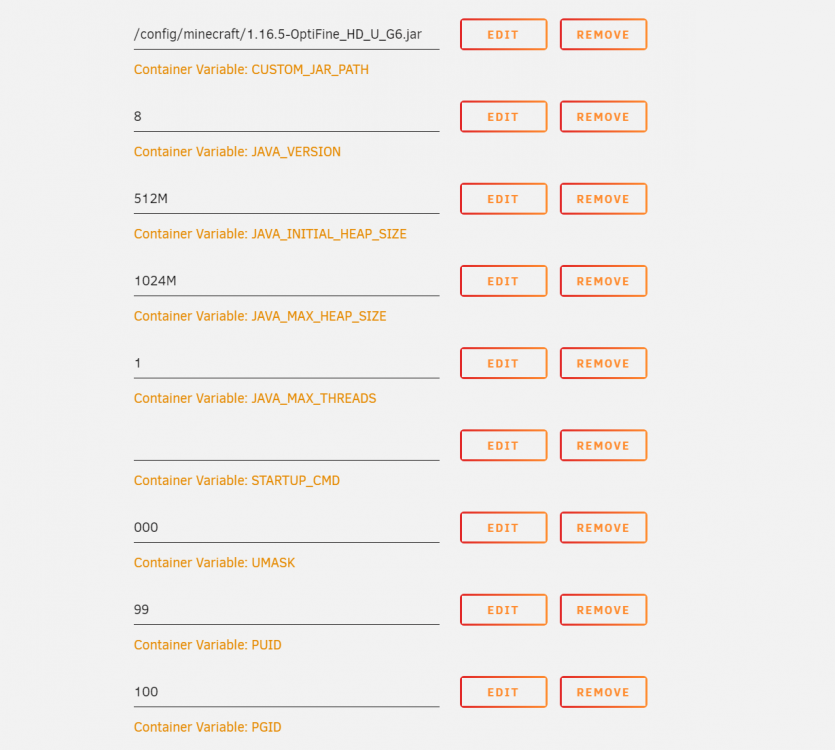
It is set to 8 and the custom jar is selected but it still runs 1.17.1 " 19:19:05] [Worker-Main-4/INFO]: Loaded 7 recipes [19:19:06] [Worker-Main-4/INFO]: Loaded 1137 advancements [19:19:07] [Server thread/INFO]: Starting minecraft server version 1.17.1 [19:19:07] [Server thread/INFO]: Loading properties [19:19:07] [Server thread/INFO]: Default game type: SURVIVAL [19:19:07] [Server thread/INFO]: Generating keypair [19:19:08] [Server thread/INFO]: Starting Minecraft server on *:25565 [19:19:08] [Server thread/INFO]: Using epoll channel type [19:19:08] [Server thread/INFO]: Preparing level "Unnamed world (useless)" [19:19:08] [Server thread/INFO]: Preparing start region for dimension minecraft:overworld [19:19:08] [Worker-Main-6/INFO]: Preparing spawn area: 0% [19:19:08] [Worker-Main-6/INFO]: Preparing spawn area: 0% [19:19:09] [Worker-Main-5/INFO]: Preparing spawn area: 0% [19:19:09] [Worker-Main-6/INFO]: Preparing spawn area: 0% [19:19:10] [Worker-Main-5/INFO]: Preparing spawn area: 0% [19:19:10] [Worker-Main-4/INFO]: Preparing spawn area: 0% [19:19:11] [Worker-Main-4/INFO]: Preparing spawn area: 0% [19:19:11] [Worker-Main-4/INFO]: Preparing spawn area: 0% [19:19:12] [Worker-Main-5/INFO]: Preparing spawn area: 1% [19:19:12] [Worker-Main-5/INFO]: Preparing spawn area: 2% [19:19:13] [Worker-Main-6/INFO]: Preparing spawn area: 4% [19:19:13] [Worker-Main-5/INFO]: Preparing spawn area: 6% [19:19:14] [Worker-Main-5/INFO]: Preparing spawn area: 16% [19:19:14] [Worker-Main-5/INFO]: Preparing spawn area: 22% [19:19:15] [Worker-Main-6/INFO]: Preparing spawn area: 34% [19:19:15] [Worker-Main-5/INFO]: Preparing spawn area: 42% [19:19:16] [Worker-Main-4/INFO]: Preparing spawn area: 55% [19:19:16] [Worker-Main-4/INFO]: Preparing spawn area: 75% [19:19:17] [Worker-Main-5/INFO]: Preparing spawn area: 96% [19:19:18] [Server thread/INFO]: Time elapsed: 9840 ms [19:19:18] [Server thread/INFO]: Done (9.930s)! For help, type "help" Error: Could not find or load main class net.minecraft.client.Main Caused by: java.lang.ClassNotFoundException: net.minecraft.client.Main Error: Could not find or load main class net.minecraft.client.Main Error: Could not find or load main class net.minecraft.client.Main"
-
I know you didnt want people using custom variations for this very reason but my kids love their optifine world and I had to use it to get it to work on unraid. It appears that this update has killed the MAIN_EXECUTABLE variable, or i am not doing something right. I can get it to start but only as 17.1 which wont work. Is there another way to get their custom 1.16.5 optfine to work now?
-
i killed dockerd how can i see what specific is it waiting on? I also unmounted some external unassigned disks.
-
can i find out what its waiting on and kill it? i hate having to fat finger it. All dockers stopped but plex and duplicati and I cant stop them from command line.
-
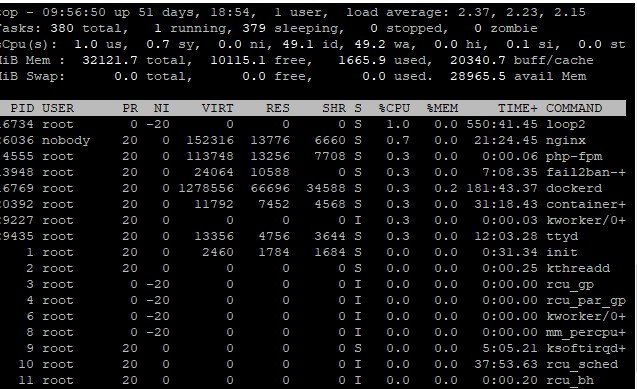
is the wait the "wa" sorry dont use linux that often
-
seeing that as i cannot reboot, plex and duplicati wont shut down will probably have to fat finger after work.
-
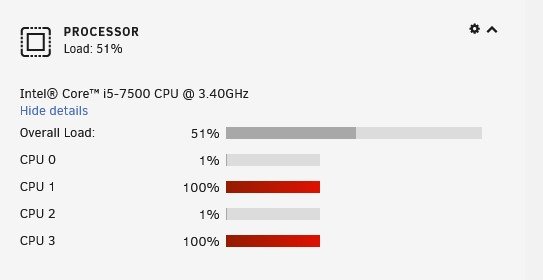
and top screenshot and gui
-
same thing today on latest unraid any answers? Attaching diags before rebooting lillis.69.mu-diagnostics-20191112-1454.zip


