





LyDjane
Members
-
Joined
-
Last visited
Everything posted by LyDjane
-
ui das mit dem delay wusste ich ja noch gar nicht. Klingt super, teste ich!
-
Ja würde ich so sagen. Exakt. Genau so ist es.
-
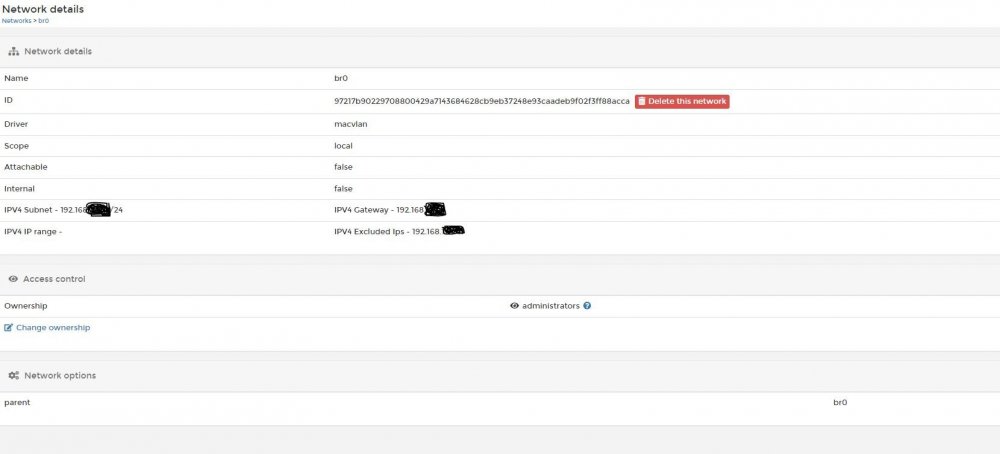
Anbei der Screen der Einstellung aus Portainer für das br0.
-
Nein. Nur noch IPv4. In den Netzwerkeinstellungen ist bei unRAID auch nur IPv4 aktiviert. Im Anhang mal ein Snipping von den Network Einstellungen des br0 seitens Portainer. Anhang kommt morgen neu.
-
97217b902297 br0 macvlan local 81dea636ca0c bridge bridge local 2396d1b3aa86 host host local 079d4e0e8905 none null local da du den Punkt gefühlt das 50 mal ansprichst, ja. eigentlich nicht? nur den "normalen portainer" zum administrieren (https://docs.portainer.io/v/ce-2.11/start/install?hsCtaTracking=a66b69bb-4970-46b7-bc31-cfc8022c7eb2|0d5be9a2-9dac-4ab1-9498-4b07566effd3) ändert sich nichts.
-
Guter Punkt, nicht dran gedacht. Und es bestätigt sich meine Vermutung immer mehr: docker start adguard Error response from daemon: network 74e043e84f388575b969df56068e4be4eee56c4cedd1d1d4721637437fffd569 not found Error: failed to start containers: adguard
-
Scheint wohl nicht nur mir so zu gehen:
-
Das sagt mir gerade nichts nein! Edit: Ist aktiviert.
-
ich glaube es hängt einfach mit dem custom br0 zusammen. Alles andere läuft tadellos (ob unraid oder portainer). Sobald das custom br0 ins spiel kommt, klappts nicht.
-
ich habe den container rein via unraid aufgesetzt und verwaltet. In Portainer war ich nicht drin und habe am container gearbeitet.
-
okay schade. Auch unter unraid, wenn ich ihn dort anwerfe, erscheint nur: Fehler bei der Ausführung No such container
-
klappt einwandfrei danke! Nach neustart vom adguard server zeigt sich auch hier leider exakt das gleiche verhalten. Docker kommt nicht mit hoch.
-
na klar Keine Chance. Passwort muss vorhanden sein.
-
läuft, bist zum login. got you absolut korrekt. Wollte damit nur aussagen, dass die Docker via Portainer konfiguriert wurden anstatt uber die unRAID Öberfläche.
-
okay, das funktioniert nicht. Genau das hatte ich so probiert. dafür nutze ich watchtower. also ich habe bisher alles über portainer gemacht. Unraid nur als Server und bisher keinen Docker darüber am laufen. der war ja hinterlegt (zu testzwecken wieder deaktiviert).
-
in Teilen schon, dass ist richtig. Vielleicht stelle ich das auch noch um
-
Ja und Nein. Hatte beides keine Auswirkung. Ironisch gemeint? Alternativ? Oder bist du da nur mit dem unRAID unterwegs? Negative Erfahrung mit Portainer? Bin halt ein Gui Fan. 😄 dumme Frage, Userdaten?
-
war auch meine erste Vermutung. Nachdem ich den Docker nun aber bereits 5 mal neu aufgesetzt habe, denke ich, es liegt an dem custom:br0. das passt. weil ich mit circa. 15 Docker dort besser den Überblick habe und mich seit einem Jahr mit Portainer beschäftigt habe. Finde es klasse. sowohl als auch. Bei beidem ist es das gleiche. ändert nicht viel. Selbst nach der Grundeinrichtung und ohne Backup zeigt er das gleiche Verhalten. bereits mehrfach versucht. -> was ich feststelle, dass wenn er auf bridge läuft, klappt alles einwandfrei. Sobald er auf dem custom:br0 läuft gibt es die Probleme. Viele Grüße und vielen Dank für eure Hilfe!
-
Short Question. I want to transfer my backup to a remote server via script. # user-defined rsync command alias rsync='sshpass -p "PUT MY PASSWORD HERE" rsync -e "ssh -o StrictHostKeyChecking=no"' # user-defined ssh command alias ssh='sshpass -p "PUT MY PASSWORD HERE" ssh -o "StrictHostKeyChecking no"' Is this right? If i run the script ive got the error: sshpass command not found! Thank you
-
br0 ist custom:br0. stimmt, die Mappings habe ich mal rausgenommen (waren noch von Bridge Zeiten). ohne Portainer habe ich das gleiche Phänomen.
-
Niemand mal ein ähnliches Problem gehabt?
-
Hallo zusammen, vorab möchte ich sagen, dass ich weis Gott kein Docker Profi bin. Ich habe meine Handvoll Docker-Systeme auf Network Modus bridge stehen. Nun habe ich AdGuard als Docker wieder zum Leben erwecket und möchte diesen gerne auch wieder laufen haben nach meinem Umzug auf den Server. Dieser soll, wenn möglich, auf dem Network br0 laufen. Port Freigaben sind alle eingerichtet und auch die Volumes. Sobald ich den Docker starte, läuft dieser auch. Recreate funktioniert auch ohne Probleme. Problematisch wird es, wenn es einen Neustart des unRAID-Servers gibt. Dann kommt AdGuard nicht hoch und wirft folgende Fehlermeldung in Portainer: 2022/03/23 18:20:07.455896 [info] AdGuard Home, version v0.107.5 2022/03/23 18:20:07.459762 [info] Initializing auth module: /opt/adguardhome/work/data/sessions.db 2022/03/23 18:20:07.460672 [info] auth: initialized. users:1 sessions:1 2022/03/23 18:20:07.460682 [info] Initialize web module 2022/03/23 18:20:07.475107 [info] AdGuard Home is available at the following addresses: 2022/03/23 18:20:07.475440 [info] Go to http://127.0.0.1:80 2022/03/23 18:20:07.475450 [info] Go to http://192.XXX.XXX.2:80 2022/03/23 18:20:07.716888 [info] Starting the DNS proxy server 2022/03/23 18:20:07.716904 [info] Ratelimit is enabled and set to 20 rps 2022/03/23 18:20:07.716906 [info] The server is configured to refuse ANY requests 2022/03/23 18:20:07.716908 [info] DNS cache is enabled 2022/03/23 18:20:07.716913 [info] MaxGoroutines is set to 300 2022/03/23 18:20:07.716919 [info] Creating the UDP server socket 2022/03/23 18:20:07.716974 [info] Listening to udp://[::]:53 2022/03/23 18:20:07.717001 [info] Creating a TCP server socket 2022/03/23 18:20:07.717049 [info] Listening to tcp://[::]:53 2022/03/23 18:20:07.717359 [info] Entering the UDP listener loop on [::]:53 2022/03/23 18:20:07.717403 [info] Entering the tcp listener loop on [::]:53 2022/03/23 18:20:13.884924 [info] Received signal "terminated" 2022/03/23 18:20:13.884934 [info] stopping AdGuard Home 2022/03/23 18:20:13.884937 [info] stopping http server... 2022/03/23 18:20:13.886129 [info] stopped http server 2022/03/23 18:20:13.886177 [info] Stopping the DNS proxy server 2022/03/23 18:20:13.886246 [info] Stopped the DNS proxy server 2022/03/23 18:20:13.893869 [info] Stopped 2022/03/23 18:20:14.229947 [info] AdGuard Home, version v0.107.5 2022/03/23 18:20:14.233599 [info] Initializing auth module: /opt/adguardhome/work/data/sessions.db 2022/03/23 18:20:14.233683 [info] auth: initialized. users:1 sessions:1 2022/03/23 18:20:14.233703 [info] Initialize web module 2022/03/23 18:20:14.244742 [info] AdGuard Home is available at the following addresses: 2022/03/23 18:20:14.245169 [info] Go to http://127.0.0.1:80 2022/03/23 18:20:14.245203 [info] Go to http://192.XXX.XXX.2:80 2022/03/23 18:20:14.413985 [info] Starting the DNS proxy server 2022/03/23 18:20:14.414001 [info] Ratelimit is enabled and set to 20 rps 2022/03/23 18:20:14.414003 [info] The server is configured to refuse ANY requests 2022/03/23 18:20:14.414006 [info] DNS cache is enabled 2022/03/23 18:20:14.414026 [info] MaxGoroutines is set to 300 2022/03/23 18:20:14.414032 [info] Creating the UDP server socket 2022/03/23 18:20:14.414116 [info] Listening to udp://[::]:53 2022/03/23 18:20:14.414135 [info] Creating a TCP server socket 2022/03/23 18:20:14.414230 [info] Listening to tcp://[::]:53 2022/03/23 18:20:14.414336 [info] Entering the UDP listener loop on [::]:53 2022/03/23 18:20:14.414429 [info] Entering the tcp listener loop on [::]:53 2022/03/23 18:20:44.503431 [info] Received signal "terminated" 2022/03/23 18:20:44.503442 [info] stopping AdGuard Home 2022/03/23 18:20:44.503445 [info] stopping http server... 2022/03/23 18:20:44.506070 [info] stopped http server 2022/03/23 18:20:44.506108 [info] Stopping the DNS proxy server 2022/03/23 18:20:44.506251 [info] Stopped the DNS proxy server 2022/03/23 18:20:44.528173 [info] Stopped Auch wenn ich ihn manuell neu starte, hängt er fest. Erst ein recreate, lässt ihn wieder auflaufen. Hatte sowas von euch schon jemand mal bzw. hat einen Denkanstoß für mich? Viele Grüße
-
Error was obviously due to USB stick. After trying everything I changed the stick. Now the restart runs without problems.
-
doesnt work. the first error with the hp pc hardware check no longer appears, however it still does not find the boot device.
-
thank you I will check that immediately!
