





VolzanIT
Members
-
Joined
-
Last visited
Everything posted by VolzanIT
-
hello, trying to install frigate but it wont start ok the problem is that im stupid
-
sure not but it can trwo error because of the termal throttling i think
-
the error was there because my cpu was 100degrees because the cooler was broken now it should be allright so start with 3 data disk will rebuild all the data splitted in these disks?
-
the disk 4 is working only have some read error so it was disabled by unraid but the data are there, but unraid dont allow my to start paritywith that disk
-
I arguing if the is a way to say to unraid to read from parity 1,2,4 disk so i can add another parity disk and after data replace the 2 falling of from time to time
-
the 4rth disk is disabled but work and i can't reenable it dont know why, the disk 3 instead isn't read in unraid but on widows i can read it, attached in this comment there is the diagnostic file nas-diagnostics-20240212-2016.zip
-
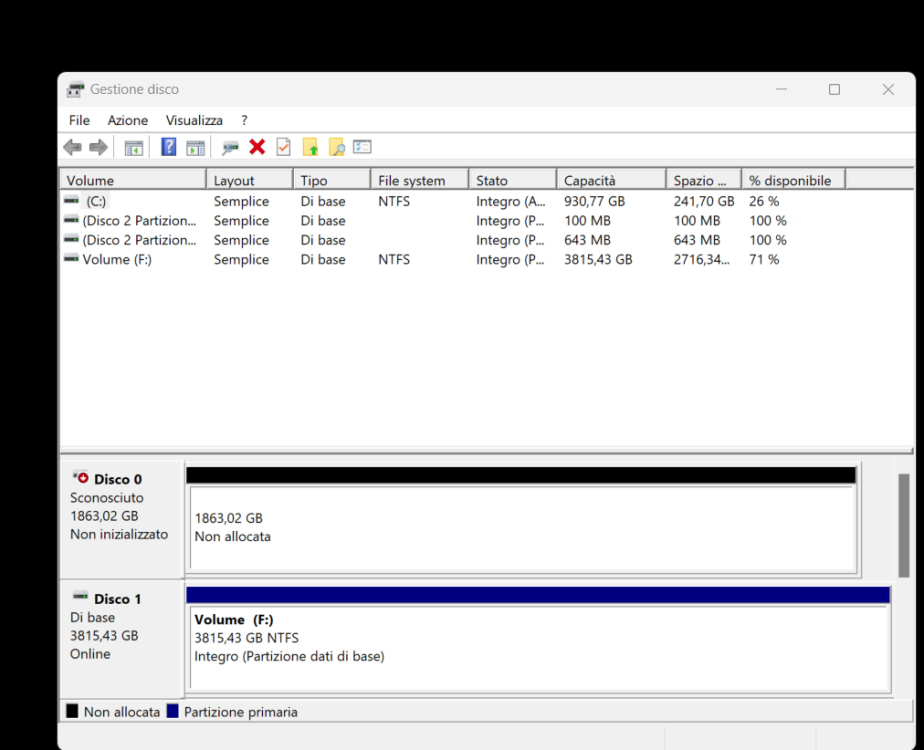
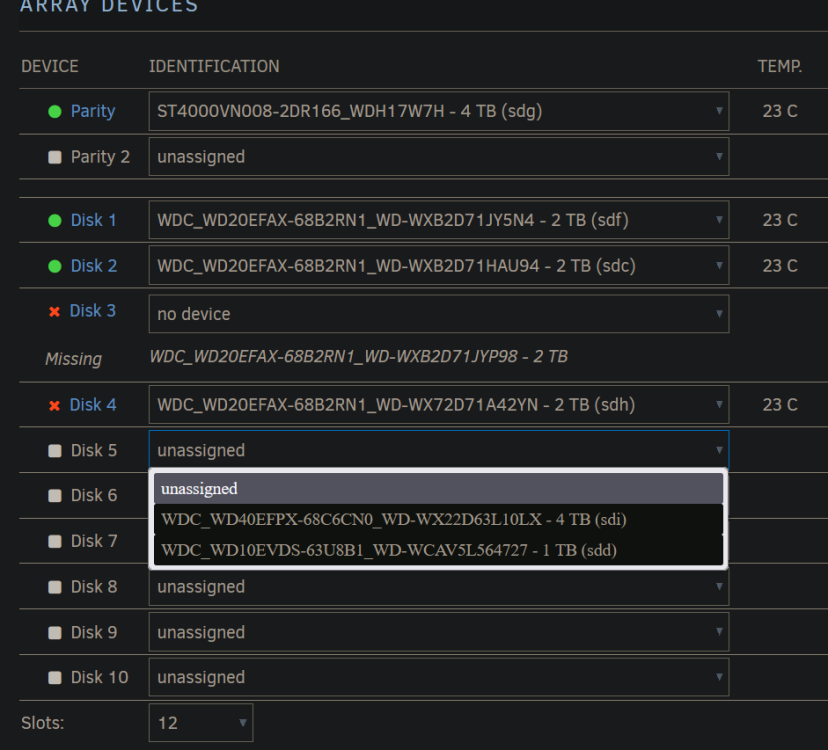
hello, i have 2 driver fault so tecnicaly all my data is lost, a driver is in his place in array configuration but not recognized, the fun thing is that the disk 4 continue to trow error so i decided to replace it past weekend but after the reboot of the server the situation is this, windows can read the disk that unraid cant
-
in the end it was the bios
-
u mean nvidia firmware? the bios is old i think didn't remembe the time wen i did the last update
-
Dec 20 14:25:54 nas kernel: NVRM: GPU at PCI:0000:01:00: GPU-458b205b-492c-8589-395a-9599271b9ce7 Dec 20 14:25:54 nas kernel: NVRM: Xid (PCI:0000:01:00): 79, pid='<unknown>', name=<unknown>, GPU has fallen off the bus. Dec 20 14:25:54 nas kernel: NVRM: GPU 0000:01:00.0: GPU has fallen off the bus. Dec 20 14:25:54 nas kernel: NVRM: GPU 0000:01:00.0: RmInitAdapter failed! (0x22:0x56:762) Dec 20 14:25:54 nas kernel: NVRM: GPU 0000:01:00.0: rm_init_adapter failed, device minor number 0 so changed the gpu with a 1660 with external psu it throw the same error, next step is bios update then i think i need to change the MB i hope not is to old and with a i5 6600k and find a mb that support this cpu it will be a pain
-
yes is just for trying i was transcoding on a 1650 previusly
-
with this gt 710 it seams to work but plex dont stream anything to that Thu Dec 14 18:26:07 2023 +-----------------------------------------------------------------------------+ | NVIDIA-SMI 470.199.02 Driver Version: 470.199.02 CUDA Version: 11.4 | |-------------------------------+----------------------+----------------------+ | GPU Name Persistence-M| Bus-Id Disp.A | Volatile Uncorr. ECC | | Fan Temp Perf Pwr:Usage/Cap| Memory-Usage | GPU-Util Compute M. | | | | MIG M. | |===============================+======================+======================| | 0 NVIDIA GeForce ... Off | 00000000:01:00.0 N/A | N/A | | 50% 41C P0 N/A / N/A | 0MiB / 2001MiB | N/A Default | | | | N/A | +-------------------------------+----------------------+----------------------+ +-----------------------------------------------------------------------------+ | Processes: | | GPU GI CI PID Type Process name GPU Memory | | ID ID Usage | |=============================================================================| | No running processes found | +-----------------------------------------------------------------------------+ docker run -d --name='Plex-Media-Server' --net='host' -e TZ="Europe/Berlin" -e HOST_OS="Unraid" -e HOST_HOSTNAME="nas" -e HOST_CONTAINERNAME="Plex-Media-Server" -e 'PLEX_UID'='99' -e 'PLEX_GID'='100' -e 'VERSION'='latest' -e 'NVIDIA_VISIBLE_DEVICES'='GPU-7e5696c2-b6d8-ed4b-a534-a7b6c28ce8d4' -e 'NVIDIA_DRIVER_CAPABILITIES'='all' -l net.unraid.docker.managed=dockerman -l net.unraid.docker.webui='http://[IP]:[PORT:32400]/web' -l net.unraid.docker.icon='https://raw.githubusercontent.com/plexinc/pms-docker/master/img/plex-server.png' -v '/tmp/':'/transcode':'rw' -v '/mnt/user/Media/':'/data':'rw' -v '/mnt/user/Plex_Config/':'/config':'rw' --runtime=nvidia 'plexinc/pms-docker' 560b98e904be23bfb575b4d1815d4a08d5c4c0f4ad0749c23694e160d706ff47
-
ok tryed with a gt710 () it seams to not work i get this error NVIDIA-SMI has failed because it couldn't communicate with the NVIDIA driver. Make sure that the latest NVIDIA driver is installed and running. Edit NVM Need legacy driver for this gpu
-
ok ill try with another card and put this one on the other system i have
-
this is the new diagnostic after the update nas-diagnostics-20231214-1515.zip
-
good morning, my gpu after a few seconds stops being recognized by nvidia drivers and nvidia-smi, although the video output works properly the card is attached to pcie i try to chenge pcie slot too but without any success *-display description: VGA compatible controller product: TU117 [GeForce GTX 1650] vendor: NVIDIA Corporation physical id: 0 bus info: pci@0000:01:00.0 version: a1 width: 64 bits clock: 33MHz capabilities: pm msi pciexpress vga_controller cap_list rom configuration: driver=nvidia latency=0 resources: irq:16 memory:de000000-deffffff memory:c0000000-cfffffff memory:d0000000-d1ffffff ioport:e000(size=128) memory:c0000-dffff edit in the file i noticed this 1 Dec 14 13:38:48 nas kernel: NVRM: Xid (PCI:0000:01:00): 79, pid='<unknown>', name=<unknown>, GPU has fallen off the bus. Dec 14 13:38:48 nas kernel: NVRM: GPU 0000:01:00.0: GPU has fallen off the bus. nas-diagnostics-20231214-1354.zip nvidia-bug-report.log.gz
-
hello, the strange things is that now its working from early this morning because i restarted the server and not started the array, next week ill upgrade the bios and clean the case to chek if some dust is the problem Fri Sep 15 18:29:43 2023 +---------------------------------------------------------------------------------------+ | NVIDIA-SMI 535.104.05 Driver Version: 535.104.05 CUDA Version: 12.2 | |-----------------------------------------+----------------------+----------------------+ | GPU Name Persistence-M | Bus-Id Disp.A | Volatile Uncorr. ECC | | Fan Temp Perf Pwr:Usage/Cap | Memory-Usage | GPU-Util Compute M. | | | | MIG M. | |=========================================+======================+======================| | 0 NVIDIA GeForce GTX 1650 Off | 00000000:02:00.0 Off | N/A | | 41% 59C P0 1W / 75W | 0MiB / 4096MiB | 0% Default | | | | N/A | +-----------------------------------------+----------------------+----------------------+ +---------------------------------------------------------------------------------------+ | Processes: | | GPU GI CI PID Type Process name GPU Memory | | ID ID Usage | |=======================================================================================| | No running processes found | +---------------------------------------------------------------------------------------+ root@nas:~# uptime 18:34:23 up 10:57, 0 users, load average: 0.13, 0.28, 0.21
-
yes i have a vm but is stopped and no gpu is configured in it, attached to this comment the diagnostic file nas-diagnostics-20230914-1909.zip
-
hello, i got this problem, if i start the unraid server without starting the array, nvidia smi works perfectly and the gpu is recognized, but as soon as i start the array the gpu stop to be recognized with error "No devices were found"
-
ok i think thgat the problem is the i/o read errors so i tried a pre clear and see if it solves if it not i think i need to chenage the hdd, is an old hdd that i have in the house, i need it for testing cctv software to chose my best fit nas-diagnostics-20230218-0755.zip
-
hello, cant see my disk in /mnt/disks


