





Nath2125
Members
-
Joined
-
Last visited
Everything posted by Nath2125
-
Hi there, Just today bought a new m.2 ssd samsung drive, installed it directly into the motherboard. After turning on the pc leaving the array off to then add it i noticed its not there. Ive gone to tools and system devices and looks like its not there either so somethings up. Here are my system devices as well as the logs as of just turning on the pc to see if anyone can further help me! My main goal was to use this as another cache drive but seems that may be put on hold now. Eh! Im Running unraid Version: 6.11.2 incase thats needed. [0:0:0:0] disk TOSHIBA TOSHIBA USB DRV PMAP /dev/sda 15.5GB [1:0:0:0] disk ATA WDC WD101EFBX-68 0A85 /dev/sdb 10.0TB [2:0:0:0] disk ATA WDC WD40EZRZ-22G 0A80 /dev/sdc 4.00TB [3:0:0:0] disk ATA ST6000VN001-2BB1 SC60 /dev/sdd 6.00TB [4:0:0:0] disk ATA ST4000DM004-2CV1 0001 /dev/sde 4.00TB [5:0:0:0] disk ATA ST2000DM001-1CH1 CC47 /dev/sdf 2.00TB [6:0:0:0] disk ATA CT480BX500SSD1 054 /dev/sdg 480GB [11:0:0:0] disk ATA WDC WD60EFRX-68M 0A82 /dev/sdh 6.00TB [12:0:0:0] disk ATA WDC WD80EFZX-68U 0A83 /dev/sdi 8.00TB Let me know if there is any more data required to help diagnose whats going on! Thanks mediaserver-diagnostics-20221109-1531.zip
-
Thanks that fixed it. Was kinda shitting myself
-
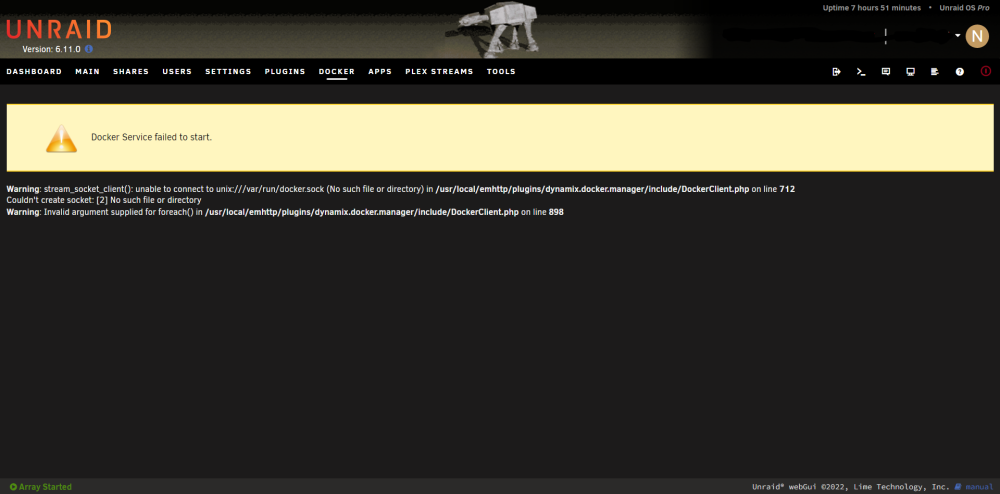
Hi there, So i have been re arranging my home network and needed to change some of the network settings on my unraid server. This requiring me to turn on and off the vms and docker services. Due to having dns problems i have had to to that multiple times including a restart. after the restart and turning all the services back on. I was greeted with this message. How F***** am I? interms of fixing this. mediaserver-diagnostics-20221004-2238.zip
-
I just found this topic and i think its the same problem i have been having also i have figured out based on following whats happened here that my plex media server is the issue the docker it seems and happens every sunday morning at 430am. I just cant figure out why its happening because its been given the ability to use up to 24gb of memory. I do run ram transcoding through plex but nothings ever being transcoded at the a time or even being watched and its been happening for the last few months now i wasnt sure if maybe you can shed some light onto where i can go to find the answer because i kinda strugging since im not sure what plex could possibly be doing with 24gbs or ram to be killed by unraid
-
still cant find the culprit and its just happened again. This will be the 3rd or 4th time now mediaserver-diagnostics-20220515-1257.zip
-
I has happened again today and i havent heard from a responce from anyone? Unsure what to do if i could get some help maybe figuring this out mediaserver-diagnostics-20220508-1743.zip
-
I has happened again today and i havent heard from a responce from anyone? Unsure what to do if i could get some help maybe figuring this out
-
mediaserver-diagnostics-20220501-1159.zip Hi there, This morning I woke up to a lovely message "Out of Memory errors detected on your server" "Your server has run out of memory, and processes (potentially required) are being killed off." I have posted in here the diagnostics to see if someone can read and tell me what happened or what the issue could be. Is it a simple thing that i need more ram? or that i was running to many things that required ram at one time? Any assistance will be greatly appricated Thanks, disk.cfg docker.cfg domain.cfg flash.cfg go.txt ident.cfg network.cfg c---e.cfg share.cfg super.dat docker.txt libvirt.txt syslog.1.txt syslog.2.txt syslog.txt disk.cfg docker.cfg domain.cfg flash.cfg go.txt ident.cfg network.cfg c---e.cfg share.cfg super.dat docker.txt libvirt.txt syslog.1.txt syslog.2.txt syslog.txt mediaserver-diagnostics-20220501-1159.zip
-
is there a away for it to stop appearing if its not an issues like just for the hardware error issues i like the other notifications i get and i have tried to like press on ignore so it knows not to show again but it seems to reset when i restart the machine.
-
following on to this at 8:53am it seems my machine must of turned off some how or something to that affect cause it hit another error message check for hardware issues which also happened during a preclear of some of my new drives i mentions up there earlier. i will post these diagnostics again. I would like to know what could have caused this too. seems really strange! mediaserver-diagnostics-20220326-1907.zip
-
Hey there, I made a previous post ages ago about a Machine Check Events detected on your server (Your server has detected hardware errors). And i just added in 2 drives today which are preclearning right now and when i loged in to check on them i was greeted with 2 new machine check events detected. The last post i was told to ignore it but now im just confused because i not sure why it still happening when i only added in 2 new drives. also i beleve seeing the time on the notifications were around like 3:13pm or something like that when i got them, not sure if that helps. Any assistance will be greatly appricated!! Thanks, mediaserver-diagnostics-20220325-1628.zip
-
quite new to this but how are people now connecting radarr and sonarr together with a vpn container and running it all through that vpn? i've been trying a few things myself but doesnt seem to work? Im running delugevpn container atm linked with my nordvpn (Openvpn) account and it runs fine but it seems i need to link radarr and sonarr with it cause it wont pick it up otherwise.
-
Ok cool, just another quick question at one point I did attempt to run memtest to see if that was an issue and it seems to boot cycle so like when I clicked on it went blank then went back to unraid boot drive options again and just kept doing that. Not sure if that’s just me usb or my system but thought it was werid. I did also have to remove the “-“ from the efi folder in order for it to boot cause it wasn’t before that not sure if that had anything to do with the memtest thing
-
I was talking with someone else and they reckoned there was a possible ram error or something like a piece of hardware was faulty during startup? Is that true or from what ur saying all good just need to ignore it?
-
would anyone be able to review the .zip files from diagnostics and see what the problem might be? I just upgraded motherboard and cpu and replaced the ram i had with before. so not sure if that was it, but interms of any new changes thats the only one i know of mediaserver-diagnostics-20220312-1217.zip

