





Dal
Members
-
Joined
-
Last visited
Everything posted by Dal
-
Just have to give up on this. It is too unstable. Proper rights are set on the first folder, but not on subfolders. Enable inheritance does nothing. Removing additional users that has been added later does not work, etc. I'm starting to think Unraid was a bad idea for me. Sure, it's fun to run docker containers with the storage space to go with it. But when it comes to granular security on the shares, it is horrible. Especially when comparing to AD. That's why it was so interesting to be able to join the Unraid server into my AD domain to have a proper way to manage shares. Too bad the implementation is so bad.
-
Strange. I'm at 6.11-rc3. and I'm still, seeing this message
-
Hi. I'm seeing a lot of errors in my log saying: winbindd[29917]: idmap_hash_initialize: The idmap_hash module is deprecated and should not be used. Please migrate to a different plugin. This module will be removed in a future version of Samba winbindd[29917]: idmap_hash_initialize: The idmap_hash module is deprecated and should not be used. Please migrate to a different plugin. This module will be removed in a future version of Samba I have seen several postings on this, but not a clear answer on how to get rid of it. I'm running SMB with Active Directory. I'm also running a plugin Unassigned Devices. Could that be the cause of it? If so it's a bit strange, since it gets updates regularly. Thanks
-
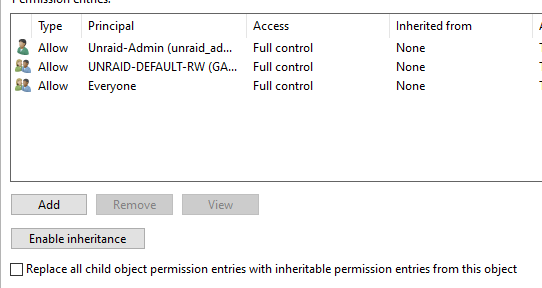
Doesn't Enable Inheritance work in Unraid when using SMB with Active Directory. No matter how many times I try to turn it on it does not seem to stick. And why are all shares set up with Full Control to Everyone as default? I have tried different versions of Unraid, and right now I'm at Version: 6.11.0-rc3 Thanks
-
I find the Active Directory integration messy and confusing, especially when involving docker containers as well. I think it would be easier if it was possible to run the containers as another user that AD recognizes. I'm wondering if it's just as easy to switch this around; Remove AD integration from SMB -> Create a local user in Unraid -> Put that local user into Credential Manager in Windows Server
-
Not entirely true. Active Directory users seems to have access just fine. But when changing Security to "Secure" it seems that docker containers can access the share too. But it seems that the docker containers have to create the subfolders first. If they are created in Windows for example, docker containers don't get access. What a mess. Isn't it wise to have it on cache for speed? Doesn't the data get written to the storage disk at all when doing this? Maybe I just doesn't understand how the cache disk works. Thanks again
-
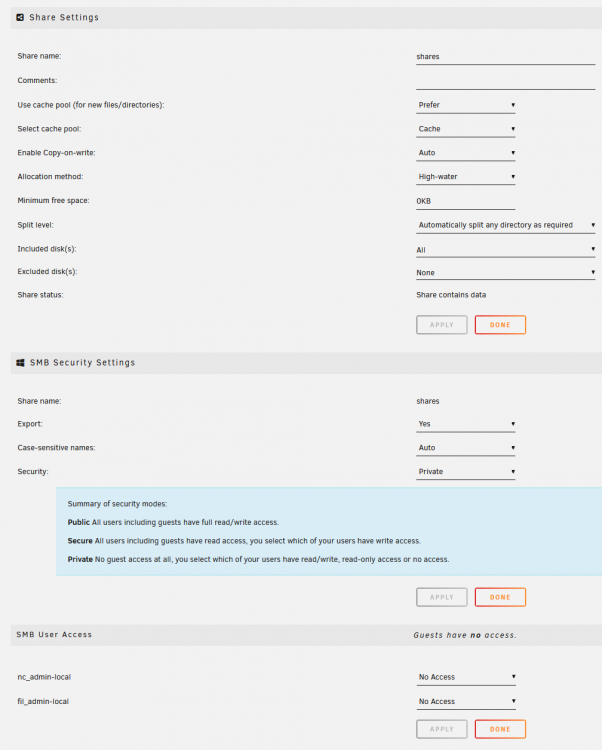
Hmm, I thought you were pointing me to the manual telling me how to set up Global share settings. Is this what you are looking for?
-
Yes, the /user-files/ is now mapped to /mnt/user/shares The user share is configured to Enabled: Thanks

-
Some additional info that puzzles me: I have a local user called nc_admin-local, and one of my docker containers are owned and ran as that user. But I haven't done anything to achieve this: drwxrwxrwx 1 nc_admin-local 1000 316 Jul 22 09:45 amp/ drwxrwxr-x 1 nobody users 56 Jul 21 23:32 binhex-krusader/ drwxrwxrwx 1 nobody users 114 Jun 9 14:47 mariadb/ drwxrwxrwx 1 nobody users 142 Jun 9 15:07 nextcloud/ drwxrwxrwx 1 nobody users 56 Jul 7 14:06 plex/ drwxr-xr-x 1 nobody users 242 Jul 22 20:52 radarr/ drwxrwxrwx 1 nobody users 222 Jun 9 14:58 swag/ How can this be? And shouldn't it be possible to give nc_admin-local rights to /mnt/user/shares/felles and run the filerun container as nc_admin-local? thanks
-
Yeah, it found the path when changing the host path to /mnt/user/shares/, but there is no write access though. So I was hoping that the docker container could run as another user. Or maybe there is a way in the SMB settings to give the default docker user access. I read a thread earlier today that mentioned that I could set permissions in the app settings, but I cannot find that option. Here is the thread:
-
Specifically for Filerun I think you mean the parameter called /user-files/ and the host path for that points to /mnt/user/appdata/docker-containers/filerun/data. All users have their own directory under here, where they store their files. The shared file library is under another Unraid created share in /mnt/user/shares/felles, and this is what i want for the joint (common?) user. That user is meant to share that folder for all other Filerun users.
-
Hi. I want to create a shared file area for photos. SMB is set up with Active Directory. The idea is that everyone and everything should use this folder to access photos. Docker containers like Filerun and Photoprism, shares from Win10, etc. But when I install the Filerun container and try to point the home directory to this share, I get an error: Failed to create folder. (mkdir(): Permission denied) Is this possible to achieve? Can a docker container log in as a different user perhaps? Thanks.
-
Full log: root: -----------------Installing Nvidia Driver Package v495.46------------------- kernel: Linux agpgart interface v0.103 kernel: nvidia: loading out-of-tree module taints kernel. kernel: nvidia: module license 'NVIDIA' taints kernel. kernel: Disabling lock debugging due to kernel taint kernel: nvidia-nvlink: Nvlink Core is being initialized, major device number 245 kernel: NVRM: The NVIDIA GeForce GTX 760 GPU installed in this system is kernel: NVRM: supported through the NVIDIA 470.xx Legacy drivers. Please kernel: NVRM: visit http://www.nvidia.com/object/unix.html for more kernel: NVRM: information. The 495.46 NVIDIA driver will ignore kernel: NVRM: this GPU. Continuing probe... kernel: NVRM: No NVIDIA GPU found. kernel: nvidia-nvlink: Unregistered the Nvlink Core, major device number 245 root: root: --------------Installation of Nvidia driver v495.46 successful--------- A driver that old is not in the list at Settings -> Nvidia Driver. Is there an easy way to install an older v470 driver directly through the terminal window? Thanks.
-
Hi Some explanation is needed: I run a (Hansson) Nextcloud VM on VMWare Vsphere server. The server has a smb network share (called nextcloud) on my Unraid server. The Unraid SMB settings is set to use Active Directory. I have created a AD initial owner in AD (unraid_admin) and a AD initial group (UNRAID-DEFAULT-RW). In addiction, I have added a user called nc_admin that is actually used to map up the share from the Nextcloud VM. This works fine as long as I use Unraid v6.9.2. Using smbstatus, it looks like this: root@Unraid:~# smbstatus Samba version 4.12.14 PID Username Group Machine Protocol Version Encryption Signing ---------------------------------------------------------------------------------------------------------------------------------------- 5117 nc_admin unraid-nextcloud-rw 2c43:97e0:cbbd:c0ce:250:56ff:fe8b:7e3f (ipv6:2c43:97e0:cbbd:c0ce:250:56ff:fe8b:7e3f:58120) SMB3_02 - partial(AES-128-CMAC) Service pid Machine Connected at Encryption Signing --------------------------------------------------------------------------------------------- nextcloud 5117 2c43:97e0:cbbd:c0ce:250:56ff:fe8b:7e3f Sun May 29 12:19:01 PM 2022 CEST - - When I upgraded to Unraid 6.10, this stopped working, and smbstatus shows me nothing at all. I'm not able to map up the nextcloud share from a regular Windows PC either (using the nc_admin user). unraid_admin and Administrator is still able to map it, though. So the question is, are there any significant changes in SMB that causes this, or is it a bug? Thanks
-
Hi. I'm installing Plex Media Server as a Docker Container (I have tried several), but PMS does not publish ports unless network type is HOST? I have tried custom networks and the default BRIDGE network, but the same result. Is that the way it's supposed to be? Thanks.
-
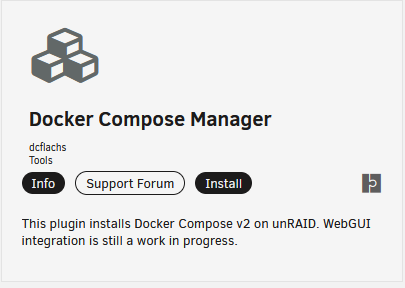
Thanks for answering. And thanks for clear up a few things for me. Good to know that such network configuration is still viable. Excellent news! Is it this one? Thanks again
-
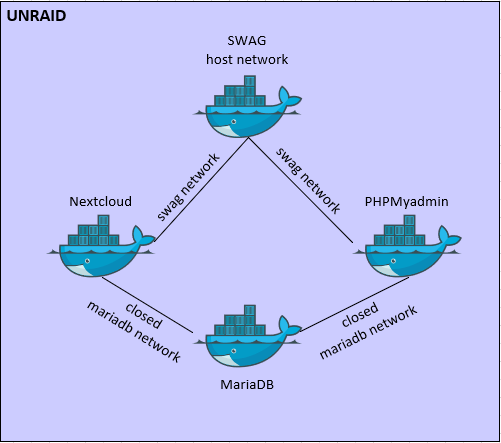
Hi. I'm in the process of setting up Unraid + docker for the first time. And coming from the network world, I find it confusing. If I want to setup SWAG as a network proxy, it would be natural in my mind to set up two networks on that container; one for the outside (host network, probably) and one for the inside. I made a drawing to show what I'm after: That way I can hinder that Nextcloud and PHPMyadmin (as an example) and their SQL database is not exposed to anything other than SWAG. But after reading a lot, this does not seem to be common practice when it comes to docker? Unraid doesn't even support more than one network initially on it's containers. I'm confused. What is common or recommended practice to solve things like this? Thanks.
-
When enabling VLANs, can I remove the IP address that is directly put on eth0 and set it on one of the VLANs instead? That way I can have all IP addresses in the system assigned to VLANs and not directly on an interface card. Much cleaner that way. Thanks


