





Dal
Members
-
Joined
-
Last visited
Everything posted by Dal
-
This is an extensive piece of software. Thank you! But I'm getting hit with: write /mnt/cache/.vault-stage/backup-: no space left on device. I cannot see that my storage devices are full, so it leaves me to think that it is the default cache disk that is full? My unraid cache disk is a Samsung NVMe 256 Gig disk with about 70 GB space left on device right now... could it really be this on that gets filled up during backups? I'll throw in a few wishes here as well: Make folder exclusions global I think adding support for folder exclusions through docker labels would be more dynamic and easier than the way folder exclusions are done today postgres / mariadb / mysql backup? Thanks again for your excellent work
-
Hi! I just discovered that 1password has 2 containers in the Unraid App Store, and that got me thinking: Is it possible to retrieve secrets from a 1password vault directly into the creation of docker containers via the Docker Web GUI? I'm thinking of the ability to fill out environment variables with a secret name from the 1password vault instead of the API key (example) directly. That would have been SO nice. Let's face it; having all those API keys etc exposed when creating a multitude of containers isn't the best security
-
I have checked and there is no support thread for this container. Anyway, I am having trouble setting it up "Unraid style" If I run this from the Unraid console, it works: docker run -p 6343:6343/udp -p 2055:2055/udp --net frontend -ti ghcr.io/openobserve/goflow2:v100.0.1 -transport=http \ -transport.http.destination=http://192.168.1.60:5080/api/default/netflow1/_json \ -transport.http.batchSize=100 \ -transport.file /var/logs/goflow2.log \ -transport.http.auth.header=Authorization \ -transport.http.auth.credentials="Basic notnotnotnotFDGDF" \ But if I set up the container and all those parameters into the docker GUI, it does not work: docker run -d --name='goFlow2' --net='frontend' --pids-limit 2048 -e TZ="Europe/Berlin" -e HOST_OS="Unraid" -e HOST_HOSTNAME="Unraid" -e HOST_CONTAINERNAME="goFlow2" -e 'transport'='http' -e 'transport.http.destination'='http://192.168.1.60:5080/api/default/netflow1/_json' -e 'transport.http.batchSize'='100' -e 'transport.http.auth.header'='Authorization' -e 'transport.http.auth.credentials'='Basic notnotnotnotFDGDF' -e 'transport.file '='/var/log/goflow2.log' -l net.unraid.docker.managed=dockerman -p '2055:2055/udp' -p '6343:6343/udp' -v '/mnt/user/appdata/docker-containers/goflow2_data':'/var/logs':'rw' 'ghcr.io/openobserve/goflow2:v100.0.1' 0515a21efef55ae3c8db38602a29209fab962abc88adc895b1c79c03012ba4ec I don't understand what is the difference between these 2 methods, but obviously there is one. Maybe one of you can spot what I am doing wrong? Thanks.How do I get Icons to display? I have downloaded a .png file and placed it a folder called icons. The folder is placed in the same directory as the docker-compose.yml and .env file. But it doesn't display Thanks
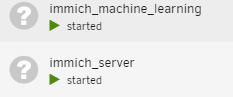
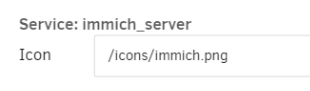 Hi. How can I get the networks to display the correct name? The compose file contains: networks: frontend: external: true name: frontend Thanks
 Yeah, in hindsight it was pretty stupid and I should have known better. Not much of a loss money wise anyway. Imagine if it WAS real. Flash memory prices could have dropped like crazy in China for all I knew I actually had no idea that faking flash drives was a thing. Today I learned USB flash drive validation for the flash drive from ValiDrive, lol: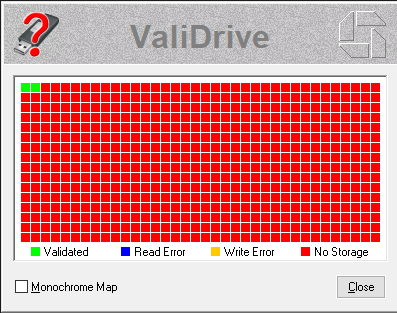
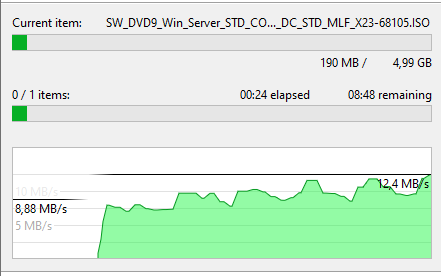
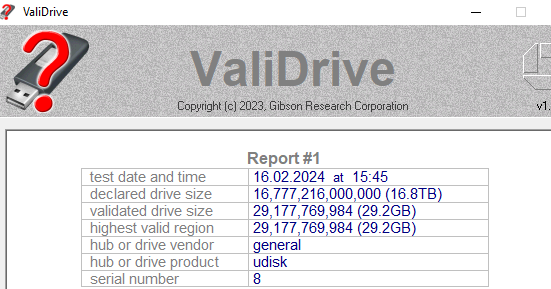 Heh. I bought one of these: https://www.aliexpress.com/item/1005006353288880.html And in Windows it says: Copying seems to work fine in Windows, although slow Heh, according to the comments on that AliExpress page it seems that I got fooled. The joke's on me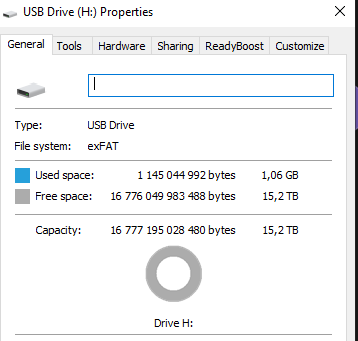
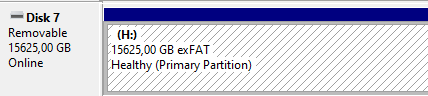
 I recently purchased a 16TB USB stick and attaced to my Unraid server. Thinks LOOKS OK, but I'm not able to mount / write to it. And I have errors Feb 16 13:18:44 Unraid kernel: sd 1:0:0:0: [sdb] tag#0 UNKNOWN(0x2003) Result: hostbyte=0x00 driverbyte=DRIVER_OK cmd_age=0s Feb 16 13:18:44 Unraid kernel: sd 1:0:0:0: [sdb] tag#0 Sense Key : 0x5 [current] Feb 16 13:18:44 Unraid kernel: sd 1:0:0:0: [sdb] tag#0 ASC=0x21 ASCQ=0x0 Feb 16 13:18:44 Unraid kernel: sd 1:0:0:0: [sdb] tag#0 CDB: opcode=0x28 28 00 f4 23 ff e8 00 00 01 00 Feb 16 13:18:44 Unraid kernel: critical target error, dev sdb, sector 32767999808 op 0x0:(READ) flags 0x0 phys_seg 1 prio class 2 Feb 16 13:18:44 Unraid kernel: Buffer I/O error on dev sdb1, logical block 4095999968, async page read Can it simply be that the USB Stick is too large? I cannot find a way to delete all config and re-initialize it either. Any tips? Thanks
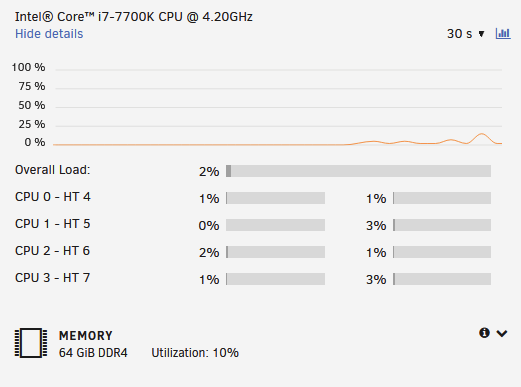
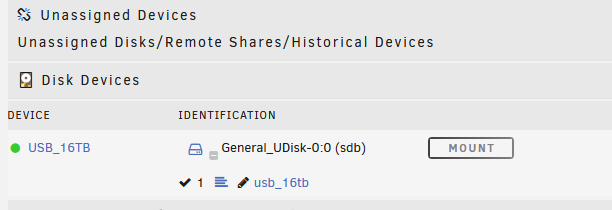 This plugin is gone from my dashboard. I found it under failed installed plugins, so I deleted it from there. Tried to download it again from CA, but there is no install button. Where it usually says install, is says "Pending" now How can I get this neat plugin back on my dashboard? ThanksHi. Getting tired of using nano and vi to configure files inside and outside of containers, I was thinking of using a docker running code-server. Much easier to edit files that way, ensuring the correct intends for example. But when trying to edit files, it throws errors saying I have no write permissions on those files How to best solve this? I was thinking it would be wise to create a new user to maintain all things docker; backups, edit files, running the containers etc? If so, how? Any thoughs? ThanksHi. I run Plex in a container in Unraid. Initially I had a GTX 980 in the server. So I set up the container to use HW acceleration. So when I movie plays, I get this little Plex icon in the GPU Monitor: But there was stutters and buffering, and the CPU goes to 100% on all 4 cores. This, and the fact that GTX980 doesn't support all HEVC types and no AV1 at all, led me to buy a RTX3050 But the results are the same. I still have stuttering and buffer pauses. And CPU goes to nearly 100% on all 4 cores But the GPU monitor shows that Plex is an active app. In docker, it looks like this: I have also set the Extra Parameter: --runtime=nvidia in Advanced Options Is it simply my hardware that isn't good enough? It is a I7-7700k, and the server has 64GB memory: What am I missing here? Thanks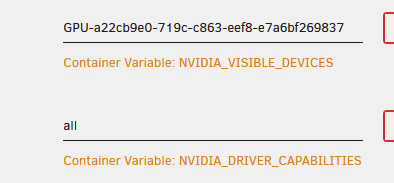
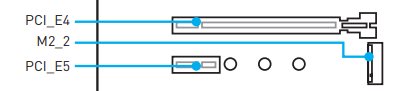
 I'm not able to log in to this docker. What is the default username and password? Thanks.Tried in a Windows 2022 server, but no go there either. Error: Num Description Ver.(hex) DevId S:B Status === ================================== ============ ===== ====== ============== 01) Intel(R) Ethernet Server Adapter 64.04(40.04 151C 00:002 Update not X520-T2 available Tool execution completed with the following status: Device not found. Press any key to exit. The card seems to work fine, though. So I don't understand what is wrong. Time to give upYeah, Intel is impossible to reach And I think this card came from a Dell server. And I found new firmware on the Dell pages, but all the packages are not compatible with Unraid it seems There are packages for Redhat, SUSE and Ubuntu, and all gives me the same error: This Update Package is not compatible with your system configuration. Must try to move the card to another server I guessCan I download and install drivers myself in this OS? I downloaded the latest (5.18.6) from Intel to tmp diretory using wget, but don't really know where to go from thereHello again. As suspected, when movin the M2 disk to the other slot, the NIC seems to work also But the log still fills up with these messages: Unraid kernel: ixgbe 0000:04:00.1: Warning firmware error detected FWSM: 0x00000000 So unless it's fixable or the logs supressable, it's still a no go really. ThanksI think the answer was in the Motherboard manual Some highlights: 2x PCIe 3.0 x16 slots (supports x16/x4 mode)* 4x PCIe 3.0 x1 slots** * The PCI_E4 slot will be unavailable when an M.2 SSD module has been installed in the M.2_2 slot. And according to this picture, That is exactly where I have the NIC (PCI_E4) and the M2 disk (M2_2) So in theory, if I move the M2 disk to the M2_1 slot, everything should work fine. Trying that tomorrow. To be continued Thanks for helping out, and I guess the moral is: If all else fails, RTFM
 Damn, you're thorough Makes me think you read logs for a living. And I think you're right; Tested some more an the m2 disk does not even show up in BIOS when the NIC is attached. So yes, this is probably NOT a driver / firmware problem. I seem to vaguely remember that some lanes were disabled if all SATA ports where enabled or something like that. Going to read the motherboard manual now. Thanks so far.Thank you for a proper answer. Can I use those drivers directly in Unraid, or must I put the card inside a machine running linux? I have put it inside a Windows Server machine now, looking for drivers for that one as well.... sure. But where? All I seem to find are drivers, not firmwareI added an Intel NIC to my Unraid-server, but now the cache disk (a NVMe M2 disk) is gone, and the logged is filled with messages like this: ixgbe 0000:04:00.1: Warning firmware error detected FWSM: 0x00000000 ethtool eth2 and ethtool eth1 says: root@Unraid:~# ethtool -i eth1 driver: ixgbe version: 5.19.17-Unraid firmware-version: 0x800001a5 expansion-rom-version: bus-info: 0000:04:00.0 supports-statistics: yes supports-test: yes supports-eeprom-access: yes supports-register-dump: yes supports-priv-flags: yes I know there are similar posts about this, but it's unclear if it ever were fixed or not. Is it possible to fix, or should I ditch the NIC? I'm running Unraid v6.11.5 ThanksYou have to something like this: docker network create -d bridge \ --subnet=172.25.0.0/16 \ --gateway=172.25.0.1 \ --subnet=fd25::/64 \ --gateway=fd25::1 \ --ipv6 \ yournetworkname I have done this myself, and the docker containers can talk to each other with IPv6. But i cannot get the docker containers to talk using IPv6 beyond the docker host. Any tips is appreciatedIf i Enable Inheritance on existing folder, it does not stick. It goes back do disabling it. It's probably true that if you set permissions forehand it will work. But if a docker container uses that share too, it will changeChanges in security. Full AD integration for example. If I remember correctly this post said there would be some security changes in 6.10. But it's not particularly secure now. And now 6.11 is in RC3

