





TechZeug
Members
-
Joined
-
Last visited
Everything posted by TechZeug
-
Das ist ein X99 System, was ist HT? Was muss da aktiviert werden?
-
Ahh, okay, das ist ein Argument.
-
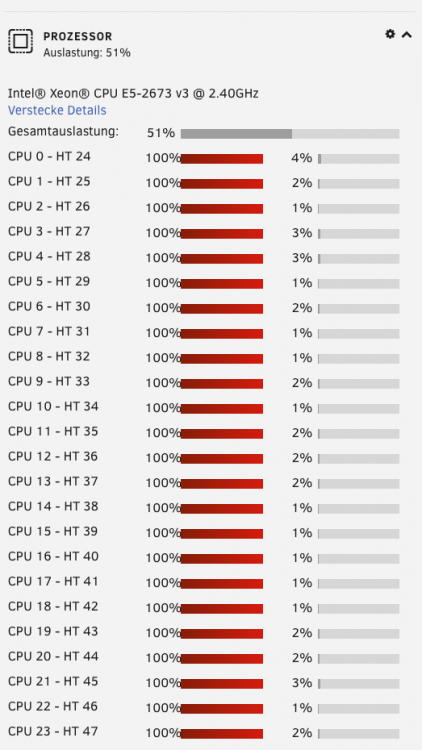
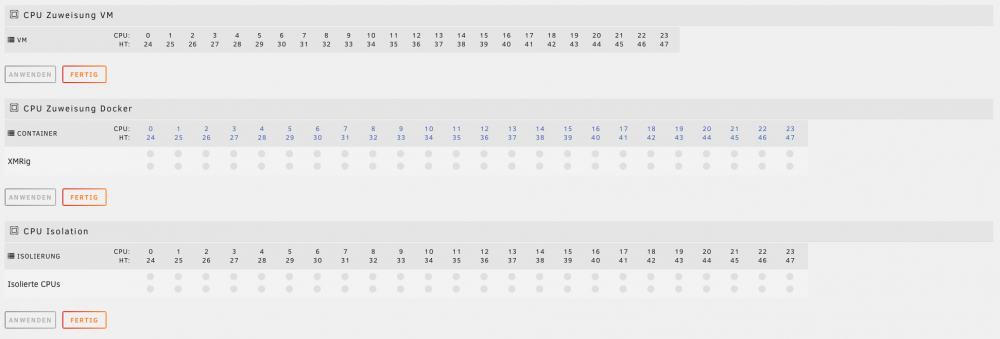
Mein Unraidserver ist ein Dual CPU System. Ich wollte das System mal unter Last testen und hab ein XMrig Docker gestartet. Aus irgendeinem Grund nutzt der Container aber nur 50% der CPU. Das sieht ja so aus als wenn nur eine CPU genutzt wird. Muss man dem Container extra mitteilen, dass er beide CPUs nutzen soll? Jemand eine Idee? DANKE
-
ähh, denke schon. Ziel ist, das grundsätzlich für system, docker, vms, isos grundsätzlich immer die schnelle SSD genommen wird. Es soll vermieden werden das die Daten auf einer langsamen HDD liegen.
-
Aber bei Deiner Antwort geht es ja nur um den die Cache Einstellung Hier soll doch grundsätzlich immer ein anderes physikalisches Laufwerk genutzt werden. Geht das nur mit dem Workaround das man dem System sagt sagt er soll grundsätzliche den Cache verwenden und dann die entsprechende SSD auswählt. Kann man den Pfad nicht grundsätzlich irdendwo anpassen?


