





JPilla415
Members
-
Joined
-
Last visited
Everything posted by JPilla415
-
Thank you both. I will mark this as resolved then.
-
Since writing my original post, reads have gone up to 58,703 and writes to 567. Again, just not sure what is considered normal. Appreciate any insights.
-
My server, running 7.0.1 has been up for 4.5 days and I am currently seeing 57,962 reads from the flash drive, and 548 writes. I see that there is a known issue with Unraid 7.0 around excessive USB usage. I am just not clear on whether or not this is considered excessive? Is there a known good baseline? Diagnostics attached, if they are needed. tower-diagnostics-20250702-0919.zip
-
This may be the wrong place to ask, but will we see an update to "Update Assistant" to check against 7.1 soon? It seems to still be checking against 7.0.1.
-
Thanks very much
-
Hello all - Thank you in advance for any recommendations on the best course of action. My goal is not speed, but safety of data. Current Server/Scenario: Running Unraid 6.12.14 1x 20TB Parity Drive 13x Data drives of varying sizes I have maxed out my available drive slots in my case. All drives are healthy Goals: Shrink array by 1x data drives Install new, larger parity drive Historically, I have used the "Unbalanced" plug-in to move all data off of a drive and then run the "clear an array drive" script to remove a drive from the array while maintaining parity. From what I understand, this is no longer a recommended approach. Is there another method that can be used that will maintain parity? Or is the recommended approach to: Move all data off data drive, which is going to be removed Stop the array Unassign the data drive and current parity drive assignments Start the array Stop the array Physically remove the data drive Physically remove parity drive Install the new larger parity drive Start the server in maintenance mode Rebuild parity Appreciate the guidance and thoughts.
-
Thanks so much for taking a look. I appreciate it.
-
I recently pre-cleared a new disk, using a USB external enclosure. The pre-clear process went fine, no errors detected. Log attached. However, in my system logs, there were several I/O errors, like so: May 25 14:07:25 Tower kernel: I/O error, dev sdq, sector 216176640 op 0x0:(READ) flags 0x80700 phys_seg 256 prio class 3 May 25 17:46:47 Tower kernel: I/O error, dev sdq, sector 7100000256 op 0x0:(READ) flags 0x80700 phys_seg 256 prio class 3 May 25 19:29:54 Tower kernel: I/O error, dev sdq, sector 10371895296 op 0x0:(READ) flags 0x80700 phys_seg 256 prio class 3 May 25 21:46:52 Tower kernel: I/O error, dev sdq, sector 14667474944 op 0x0:(READ) flags 0x80700 phys_seg 235 prio class 3 May 25 23:15:57 Tower kernel: I/O error, dev sdq, sector 17367803904 op 0x0:(READ) flags 0x80700 phys_seg 256 prio class 3 May 25 23:25:31 Tower kernel: I/O error, dev sdq, sector 17650579456 op 0x0:(READ) flags 0x80700 phys_seg 256 prio class 3 May 25 23:28:55 Tower kernel: I/O error, dev sdq, sector 17751074816 op 0x0:(READ) flags 0x80700 phys_seg 256 prio class 3 May 26 02:26:36 Tower kernel: I/O error, dev sdq, sector 22836414464 op 0x0:(READ) flags 0x80700 phys_seg 143 prio class 3 May 26 04:42:18 Tower kernel: I/O error, dev sdq, sector 26456676352 op 0x0:(READ) flags 0x80700 phys_seg 250 prio class 3 May 26 05:30:42 Tower kernel: I/O error, dev sdq, sector 27685124096 op 0x0:(READ) flags 0x80700 phys_seg 256 prio class 3 May 26 05:47:47 Tower kernel: I/O error, dev sdq, sector 28108584960 op 0x0:(READ) flags 0x80700 phys_seg 255 prio class 3 May 26 06:38:47 Tower kernel: I/O error, dev sdq, sector 29346476032 op 0x0:(READ) flags 0x80700 phys_seg 255 prio class 3 May 26 06:55:44 Tower kernel: I/O error, dev sdq, sector 29748836352 op 0x0:(READ) flags 0x80700 phys_seg 256 prio class 3 May 26 09:56:49 Tower kernel: I/O error, dev sdq, sector 33768067072 op 0x0:(READ) flags 0x80700 phys_seg 177 prio class 3 May 26 12:35:24 Tower kernel: I/O error, dev sdq, sector 36843491328 op 0x0:(READ) flags 0x80700 phys_seg 248 prio class 3 May 27 16:50:40 Tower kernel: I/O error, dev sdq, sector 829847552 op 0x0:(READ) flags 0x80700 phys_seg 256 prio class 3 May 27 17:23:38 Tower kernel: I/O error, dev sdq, sector 1869090816 op 0x0:(READ) flags 0x80700 phys_seg 256 prio class 3 May 27 18:14:28 Tower kernel: I/O error, dev sdq, sector 3488593920 op 0x0:(READ) flags 0x80700 phys_seg 255 prio class 3 May 27 18:17:12 Tower kernel: I/O error, dev sdq, sector 3575107584 op 0x0:(READ) flags 0x80700 phys_seg 256 prio class 3 May 27 18:30:54 Tower kernel: I/O error, dev sdq, sector 4006899712 op 0x0:(READ) flags 0x80700 phys_seg 256 prio class 3 May 27 22:18:08 Tower kernel: I/O error, dev sdq, sector 11223660544 op 0x0:(READ) flags 0x80700 phys_seg 254 prio class 3 May 27 22:38:32 Tower kernel: I/O error, dev sdq, sector 11866187776 op 0x0:(READ) flags 0x80700 phys_seg 218 prio class 3 May 27 22:47:46 Tower kernel: I/O error, dev sdq, sector 12155328512 op 0x0:(READ) flags 0x80700 phys_seg 255 prio class 3 May 28 02:27:18 Tower kernel: I/O error, dev sdq, sector 18810028032 op 0x0:(READ) flags 0x80700 phys_seg 99 prio class 3 May 28 02:53:56 Tower kernel: I/O error, dev sdq, sector 19580878848 op 0x0:(READ) flags 0x80700 phys_seg 256 prio class 3 May 28 03:22:13 Tower kernel: I/O error, dev sdq, sector 20390768640 op 0x0:(READ) flags 0x80700 phys_seg 256 prio class 3 May 28 04:57:37 Tower kernel: I/O error, dev sdq, sector 23055421440 op 0x0:(READ) flags 0x80700 phys_seg 36 prio class 3 May 28 06:07:08 Tower kernel: I/O error, dev sdq, sector 24922828800 op 0x0:(READ) flags 0x80700 phys_seg 211 prio class 3 May 28 07:18:30 Tower kernel: I/O error, dev sdq, sector 26779922432 op 0x0:(READ) flags 0x80700 phys_seg 167 prio class 3 May 28 09:10:28 Tower kernel: I/O error, dev sdq, sector 29533231104 op 0x0:(READ) flags 0x80700 phys_seg 248 prio class 3 May 28 10:02:02 Tower kernel: I/O error, dev sdq, sector 30733670400 op 0x0:(READ) flags 0x80700 phys_seg 256 prio class 3 May 28 13:04:12 Tower kernel: I/O error, dev sdq, sector 34633654272 op 0x0:(READ) flags 0x80700 phys_seg 256 prio class 3 I'm under the assumption is this due to a flaky USB enclosure disconnecting and reconnecting, but I wanted to ask the experts to be sure. Diagnostics attached. Appreciate any thoughts and feedback! preclear_disk_8LJBK2XN_8429.txt tower-diagnostics-20240529-0718-ANON.zip
-
Shoot! Didn't think about that. Thanks very much!
-
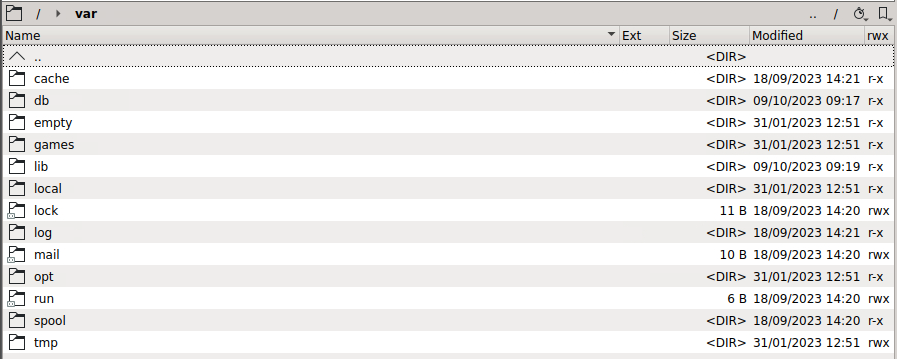
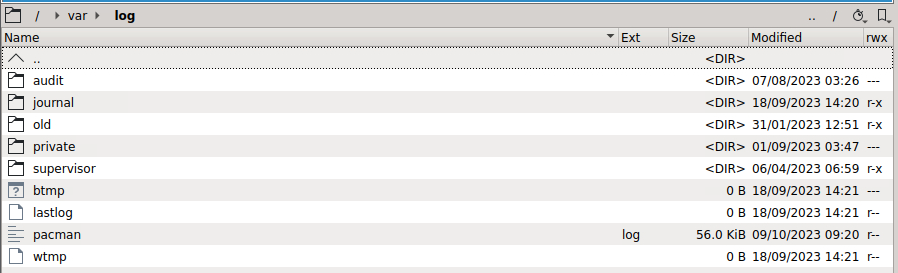
Forgive me if I am missing something painfully obvious, but the new Unbalanced UI is indicating the following: However, when looking through /var/log via Krusader, I am not seeing any log file. The last modified date for /var/log is back in 2023 for me. Appreciate the help!
-
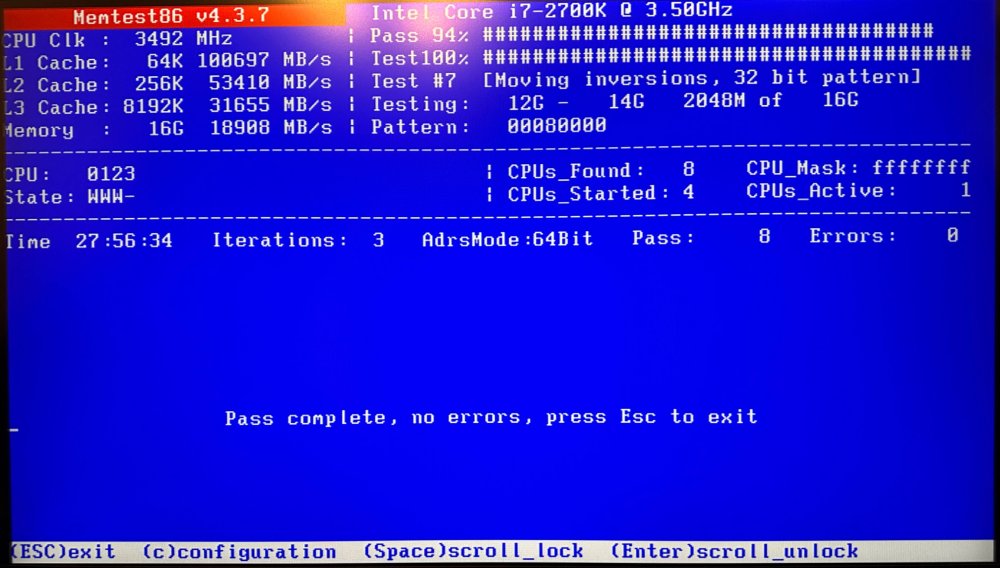
28 hour MemTest with clean results! Booting back up the server again after several days of downtime. Fingers crossed! Thanks again for all the help.
-
Thanks so much!
-
Thanks very much for the time and help on this! I'll go ahead and mark the MemTest post from you as the solution. If other issues crop back up, I'll come back to the thread and add more details. Fingers crossed this is the end of it. Is there a current recommendation for my RealTek Adapter, it's unclear to me if I should be using the RealTek plug-in or not:
-
I had similar BTRFS errors in my logs last week, and the first step recommended to me from the team here was to run a MemTest.
-
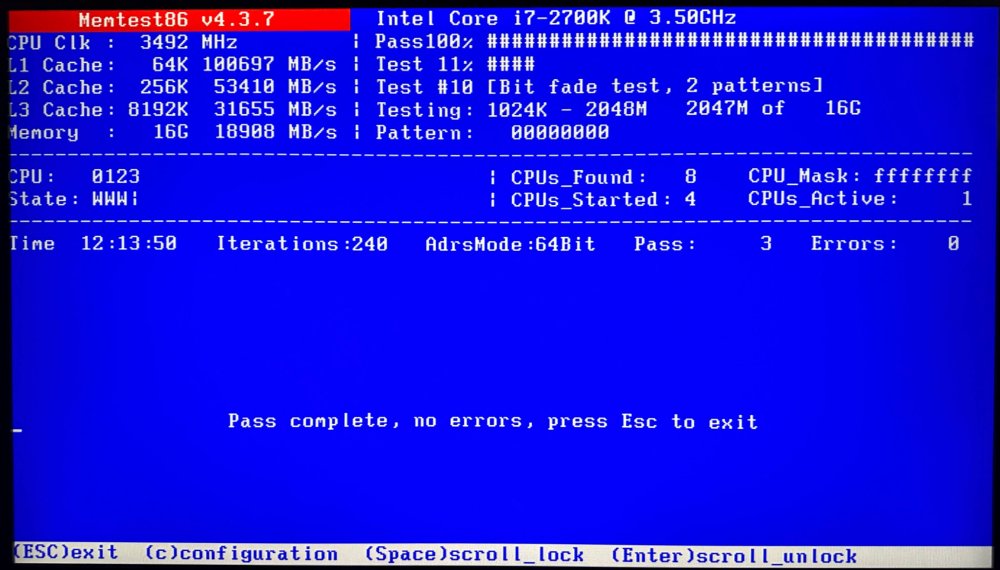
12 hours and error free with the new ram. I'm going to let this run the rest of the day to play it safe. Assuming I encounter no errors in the next 12-24 hours, what is the recommended next step to troubleshoot my slow cache write performance outlined earlier in the thread? Just go back to normal day-to-day use of the server and see if the issue pops up again? Thank you again for all of the help!
-
Understood, will do thanks again!
-
Much appreciated. I will start to track down some new ram and report back. Sorry to repeat this: but would failing memory explain the drop in cache write speeds I have been observing? Or is that likely another scenario which I will need to troubleshoot after getting new ram. Thanks again.
-
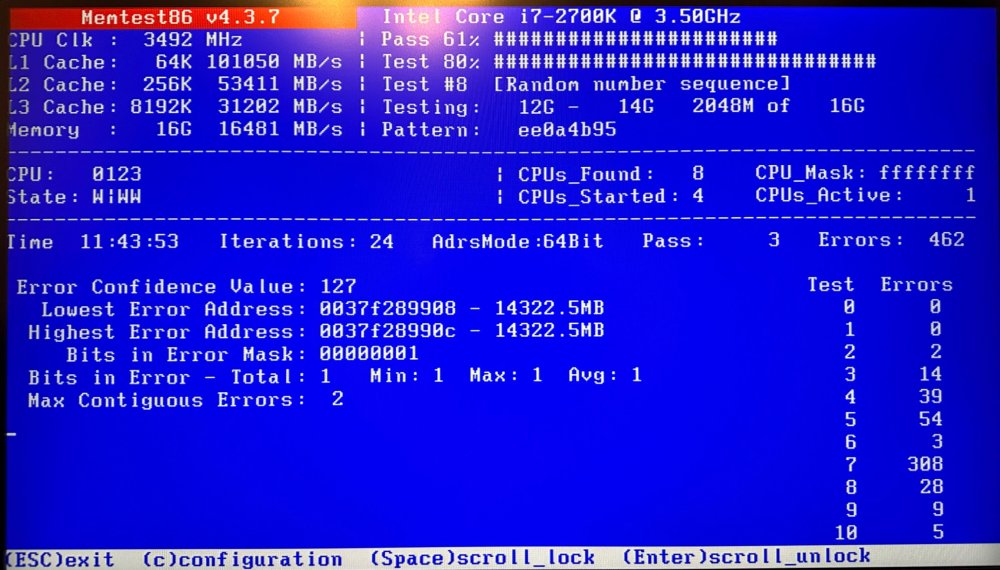
I believe the recommendation is to run Memtest for a full 24 hours, but given that I am 12 hours in and have already logged 462 errors, I'm suspecting this is enough data to call my dimms bad? Is that that the general consensus? I assume even one error is above a comfortable threshold. If so, I need to work on tracking down some ram compatible with my motherboard and CPU. I am using older hardware and I am not clear on whether or not ram is still manufactured or available. Are there current recommendations around ram? Is it better/worse to utilize all four slots on the motherboard? If I have been comfortably running 16GB for years, is there any reason to bump to 32GB? If I move from 4 dimms to 2 dimms, is that going to present any sort of issue? I assume the answer to all of these is no, but better to check than be surprised. Last question, would failing memory explain the drop in cache write speeds I have been observing? Appreciate everyone's time and thoughts.
-
Understood, thank you very much for the suggestion. Running a memtest now. I will report back tomorrow.
-
I've made no changes to my network, Unraid or PC. Tried another copy to the Unraid cache and this is what I am seeing now. These are the speeds I am used to seeing.

-
Hello, sincere appreciation in advance for any guidance and thoughts from the community on this topic. Over the last several weeks, I have noticed in some instances the speeds with which I can write TO my cache drive will drop significantly. I use Teracopy to write files to my server, and in these instances of poor cache write performance, I will frequently get an error that the hashes don't match for the files written to the server. In each case, when troubleshooting the issue I have rebooted my server, and it has resolved the issue for some amount of time. An example of the change in write speed is as follows: Average normal write speed: 85-90 MB/s Average degraded write speed: 25-40MB/s Here is the current write speeds to my Unraid Server, writing to SSD Cache drive: As a point of comparison, here are the write speeds to my Synology server, no cache SSD. The same source computer, same network, same router, same switch, same file are being used for both servers: It is worth noting that in this window, I updated to Unraid 6.12.6 and I understand that there are potential networking issues with RealTek adapters. Last week I downloaded the suggested RealTek driver from the Fix Common Problems Plug-in but the same issue popped up. I removed the plug-in yesterday. Here is the information being shown in my system devices for the network adapter: I have also noticed the following errors in my system log from this morning: I also had BTRFS errors in my logs over the past several days. I suspect these are related, but I can't be certain. Apologies if I am conflating two separate issues, but I wanted to share as much as possible. I have attached Diagnostics, as well as my system logs from these periods. My apologies for the noise in the logs, when rebooting my server, a new IP address was assigned and the server lost access to the UPS. I didn't notice the noise in the logs from this until today. I copied and pasted errors above. Please let me know if I can provide any other useful information. Thanks so much! tower-syslog-20240120-1710.zip tower-diagnostics-20240120-0909.zip tower-syslog-192.168.1.2-20240120-1711.zip


-
Ah, fair point. In this case, I want to replace the drive with a larger capacity drive.
-
OK, thanks very much for the clarification. I know it was empty as I cleared it, with the intention of shrinking the array, in order to remove the disk. However, I read that the script method of zeroing the drive was no longer the preferred approach with recent versions of Unraid, so I decided to scale up my drive sizes instead. I have one more drive with ReiserFS still kicking around. Is the best method to fully empty it, format it and THEN remove/replace the drive?
-
Hello, thanks in advance for any help you can provide. Here is my current scenario: - I have an old 6TB disc which I removed from my server. - Before removing the 6TB drive, I moved all of the data via the unbalance plug-in to another drive. The drive was completely empty. - The 6TB drive was formatted with ReiserFS. - I just installed a new 20TB drive, in place of the 6TB drive. - I started the array, and began the data rebuild process. - I realized after starting the data rebuild that I wanted to move away from ReiserFS, so I stopped the data rebuild. Changed the filesystem of the drive and formatted it. - I then re-started the data rebuild. Have any endangered any of my data via this process? I still have the 6TB drive, it is healthy, and I have a flash back-up should I need to go back to the old configuration.
-
I am attempting to increase the size of my cache pool (single drive mode). I am following the directions outlined here in the documentation: https://wiki.unraid.net/Manual/Storage_Management#Backing_up_the_pool_to_the_array I have stopped all dockers and VMs. I have disabled Docker and VM Manager. All shares with 'Prefer' or 'Only' status have been changed to 'Yes.' I have run the mover service several times, and roughly 30MB of data has been left on the cache drive both times. I have attached a syslog with mover logging enabled. According to the logs, these files and/or directories don't exist. However, they very much are on the cache drive. I have also attempted to download diagnostics, but it seems these files are also being logged in the diagnostic output, and there are so many that the job takes too long and the browser window crashes. This has happened twice now. Any thoughts or ideas? Thanks! syslog.log




